00196622-03_OM_WPC5_6_EN.pdf - 第42页
Operator Tasks Non-Stop Module at WPC6 5.3.1 Refilling with the Non-Stop Modul 42 Operating Manual SIPLACE WPC5/WPC6 5.3.1 5 . 3 . 1 R e f illin g w it h t h e N o n - S t o p M o d u l Refilling with t he Non-Stop Modul…
Operator Tasks
Non-Stop Module at WPC6
Operating Manual SIPLACE WPC5/WPC6 41
5.3
5.3 Non-Stop Module at WPC6
Non-Stop Module at WPC6
Function Description
The flap of the Non-Stop Module allows to refill the waffle pack trays or to move it out without stopping
the SIPLACE SX during operation. The operator button shows whether a waffle pack tray is in the Non-
Stop Module or the Non-Stop Module is empty or a waffle pack tray is moving currently.
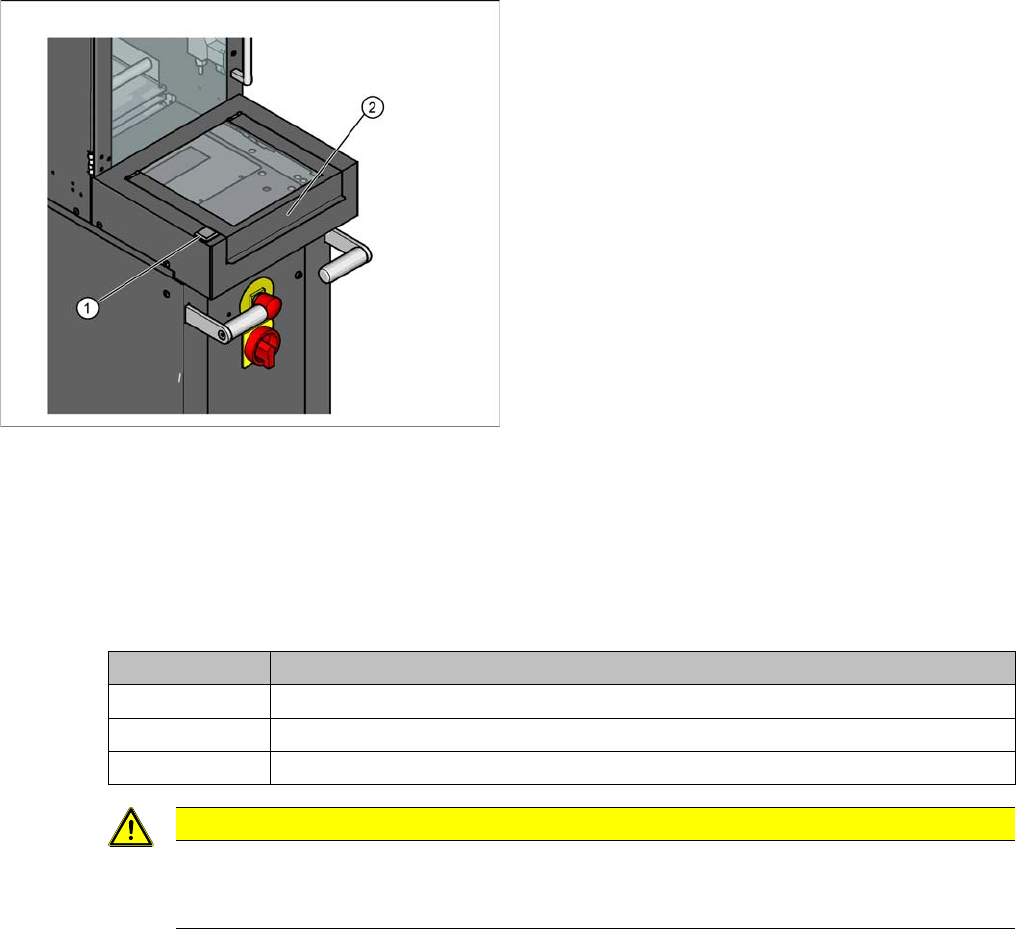
Non-Stop Module operator button
Overview
1. Non-Stop Module operator button
2. Flap for loading the Non-Stop Module
State button Function
Continuous light The waffle pack tray is in the Non-Stop Module. The flap may be opened.
Off There is no waffle pack tray in the Non-Stop Module. The flap may be opened.
Flashes The waffle pack tray is in action. The flap must not be opened.
CAUTION
Operator button at the Non-Stop Module is blinking
The waffle pack tray is moved and the action is not completed so far. If the flap is opened the
EMERGENCY STOP will be activated.
Operator Tasks
Non-Stop Module at WPC6 5.3.1 Refilling with the Non-Stop Modul
42 Operating Manual SIPLACE WPC5/WPC6
5.3.1
5.3.1 Refilling with the Non-Stop Modul
Refilling with the Non-Stop Modul
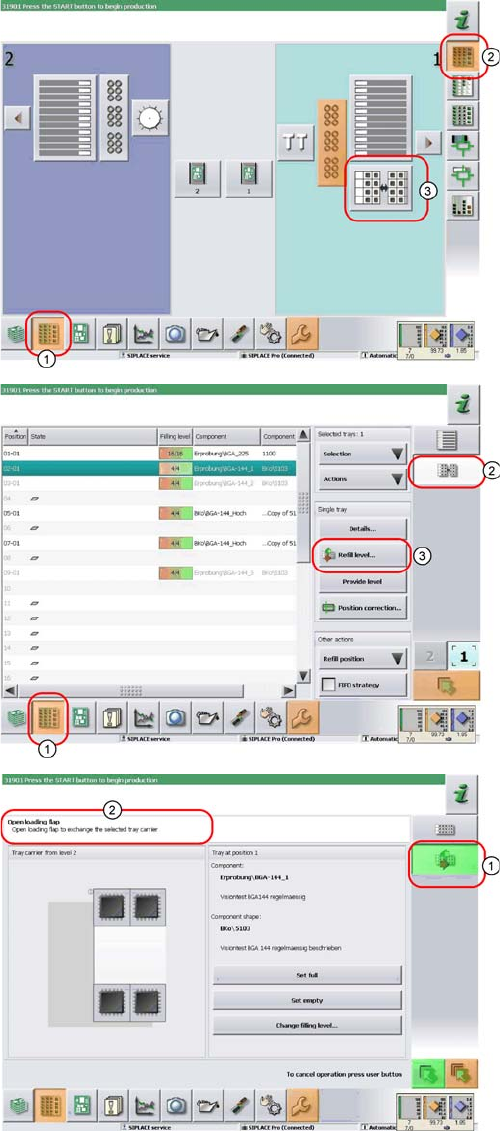
► In the tool bar of the main view click on the icon (1) for
the functions Feeder, Locations….
► Click on the icon (2). The user interface will switch to
the view Functions > Locations > WPC.
► Click on the icon (3) for the WPC5/WPC6 at the rele-
vant location (location 1 here).
The Setup > Locations > WPC view will be shown for
the selected Location.
► Click on the icon (2).
► Click on the Refill level… (3) icon.
The view for refilling the Non-Stop Module will be dis-
played.
► The icon (1) shows, that one tray carrier is transport-
ed in or out of the Non-Stop Module.
► You see the current actions in the indicator area (2).
Observe the hints and follow the instructions provid-
ed.
► Press the operating button to start the actions with
the Non-Stop Module. Check the status of the button
(continuous light, blinking light or no light) and carry
out the actions allowed.
Operator Tasks
5.5.1 Basic View Maintenance and Service
Operating Manual SIPLACE WPC5/WPC6 43
5.4
5.4 Maintenance and Service
Maintenance and Service
See also the document "Maintenance guide WPC4/WPC5WPC6" [item no. 00195347-xx].
5.5
5.5 Functions at the Station Computer (SR703.xx)
Functions at the Station Computer (SR703.xx)
5.5.1
5.5.1 Basic View
Basic View
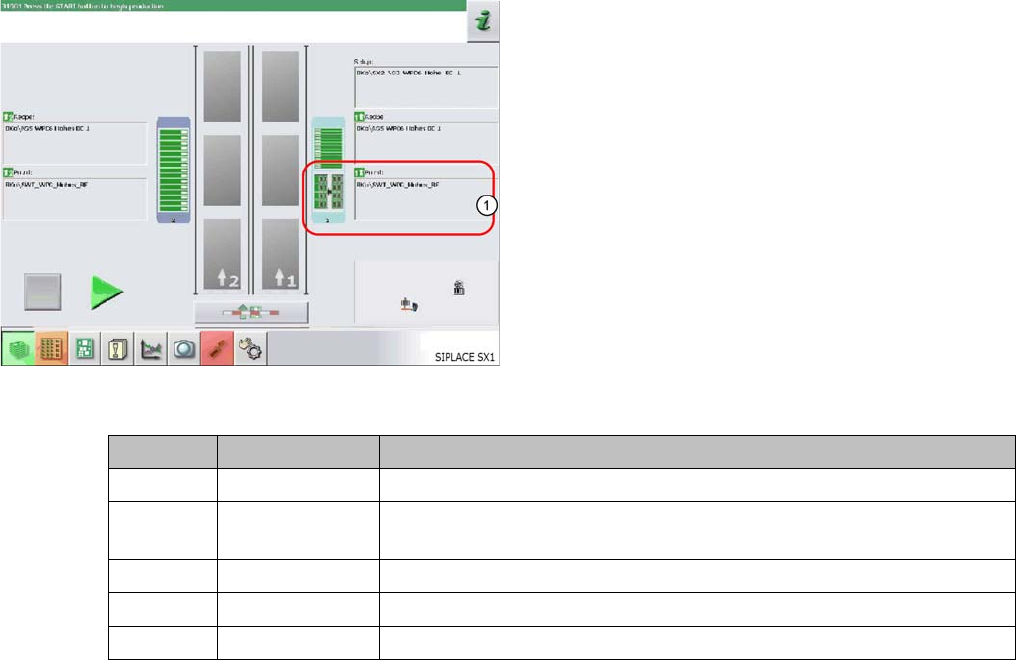
The WPC icon (1) can be displayed in various colors in the basic view. These mean:
The display applies equally to the WPC and to the feeder modules, which are set up on the remaining
feeder locations, next to the WPC.
The basic view shows the SIPLACE machine from above.
The PCB conveyor runs through the center. The locations
are positioned on the right and left. The location of the
WPC is shown as item (1) in this example.
WPC color Component color Meaning
Gray - - - No component in WPC / feeder module configured or no setup defined.
Gray Green A setup is present and one or more components are defined for this lo-
cation.
Gray Red / green Empty waffle pack trays/ tracks in WPC / feeder module
Red Red / green Track error at this location (WPC / feeder module)
Yellow Red / green Production was continued although the WPC is in the refill position.