JANETS_SPE_EN.pdf - 第11页
JaNets Prod uct Specific ations 1. JaNets Overview 1-8 System Configu r ation 1.3.1 Supported machine models Item Specificati ons Supported ma chine models Maximum number of machines t hat can be connect ed to one produc…
JaNets Product Specifications
1.
JaNets Overview
1-7
Some functions work differently depending on whether the setting of connection to Data Manager is
enabled or disabled. If the description is effective only when the system is connected to a server, it
is described so or is shown together with the corresponding section number.
1.2.5 Equipment Manager
Equipment Manager is an option of Line Manager. The functions, which can be used when the
Equipment Manager option is enabled, are provided with a mark in the description or title in this
document.
When you use Equipment Manager, you can use the following functions: production line
configuration including a printer and an inspection machine, online PWB production and linkage
between machines.
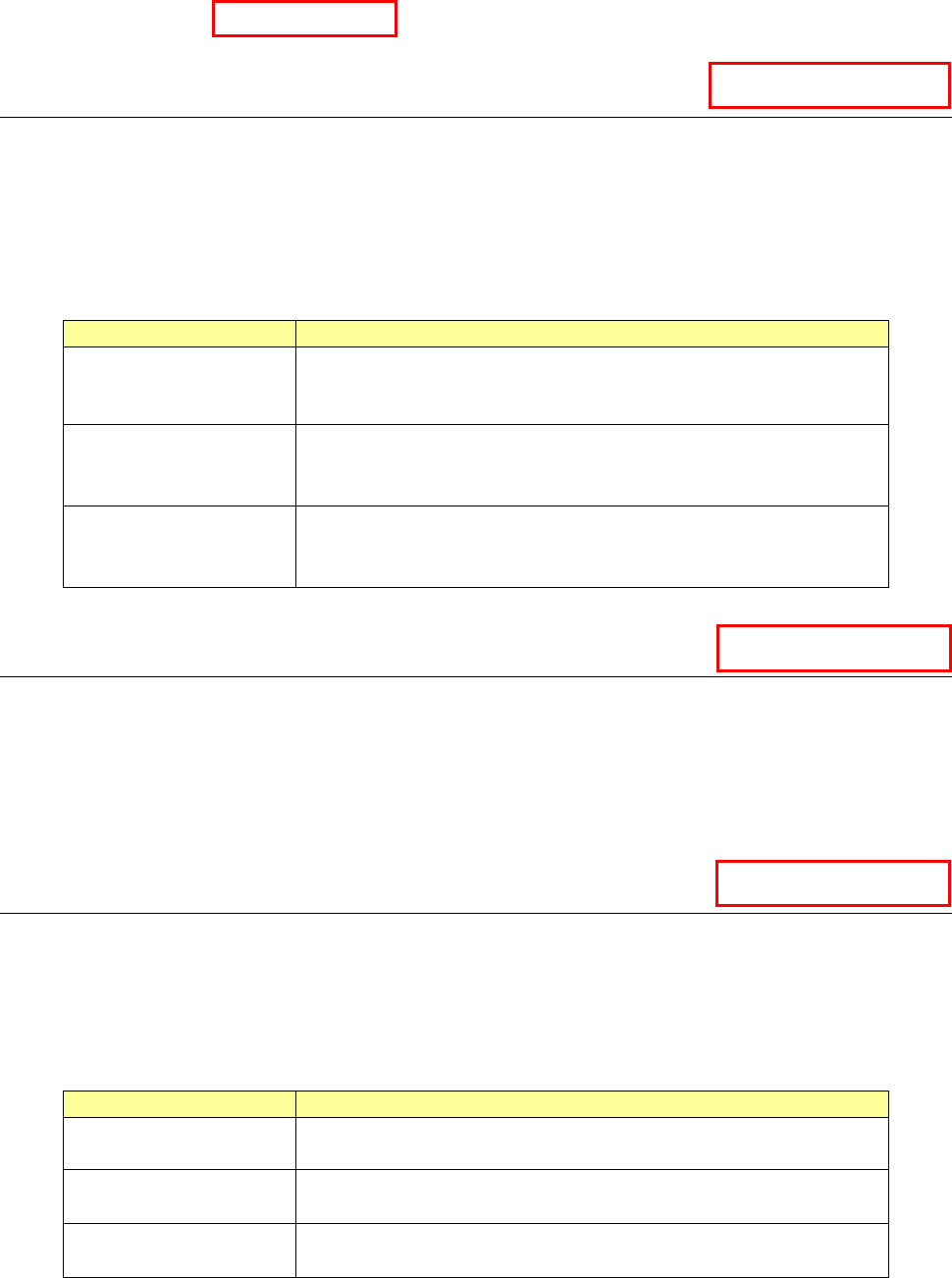
Name
Overview
Shopfloor Setup
Line configuration including a printer and an inspection
machine
Setting of the device linkage function.
Program Editor
Association of production programs to be used with a printer
and an inspection machine
Setting of the device linkage function.
Program Downloader
Online production with a production line including a printer and
an inspection machine
Execution of the device linkage function.
1.2.6 TraceMonitor
TraceMonitor is an option of Line Manager. TraceMonitor is an option of Line Manager. The
corresponding mark is put to the functions you can use in the description and the respective titles of
this manual when the TraceMonitor option is enabled.
When you use TraceMonitor, it collects information on each device to accumulate the information.
When you want to just refer to information collected with JaNets with JaNets installed on another PC,
you do not need the TraceMonitor option.
1.2.7 OtherMachine
OtherMachine is an option of Line Manager. The corresponding mark is put to the functions you
can use in the description and the respective titles of this manual when the OtherMachine option is
enabled.
When you use OtherMachine, you can use the function for linking devices that use equipment of
another company.
Name
Overview
Shopfloor Setup
Line configuration including equipment of another company
and settings of the device linkage function
Program Editor
Association of production programs to be used with equipment
of another company and settings of the device linkage function
Program Downloader
Execution of the device linkage function for equipment of
another company
Contact us for communication interface between JaNets and equipment of another company.
TraceMonitor
OtherMachine
Equipment Manager
Data Manager
JaNets Product Specifications
1.
JaNets Overview
1-8
System Configuration
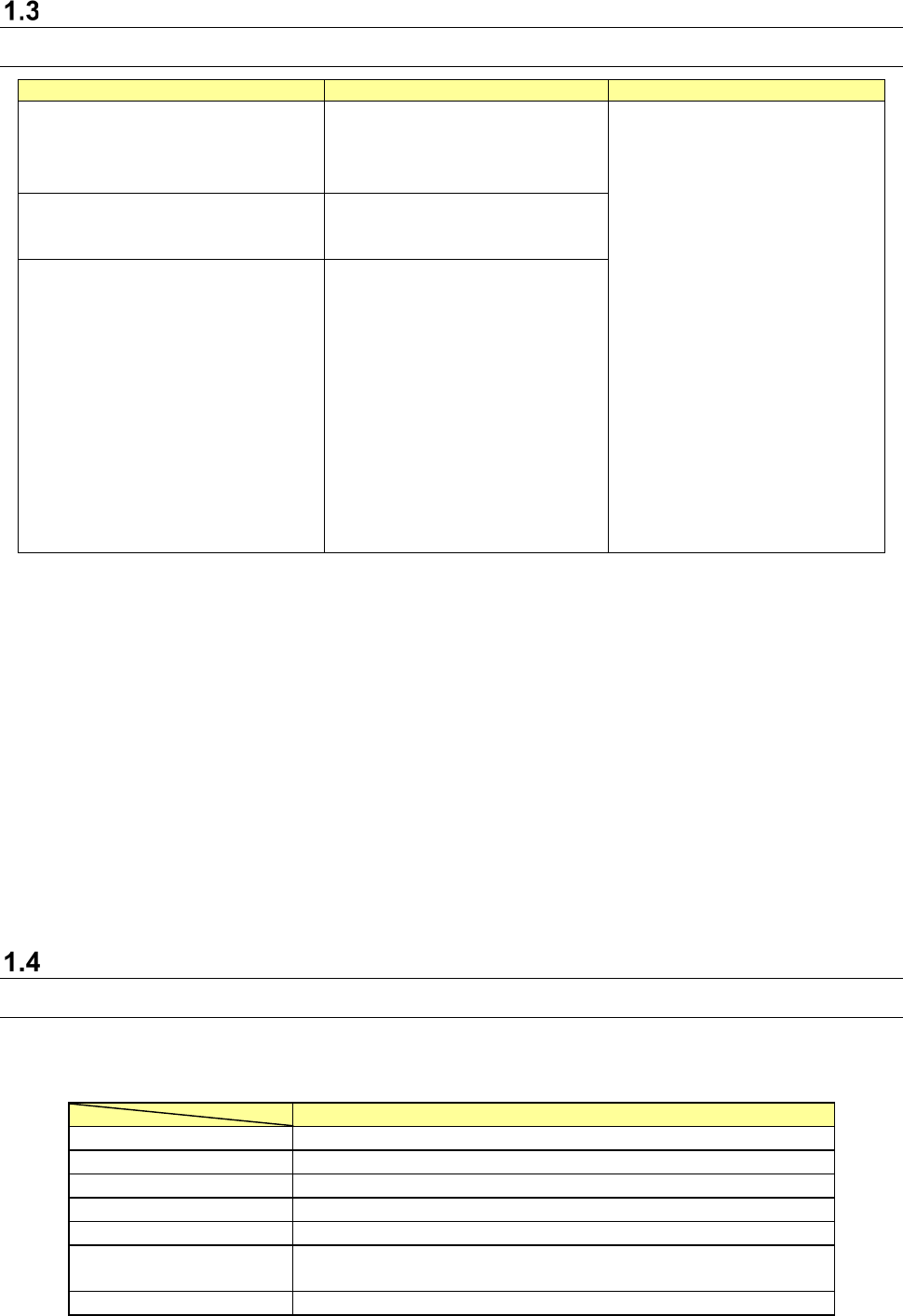
1.3.1 Supported machine models
Item
Specifications
Supported machine models
Maximum number of machines that
can be connected to one production
line
10
RS-1/RS-1R *5
RX-7/RX-7R *5 *6
RX-8 *5 *6
RX-6(RX-6B *1)/RX-6R *5
KE-3010A/3020VA/3020VRA
KE-3010/3020V/3020VR
KE-3020/3020R
KE-2070/2080/2080R
KE-2050R/2055R/2060R
KE-2050/2060
FX-3/RX-3R/FX-3RA
KD-2077 *6
JX-350 *2
RV-1 *3 *6
RV-2 *3 *6
RV-2-3D *3 *6
RP-1 *3 *6
RP-2 *3 *6 *7
JM-10 *4
JM-20 *4
JM-100 *4 *5
JM-50 *2
Maximum number of machines that
can be created
50
200 when Data Manager is used
Maximum number of lines that can be
connected
15
*1 Treat RX-6B as RX-6.
*2 Only EPU mode is supported.
*3 The Equipment Manager license is required for a printer and an inspection machine
respectively.
*4 You cannot create any production line that connects a mounter, an adhesive dispenser and an
inserting machine.
You can create a production line configured of a printer, an inspection machine and an
inserting machine.
*5 Machine models supporting TraceMonitor.
*6 Machine models non-supporting EPU mode. (The Equipment Manager license is required)
*7 When you use an RP-2, specify “GenericPrinter” as a machine model to create machine
information with the Shopfloor Setup. Functions the RP-2 can use are the same as those an
RP-1 can use. You can change the setting of the item “Change Planned No. of PWBs
(Production schedule list)” of the Down Loader also.
Specifications of a used PC
1.4.1 JaNets PC
Specifications of a PC on which the JaNets operates are shown below (note that you have
to use a keyboard/mouse/printer supported with the Operating System (OS)).
Recommended specifications
CPU
Intel Core i3, Maximum click frequency 3.0 GHz or higher
Memory
8 GB or more
Available hard-disk space
50 GB or more
CD-ROM drive
1 or more
Screen resolution
FWXGA 1366×768 pixel or higher
Interface
1000BASE-T LAN connector (RJ-45) × 1
USB 2.0/3.0 × 1
OS
Microsoft Windows 10 Pro (64bit)
*1 A “DPI setting” for screen supports “normal size (96 DPI)” only.
JaNets Product Specifications
1.
JaNets Overview
1-9
* Intel and Core i3 are trademarks of Intel Corporation in the U.S.A. and other countries.
* Microsoft and Windows10 are trademarks of US Microsoft Corporation in the U.S.A. and other
countries.