JANETS_SPE_EN.pdf - 第14页
JaNets Prod uct Specific ations 1. JaNets Overview 1- 11 When using Data Manager on Microsoft Azure The specifications recommended when y ou operate Data Manager on Mi crosoft Az ure are shown in the table below . Specif…
JaNets Product Specifications
1.
JaNets Overview
1-10
1.4.2 Data Manager PC
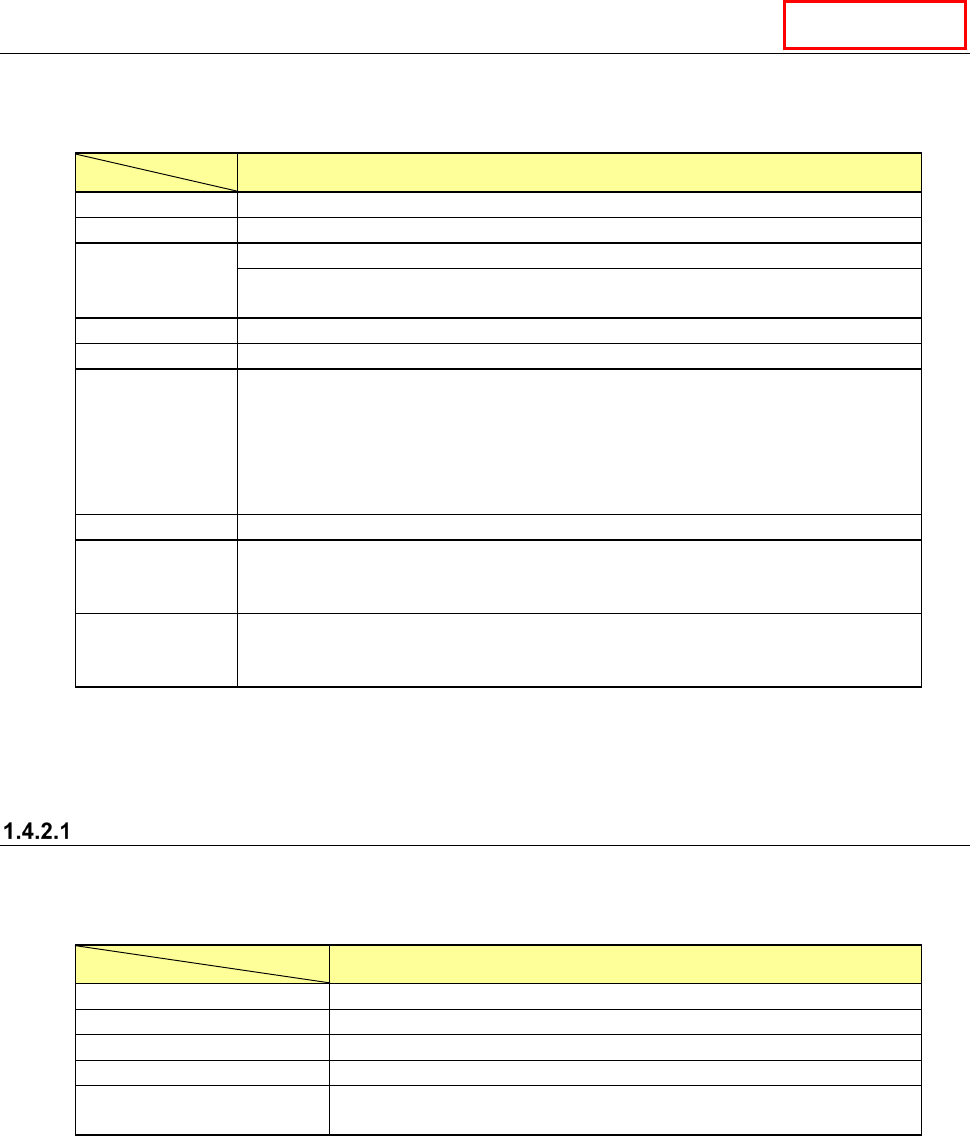
The specifications of a PC on which Data Manager operates are shown below (note that you have
to use a keyboard/mouse/printer supported by the OS).
Specifications of a PC on which Data Manager operates
CPU
Intel Xeon CPU (3.00 GHz) or higher
Memory
8 GB or more
HDD
Unoccupied space capacity 250 GB or more
It is recommended to create the drives C and D, and then use the drive D as data
storage area.
DVD
1 or more
Screen resolution
XGA (1024 × 768) or higher
Interface
Keyboard (USB 2.0/3.0 or mini DIN 6-pin) × 1
Mouse (USB 2.0/3.0 or mini DIN 6-pin) × 1
1000BASE-T LAN connector (RJ-45) × 1
* When a UPS is used, an I/F port compatible with the UPS is required separately.
* When a printer is used, an I/F port compatible with the printer is required
separately.
Back-up device
LTO-5 1.5 TB (when not compressed)/3.0 TB (when compressed)
OS Microsoft Windows Server 2012 R2 Standard Edition (64bit)
Microsoft Windows Server 2016 Standard Edition (64bit)
Microsoft Windows Server 2019 Standard Edition (64bit)
Uninterruptible
power supply
system (UPS)
Approximately 100 minutes at 100 VA/70 W
(APC Smart-UPS 1000 or equivalent)
* Intel and Xeon are trademarks of Intel Corporation in the U.S.A. and other countries.
* Microsoft and Windows Server are trademarks of US Microsoft Corporation in the U.S.A. and
other countries.
When using Data Manager on a virtual server
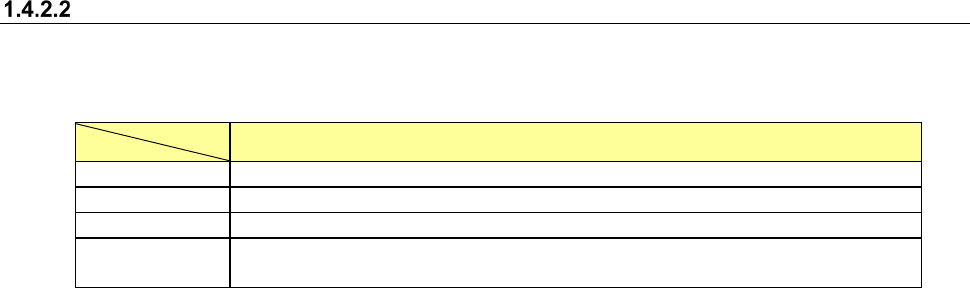
The specifications recommended when you operate Data Manager on a virtual machine constructed
with Hyper-V or any other similar system are shown in the table below.
Data Manager virtual machine specifications
Virtual CPU
2 Cores or more
Allocated memory
8 GB or more
Virtual HDD (for the system)
64 GB or more
Virtual HDD (for data)
Unoccupied space capacity: 250 GB or more
OS Microsoft Windows Server 2016 Standard Edition (64bit)
Microsoft Windows Server 2019 Standard Edition (64bit)
* Microsoft, Windows Server and Hyper-V are trademarks of Microsoft Corporation in the U.S.A.
and any other countries.
Data Manager
JaNets Product Specifications
1.
JaNets Overview
1-11
When using Data Manager on Microsoft Azure
The specifications recommended when you operate Data Manager on Microsoft Azure are shown in
the table below.
Specifications of a Data Manager virtual machine instance
Series
Av2 series
Size
Standard_A4_v2 or higher
Disk for data
S15 (Standard HDD 256 GB) or higher
OS
Microsoft Windows Server 2016 Standard Edition (64bit)
Microsoft Windows Server 2019 Standard Edition (64bit)
* Microsoft, Microsoft Azure and Windows Server are trademarks of Microsoft Corporation in the
U.S.A. and any other countries.
JaNets Product Specifications
1.
JaNets Overview
1-12
Simultaneous Start-up of Application Programs
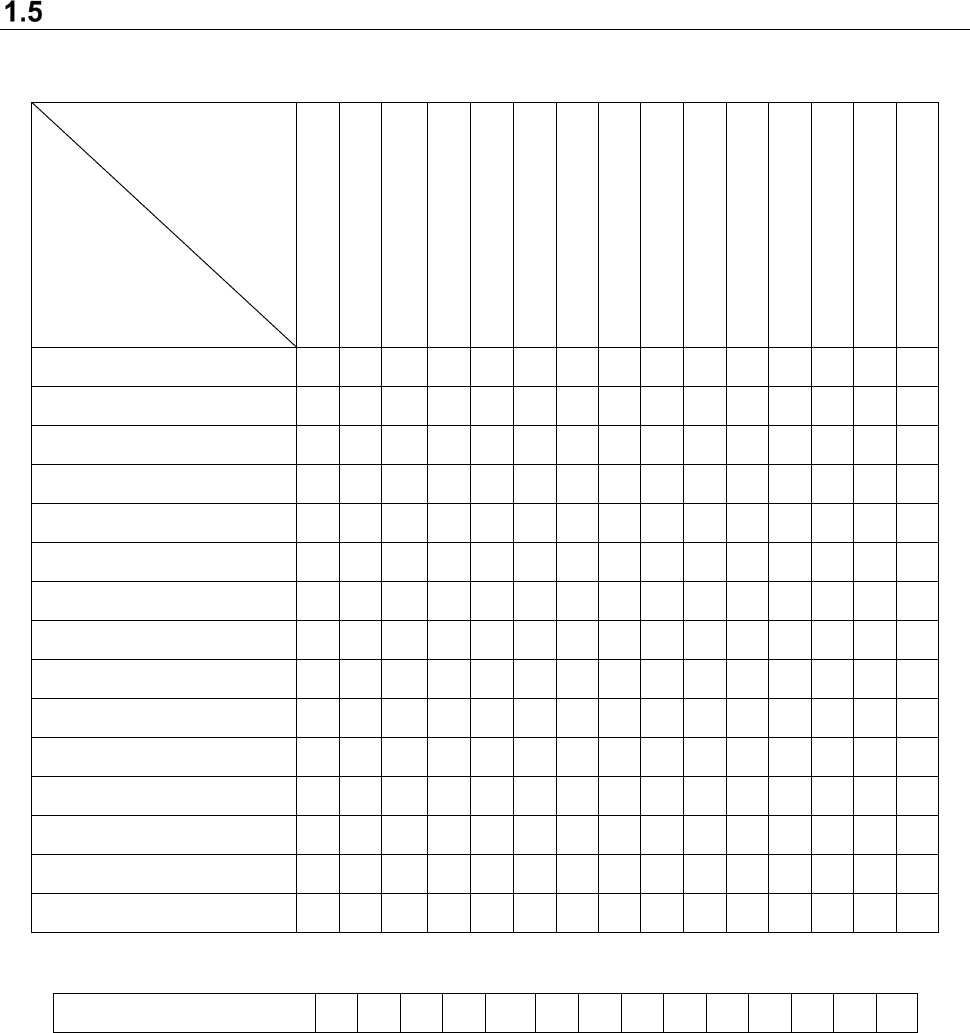
The correlation of applications that can start up at the same time on the PC is shown below.
User Management
Shopfloor Setup
Component Database *1
Language Changer
Program Editor
Job optimizer
Tact simulation
Feeder Set Database
Mark Database
FlexlineCAD
Machine Program Relator
Program Downloader
Nozzle data viewer
Snapshot Tool
Log Management Tool
User Management
× ○ ○ ○ ○ ○ ○ ○ ○ ○ ○ ○
○
○ ○
Shopfloor Setup
○ × ○ ○ × × × ○ ○ ○ × ×
×
○ ○
Component Database *1
○ ○ × ○ ○ ○ ○ ○ ○ ○ ○ ○
○
○ ○
Language Changer
○ ○ ○ × ○ ○ ○ ○ ○ ○ ○ ○
○
○ ○
Program Editor
○ × ○ ○ × ○ ○ ○ ○ ○ ○ ○
○
○ ○
Job optimizer
○ × ○ ○ ○ × ○ ○ ○ ○ ○ ○
○
○ ○
Tact simulation
○ ○ ○ ○ ○ ○ × ○ ○ ○ ○ ○
○
○ ○
Feeder Set Database
○ ○ ○ ○ ○ ○ ○ × ○ ○ ○ ○
○
○ ○
Mark Database
○ ○ ○ ○ ○ ○ ○ ○ × ○ ○ ○
○
○ ○
Flexline CAD
○ ○ ○ ○ ○ ○ ○ ○ ○ × ○ ○
○
○ ○
Machine Program Relater
○ × ○ ○ ○ ○ ○ ○ ○ ○ × ○
○
○ ○
Program Downloader
○ × ○ ○ ○ ○ ○ ○ ○ ○ ○ ×
○
○ ○
Nozzle data viewer
○ × ○ ○ ○ ○ ○ ○ ○ ○ ○ ○ × ○ ○
Snapshot Tool
○ ○ ○ ○ ○ ○ ○ ○ ○ ○ ○ ○
○
× ○
Log Management Tool
○ ○ ○ ○ ○ ○ ○ ○ ○ ○ ○ ○
○
○ ×
(○: Can start up, ×: Cannot start up)
Component Database ○ ○ ○ ○ ○ ○ ○ ○ ○ ○ ○ ○ ○ ○
(Function cooperating with the main unit)
*1 Simultaneous start-up is enabled when a Data Manager option is added to the system. This
is an application program other than Component Database described as the function
associated with JaNets in this Manual.
* You cannot start up two or more same application programs at the same time.
* Since the “Shopfloor Setup” is a function for changing the production line information, you
cannot start up any application that browses the production line information at the same time.
* When you use a Data Manager option, you cannot simultaneously start up “Shopfloor Setup”
and “User Control” with two or more JaNets systems connected to Data Manager.