JANETS_SPE_EN.pdf - 第16页
JaNets Prod uct Specific ations 1. JaNets Overview 1- 13 Flow of PWB Production with JaNets 1.6.1 Basic Editor The operation f low up to PWB producti on using Basic Edi tor is shown belo w. <Movement of t he data from…

JaNets Product Specifications
1.
JaNets Overview
1-12
Simultaneous Start-up of Application Programs
The correlation of applications that can start up at the same time on the PC is shown below.
User Management
Shopfloor Setup
Component Database *1
Language Changer
Program Editor
Job optimizer
Tact simulation
Feeder Set Database
Mark Database
FlexlineCAD
Machine Program Relator
Program Downloader
Nozzle data viewer
Snapshot Tool
Log Management Tool
User Management
× ○ ○ ○ ○ ○ ○ ○ ○ ○ ○ ○
○
○ ○
Shopfloor Setup
○ × ○ ○ × × × ○ ○ ○ × ×
×
○ ○
Component Database *1
○ ○ × ○ ○ ○ ○ ○ ○ ○ ○ ○
○
○ ○
Language Changer
○ ○ ○ × ○ ○ ○ ○ ○ ○ ○ ○
○
○ ○
Program Editor
○ × ○ ○ × ○ ○ ○ ○ ○ ○ ○
○
○ ○
Job optimizer
○ × ○ ○ ○ × ○ ○ ○ ○ ○ ○
○
○ ○
Tact simulation
○ ○ ○ ○ ○ ○ × ○ ○ ○ ○ ○
○
○ ○
Feeder Set Database
○ ○ ○ ○ ○ ○ ○ × ○ ○ ○ ○
○
○ ○
Mark Database
○ ○ ○ ○ ○ ○ ○ ○ × ○ ○ ○
○
○ ○
Flexline CAD
○ ○ ○ ○ ○ ○ ○ ○ ○ × ○ ○
○
○ ○
Machine Program Relater
○ × ○ ○ ○ ○ ○ ○ ○ ○ × ○
○
○ ○
Program Downloader
○ × ○ ○ ○ ○ ○ ○ ○ ○ ○ ×
○
○ ○
Nozzle data viewer
○ × ○ ○ ○ ○ ○ ○ ○ ○ ○ ○ × ○ ○
Snapshot Tool
○ ○ ○ ○ ○ ○ ○ ○ ○ ○ ○ ○
○
× ○
Log Management Tool
○ ○ ○ ○ ○ ○ ○ ○ ○ ○ ○ ○
○
○ ×
(○: Can start up, ×: Cannot start up)
Component Database ○ ○ ○ ○ ○ ○ ○ ○ ○ ○ ○ ○ ○ ○
(Function cooperating with the main unit)
*1 Simultaneous start-up is enabled when a Data Manager option is added to the system. This
is an application program other than Component Database described as the function
associated with JaNets in this Manual.
* You cannot start up two or more same application programs at the same time.
* Since the “Shopfloor Setup” is a function for changing the production line information, you
cannot start up any application that browses the production line information at the same time.
* When you use a Data Manager option, you cannot simultaneously start up “Shopfloor Setup”
and “User Control” with two or more JaNets systems connected to Data Manager.
JaNets Product Specifications
1.
JaNets Overview
1-13
Flow of PWB Production with JaNets
1.6.1 Basic Editor
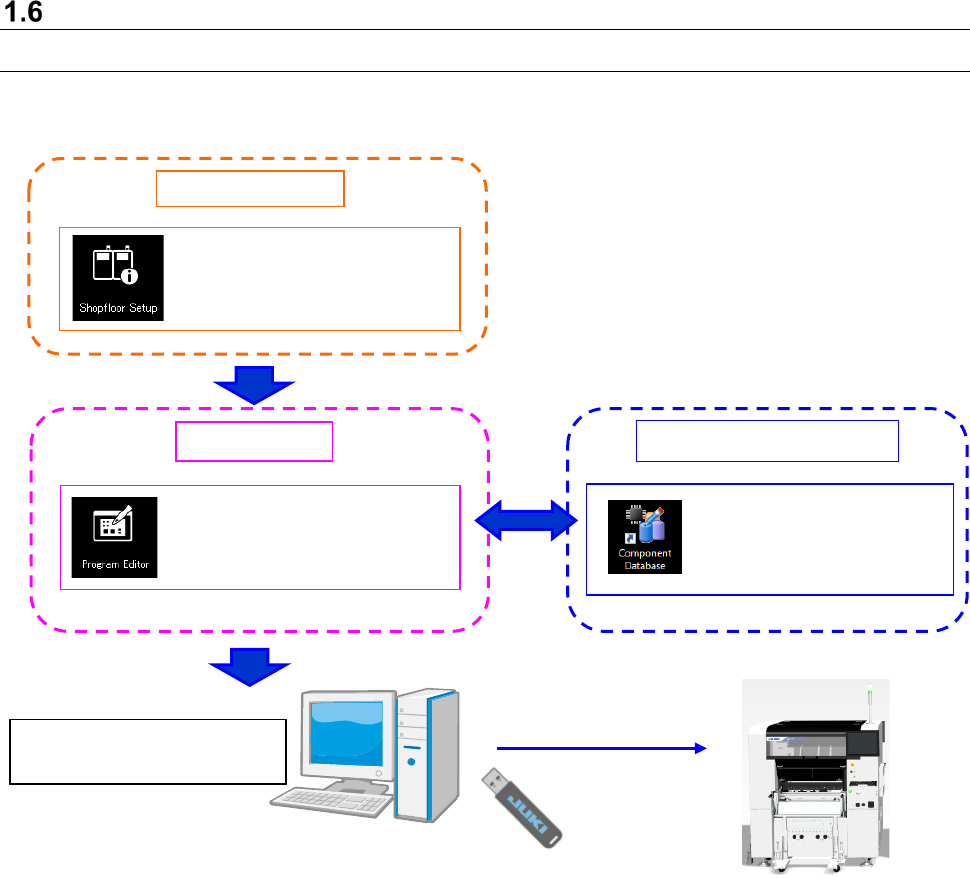
The operation flow up to PWB production using Basic Editor is shown below.
<Movement of the data from the JaNets by using a USB flash memory>
For the RX-6, copy the production program (division file) created by a "Data creation" command to a
USB flash memory, and save in a drive D drive on a main unit side. For the RX-7, read a production
program from a USB port. Refer to the section “File Management (Explorer)” of the Instruction
Manual of the main unit.
Note: Never save any program to the drive C of the main unit.
<The notes at the time of production execution when the data is transferred with a USB flash memory
(RX-6)>
Use a production program of the main unit to produce PWBs.
Be sure to remove the USB flash memory stick.
Create Data
Component Database
: Creation of a production
program (execution of
optimization)
Use a USB flash memory stick
to copy a production program.
Shared function
: Configuration of a machine
: Registration of
component information
JaNets Product Specifications
1.
JaNets Overview
1-14
1.6.2 Line Manager option
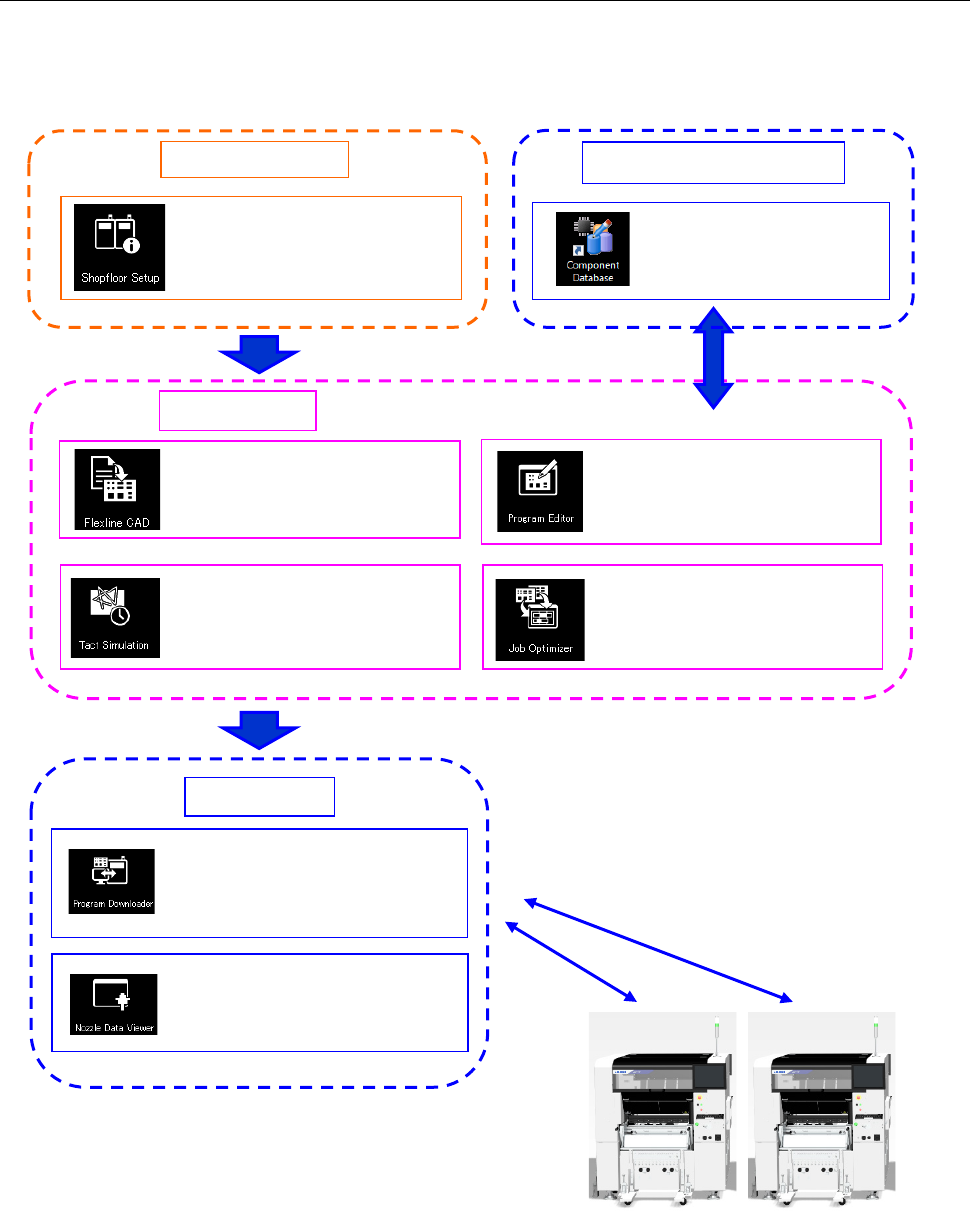
The operation flow up to PWB production, when the Line Manager option is added to Basic Editor, is
shown below.
A data shift using the USB flash memory can be
performed in the same way as Basic Editor.
Create Data
: Conversion of external data
into JUKI data (optional)
: Creation of a production
program (execution of
optimization)
: Time measurement by
optimized production
program
Shared function
: Optimization of feeder
setting change
Component Database
: Registration of
component information
: Configuration of a floor, line and
machine
: Viewing usage status of
ID-equipped nozzles
Production
: Downloads of a production
program, and uploading of them
after PWB production