JANETS_SPE_EN.pdf - 第21页
JaNets Prod uct S pecific ations 2. JaNets Exter nal Output Fu nction Overview 2-1 2. JaNets Exter nal Output Function Overview Product Confi guration The External Output Function is an opti onal function of the JaNets .…
JaNets Product Specifications
1.
JaNets Overview
1-17
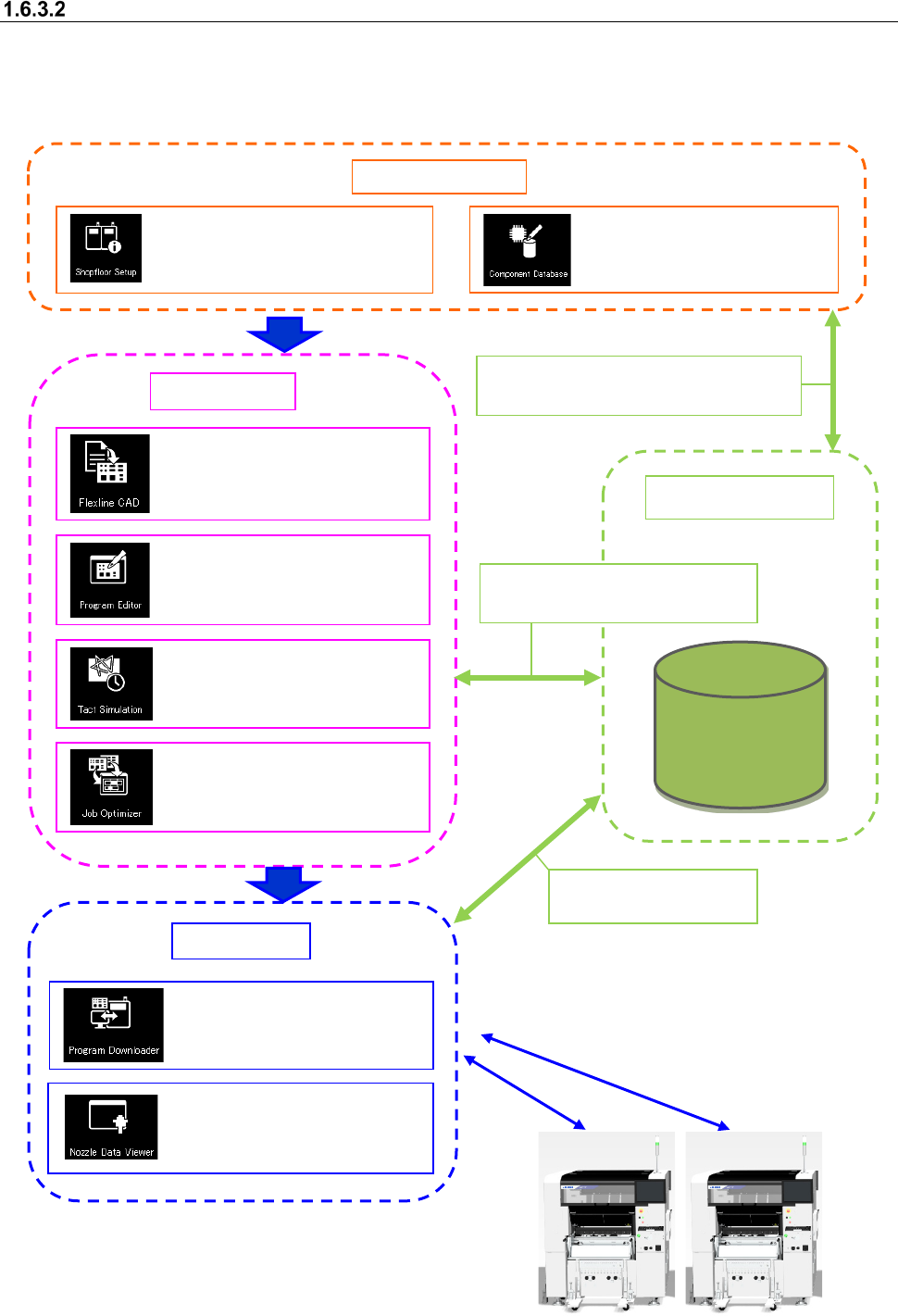
When a Line Manager option and a Data Manager option are added to Basic Editor
The operation flow up to PWB production to be applied when a Line Manager option and a Data
Manager option are added to Basic Editor is shown below.
A data shift using the USB flash memory can be
performed in the same way as Basic Editor.
Data Manager
Data Base
Data Manager
Sharing of the floor/line/machine information
Sharing of Component data
Sharing of a production program
Sharing of Component data
Sharing of a production
program
Create Data
Shared function
: Configuration of a floor, line
and machine
: Registration of component
information
Production
: Conversion of external data
into JUKI data (optional)
: Creation of a production
program (execution of
optimization)
:
Time measurement by
optimized production program
: Optimization of feeder setting
change
: Downloads of a production
program, and uploading of
them after PWB production
: Viewing usage status of
ID-equipped nozzles
JaNets Product Specifications
2. JaNets External Output Function Overview
2-1
2. JaNets External Output Function Overview
Product Configuration
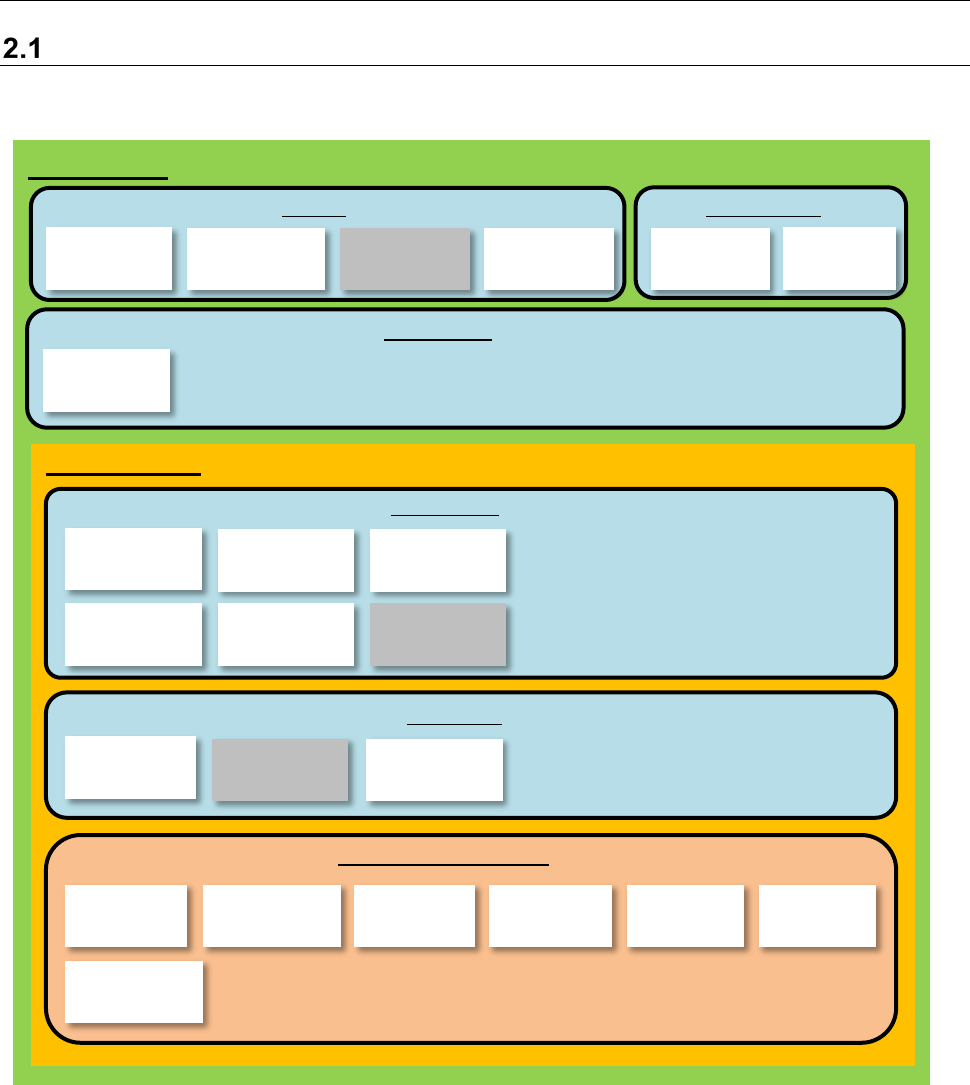
The External Output Function is an optional function of the JaNets.
This function is to be incorporated into the JaNets configuration as shown below.
Figure 1.1.1 Product Configuration
*1 Line Manager is an option of Basic Editor.
*2 The external output function is an option of Line Manager.
*3 Output in the JSON format is an option of the External Output Function.
*4 Device linkage function is an option of Line Manager.
*5 The Off-line Setup function is an option of the External Output Function, and can be used with three
terminals per JaNets system.
*6 The CFX output function is an option of the External Output Function. See Section 8.6 “CFX Output
Function” for details.
*7 The JaNets Mobile linkage function is an option of the External Output Function. See Section 8.7
“JaNets Mobile” for details.
User Man-
agement
Shopfloor
Setup
Component
Database
Language
Changer
Program
Editor
Create Data
Shared
Basic Editor
Program
Downloader
External
output monitor
External output
function Envi-
ronment setting
Parts stock
management
tool
External output function *2
Production
Line Manager *1
Snapshot
Tool
Maintenance
Log Control
Tool
Job
Optimizer
Mark
Database
Feeder Set
Database
Machine
Program Relater
Tact
Simulation
Create Data
Flexline CAD
Output in the
JSON format
Off-line Setup
function
CFX output
function
JaNets Mobile
linkage function
Device linkage
function
Nozzle data
viewer
JaNets Product Specifications
2. JaNets External Output Function Overview
2-2
Overview of the Functions
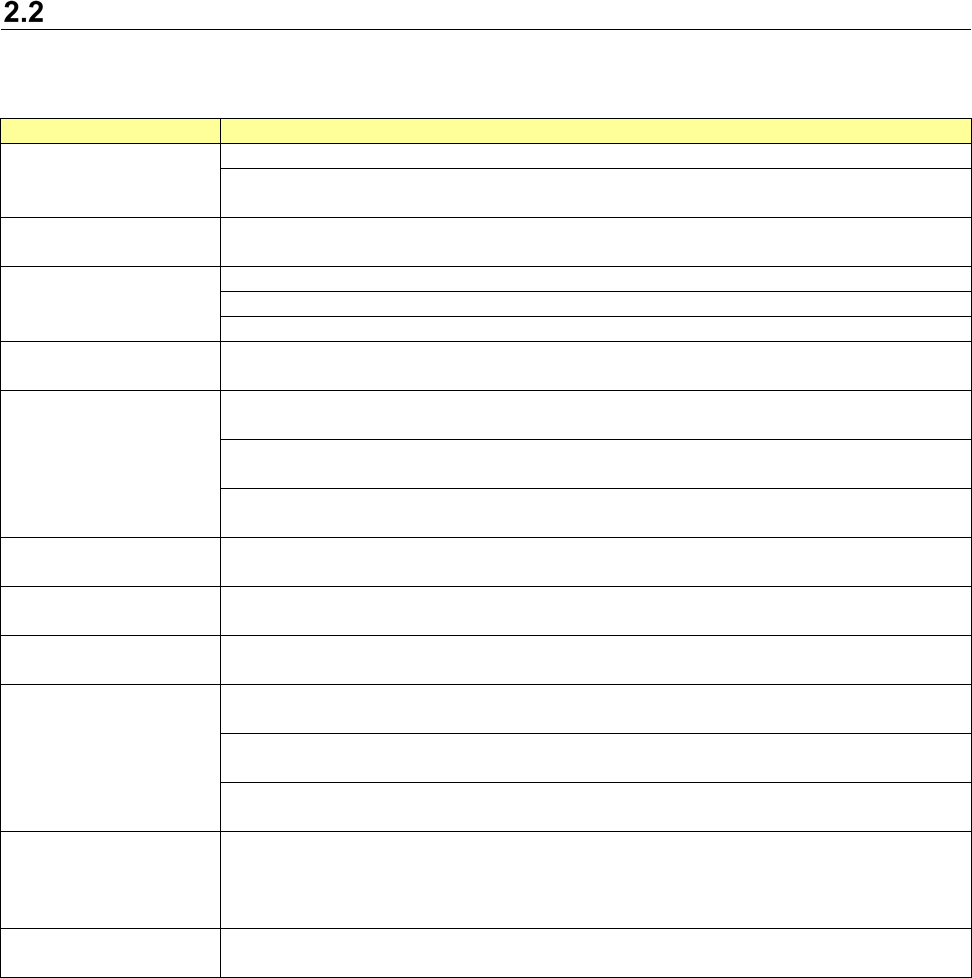
The functional overview of the External Output Function is described below.
Table 1.2.1 Functional overview of the External Output Function
Function name
Overview
How to Use Each
Function
Outputs error information.
Outputs backed-up data such as information output to an external system and the environ-
mental settings.
Line configuration infor-
mation output function
Outputs the information on the line configuration and machine setting which are controlled
by Shop floor setup.
Machine monitoring
function
Outputs information on production management.
Outputs the status information of the machine.
Outputs information on the tact.
The machine event
notifying function *1
Outputs the information (machine production start/end information, etc.) related to machine
events.
The mis-placement
preventive function *2
Checks the interrelation among the feeder, placement position and component (reel) and
mis-placement.
Extracts the component names and component serial by using the standard expression from
the character string of a bar code scanned by the machine side.
Extends the output information of the machine event notifying function and gives machine
reel information and residual number of components.
Off-line Setup function *3
Creates information on loading of a feeder or a component for a container (such as a bank
and a stacker) to load it to machines collectively.
Traceability function *4
Extends the output information of the machine event notifying function and gives traceability
information (PWB code information and placement information).
IFS-NX linkage function
*5
Obtains information from IFS-NX to output machine event information and/or machine reel
information.
Parts stock management
function *6
Creates component lists required for production from the optimized production program.
(The component lists can be registered as BOM information by importing them into ISM.) *8
Updates the residual number of components registered in ISM at the end of production of
each PWB. *6
Performs automatic delivery. (Estimates “No components” at the end of production about
each PWB and sends a delivery order to ISM before occurrence of “No components”.) *7 *9
Machine operation
function
Requests the machine to temporarily stop, abort the current operation or perform a cycle
stop.
Asks an external system whether it can produce a PWB at start of production as the start
interlock function of the machine too.
Symptom management
function
Outputs the machine operation information.
*1 To use all the event notifying functions of the machine, install the external output option and MounterExtension on
the machine side.
*2 To use the mis-placement preventive function, install the external output option and GCI on the machine side and
enables the mis-placement preventive function in the machine setup. Install the barcode reader in the machine.
*3 To use the Off-line Setup function, make settings of the External Output option (*2) and enable the Off-line Setup
function with the machine.
*4 To use the traceability function, install the external output option on the machine side and enable the traceability
function in the machine setup. (It is necessary to use the mis-placement preventive function as a prerequisite.) The
hardware of the code reader must be purchased on the machine side.
*5 To use the IFS-NX linkage function, IFS-NX is required. (IFS-NX has to be set to be used with the machine, and the
option installer for IFS-NX is required. Any option installer of the machine for the External Output Function (such as
the installers for the machine event notification function, mis-placement preventive function and traceability function)
is not required.)
*6 To use the component storage control function, ISM is required.
*7 The mis-placement preventive function of an external output option is used on the machine side and the reel is
loaded. (This is not applicable when IFS-NX is used.)
*8 When the system extracts a component normally via the ISM Connection, it does not create any BOM information
because the component list is used for component extraction information if components are set to be extracted in the
normal way via the ISM Connection.
*9 When the system extracts a component in case of emergency via the ISM Connection, it sends a component deliv-
ery (extraction) order to the ISM Connection.