M6ex_ServiceManual_e.pdf - 第55页
3 Mechanical Section 3-21 Cleaning of Teach Camera The lens of teach camera faces downward, and usua lly it would not get any dirt/dust under the norm al operation. However, if it gets dirt y, blow air using blower brush…
3 Mechanical Section
3-20
NOTE: Since the scan camera’s mirror is the surface deposition type and easily gets scratched, special care should
be paid to it when cleaning. Furthermore, organic solvent such as liquid cleaner should not be used.
NOTE: Be careful not to touch your finger or cotton swab directly to the LED lighting. The careless touch may
change the optical axis of lighting, causing vision recognition problem.
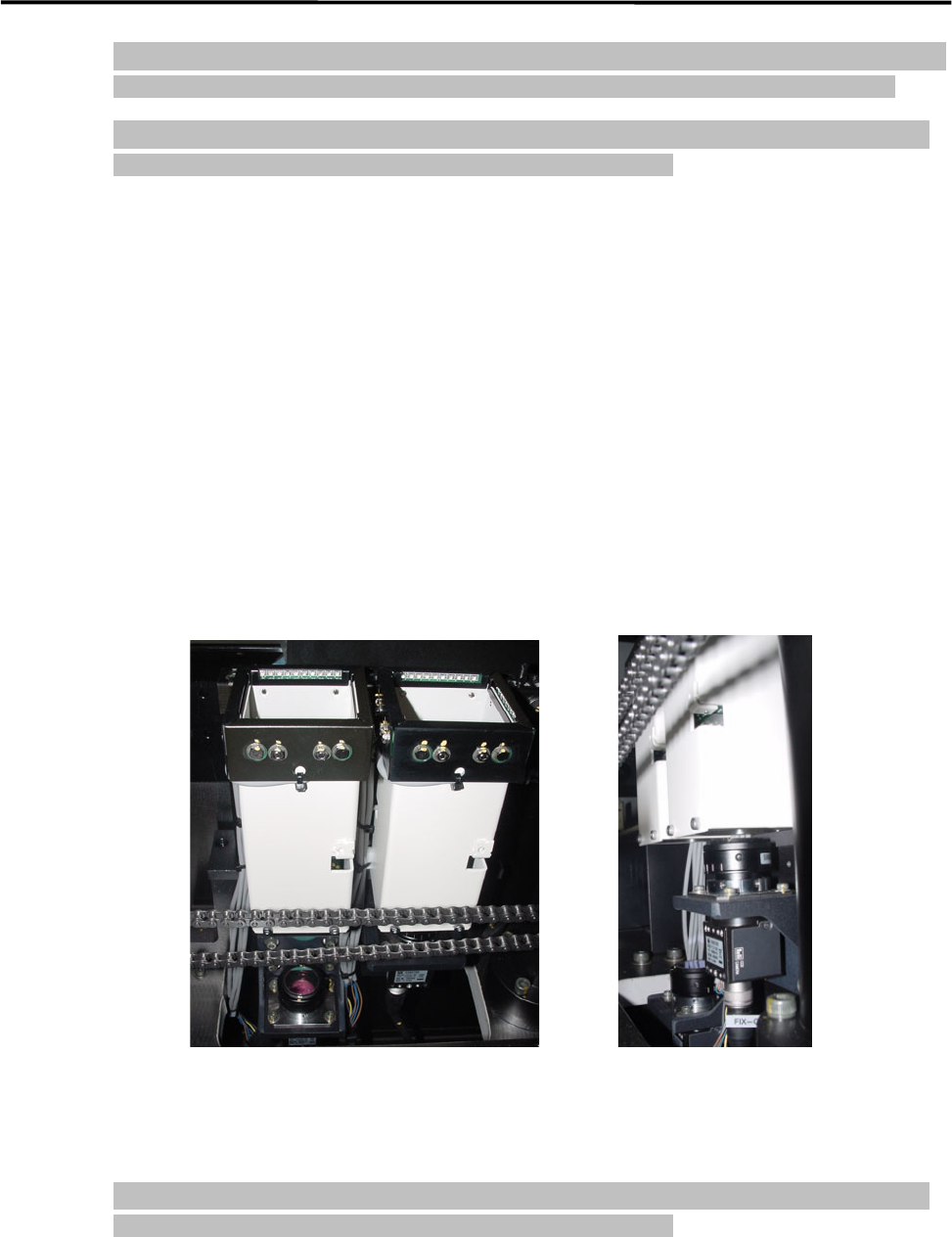
Cleaning of Fixed camera
Remove dirt/dropped obstacles (components or deposits) in a gentle way from the lens or lens filter of the
fixed camera, blowing air with a blower brush or wiping with a dry thing like a cotton swab. Avoid
applying your finger pressure directly to the lens and mirror through the use of such things as tissues.
For stubborn and sticky dirt such as grease, which cannot be cleaned away by air blow or wiping with dry
cotton swab, wipe it off with a moistened cotton swab with little amount of liquid cleaner, and finally with
dry one to remove the liquid cleaner and dirt completely. Do not apply the liquid cleaner directly on the lens
or lens filter.
NOTE: Be careful not to touch your finger or cotton swab directly to the LED lighting. The careless touch may
change the optical axis of lighting, causing vision recognition problem.
Fixed camera

3 Mechanical Section
3-21
Cleaning of Teach Camera
The lens of teach camera faces downward, and usually it would not get any dirt/dust under the normal
operation. However, if it gets dirty, blow air using blower brush from the bottom of the teach camera in
order to remove the dust.
Cleaning of Lens Filter
When components or obstacles get on the lens filter, remove them with a blower brush or tweezers.
When the grease gets on the filter, use camera lens cleaner and lens cleaning tissue.
If condensation occurs inside the protective filter, remove the filter to wipe off the moisture with lens
cleaning tissue.
3 Mechanical Section
3-22
Lubrication
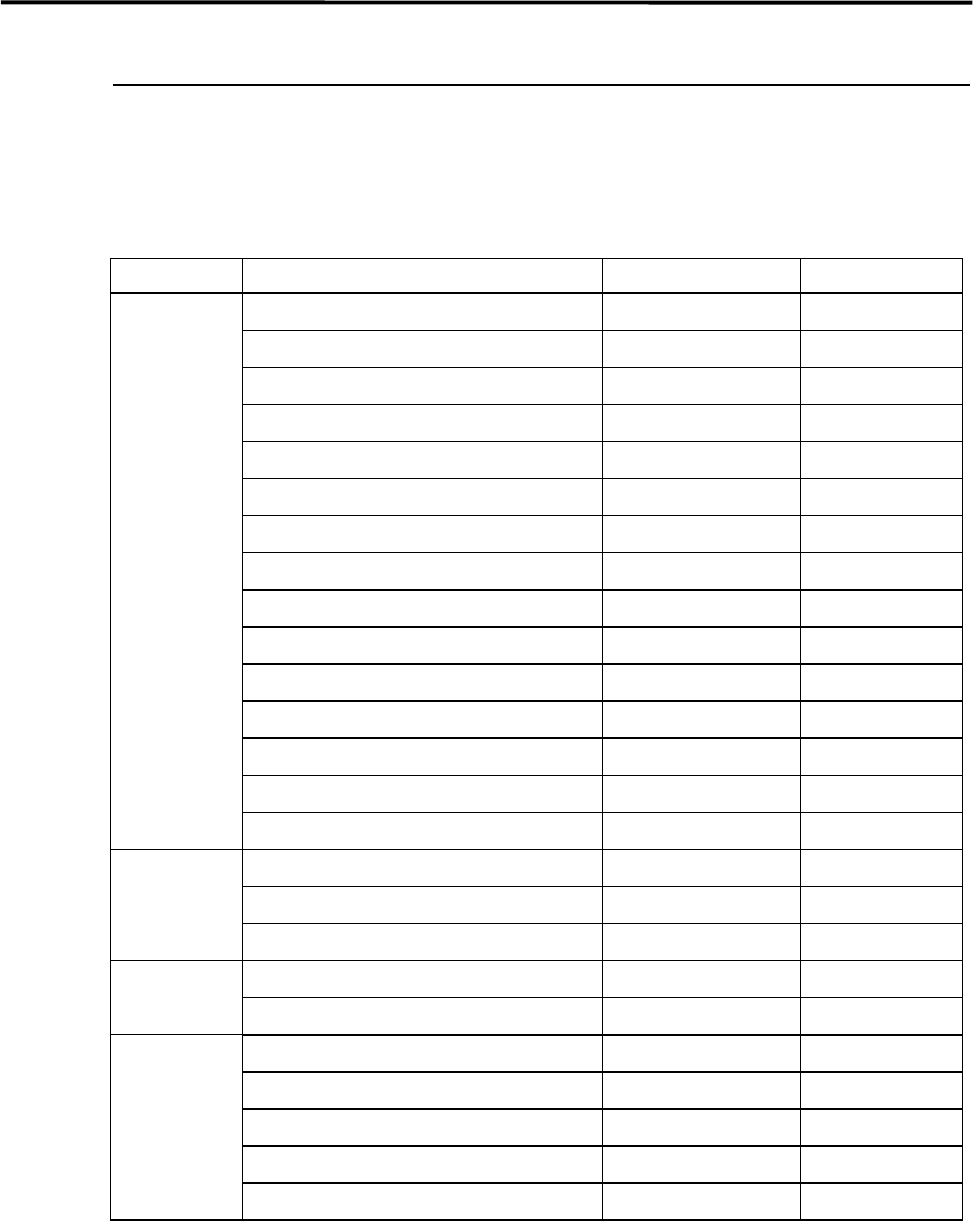
Lubrication Points
Lubricate the specified portions listed below with cotton swab soaked with lubricant.
UNIT PORTION LUBRICANT FREQ.
Ball Screw of X-axis Grease Every two weeks
Linear Guide of X-axis (Upper and Lower) Grease Every two weeks
Ball Screw of Y-axis (Right and Left) Grease Every two weeks
Linear Guide of Y-axis (Right and Left) Grease Every two weeks
Feeder Bank Plates Grease Every two weeks
Conveyor Width Adjusting Screw Grease Monthly
M6e Conveyor Guide Shaft Grease Monthly
Ball Screw of Z-axis Grease Every two weeks
Guide of Z-axis Grease Every two weeks
Spline shaft of R-axis Grease Every two weeks
Gear of R-axis Grease Monthly
Ball Screw of S-axis Grease Every two weeks
Linear Guide of S-axis Grease Every two weeks
Nozzle Holder Silicone Grease Monthly
Nozzle Silicone Grease Weekly
MX-20 Ball Screw Grease Monthly
(OPTION) Slide Pack Grease Monthly
Slide Pack (Shuttle Unit) Grease Monthly
MXR-20 Ball Screw Grease Monthly
(OPTION) Linear Shaft Grease Monthly
MX-ST2 Shaft Grease Monthly
(OPTION) Parallel Pin Grease Monthly
Downside of cap Grease Monthly
Contact part of shaft and cap Grease Monthly
Contact part of shaft and bracket Grease Monthly
NOTE: Do not apply excessive oil/grease. This may cause oil/grease scattering when the mounter is in operation.