PC150-Manual-REV-A-2.pdf - 第23页
PC150 Valve Manual Revision A / Jan uary 202 2 Page 23 of 26 Troubleshooting Troubleshooting Problem Possible C ause Corrective A ction Va lv e D oes Not Cycle • Air pressure to air section is t oo low • Stroke adj ust m…
PC150 Valve Manual
Revision A / January 2022
Page 22 of 26
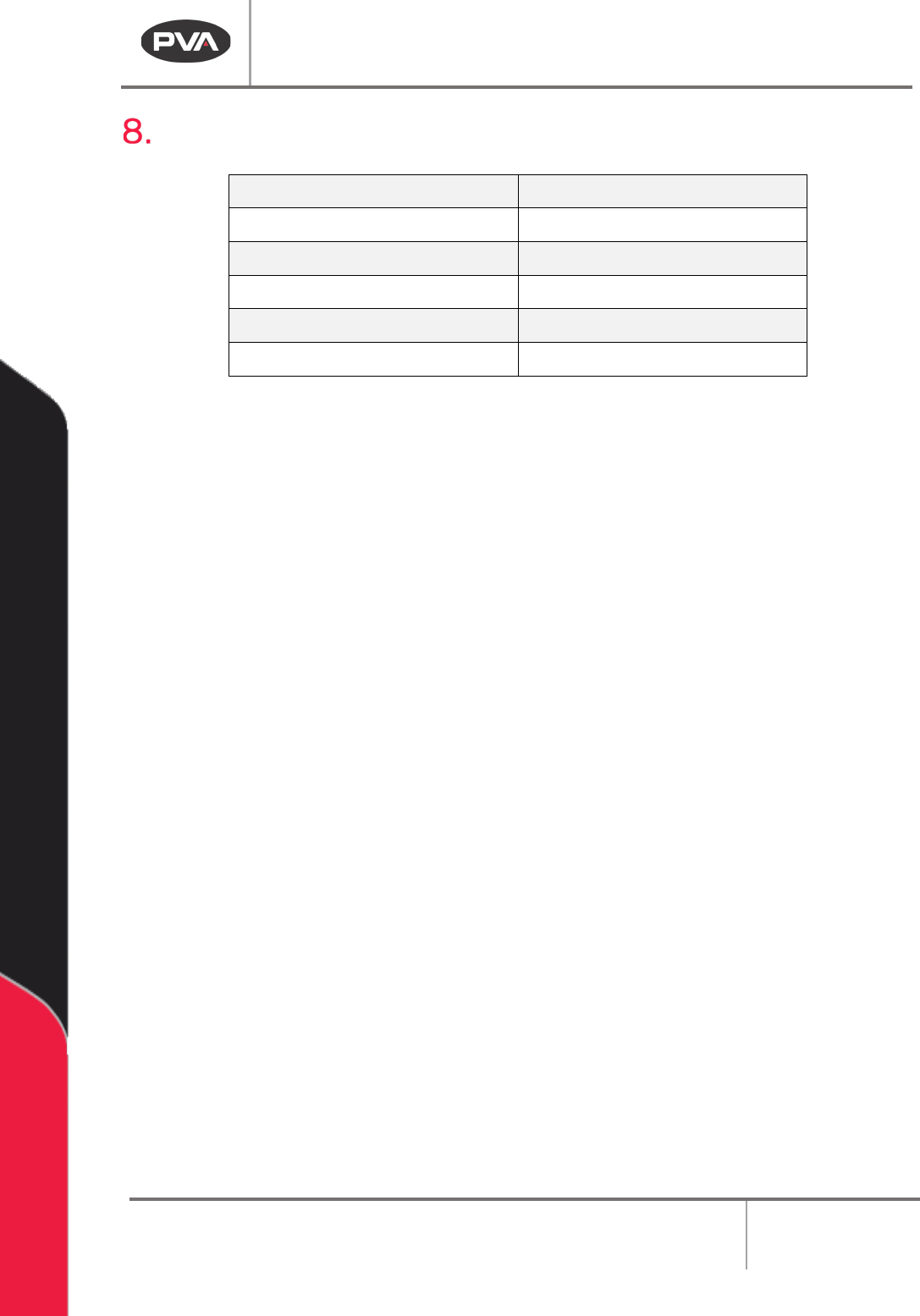
Technical Specifications
Weight
Approximately 550mg (1.2 lbs)
Material inlets
1/8” NPT
Air Ports
M5 X 0.8-6H
Operating Air Pressure
60 – 100 psi
Maximum Fluid Pressure
1500 psi
Viscosity Range
1 cps – Paste (unfilled)
Figure 24: PC150 Technical Specifications
PC150 Valve Manual
Revision A / January 2022
Page 23 of 26
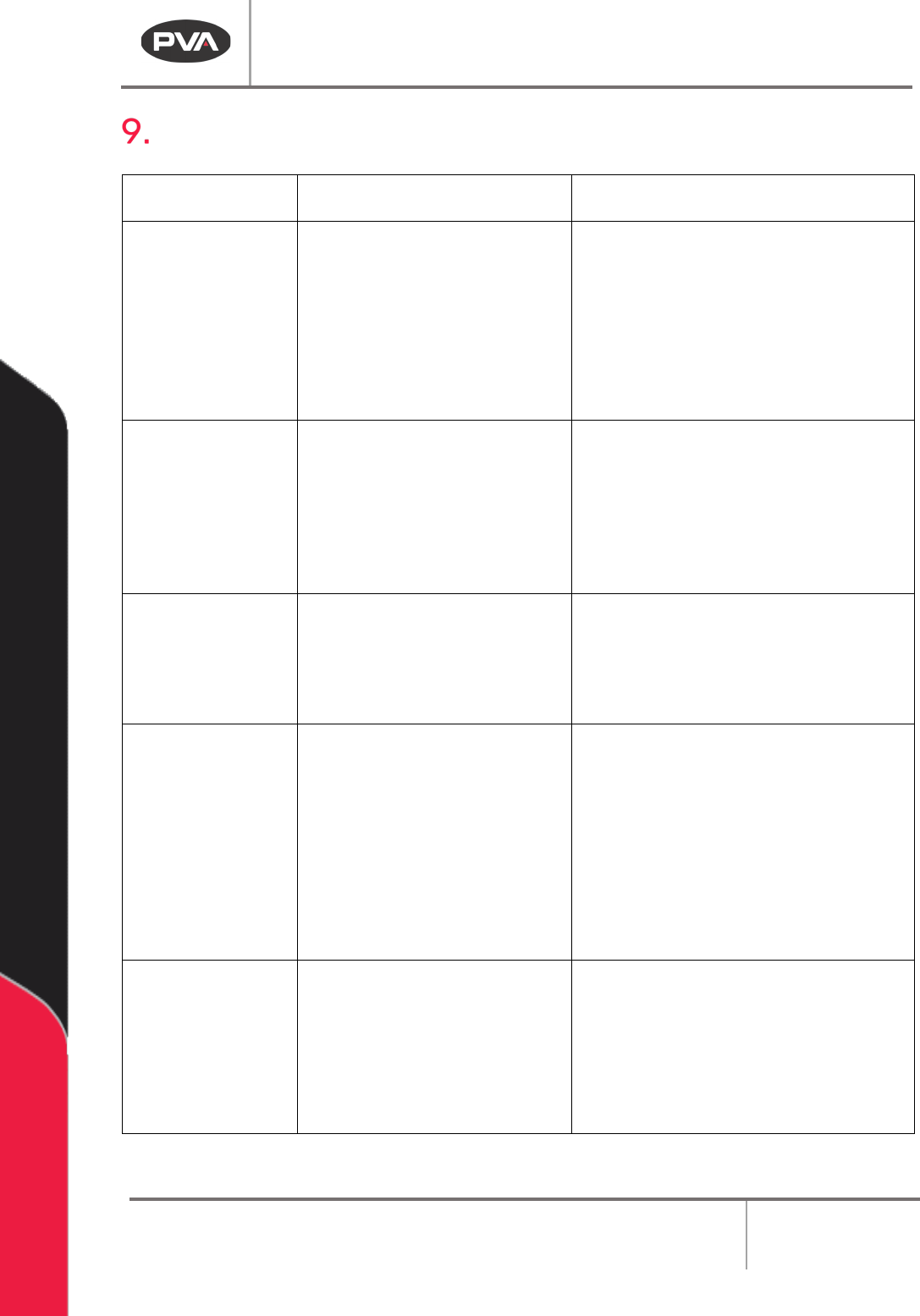
Troubleshooting
Troubleshooting
Problem
Possible Cause Corrective Action
Valve Does Not
Cycle
• Air pressure to air section
is too low
• Stroke adjustment screw
is fully engaged
• Material is cured in the
valve
• Increase the air pressure to 60-
100 psi
• Turn stroke adjustment screw
counter-clockwise to increase
snuff back
• Disassemble and clean valve
Material Leaks
From Static
Mixer
• Snuff back is set too low
• Fluid seals are worn
• Air trapped in the valve or
static mixer
• Turn stroke adjustment screw
counter-clockwise to increase
snuff back
• Replace o-rings
• Bleed valve until air is removed
Air Bubbles In
Fluid
• Valve is not correctly bled
• Problem with fluid delivery
system
• Bleed the valve until the air is
removed
• Diagnose and repair
No Flow From
Valve
• Manifold is blocked
• Air cylinder does not
operate
• Static mixer is plugged
• Problem with material
supply
• Examine and clean manifold
• Increase operating air pressure to
80 psi. Inspect valve for cured
material
• Replace static mixer
• Examine material supply to the
valve
Valve Drips
Continuously
After Shutoff
• Snuff back is set too low
• Fluids seals are damaged
or worn
• Valve rods are defective or
worn
• Turn stroke adjustment screw
counterclockwise to increase
snuff back.
• Examine and replace O-ring seals
• Examine and replace valve rods
PC150 Valve Manual
Revision A / January 2022
Page 24 of 26
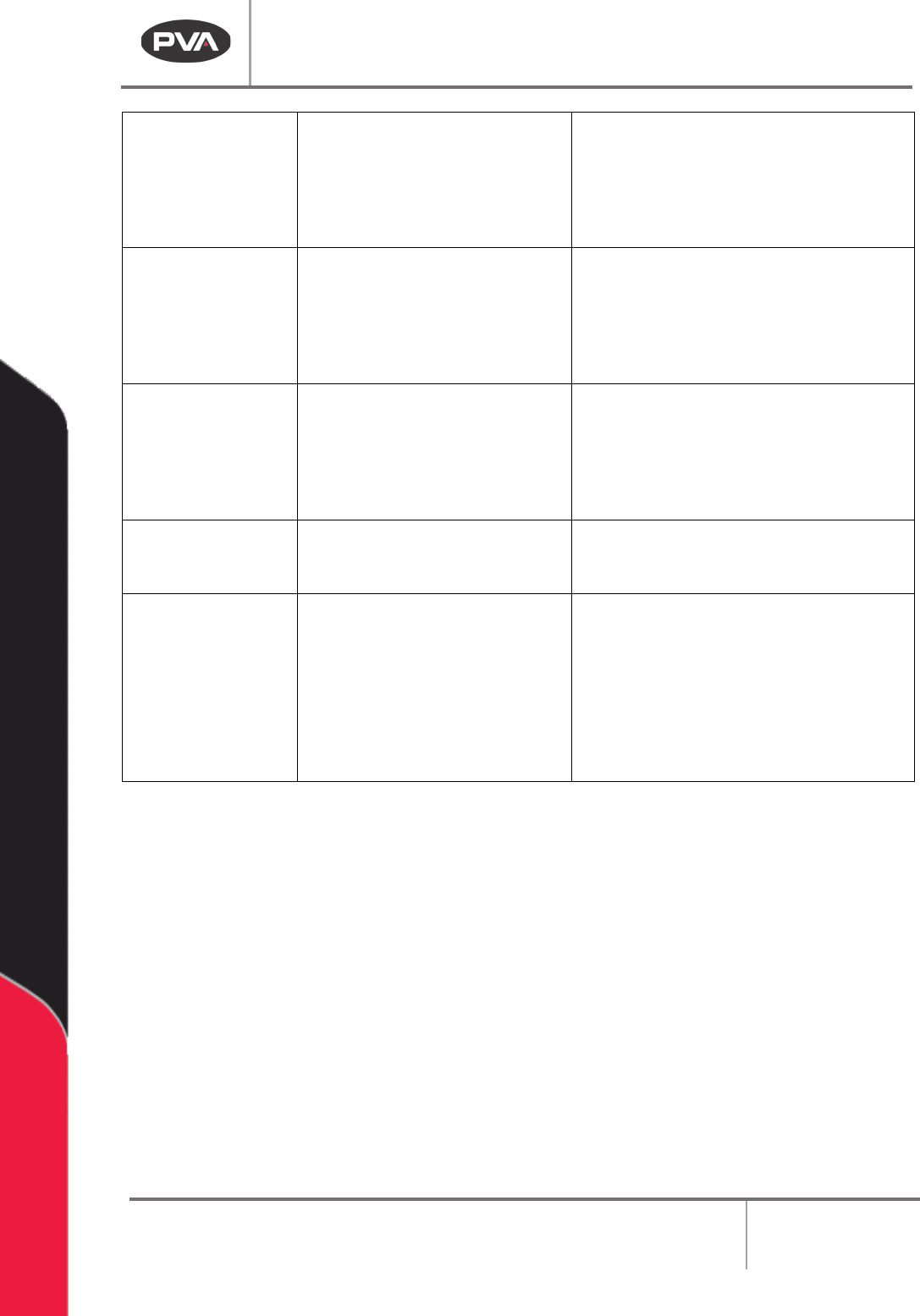
Valve Drips For a
Short Time After
Shutoff
• Air is trapped in the
manifold
• Air is trapped in the static
mixer
• Bleed the valve until the air is
removed
• Bleed the valve until the air is
removed
Cross-
Contamination
In Manifold
Nozzle
• Snuff back is set too high
• System material supply
not correctly bled of air
• Turn stroke adjustment screw
clockwise to decrease snuff back
• Bleed material supply system until
the air is removed
Seals Fail
Rapidly
• Seals are not compatible
with material
• Material has abrasive
fillers
• Contact PVA for seal options
• Contact PVA for seal options
Valve Has Air
Leak
• Jam nut is loose • Tighten jam nut against stroke
adjustment sealing washer
Material Does
Not Cure
• Mix ratio is incorrect
• Material not sufficiently
mixed
• Do ratio checks at manifold and
adjust metering system as
necessary
• Use a static mixer with sufficient
mixing elements – consult
material manufacturer or PVA
Figure 25: Troubleshooting Guide