00198612-01_VD_SIPLACE_Pro_16.0_R18-2_DE_EN.pdf - 第15页
SIPLACE Pro 16.0 (R 18 - 2) / Version Desc ription 11/2018 Edition 15 4 Features of SIPLACE Pro 1 6.0 If not differently described, the feature s of the previous SI PLACE Pro versions ar e contained in SIPLACE Pro 1 6.0 …
SIPLACE Pro 16.0 (R18-2) / Version Description 11/2018 Edition
14
Processing Feeders from ASM Assembly Systems
– MeasuringFeeder X
– SIPLACE Glue Feeder
– Reject conveyor with X-adapter
– Linear Dipping Module X
– Linear Dipping Unit 2 X
– Linear Dipping Unit 2 E (E-series only)
– Label feeder with X-adapter
– Splice sensor X-feeder
Modules from 3
rd
party suppliers
– FFI feeders:
Data IO RoadRunners
– IPTE Multi Stick Feeder:
IPTE MSF 60 AX
IPTE MSF XL80 AX
– SEMO CRF80 tape feeder

SIPLACE Pro 16.0 (R18-2) / Version Description 11/2018 Edition
15
4 Features of SIPLACE Pro 16.0
If not differently described, the features of the previous SIPLACE Pro versions are contained in
SIPLACE Pro 16.0. The main new features of SIPLACE Pro 16.0 are listed below.
NOTICE
Detailed information on the individual functions can be found in the Online Help for
SIPLACE Pro.
4.1 Customer-Specific Nozzles – Improvements
The treatment of customer-specific nozzles has been improved as follows:
– Customer-specific nozzles for the C&P20 P and CPP heads can be equipped with a nozzle ID.
A nozzle ID can be specified for 6xxx, 4xxx, 2xxx and 28xx customer-specific nozzles in the
Nozzle Tree View of SIPLACE Pro Desk. The nozzle ID will be sent to the station when a job is
downloaded from SIPLACE Pro.
– The nozzle report will contain the nozzle ID.
– Automatic nozzle ID recognition can be performed for the customer-specific nozzles in the
same way as for standard nozzles at the station.
– The name of customer-specific nozzles will be displayed at the station when a job is
downloaded from SIPLACE Pro.
– Contamination Scan
SIPLACE Vision provides a new nozzle scan for customer-specific nozzles to detect
contamination by solder paste. The Scan Solder Paste Contamination option must be
enabled in the Nozzles tab of the Component Shape Editor. Following parameters are
available and can be changed:
Sensitivity correction
Sensitivity for detection of solder paste contamination. Negative values indicate lower and
positive values higher sensitivity.
Valid values: [-75; +100]. Default value: 0.
Scan after
Number of components to be placed after which a nozzle scan will be performed.
Valid values range from [10; 10.000]. Default value: 100.
The contamination scan is supported for the following camera types:
SST23, SST25, SST28, SST29, SST30, SST33, SST36, SST38, SST41, SST45, SST48 and
SST49.
The operator must start the contamination check manually at the station.
SIPLACE Pro 16.0 (R18-2) / Version Description 11/2018 Edition
16
4.2 OSC Package Option – Enhancements
Detailed information on the OSC Package features can be found in the OSC Package User Guide,
item no. [00198374-xx].
The main enhancements made for the OSC Package Option in SIPLACE Pro are listed in the
overview below.
Pin in Paste Height Check for TH and CPP Placement Head
The height check is supported for the TH and CPP placement heads. The functionality is the same
as for the existing height measurement in the Snap-In detection for the Twin VHF placement head,
but the components have centering pins instead of board locks.
The height check can be activated by enabling the new Pin in Paste height check option in the
Handling tab of the Component Shape Editor. The option may only be enabled if the Standard
placement process has been selected. If the Pin in Paste height check option has been enabled,
a value may be entered for the Z-threshold. Default value = 500 µm.
Restrictions
– Not supported on SIPLACE CA4 and CA4 V2 placement machines.
– Only supported together with station software as of version 712.0. If the line does not contain
any station with station software >=712.0, the feature is ignored, and a warning displayed.
Increased Placement Force for TH Placement Head
The placement force has been increased to maximum 30 N for the TH placement head.
Restrictions
– Not supported on SIPLACE X-Series placement machines.
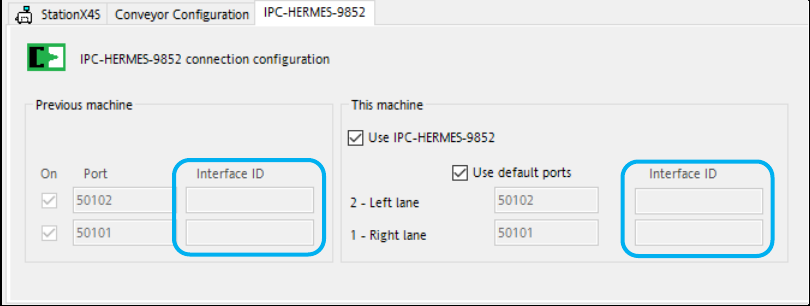
4.3 "IPC-HERMES-9852" – Interface ID
SIPLACE Pro supports the new Interface ID that has been implemented in the
"IPC-HERMES-9852" protocol for Hermes 1.1. This property is used to identify additional input or
output lanes of a special device. Additional lanes may e.g. be used to transport the board back to
the previous device or as output branches for faulty boards. The additional lanes must be
configured on the device itself.
Only the default lanes can be configured in SIPLACE Pro Desk (i.e. transport board from first to
last device on lane 1 or 2) but with the additional Interface ID property.
Figure 4-1: IPC-HERMES-9852 connection configuration dialog
If configured, the Interface ID will be appended to the connection string in the configuration check
result table on the Line Control GUI.