00198612-01_VD_SIPLACE_Pro_16.0_R18-2_DE_EN.pdf - 第22页
SIPLACE Pro 16.0 (R 18 - 2) / Version Desc ription 11/2018 Edition 22 Example – Number of measurem ents ; x = length of m easurement cycle (def ault = 1) – periodic measurement – Restart m easurement after y compone nt s…
SIPLACE Pro 16.0 (R18-2) / Version Description 11/2018 Edition
21
It also must be specified how the individual components within the grey zone should be treated.
I.e., the components for which the system cannot determine to which packaging tape (old / new)
they belong to.
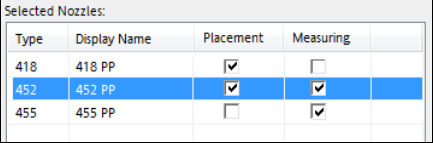
If a component is selected for electrical verification, at least one nozzle must be selected to pick up
the component and put it on the measuring feeder. The nozzle might differ from the one which is
used for placing the component. Certain components will require two nozzles (one for measuring
and one for placement) in the corresponding nozzle changer. The placement and measuring
nozzles can be selected in the Nozzle tab of the Component Shape Editor:
Figure 4-4: Selecting placement and measuring nozzles
4.12 DEK Printer Support - Enhancements
New printer types have been added in SIPLACE Pro. The following printer types are supported:
– DEK Galaxy
– DEK Horizon iX
– DEK NeoHorizon
– E by DEK
Additionally, a conveyor type can be selected for each printer type: DEK Standard or DEK HTC
Conveyor (High Throughput Conveyor).
4.13 Cracked Die Inspection
Cracked components can be detected with the new Cracked Die Inspection. This option is
supported for the following component shapes:
BAREDIE
BGA
CCGA
CHIP
Non-standard
If the Cracked Die Inspection is enabled in the Component Editor, the components will be
measured with the board camera. If the component is cracked, it will be left in the tray or tape.
The inspection can optionally be activated for a defined period and the feeder deactivated after a
defined number of detected cracked components by using the following parameters:
– x Number of Measurements
– Restart measurement after y Components
– Stop station after z Number of cracked dies

SIPLACE Pro 16.0 (R18-2) / Version Description 11/2018 Edition
22
Example
– Number of measurements; x = length of measurement cycle (default = 1) – periodic
measurement
– Restart measurement after y components (default = 1)
– Stop station after z number of cracked components
x = 5; y= 10; z = 2
The Cracked Die Inspection runs during the green phases. If two cracked components are
detected during the green phase, the feeder will be deactivated.
4.14 Measuring Barcode on Bottom Side of Component
For a component it can be specified that its barcode on the bottom side shall be read with the
component camera and stored in the Traceability data. A corresponding barcode description must
have been defined in SIPLACE Pro.
The barcode must first be created in the Component Shape Editor by using the new Barcode lead
group type to define the position and size of the barcode.
In the Component Editor, Setup Verification – Trace must be enabled and the Barcode on
bottom option selected.
4.15 Disabling Creation of LCU Number
When a component shape is created, a new unique LCU number is generated automatically
(LCU = Line Computer Unix). This number is only required in older station software versions
(4xx, 5xx and 6xx).
The creation of the LCU number can be switched off with the new Enable extended Component
Shape range (Disable automatic unique LRU number generation) option in the Global
Settings. If this option is enabled and component shapes with no unique numbers are sent to a
station using ICOS Vision or an older software version, a correspondent error message is
displayed, and the user must repair these numbers manually.
4.16 Free Nozzle Orientation
SIPLACE Pro supports free nozzle orientation for component pickup. In addition to the existing
common orientation (0°, 90°, 180°, 270°), a specific angle in the range of 0° - 360° can be specified
for single nozzles.
The Component Shape Editor has been enhanced accordingly. In the Selected Nozzles list, the
Use Specific Nozzle Orientation option can be selected for an assigned nozzle and a specific
angle value entered in the Specific Nozzle Orientation Angle column.
Restrictions
This feature is not supported in older station software versions (4xx, 5xx). If no station of the line
can set a specific nozzle orientation value, an error message is displayed.

SIPLACE Pro 16.0 (R18-2) / Version Description 11/2018 Edition
23
4.17 Stand-alone Data Model Import Tool
The Data Model Import Tool has been established as a stand-alone executable program and
renamed to SIPLACE Pro Import Tool.
Figure 4-5: Start screen of SIPLACE Pro Import Tool
SIPLACE Pro Import Tool will be installed with the SIPLACE Pro Desk applications during standard
installation of SIPLACE Pro and can be used within or independent of SIPLACE Pro Desk.
The program can either be started under Start Menu – SIPLACE Pro Import Tool or from the
SIPLACE Pro Desk main menu under Tools – Import – SIPLACE Pro Import Tool.
4.18 Grid Board Editor – Enhancements
The following enhancements have been introduced in the Grid Board Editor:
– The package types can now contain fiducials and inkspots.
Each package type contains an own fiducial list.
An inkspot can be added to the package type list by selecting a fiducial type under Fiducials.
The package type list contains four columns to specify an inkspot: Inkspot, Offset X, Offset Y
and Disable.
– Grid Board and Grid Panel Type can contain a board barcode fiducial.
A Barcode Fiducial can be selected in the Height Measurement field in the Board Fiducials
and Panel Type Fiducials tabs respectively.