00198612-02_VD_SIPLACE_Pro_16.1_R19-1_DE_EN.pdf - 第16页
SIPLACE Pro 16.1 (R19-1) / Version Description 05/2019 Edition 16 Defining Circular or Elli ptical Panels The dropdown list in the Ne w Polygon Shape dialog can al so be used to define circular or e lliptical panels by s…
SIPLACE Pro 16.1 (R19-1) / Version Description 05/2019 Edition
15
4.3 Customer Specific Nozzles – Storing Additional Nozzle Data
The data field Additional Nozzle Data has been added to SIPLACE Pro.
The data from the Additional Nozzle Data field can be saved to an XML file, which can be exported
and edited in an external text editor. It is also possible to import XML files or delete existing XML
data.
4.4 Hiding Unused Hardware in SIPLACE Pro Desk
There is a new functionality in SIPLACE Pro Desk to hide components from the Tree View. This
way, hardware that is currently not needed or cannot be used with the station type can be hidden in
the view, thus trimming the object list in the Tree View to a clearer structure. If an object has been
hidden, the icon of the folder containing the object in the Tree View changes.
The main changes made in this context are listed in the overview below.
Hide Unused Hardware Dialog
The Customize dialog under Tools – Settings in SIPLACE Pro Desk has been removed. Instead,
the Hide Unused Hardware dialog has been added to support the new functionality. The dialog
can be used to hide or restore objects. It is possible to hide or restore objects individually, by object
type, or all objects at once.
Automatically Hide Sub-Objects
When a station type is hidden, any sub-objects belonging to this station type that cannot be used
by any of the remaining station types can be automatically hidden as well. The same applies when
restoring hidden stations. If a sub-object is already in use, a respective message is shown.
Import / Export Settings for Hidden Hardware
In the Hide Unused Hardware dialog, it is possible to export or import the settings for hidden
hardware.
Managing Hidden Objects in the Tree View
If the Security option in the System Settings is activated, administrator users or users with the
corresponding privilege can hide and restore objects in the Tree View via the context menu.
4.5 SIPLACE Pro Desk Board Editor – Enhancements
To offer more realistic panel designs, the Board Editor has been enhanced to support polygon and
circular panels as well as rectangular panels.
Defining Polygon Panels
When opening a board and selecting a panel, the Panel Properties form contains the Polygon
Panel checkbox that opens the Panel Vertices group when activated. Clicking the Create Shape
button opens the New Polygon Shape dialog, where the Polygon shape can be selected from a
dropdown list.
To reduce the amount of time spent defining polygon panels, the x- and y-data describing a
polygon panel can be imported via the Import Polygon icon in the Panel Vertices group, which
then opens the Import Polygon Panel Points dialog.

SIPLACE Pro 16.1 (R19-1) / Version Description 05/2019 Edition
16
Defining Circular or Elliptical Panels
The dropdown list in the New Polygon Shape dialog can also be used to define circular or elliptical
panels by selecting the respective shape from the list.
4.6 LED Centering Simulation – Enhancements
The SIPLACE Pro Optimizer has been enhanced to now consider the process time for LED
Centering. LED Centering can be switched on and off for individual placement positions by setting
an Align flag.
4.7 Activating 64-bit Object ID Range
It is possible to activate the 64-bit object ID range to use a higher number of objects in the
SIPLACE Pro Database. The 64-bit object ID range can be activated in the settings dialog.
NOTICE
As soon as this option has been enabled, the SIPLACE Pro objects can only be
transferred to stations with station software 712.x and higher or to stations with station
software 4.xx or 5.xx.
After enabling, all possible object IDs will first be filled up in the number band 32-bit,
before any object IDs larger than 32-bit are created. If no object IDs larger than 32-bit
are created, this option can be disabled again.
4.8 Grid Report of Placement List – Enhancements
The Grid Report of the placement list has been enhanced to show alternative components of the
placement. The Grid Report shows the total amount of alternative components and the amount of
alternative components per placement.
Restrictions
– Alternative component shapes are not listed.
4.9 New Nozzles for Measuring Feeder
The following measuring nozzle types have been introduced:
– 1403, 1404, 1406
– 2403, 2404, 2406
– 4403, 4404, 4406
– 6403, 6404, 6406
The nozzles are designed for electrical verification of components in the measuring feeder. They
are not assigned to any component shape of the standard shape library.
SIPLACE Pro 16.1 (R19-1) / Version Description 05/2019 Edition
17
4.10 License Changes for “Whispering Down The Line”
The “Whispering Down The Line” license has been updated. With this new version, the “Whispering
Down The Line of barcode information – Machine Connection“ license is no longer required.
If previously only the “Whispering Down The Line of barcode information – Machine Connection“
license has been purchased, then the “Whispering Down The Line” license needs to be purchased
when upgrading to SIPLACE Pro 16.1.
The “Whispering Down The Line” license is only required if IPC-HERMES-9852 is not used on the
devices between the first and last placement stations.
4.11 Individual Traceability Option for Printer and Inspection Systems
It is possible to switch the generation and processing of trace data on and off for individual printers
and inspection systems. This can be done using the Traceability option in the Device Editor.
4.12 Support of 3
rd
Party Machine Types
The Generic Line Device type list in the Object Properties dialog has been extended by the
device types Conveyor, Loader and Unloader to support 3
rd
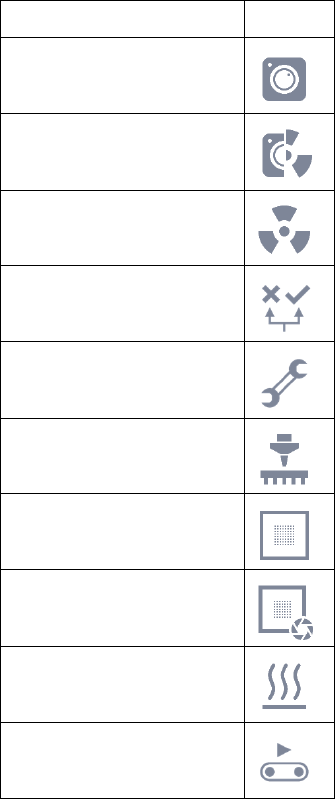
party machines. Additionally, new icons
are introduced to distinguish between the device types:
Device Type
Icon
AOI
AOXI
AXI
Classification Area
Repair Area
Placement Station
Printer
Solder Paste Inspection
System
Oven
Conveyor