00198612-02_VD_SIPLACE_Pro_16.1_R19-1_DE_EN.pdf - 第25页
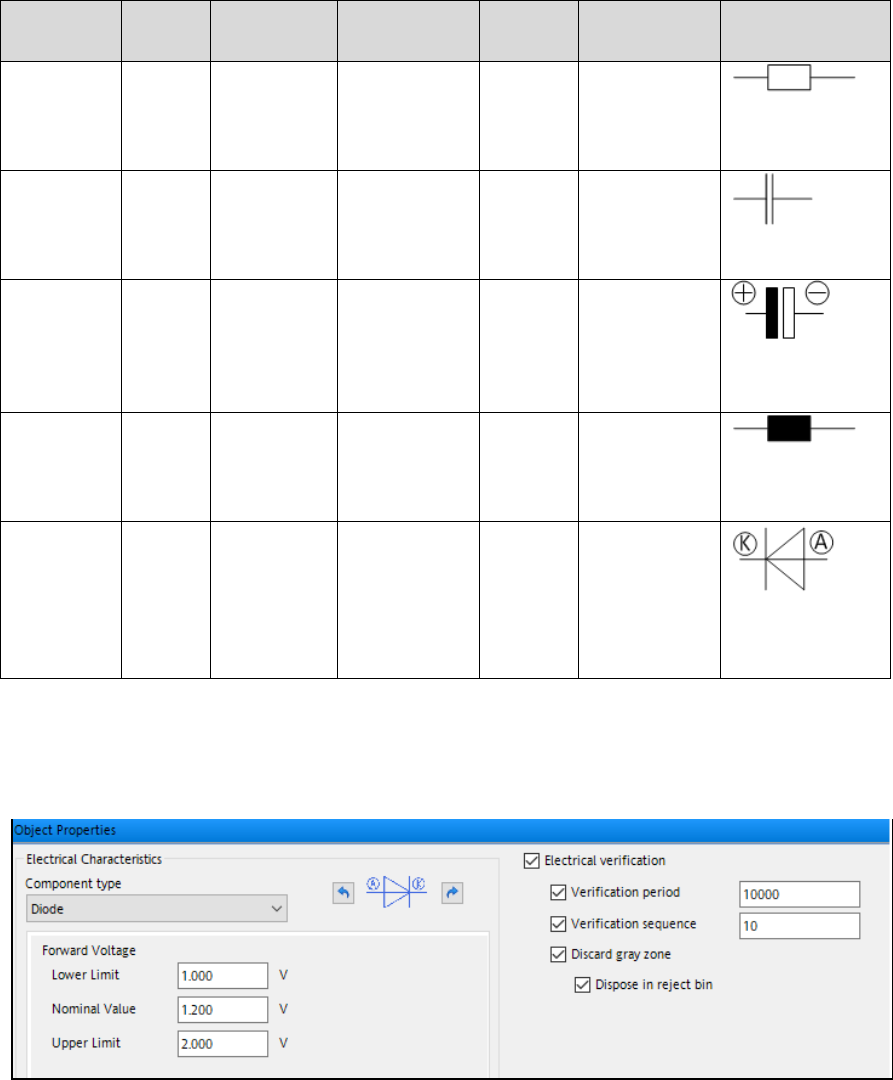
SIPLACE Pro 16.1 (R19-1) / Version Description 05/2019 Edition 25 Type Value Type Value Range Value Tolerance Polarity Additional Value Symbol Resistor Ohm 0.1 to 100k +/ - % (typical : 1, 5, 10 default: 1) No - Capacito…

SIPLACE Pro 16.1 (R19-1) / Version Description 05/2019 Edition
24
5.10 Flux Inspection
A new flux inspection has been introduced to check if components have been dipped or not. For
this, a reference image is captured before dipping. After dipping, the inspection compares the
current image with the reference image.
The flux inspection can either be enabled in SIPLACE Vision or in the Component Shape Editor by
selecting Dipping: On – Mode: Vision – Dipping – FluxInspection for the following component
shapes:
– BGA
– Non-standard
– CCGA
NOTICE
From this SIPLACE Pro version, the previous Flux inspection check box is omitted. If
this feature is enabled in a component shape, the above-mentioned mode will be set
when upgrading to SIPLACE Pro 16.0.
5.11 SIPLACE MeasuringFeeder X
SIPLACE Pro supports the new MeasuringFeeder X with which the electrical characteristics of a
component can be measured. The measuring feeder must be set up manually, occupies one track
on the X-table and is supported together with station software version 712 and higher.
The electrical characteristics of a component must be specified in the Component Editor in the new
Electrical characteristics tab. Additionally, the necessary data for handling the measurement
process must be specified in this tab. The following table gives an overview of the supported
component types and their electrical characteristics.
SIPLACE Pro 16.1 (R19-1) / Version Description 05/2019 Edition
25
Type
Value
Type
Value
Range
Value
Tolerance
Polarity
Additional
Value
Symbol
Resistor
Ohm
0.1 to 100k
+/- %
(typical:
1, 5, 10
default: 1)
No
-
Capacitor,
Standard
Farad
0.001n to
100µ
+/- %
(typical:
10, 20
default: 20)
No
-
Capacitor,
Polarized
Farad
1µ to 500µ
% (typical:
+5/-5,
+20/-50
default:
+20/-20)
Yes
Rated
Voltage
(Volt) 3.6 to
60
default: 35
*)
Inductor
Henry
100n to
50 µ
+/- %
(typical
10, 20
default: 20)
No
Diode
Volt
0.1 to 5
Absolute
upper and
lower limit
within the
value range
(default: 1)
Yes
Nominal
Value
default: 1
*)
Table 5-1: Component types and electrical characteristics
*)
Orientation corresponds to IPC7315 (Pin1 left side)
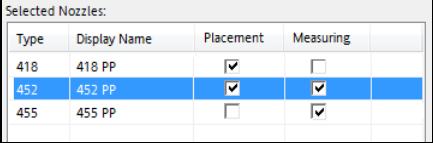
Example: Electrical characteristics of component type "Diode"
Figure 5-3: Electric characteristics of component type "Diode"
The component's electrical orientation can be adjusted by clicking the rotate buttons to the right
and left of the electrical symbol.
By enabling the Electrical verification option, the component is selected for electrical verification
on the measuring feeder.
If the component is selected for electrical verification, it will be verified at each detected package
change, in case a new feeder is set up or after a foil torn error. Optionally, an additional
Verification period can be selected. Default: periodically after 10 000 components.
Optionally a Verification sequence can be defined: e.g. first check after 10, second check after
100 and third check after 1000 components. Default: off.
SIPLACE Pro 16.1 (R19-1) / Version Description 05/2019 Edition
26
It also must be specified how the individual components within the grey zone should be treated.
I.e., the components for which the system cannot determine to which packaging tape (old / new)
they belong to.
If a component is selected for electrical verification, at least one nozzle must be selected to pick up
the component and put it on the measuring feeder. The nozzle might differ from the one which is
used for placing the component. Certain components will require two nozzles (one for measuring
and one for placement) in the corresponding nozzle changer. The placement and measuring
nozzles can be selected in the Nozzle tab of the Component Shape Editor:
Figure 5-4: Selecting placement and measuring nozzles
5.12 DEK Printer Support - Enhancements
New printer types have been added in SIPLACE Pro. The following printer types are supported:
– DEK Galaxy
– DEK Horizon iX
– DEK NeoHorizon
– E by DEK
Additionally, a conveyor type can be selected for each printer type: DEK Standard or DEK HTC
Conveyor (High Throughput Conveyor).
5.13 Cracked Die Inspection
Cracked components can be detected with the new Cracked Die Inspection. This option is
supported for the following component shapes:
BAREDIE
BGA
CCGA
CHIP
Non-standard
If the Cracked Die Inspection is enabled in the Component Editor, the components will be
measured with the board camera. If the component is cracked, it will be left in the tray or tape.
The inspection can optionally be activated for a defined period and the feeder deactivated after a
defined number of detected cracked components by using the following parameters:
– x Number of Measurements
– Restart measurement after y Components
– Stop station after z Number of cracked dies