00198612-02_VD_SIPLACE_Pro_16.1_R19-1_DE_EN.pdf - 第23页
SIPLACE Pro 16.1 (R19-1) / Version Description 05/2019 Edition 23 5.7 Long Board Option (LBO) for SIPLACE TX - and TX V2-Serie s SIPLACE Pro supports the Long Boa rd Option (LBO) on the SI PLACE TX- and SIPLACE TX V 2- S…
SIPLACE Pro 16.1 (R19-1) / Version Description 05/2019 Edition
22
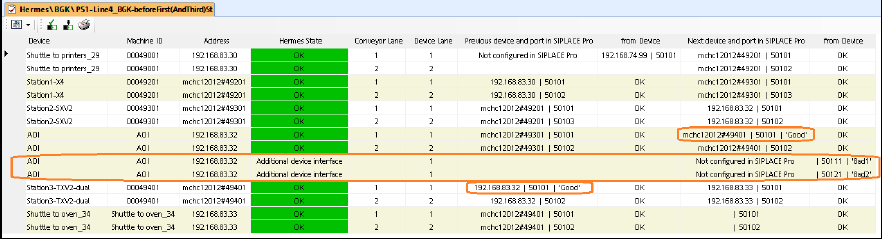
Format: <device address> | <port> | <interface ID>
All additional interfaces per device lane are added as additional rows in the table.
Figure 5-2: Line Control GUI – Configuration check result table
5.4 Using Placements as Fiducials for Aligning Components
Some boards do not have precise fiducials or any fiducials at all. For these boards, the accuracy of
the components relative to each other is important but not the placements relative to the board. For
this, a special process has been introduced in SIPLACE Pro:
Four components which are using component shapes that are suitable for measuring are placed at
the first stopper of the first placement area. Thereafter, the machine will treat these four
placements as fiducials. For every stopper in every placement area, these four placements will be
measured as fiducials.
In the Board Editor, the process can be selected under Use placements as fiducials.
At least one component shape that shall be placed, must have a fiducial type assigned to it in the
Component Shape Editor. By this, it can be measured as fiducial.
The optimizer will select four placements from all placements of component shapes which can be
measured as fiducial and placements of a component which is set up fixed in the first placement
area.
The component shapes of the selected placements must be taught at the station.
5.5 CPP Placement Head – Increased Placement Force and
Component Weight
The placement force has been increased to maximum 15 N for the CPP placement head. The
component weight has been increased to 20 g in Pick&Place mode.
5.6 Smart Pin Support for SIPLACE TX V2 Series
The automatic Smart Pin Support option is supported for the SIPLACE TX V2-series placement
machines with two gantries – TX2 V2 and TX2 V2i. The fixed Smart Pin Magazine occupies the
tracks 1-6 on a new table type. As default, five pins per lane are required. Optionally, an additional
pin magazine can be put on the station.
The first nozzle magazine(s) of the nozzle changer on the left side cannot be used. If Smart Pin
Support is installed, the first stopper position is set to a negative value to reach all positions on the
board.
If Smart Pin Support is already installed in the target setup, it will be removed during the copy
function and must be added back manually.
SIPLACE Pro 16.1 (R19-1) / Version Description 05/2019 Edition
23
5.7 Long Board Option (LBO) for SIPLACE TX- and TX V2-Series
SIPLACE Pro supports the Long Board Option (LBO) on the SIPLACE TX- and SIPLACE TX V2-
Series placement machines.
The LBO must be set in the line configuration and in the setup in SIPLACE Pro.
The configured default offset for the reverse stopper is at position -380 mm and can be changed.
Additionally, the first stopper position can be changed from 0.0 to -70.0 mm (default -30.0; -70.0)
without having LBO activated. Thus, the boards can be stopped in case the entire length can be
supported by support pins.
Detailed information on the Long Board Option can be found in the LBO for SX1/SX2 V2 / TX-
Series / X-Series S User Manual, item no. [00197085-xx].
5.8 Station Behavior When Using Alternative Tracks
Alternative track means that one or more feeders are set up with the same component on a feeder
table. Alternative tracks are mainly used to avoid machine stoppages caused by pickup issues on
the main track, e.g. foil torn, late splicing.
To avoid half empty reels or the mixing of components from different reels on the board, the user
can select when the machine shall switch between main and alternative track.
A new option has been introduced to control the behavior of the station if a feeder can no longer
deliver a component, but the track did not run empty. The user can select the behavior for each
component. If Do not use alternative tracks if feeder empty is enabled for a component in the
Component Editor, the machine stops, and an error message is displayed at the station.
Alternative tracks are only supported together with ASM Setup Center.
5.9 Linear Dipping Unit 2 X / Linear Dipping Unit E – Enhancements
From this SIPLACE Pro version, multiple cavity depths can be used on the same dipping plate.
Optionally, the dip module can be equipped with a flux level sensor.
Two dipping plate types are supported:
– Multiple fixed depths – dipping plate with up to five different cavity depths.
– Round plate – dipping plate with one (round) cavity depth.
The Linear Dipping Unit 2 X supports multiple fixed depths. The Linear Dipping Unit E only
supports one fixed cavity depth. The round plate is compatible to the legacy dip module with a
round plate that was supported in previous versions and can only be set up on this dip module.
The dipping plate type and the dip flux material to be used by the dip module must be selected in
the Setup tree view. Two new parameters are available to specify the dip flux material: Dip margin
and Flux level sensor is active.
Additionally, the Dipping distance can be specified in the Component Shape Editor.
The placement sequence has been optimized so that no head cycle will be interrupted by
squeegee cycles.
Detailed information on the functionality of the Linear Dipping Unit 2 X and Linear Dipping Unit E
can be found in the respective User Manuals SIPLACE Linear Dipping Unit 2 X, item no.
[00198517-xx] and SIPLACE Linear Dipping Unit E, item no. [00198521].

SIPLACE Pro 16.1 (R19-1) / Version Description 05/2019 Edition
24
5.10 Flux Inspection
A new flux inspection has been introduced to check if components have been dipped or not. For
this, a reference image is captured before dipping. After dipping, the inspection compares the
current image with the reference image.
The flux inspection can either be enabled in SIPLACE Vision or in the Component Shape Editor by
selecting Dipping: On – Mode: Vision – Dipping – FluxInspection for the following component
shapes:
– BGA
– Non-standard
– CCGA
NOTICE
From this SIPLACE Pro version, the previous Flux inspection check box is omitted. If
this feature is enabled in a component shape, the above-mentioned mode will be set
when upgrading to SIPLACE Pro 16.0.
5.11 SIPLACE MeasuringFeeder X
SIPLACE Pro supports the new MeasuringFeeder X with which the electrical characteristics of a
component can be measured. The measuring feeder must be set up manually, occupies one track
on the X-table and is supported together with station software version 712 and higher.
The electrical characteristics of a component must be specified in the Component Editor in the new
Electrical characteristics tab. Additionally, the necessary data for handling the measurement
process must be specified in this tab. The following table gives an overview of the supported
component types and their electrical characteristics.