sj6 uitra.pdf - 第5页
-2- Product Overview -2- 3 4 5 9 8 10 15 16 1 2 6 11 7 14 13 12

-1-
Precautions
The camera body itself is not waterproof. Before submerging in water, ensuring the
waterproof case is completely sealed. After exiting the water, completely dry the
waterproof case before opening it to remove the camera.
1. Waterproofing
The camera has no internal storage and requires a high-speed microSD card (supports
up to 512GB). Before using it, please format the SD card to ensure compatibility.
Important note: Inserting an SD card while the device is powered on will cause it to
shut down automatically. This is normal. Please power it on again.
2. Memory Card Requirements
The action camera may getting hot during usage. This is normal and does not affect
performance.
3. Overheating Notice
When not using the waterproof case, avoid scratching the lens to prevent impacts on
image quality. If the lens gets damaged or scratched during use, contact customer
service to purchase replacement parts.
6. Lens Protection
Actual battery life varies depending on usage environment and settings. For first-time
use, please fully charge the camera before turning it on.
4. Battery Precautions
Actual shooting results can be affected by environmental lighting, camera settings,
and operating techniques. If you encounter issues, please contact customer service
for assistance.
5. Shooting Effect Notice
Please note: Due to continuous product upgrades and optimizations, there might be
slight differences between the packaging appearance, operational descriptions/func-
tions in this manual, and the physical product.
7. Other Notes
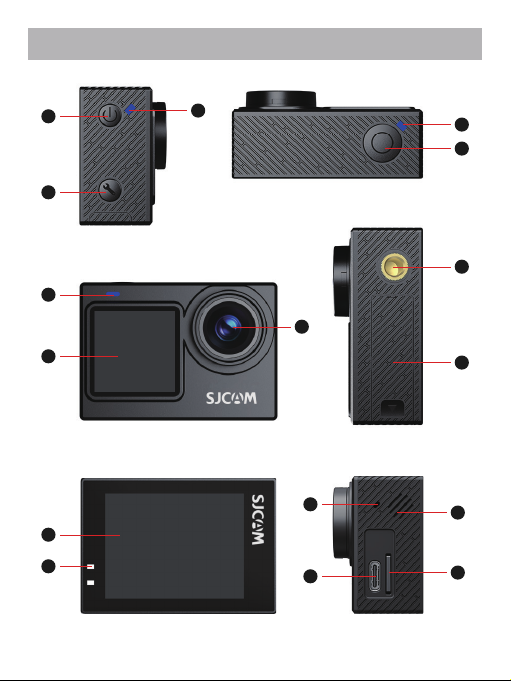
-2-
Product Overview
-2-
3
4
5
9
8
10
15
16
1
2
6
11
7
14
13
12
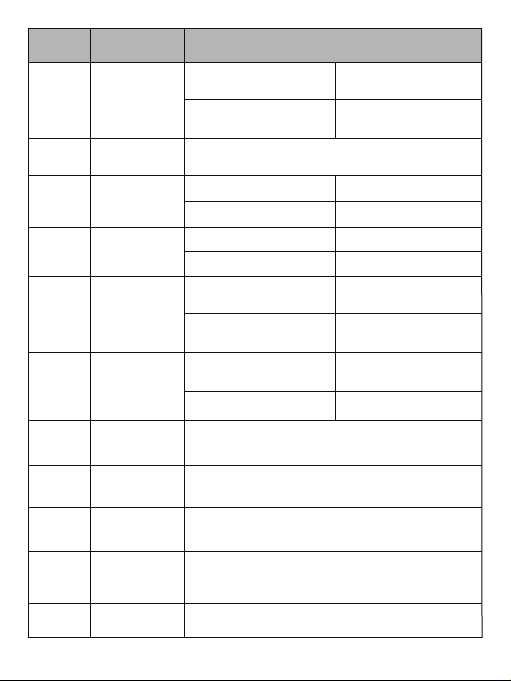
-3-
Be careful not to scratch and stain the lens when
using, otherwise it will affect the imaging clarity.
Compatible with external extension bases, mini
tripods, and other accessories.
7
8
9
10
Secondary
screen
1/4
screw hole
System
Setting Button
Battery
Compartment
Cover
1.3" LCD Display screen
Single click button to enter system settings
11
Front Screen 2.0" LCD Touch Screen
Open and remove / insert batteries
6
Start / stop recording or
take photo
Switching front and rear
screen
Name
Description
1
2
3
4
5
Power
Button
Photo
Indicator
Recording
Indicator
Recording
Button
Wi-Fi
indicator
Power on
Turn off
Blue light on
Blue light flashing
Red light flashing
NO
Single press under
power off mode
Long press 2 seconds
under power on mode
Single press under
power on
Standby
Red light on Standby
Capturing
Recording
Long press for 2 seconds
under power on
Wi-Fi has turned on,
waiting to be connected
Green Light Quick
Flashing
Green Light Always on Wi-Fi Connected
Lens