sj6 uitra.pdf - 第6页
-3- Be careful not to scratch and stain the lens when using, otherwise it will affect the imaging clarity. Compatible with external extension bases, mini tripods, and other accessories. 7 8 9 10 Secondary screen 1/4 scre…
-2-
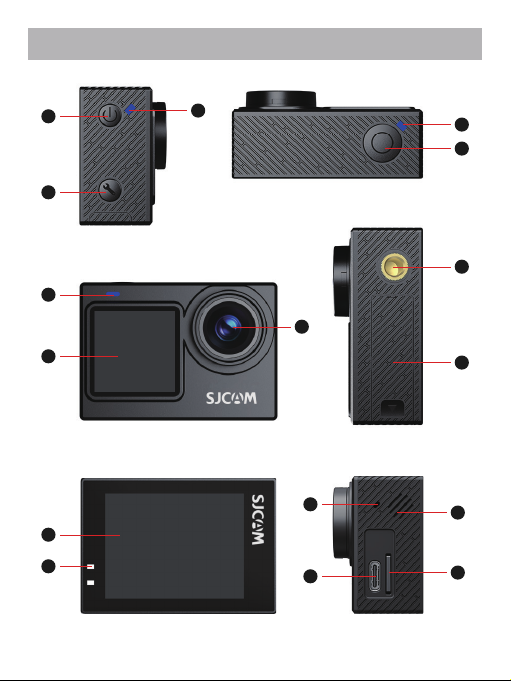
Product Overview
-2-
3
4
5
9
8
10
15
16
1
2
6
11
7
14
13
12
-3-
Be careful not to scratch and stain the lens when
using, otherwise it will affect the imaging clarity.
Compatible with external extension bases, mini
tripods, and other accessories.
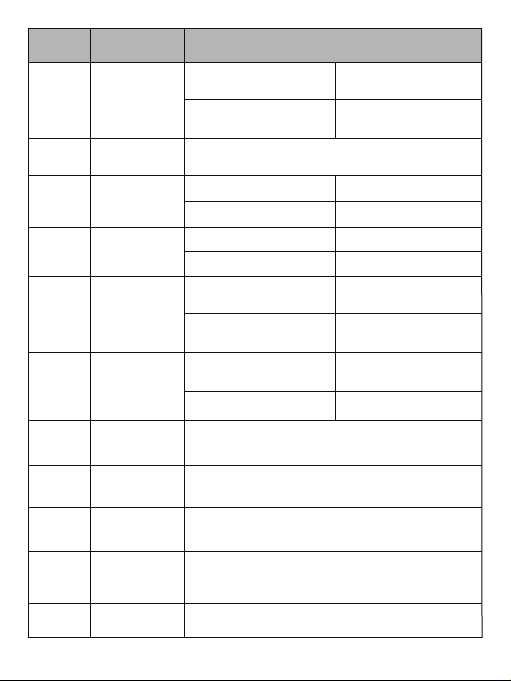
7
8
9
10
Secondary
screen
1/4
screw hole
System
Setting Button
Battery
Compartment
Cover
1.3" LCD Display screen
Single click button to enter system settings
11
Front Screen 2.0" LCD Touch Screen
Open and remove / insert batteries
6
Start / stop recording or
take photo
Switching front and rear
screen
Name
Description
1
2
3
4
5
Power
Button
Photo
Indicator
Recording
Indicator
Recording
Button
Wi-Fi
indicator
Power on
Turn off
Blue light on
Blue light flashing
Red light flashing
NO
Single press under
power off mode
Long press 2 seconds
under power on mode
Single press under
power on
Standby
Red light on Standby
Capturing
Recording
Long press for 2 seconds
under power on
Wi-Fi has turned on,
waiting to be connected
Green Light Quick
Flashing
Green Light Always on Wi-Fi Connected
Lens
-4-
Reminder:
1. Before connecting your phone to the "SJCAM X" APP, disconnect from other
Wi-Fi networks and ensure your phone's Wi-Fi is enabled.
2. Viewing and downloading photos or videos taken by the camera through the
"SJCAM X" APP does not consume your phone's data plan.
3. If an older version of the "SJCAM Zone" APP was previously installed, Wi-Fi
connection might fail. Please scan the QR code below to download and install the
latest version before connecting.
SJ6 Ultra supports three Wi-Fi connection methods: Bluetooth Quick Connect, App
QR Code Connect, and Manual Connect.
Choose one connection method based on your actual needs.
Download and Install SJCAM X APP
Scan the appropriate QR code below for your device type to download the APP.
Alternatively, search for "SJCAM X" in your phone's app store (Google Play Store
or App Store).
App Connection
TF card slot, support Max of 512 G memory card,
please choose the reputable brand
Charging / data transmission;
Voltage / current: 5V/2A, 5V/1A
SD slot
Record Audio
12
Play beep sound, recording voice playback
13
14
15
16
Charging
indicator
USB-C
connection port
Red light on
Red Light off
charging
Full charged
Microphone
Speaker