sj6 uitra.pdf - 第9页
-6- Insert the microSD card into the microSD card slot as shown. T o remove the microSD card, gently push the card inward, and it will pop out. SD Card Installation 3. Manual Connection 3.1 Go to your smartphone’ s home …
-5-
1. Bluetooth Quick Connect
1.1 Make sure the SJ6 Ultra is powered on.
1.2 On your smartphone, go to the Settings app, find the Bluetooth option, and turn
on Bluetooth.
1.3 Open the SJCAM X app and grant the necessary permissions. After following the
steps below, wait for the automatic connection.
Note: The permissions are only used to establish the connection between the app
and the camera and will not be used for any other purposes.
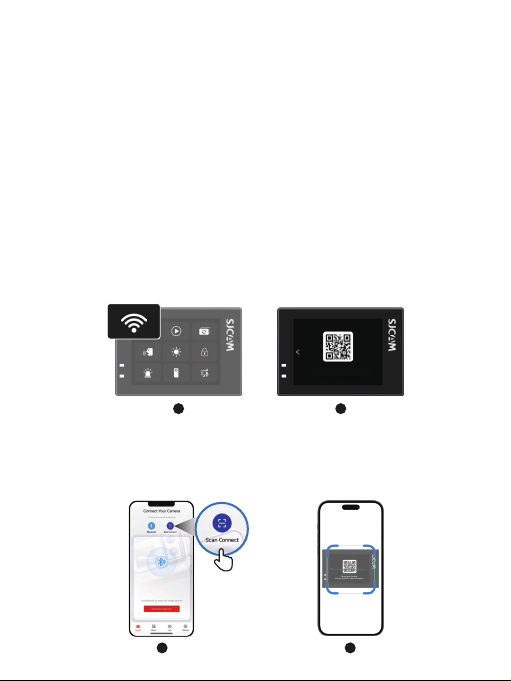
2. Scan QR code to connect
2.1 Turn on the SJ6 Ultra. Swipe down from the top edge of the screen to access the
Control Center menu. Tap the Wi-Fi icon and wait for the QR code to appear on the
camera screen.
2.2 Open the "SJCAM X" APP. Tap the "Scan QR Code" button on the homepage,
then use your phone to scan the QR code displayed on the camera screen to
connect automatically.
Note: The SJ6 Ultra's indicator light blinking green indicates that the camera's Wi-Fi
is successfully enabled and awaiting connection.
1 2
Please use the app
to scan the QR code to connect.
Please use the app
to scan the QR code to connect.
1 2
-6-
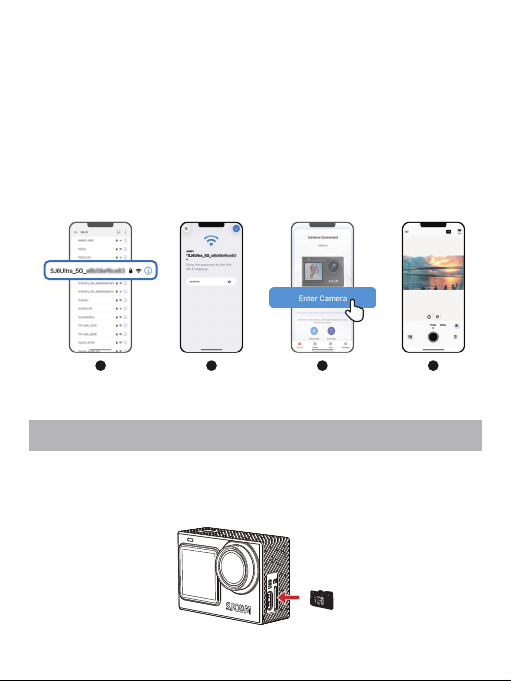
Insert the microSD card into the microSD card slot as shown. To remove the microSD
card, gently push the card inward, and it will pop out.
SD Card Installation
3. Manual Connection
3.1 Go to your smartphone’s home screen, locate and open the "Settings" app.
3.2 In the Settings menu, find and tap the Wi-Fi option.
3.3 Select the Wi-Fi network named "SJ6 Ultra_XXXX"
(e.g., "SJ6 Ultra_a8b58e410d80").
3.4 Enter the Wi-Fi password "12345678", then tap "Connect" and wait for the
connection to be established.
3.5 Once successfully connected, return to the "SJCAM X" app homepage and tap
"Manual Connection" to complete the pairing.
1 2 3 4
-7-
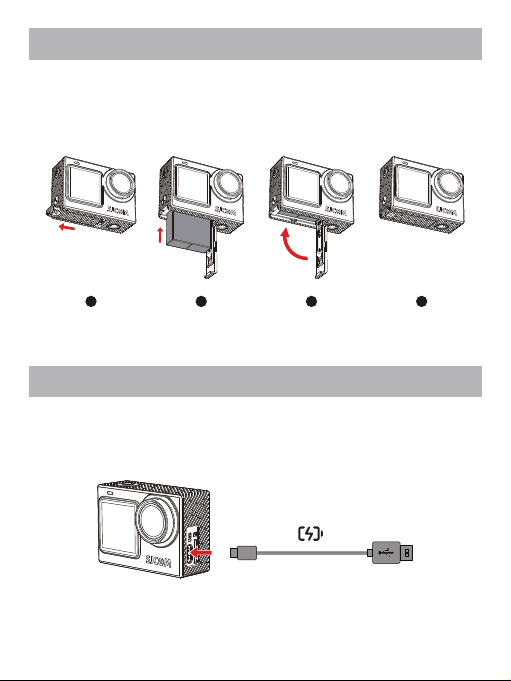
1. Press and hold the arrow mark on the battery cover and push outward to open it.
2. Insert the battery into the compartment as shown in the diagram.
3. After the battery is fully inserted, close the battery compartment cover.
Battery Installation
1 2 3 4
Use the provided USB-A to USB-C cable. Connect one end to the camera's USB-C port
and the other end to a USB-A charger to charge the camera.
Charging