00198654-01_UM_Nozzle_Cleaning_Station_EN.pdf - 第16页
2 Operational safety 2.4 Safety features 16 User Manual SIPLACE Nozzle Cleaning Station 09/2019 2.4.2 Switches and buttons Fig.5: NCS - position of switches and buttons 1 Start / stop button for shaft cleaning 2 Start /…
2 Operational safety
2.3 Safety instructions for operation
User Manual SIPLACE Nozzle Cleaning Station 09/2019 15
2.3 Safety instructions for operation
2.3.1 Safety instructions for closing the protective covers
The protection cover can be opened upwards. To avoid risk of injury when closing the protective
covers on the nozzle cleaning station, the operator must instruct the personnel concerned to al-
ways follow the instructions below when handling the protective covers.
CAUTION
Risk of crushing hands!
Risk of crushing hands if the protective covers are not closed correctly.
► Close the protective covers in accordance with the following instructions.
► To open or close the protective cover, always take hold it by the grab handle.
► When closing, do not reach into the gap between the protective cover and panel.
► When closing the protective cover, make sure that the area in which it is moved is free
of obstruction and that no other people are at risk of injury.
2.4 Safety features
2.4.1 Protective cover
The travel range of the shaft cleaning modules is covered with a movable protective cover to pre-
vent unauthorized access to the inside of the nozzle cleaning station.
CAUTION
Risk of damage!
The protective cover could be damaged if too much force is exerted.
► Only move it up and down without pressing or pulling.
Function
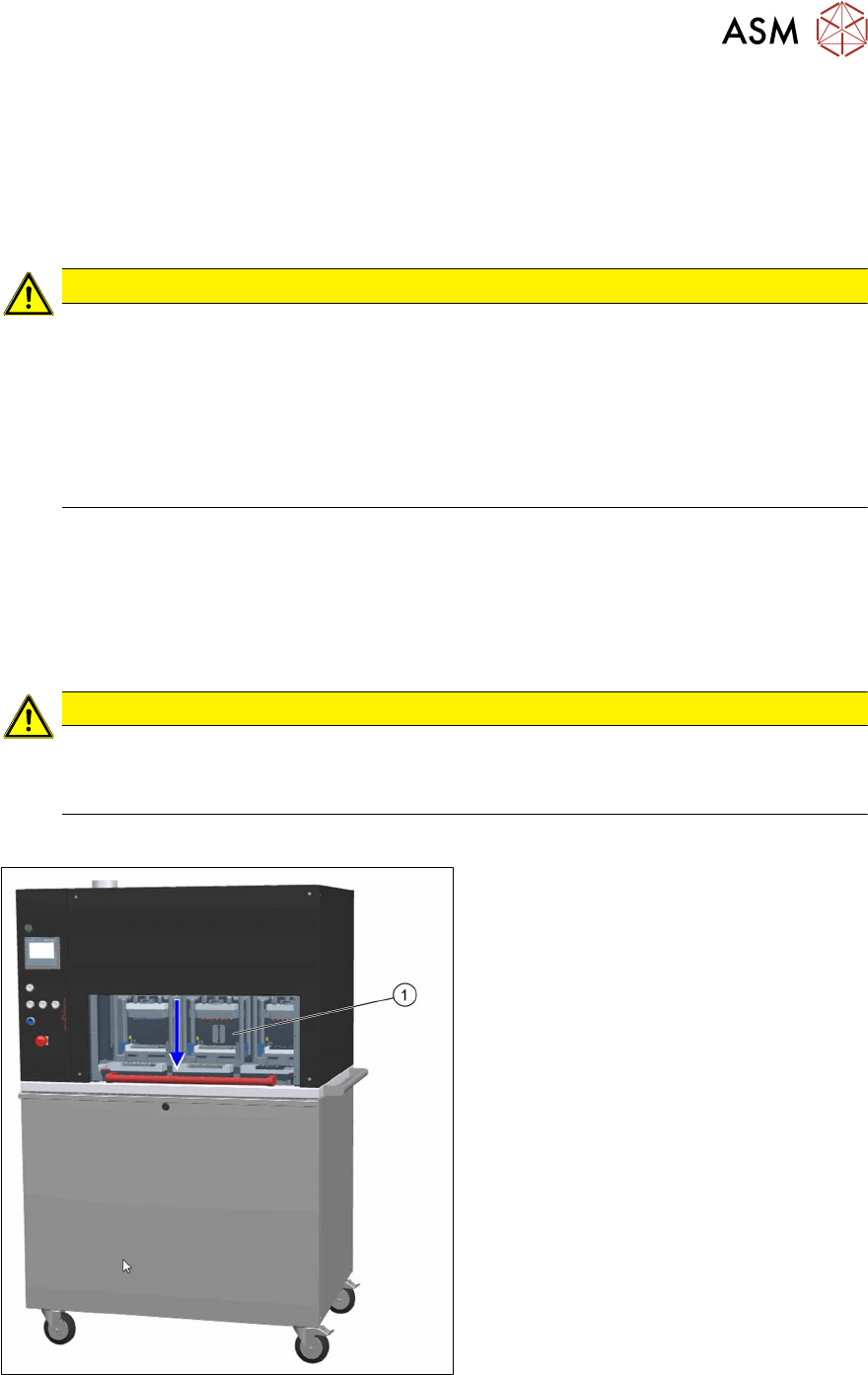
Fig.4: NCS - protective cover
If the protective cover(1) is opened upward,
the power supply to the shaft cleaning mod-
ules will be immediately interrupted. The
cleaning modules stop working and the mes-
sage "cover open” is displayed on the
screen.
Close the protective cover and press the
START button (see 2.4.2 "Switches and but-
tons" [}16]), to continue cleaning.
2 Operational safety
2.4 Safety features
16 User Manual SIPLACE Nozzle Cleaning Station 09/2019
2.4.2 Switches and buttons
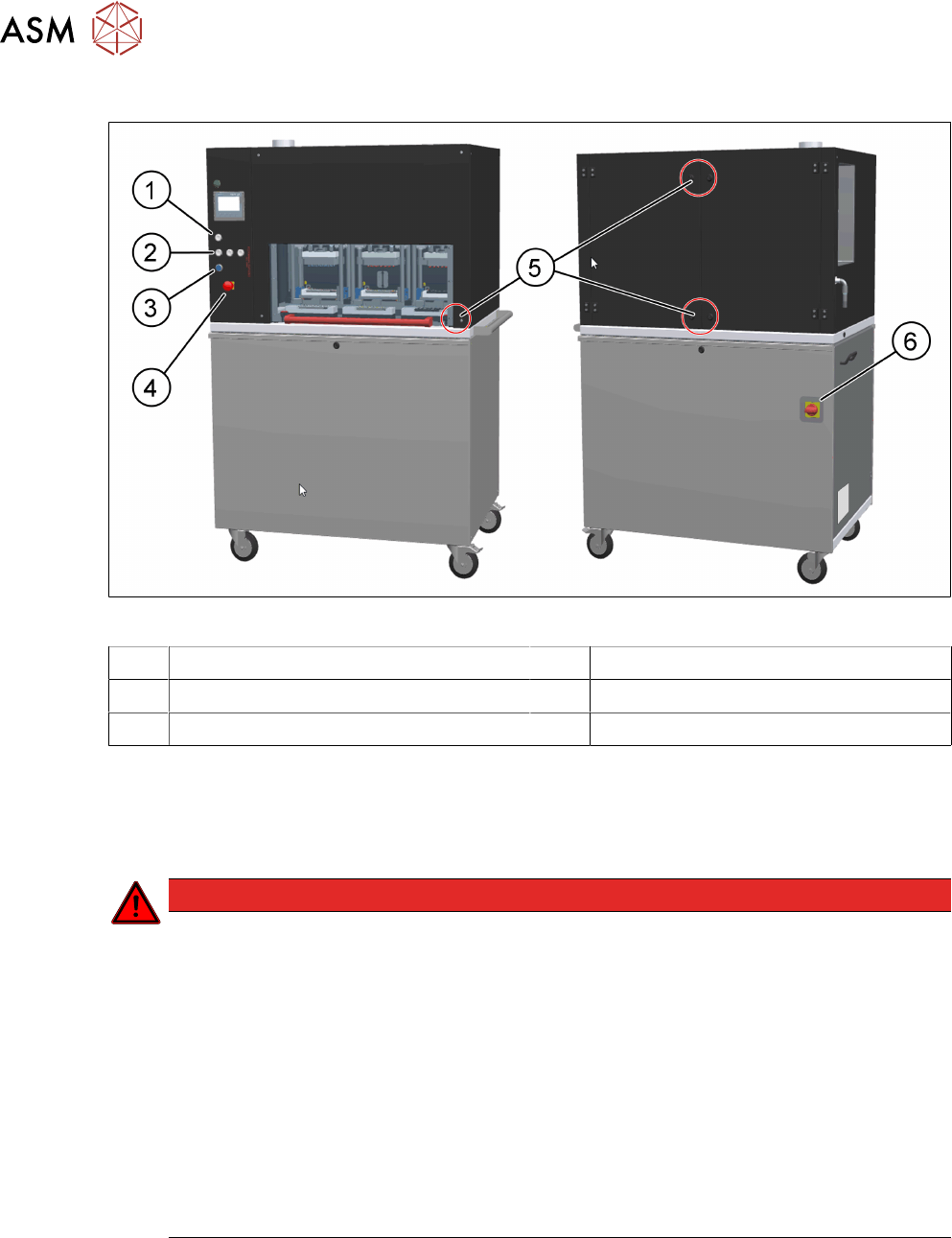
Fig.5: NCS - position of switches and buttons
1 Start / stop button for shaft cleaning 2 Start / stop button for tip
3 Reset button 4 Emergency stop button
5 Position switches 6 Main switch
2.4.2.1 Switches and buttons - description of functions
Main switch in OFF position
The main power switch disconnects the phase L1 from the power supply.
DANGER
Dangerous voltage levels!
The machine is supplied with 1 x 220 V~ ± 10 %, 50/60 Hz or optionally with 1 x 110 V~ ±
10 %; 50/60 Hz mains voltage. This means that some parts of the system carry potentially
lethal voltages - even when switched off at the main power switch.
Incorrect handling of the nozzle cleaning station can therefore result in death or severe in-
jury or considerable damage to equipment.
The following components still carry potentially lethal voltages even if the main power
switch is switched off:
► Always follow the applicable accident prevention and DIN regulations (particularly EN
60204, part 1 or IEC 60204, part 1) and the applicable regulations in your own coun-
try.
► The safety door to the power supply must ONLY be opened by appropriately qualified
and trained personnel.
Main switch in ON position
When the main switch is switched to ON, the mains voltage is switched through and all AC/DC con-
verters are addressed. The control computer starts and all supply voltages are made available in-
ternally.

2 Operational safety
2.4 Safety features
User Manual SIPLACE Nozzle Cleaning Station 09/2019 17
Start / stop button shaft cleaning, white
This button is used to start / stop the shaft cleaning process where a magazine was inserted.
► Press the button and then let go. The cleaning process is switched on.
► Press the button for at least 5 s to stop the cleaning process.
Start / stop buttons tip cleaning, white
These buttons are used to start / stop the tip cleaning process in the respective cleaning module.
► Press the button and then let go. The cleaning process is switched on.
► Press the button for at least 5 s to stop the cleaning process.
Reset button, blue
This button is used to activate the machines safety system.
EMERGENCY STOP button with forced locking
The EMERGENCY STOP button is red and latches in the ON position when pressed. When you
press the EMERGENCY STOP button, the message "EMERGENCY STOP pressed" appears on
the screen. The following modules are deactivated:
●
Pumps
●
Compressed air supply for the shaft cleaning modules
Position switches
This position switch check whether the protective circuit is open or closed. The position switches
trigger the safety cutoff (lock) when the protective cover or the doors at the back are opened. Indi-
vidual components are disabled or remain enabled.
Safety component inspection intervals and procedures
A check of all safety system components in the automatic and manual (service) modes is recom-
mended to be done by the operator at least once per working shift. The functional testing of the
ESS requires the machine operator to operate each ESS individually. Operating each ESS should
trip the machine's safety system and stop the entire machine. Next, turn the “mushroom button” of
the ESS which has been activated to release it and activate the safety system by pressing RESET.
If an ESS fails to trip the machine's safety system or the safety system cannot be activated once
the ESS has been released, the ESS has failed, and must be immediately replaced.