192866 Issue 4 - Reel to Reel Manual LoRes.pdf - 第16页
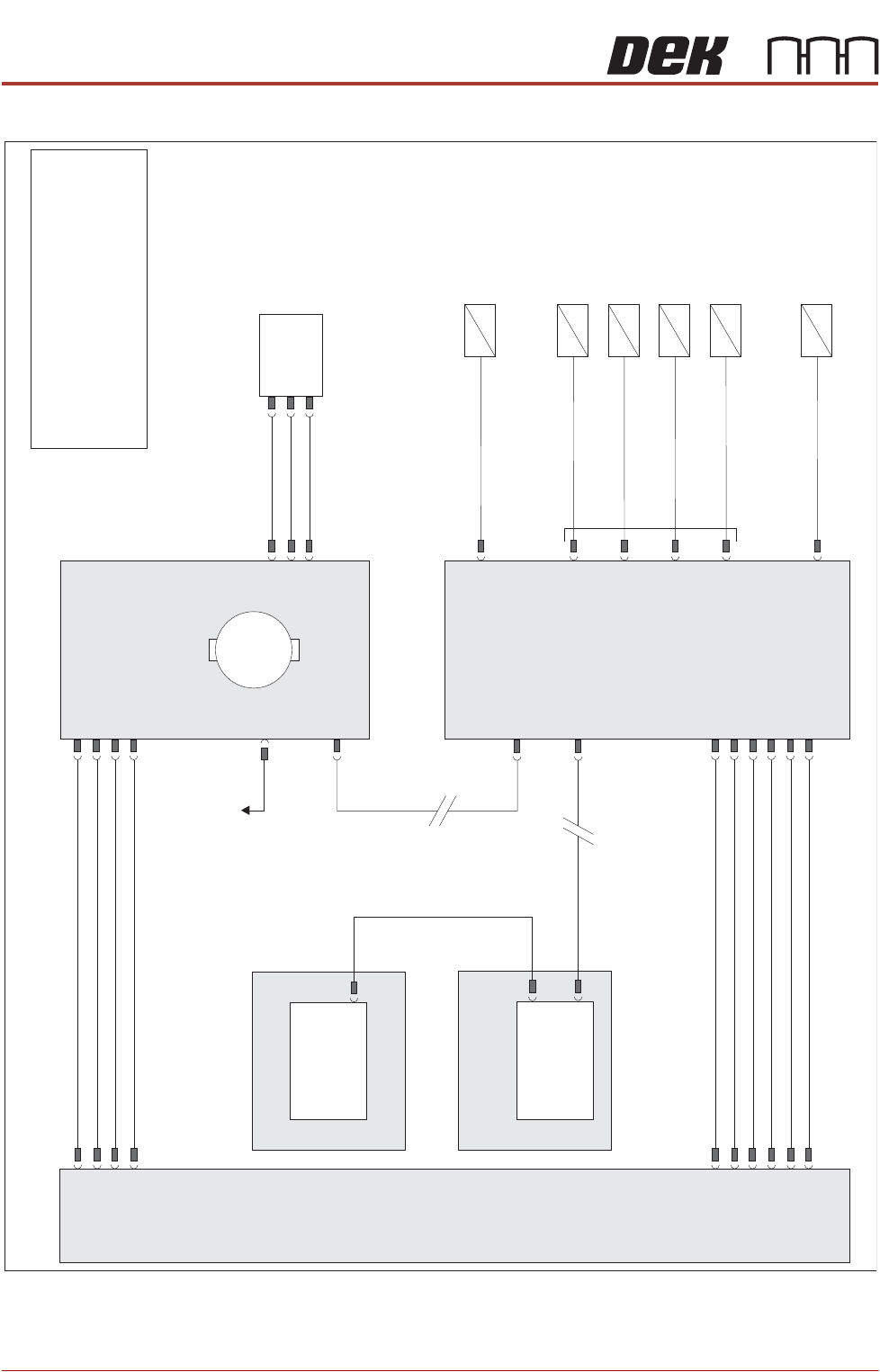
TECHNICAL REFERENCE ELECTRICAL 1.6 Reel to Reel Manual Chapter Issue 1, Apr 15 ELECTRICAL NOTE For information on the safety interlock switch and lid bolt, refer to the machine’s T echnical Re ference manual and El ectri…

TECHNICAL REFERENCE
OVERVIEW
Chapter Issue 1, Apr 15 Reel to Reel Manual 1.5
11. The inner transport vacuum plate moves towards the print station creating
the backoff length.
12. The outer transport clamps, clamp the product reel.
13. The rising table moves to vision height.
14. Vision alignment is performed.
15. The rising table moves to print height.
16. The product reel is printed.
TECHNICAL REFERENCE
ELECTRICAL
1.6 Reel to Reel Manual Chapter Issue 1, Apr 15
ELECTRICAL
NOTE
For information on the safety interlock switch and lid bolt, refer to the machine’s
Technical Reference manual and Electrical Drawings manual.
Machine P
C
Power
Supply
Enclosure
M37
Motherboard
Machine
Control
Enclosure
M36
NextMove
ES
(I/O Node 1)
X5
Main Machine
I/O Node 2
Board
Clamps
(16SO
L10)
DIG OUT 9
Inner Transport
Clamps (16SO
L14)
DIG OUT 10
Outer Transport
V
ac
Plate (16SO
L22)
Outer Transport
Clamps (16SO
L1
1)
DIG OUT 12
DIG OUT 0
Inner Transport
V
ac
Plate (16SO
L03)
Table Vacuum
(16SO
L12)
DIG OUT 15
DIG OUT 6
N2PL4
N2PL2
N2PL6
CAN Bus
CAN Bus
N2SK2
N11SK3
N11SK2
N2SK1
M37PL15
M37PL4
N2SK3
N11PL4
USB
Transport Mechanism
Home (8SE31)
N11PL1
Transport Mechanism
Servo Motor
I/O Node 1
1
M
To I/O Node 4
42V SW
24V US
24V
0V
0V
0V
0V
Signal
12V
24V US
24V SW
0V
0V
NOTE
The breaks in the CAN Bus chain reflect
that additional I/O Nodes may be fitted,
refer to Machine Control chapter of the
Technical Reference manual for the
complete CAN Bus chain.
TECHNICAL REFERENCE
ADJUSTMENTS AND SETTINGS
Chapter Issue 1, Apr 15 Reel to Reel Manual 1.7
ADJUSTMENTS AND SETTINGS
Rising Table Home Setting
WARNING
HOT SURFACES. THE SURFACE OF THIS COMPONENT OR SURROUNDING
AREA MAY BECOME HOT DURING PROLONGED OPERATION. CARE TO BE
TAKEN WHEN WORKING IN THE VICINITY OF THIS COMPONENT.
1. Remove the screen from the machine.
2. Select Maintenance.
3. Select Diagnostics.
4. Use Next or Previous to highlight Rising Table.
5. Select Select Module.
6. Ensure Home Rising Table is highlighted.
7. Select Run Diagnost.
8. Remove the left hand side safety cover.
9. Open the front printhead cover.
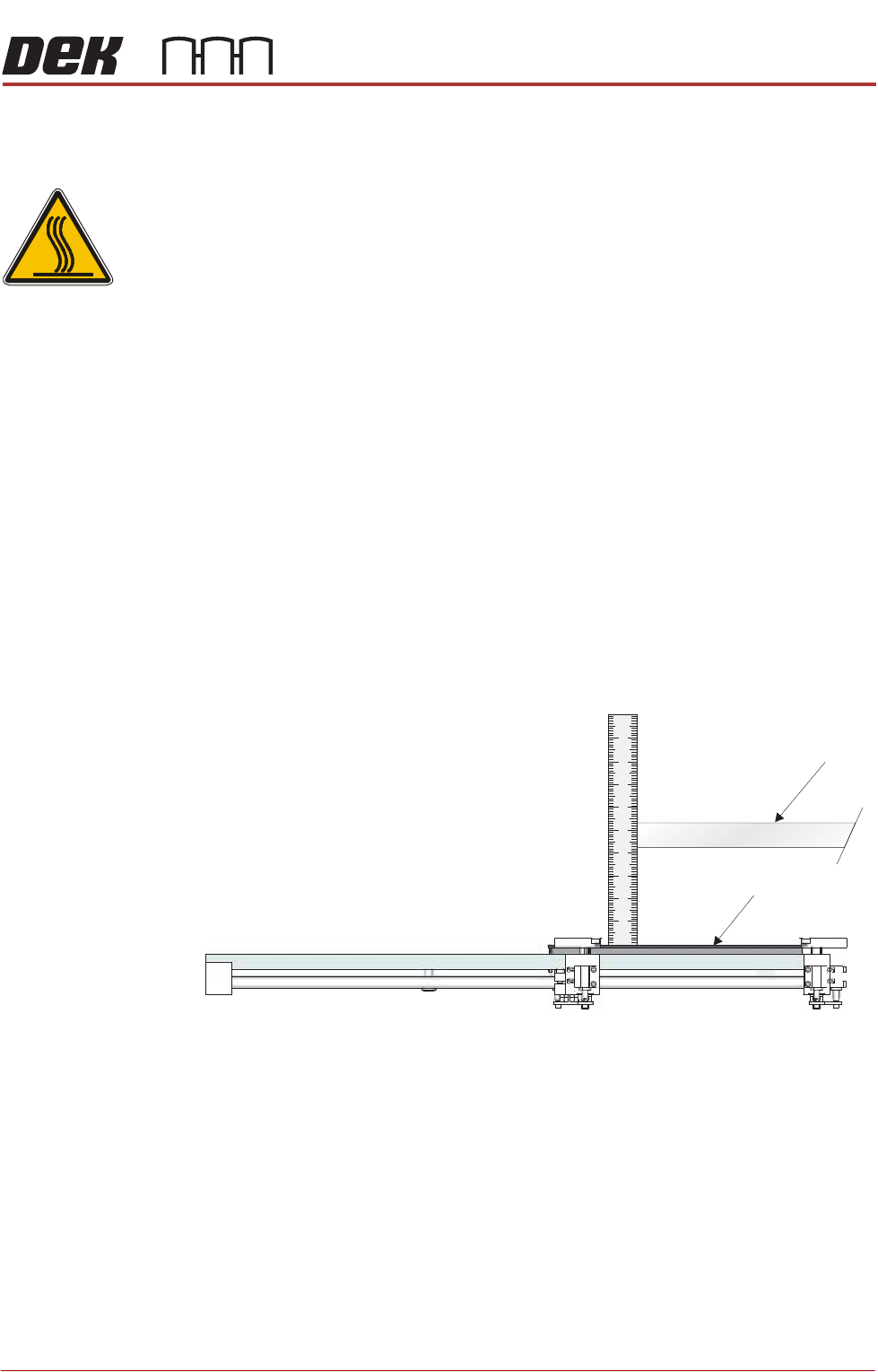
10. Fit the screen so that the rear edge is further forward than the rear edge of
the vacuum top plate.
11. Using a steel rule, measure the distance between the underneath of the
screen frame and the top of the vacuum top plate.
12. Check that the distance is 128mm -0mm/+2mm.
13. If adjustment is not required, remove the steel rule and the screen, close
the front printhead cover and go to Step 22.
Screen
Vacuum Top Plate (Tooling)
View on Left Hand Side of the Rising Table