192866 Issue 4 - Reel to Reel Manual LoRes.pdf - 第24页
TECHNICAL REFERENCE REPLACEMENT PROCEDURES 1.14 Reel to Reel Manual Chapter Issue 1, Apr 15 4. Fit one end of the new belt in the belt clamp on the right hand side of the inner transport vacuum plate ensuring the correct…
TECHNICAL REFERENCE
REPLACEMENT PROCEDURES
Chapter Issue 1, Apr 15 Reel to Reel Manual 1.13
REPLACEMENT PROCEDURES
Transport Carriage
Belts
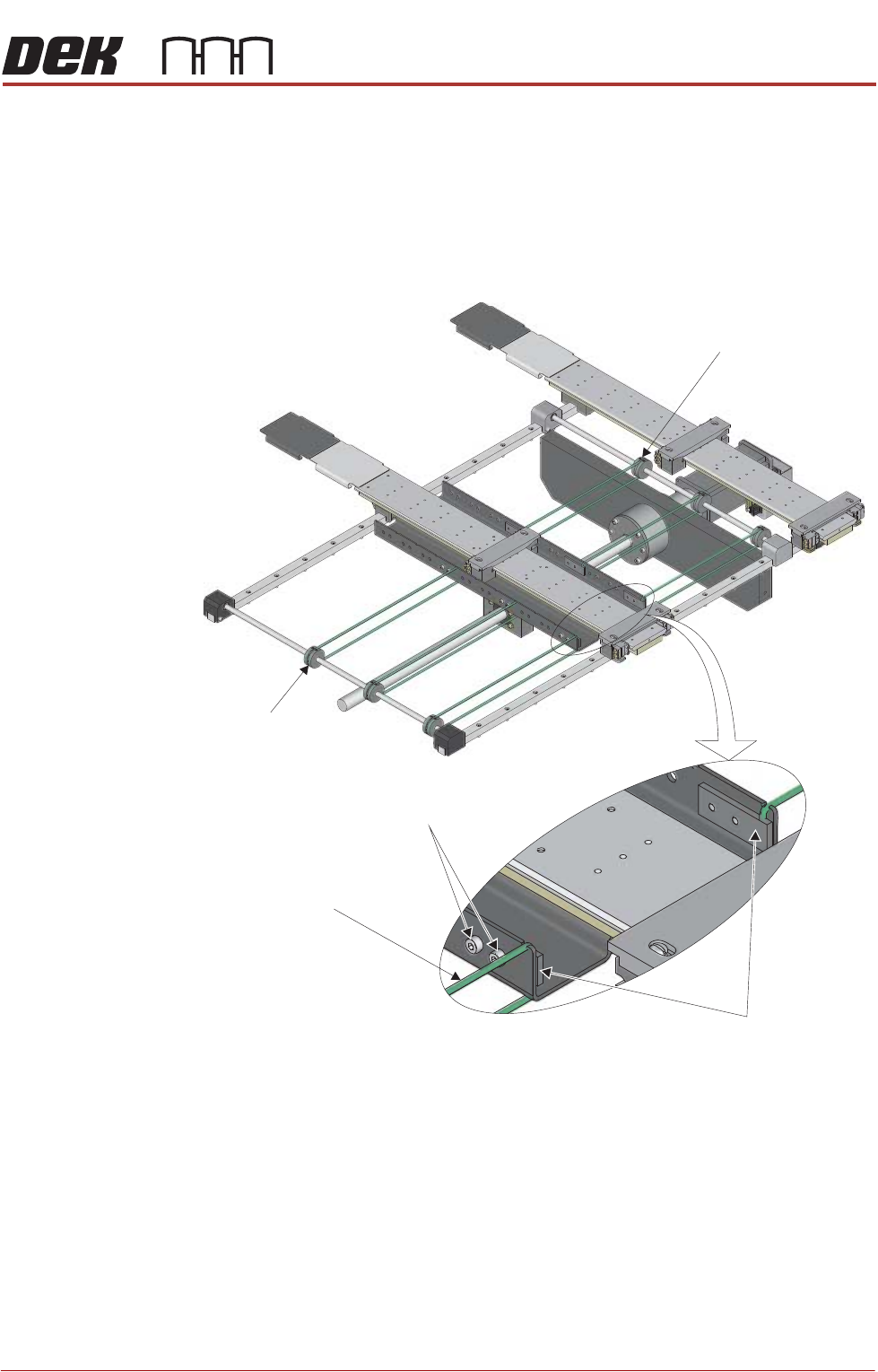
To replace one of the transport carriage belts, use the following procedure:
1. Remove the product reel from the machine.
2. Using a 3mm Allen key, loosen the four belt clamp securing screws (two on
the right hand side of the inner transport vacuum plate and two on the left
hand side).
3. Remove the transport belt, taking note how the belt is fitted in the clamp.
NOTE
If the transport carriage belt is broken, remove any debris from the machine.
Belt Clamps
Securing Screws
Transport Carriage Belt
Belt Pulley
(Left)
Belt Pulley
(Right)
TECHNICAL REFERENCE
REPLACEMENT PROCEDURES
1.14 Reel to Reel Manual Chapter Issue 1, Apr 15
4. Fit one end of the new belt in the belt clamp on the right hand side of the
inner transport vacuum plate ensuring the correct amount of belt is protrud-
ing out of the bottom of the clamp, see table below:
5. Tighten the belt clamp.
6. Feed the belt over the top of the belt pulley on the right hand side of the
transport mechanism.
7. Continue to feed the belt under the inner transport vacuum plate and feed
the belt over the left pulley.
8. Fit the end of the belt in the belt clamp on the left hand side of the inner
transport vacuum plate ensuring the correct amount of belt is protruding out
of the bottom of the clamp, see table below:
9. Tighten the belt clamp.
10. Check the other two belts for damage.
Belt Position Dimension
Front Belt 25mm below the clamp
Middle Belt 20mm below the clamp
Rear Belt 15mm below the clamp
Belt Position Dimension
Front Belt 25mm below the clamp
Middle Belt 20mm below the clamp
Rear Belt 15mm below the clamp
USER
SETUP
Chapter Issue 3, August 14 Reel to Reel Manual 2.1
CHAPTER 2 USER
SETUP
Overview This chapter outlines a product changeover and setting up on the reel to reel
machine. This must be treated as a guide only, as each reel to reel application
is customer specific and unique.
Product Changeover
1. Ensure there is no screen fitted to the machine.
2. Select Setup Product.
3. Select Load Product.
4. Highlight the correct product file and select Load.
5. Select Back.
6. Select Back.
7. Select Open Cover Commands.
8. Select Print Carriage to Rear.
9. Select Board Clamps to release the board clamps.
10. Open the front cover.
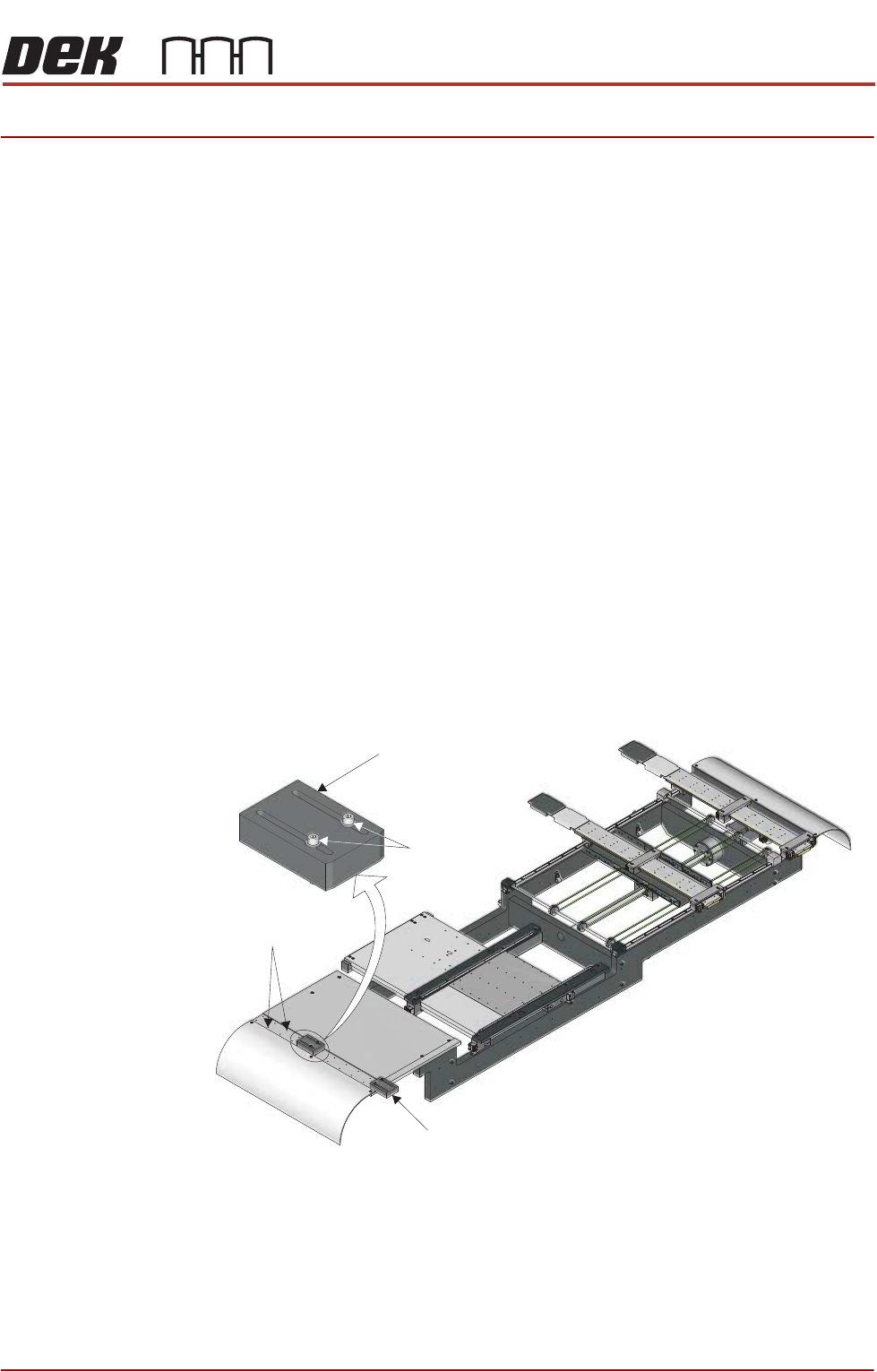
11. On the inroad conveyor, use a 3mm Allen key to loosen/remove (see note
below) the two securing screws that secure the rear product guide.
NOTE
The inroad rear product guide has coarse and fine adjustment. Coarse
adjustment is achieved by removing the guide and refitting the two securing
screws to different holes. Fine adjustment is achieved by loosening the
securing screws and moving the guide on its slots.
12. Place a sample of the product reel against the front product guide and adjust
the rear product guide to approximately 0.5mm of the rear edge of the
Rear Product Guide
Front Product Guide
Securing Screws
Course Adjustment
Hole Positions