TM6148.Force control options manual in YC8.pdf - 第16页
SMT Softw are Engineering Group IM Operations Y AMAHA MOTOR CO., L T D. Head x Parts xxxx Parts Nam e xxxxxxxxxxxxxxxxxxxxx Mount No xxxx Current Pos xxx.xx Short Dist ance x .xxx < Solutions > - Confirm insert pos…
SMT Software Engineering Group
IM Operations YAMAHA MOTOR CO., LTD.
Error Message
The below is error messages concerned to this function.
Error Message
Error
No.
Title Causes and solutions
2969 Parts insertion Errors < Causes >
Insertion operation, it did not reach the target height.
There is a possibility that parts are not inserted properly.
Make sure safety, please remove the target parts on the
head or on the board.
Press the [ERROR CLEAR] button, then confirm the parts
condition and select retry or not on the next window.
Head x
Parts xxxx
Parts Name xxxxxxxxxxxxxxxxxxxxx
Mount No xxxx
Current Pos xxx.xx
< Solutions >
- Confirm insert position
- Confirm parts height
- Confirm set force value
* "Ea2969 Parts insertion Errors" is output to the error log.
2974 Parts insertion Errors < Causes >
Insertion operation, it did not reach the target height.
There is a possibility that parts are not inserted properly.
Make sure safety, please remove the target parts on the
head or on the board.
Press the [ERROR CLEAR] button, then confirm the parts
condition and select retry or not on the next window.
SMT Software Engineering Group
IM Operations YAMAHA MOTOR CO., LTD.
Head x
Parts xxxx
Parts Name xxxxxxxxxxxxxxxxxxxxx
Mount No xxxx
Current Pos xxx.xx
Short Distance x.xxx
< Solutions >
- Confirm insert position
- Confirm parts height
- Confirm set force value
* "Ea2974 Parts insertion Errors" is output to the error log.
2975 Insert parts : Retry method
selection
< Causes >
Selection of retry method is the "No Selected".
Please select "Retry" or "Not retry".
Restrictions
This function works only with rigid type heads.
When no rigid type head is used, please make a setting to disable Force Control.
SMT Software Engineering Group
IM Operations YAMAHA MOTOR CO., LTD.
Appendix
Machine setting
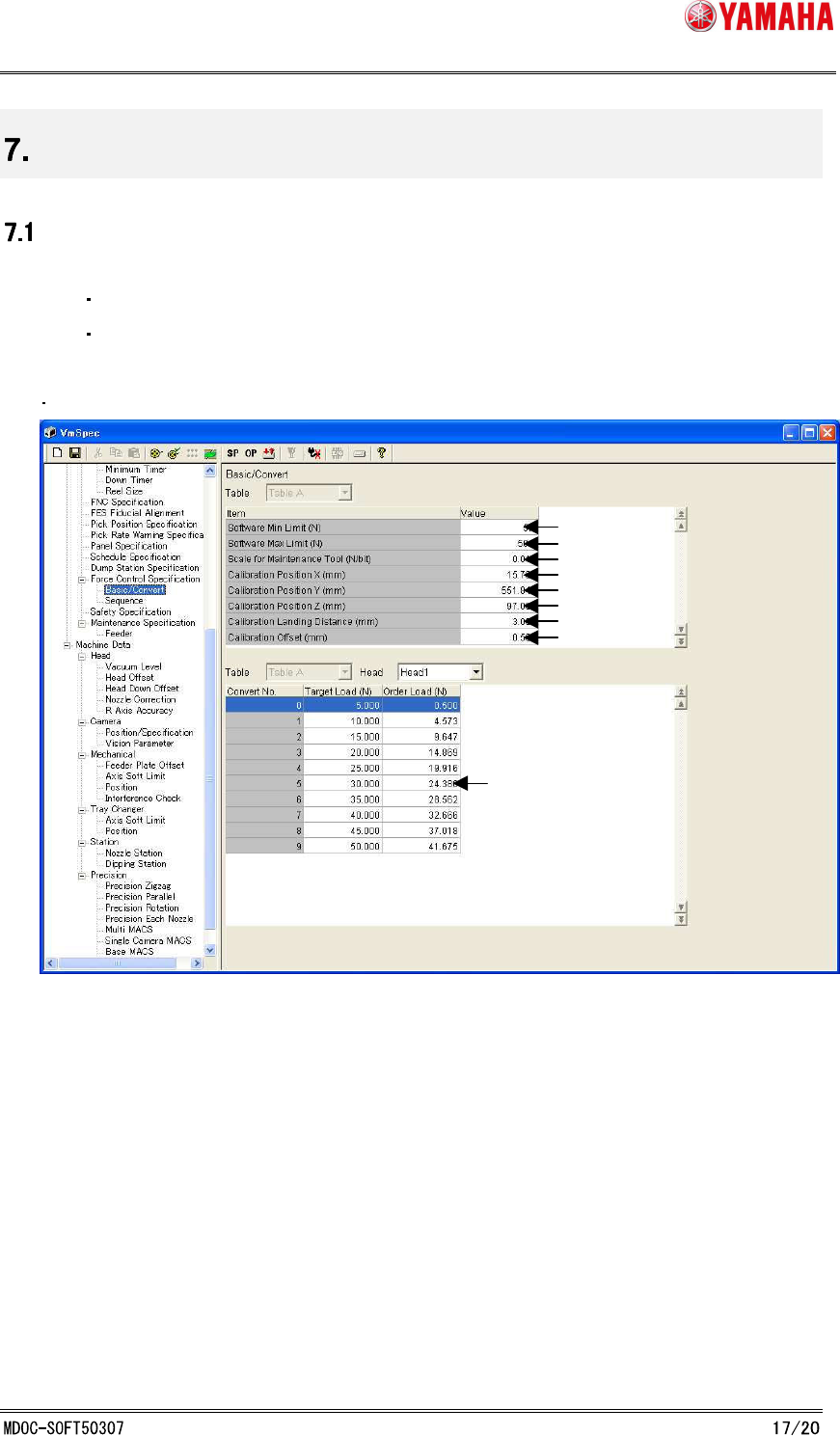
This section describes about parameters on machine setting to use Force Control.
[Specification Information] - [Force Control Specification] - [Basic/Convert]
[Specification Information] - [Force Control Specification] - [Sequence]
[Specification Information] - [Force Control Specification] - [Basic/Convert]
1.Software Min Limit (N)
The minimum force value that can be set in parts data.
2. Software Max Limit (N)
The maximum load value that can be set in parts data.
3. Scale for Maintenance Tool (N/bit)
It is a gain on AD value of the calibration station.
Defined force value(N) per 1Bit.
* The calibration station is set when adjusting the machine.
1.
2.
3.
4.
5.
6.
7.
8.
9.