TM6148.Force control options manual in YC8.pdf - 第19页
SMT Softw are Engineering Group IM Operations Y AMAHA MOTOR CO., L T D. 10. Sequence T able 10 different p atterns can be set for each operation Pick / Dip / Mount. 1 1. Maximum force (N) Operation sequence to the force …
SMT Software Engineering Group
IM Operations YAMAHA MOTOR CO., LTD.
4. Calibration Position X (mm)
X-coordinate where the calibration station is attached.
* It is set when adjusting the machine.
5. Calibration Position Y (mm)
Y-coordinate where the calibration station is attached.
* It is set when adjusting the machine.
6. Calibration Position Z (mm)
Z-coordinate where the calibration station is attached.
* It is set when adjusting the machine.
7. Calibration Landing Distance (mm)
When a correction table is created on [CalibSm] - [084 LoadControl], Force Control
starts at the height calculated by subtracting this value from "Calibration Station
coordinate Z (mm)".
8. Calibration Offset (mm)
When a correction table is created on [CalibSm] - [084 LoadControl], Force Control
starts at the height calculated by subtracting this value from "Calibration Station
coordinate Z (mm)".
9. Correction Table
It is created on [CalibSm] - [084 LoadControl].
Target load and the measuring force table when outputting the load.
* It is set when adjusting the machine.
[Specification Information]-[Force Control Specification]-[Sequence]
SMT Software Engineering Group
IM Operations YAMAHA MOTOR CO., LTD.
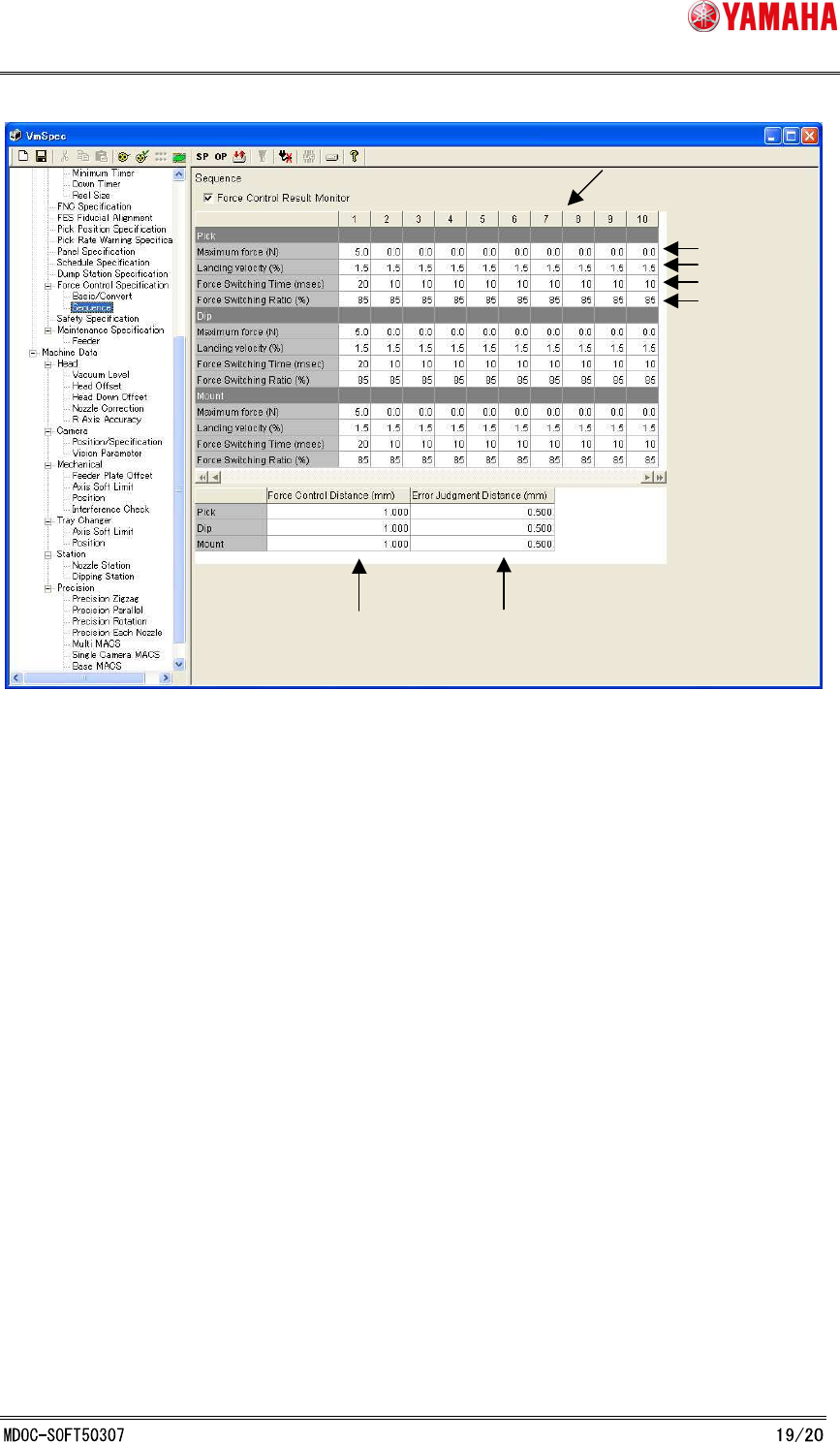
10. Sequence Table
10 different patterns can be set for each operation Pick / Dip / Mount.
11. Maximum force (N)
Operation sequence to the force value set on parts data is decided by this value
* Please do not change this setting value.
12. Landing velocity (%)
It is a velocity to contact parts to a board.
* Please do not change this setting value.
13. Force Switching Time (msec)
Time to switch from “impact value suppression current” to “thrust control current”.
* Please do not change this setting value.
14. Force Switching Rate (%)
100 * (impact value suppression current) / (thrust control current).
* Please do not change this setting value.
15. Force Control Distance (mm)
During auto-running, Force Control starts from the height calculated by subtracting this
value from the target position.
16. Error Judgment Distance (mm)
This is the distance to judge as insertion error. During auto-running, it judges as error,
11.
12.
13.
15.
16.
10.
14.
SMT Software Engineering Group
IM Operations YAMAHA MOTOR CO., LTD.
when the height does not reach the value calculated by subtracting this value from the
target position.
However, it is used at mount when [Insert Short Distance] is not valid.
Calculation of parts height
With this function, the maximum parts height of each mounting stage is calculated internally
considering [Insert Length (mm)] of parts data.
This height is used for consideration of parts height before carry-in at line distribution of
optimization, or interference check of mounted parts and picked parts.
Parts height is Calculated in the following three ways depending on machine.
1) On machine with insertion parts unsupported, or No insertion parts are used on
supported machine ([Insert Length] = 0.000)
parts height = [Body Size Z]
2) Insertion parts are used on a machine with insertion parts suppoeted. ([Insert
Length] <> 0.000)
parts height = [Body Size Z] – [Insert Length]
3) Insertion parts are used on a machine with Force Control supported. ( 2) and [Force
Control]:”EXIST”)
parts height = [Body Size Z] – [Insert Length] + [Insert Short Distance]