TM6148.Force control options manual in YC8.pdf - 第3页
SMT Softw are Engineering Group IM Operations Y AMAHA MOTOR CO., L T D. Setting and adjustment method Force Control Sett ing (Machine Setti ng) T o u se this fu nction, set [Machine] - [Machine Information] - [In st alla…
SMT Software Engineering Group
IM Operations YAMAHA MOTOR CO., LTD.
Rev No. Version Chapter No. Revised Contents
00 V3.42STD R1.000 All Created
Model and Version
Supported model and version are as follows.
Model and Version
Model Version Remarks
YC8 V3.42STD R1.000 or later
Y.Fact V1.42STD R1.000 or later
Overview
The “Force Control” function has been supported on YC8 with rigid type heads (option)
equipped instead of the buffing type heads (standard).
Force Control works for picking, dipping, and mounting operations at the height specified in
board data.
Furthermore, on YC8, it is also possible to work Force Control for “insertion parts” considering
their insertion length. It can judge if parts insertion is succeeded or not.
When rigid type heads are used without Force Control, they work servo buffing.
SMT Software Engineering Group
IM Operations YAMAHA MOTOR CO., LTD.
Setting and adjustment method
Force Control Setting (Machine Setting)
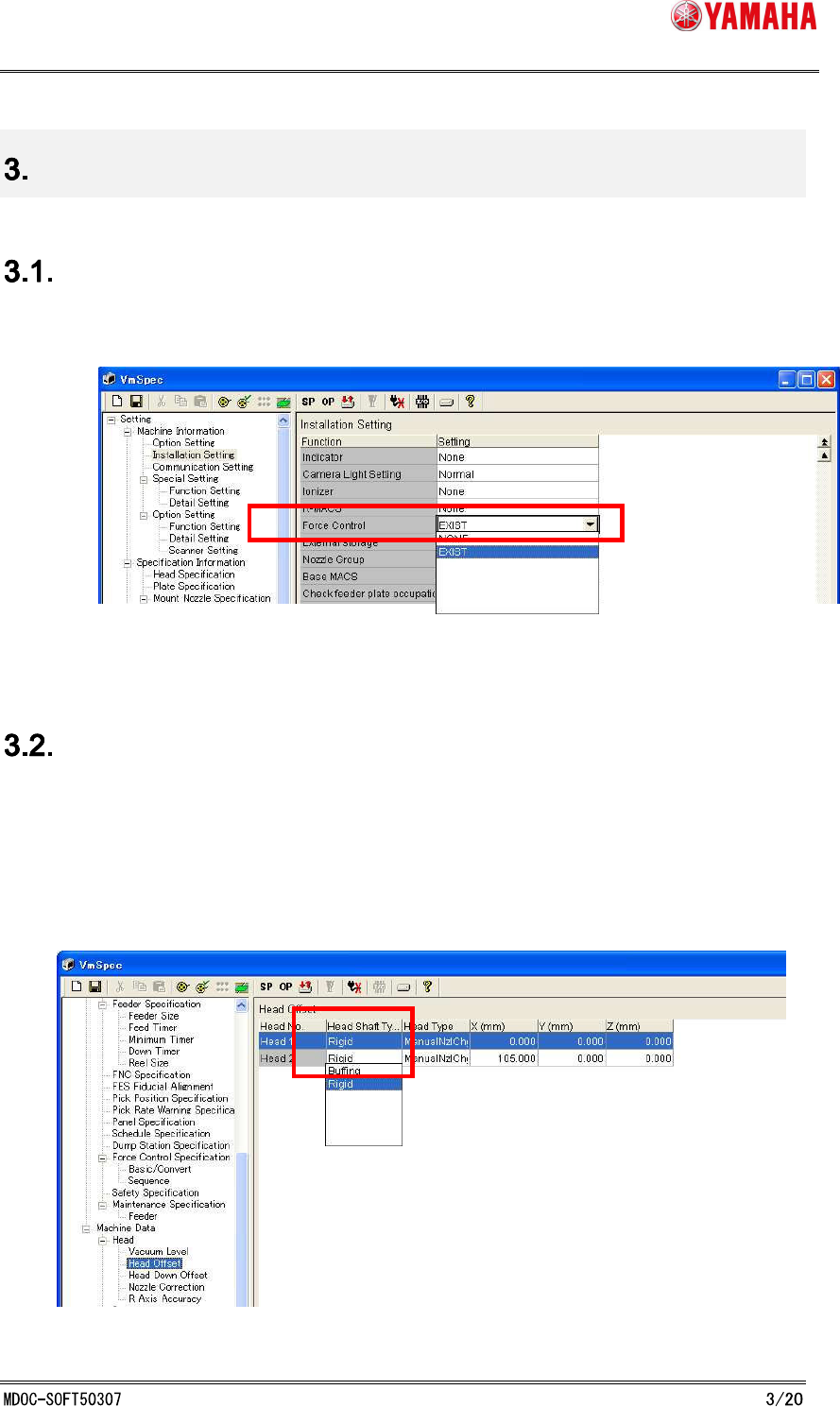
To use this function, set [Machine] - [Machine Information] - [Installation setting] - [Option] -
[Force Control] to “EXIST”. (See Fig. 3.1.1)
Fig. 3.1 Force Control Setting
Head Type Setting (Machine Setting)
This function works only with rigid type heads.
After attaching rigid type heads on machine, set [Machine] - [Machine Data] - [Head] - [Head
Offset] - [Head Shaft Type] to “Rigid”. (See Fig. 3.2.1)
[Head Shaft Type] can be selected separately for each head, but with this function, all of the
heads must be the same in this setting.
Fig. 3.2.1 Head Type Setting
SMT Software Engineering Group
IM Operations YAMAHA MOTOR CO., LTD.
Hardware setting and adjustment for Force Control
To use Force Control, make adjustment and setting as shown below.
Force Calibration Station
Force Control setting is adjusted here.
Force Calibration Station Adjustment
XYZ-coordinate and initial bit of the load cell, which is permanently attached to the force
calibration station.
Height Offset Force Correction Adjustment
In the Force Control function, the current value is changed according to the position of Z-axis,
so that it is necessary to adjust the offset value.
Force Control Correction Table Adjustment
In the Force Control function, there is a difference between the desired force value and the
control force value when outputting the force, so that it is necessary to create a correction
table.
Force Calibration Station Setting
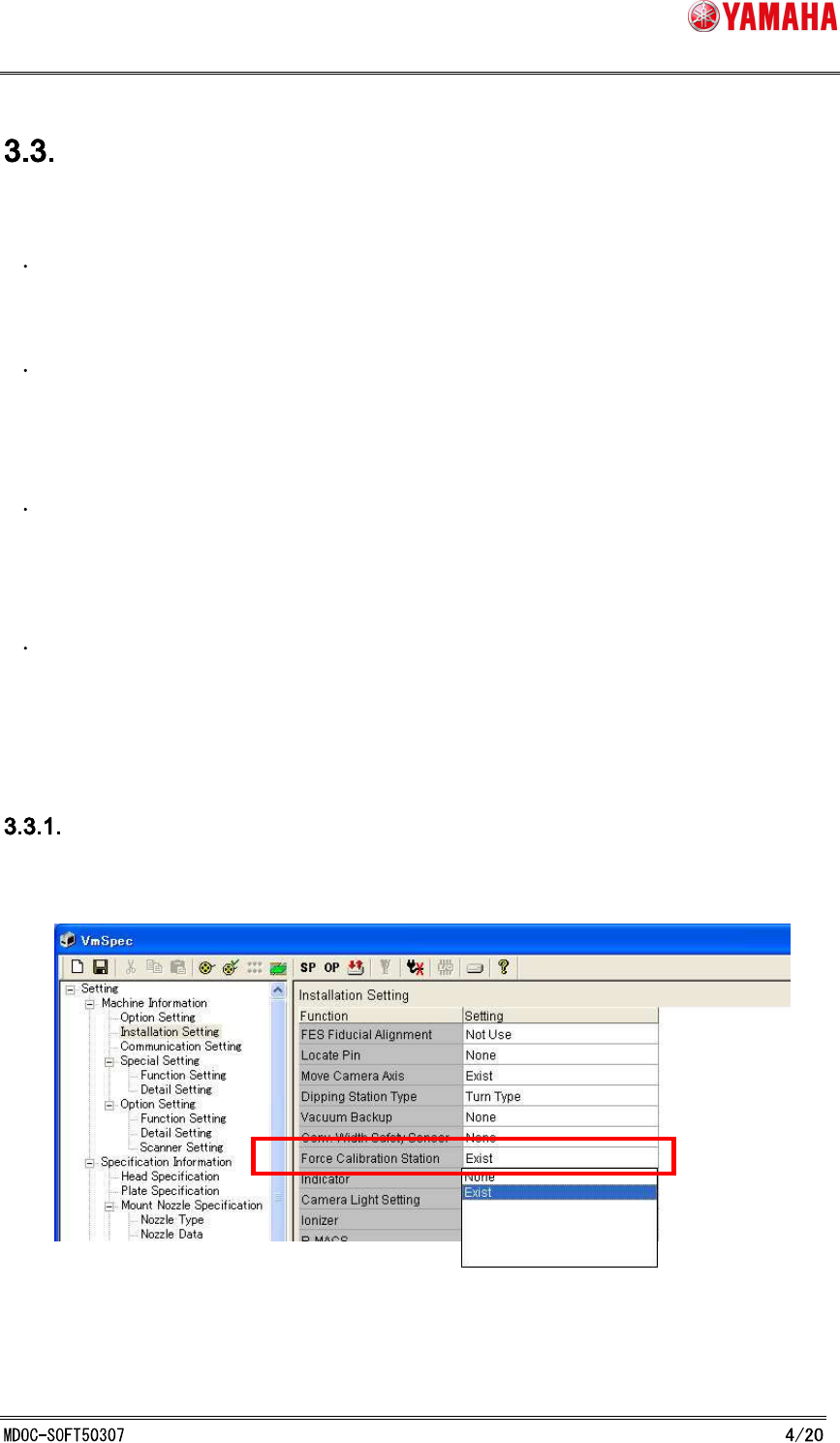
Set [Machine] - [Machine Information] - [Installation setting] - [Option] - [Force Calibration
Station] to “EXIST”. (See Fig. 3.3.1.1)
Fig. 3.3.1.1 Force Calibration Station Setting