TM6148.Force control options manual in YC8.pdf - 第9页
SMT Softw are Engineering Group IM Operations Y AMAHA MOTOR CO., L T D. Force Control Sett ing (Part s informat ion ) This item can be set for each p arts. Select “Y es(High Accuracy)” on [Part s] - [Pick] - [Q:Force Con…
SMT Software Engineering Group
IM Operations YAMAHA MOTOR CO., LTD.
button. XY-axis automatically moves to the load cell, and measurement starts.
2. When measurement is completed, adjustment value is displayed in the [Measure
force] column and the saving confirmation dialog appears.
If you want to save this value, select [OK].
To view the values, select the [Number] tab, and to view the graph, select the
[Glaph] tab.
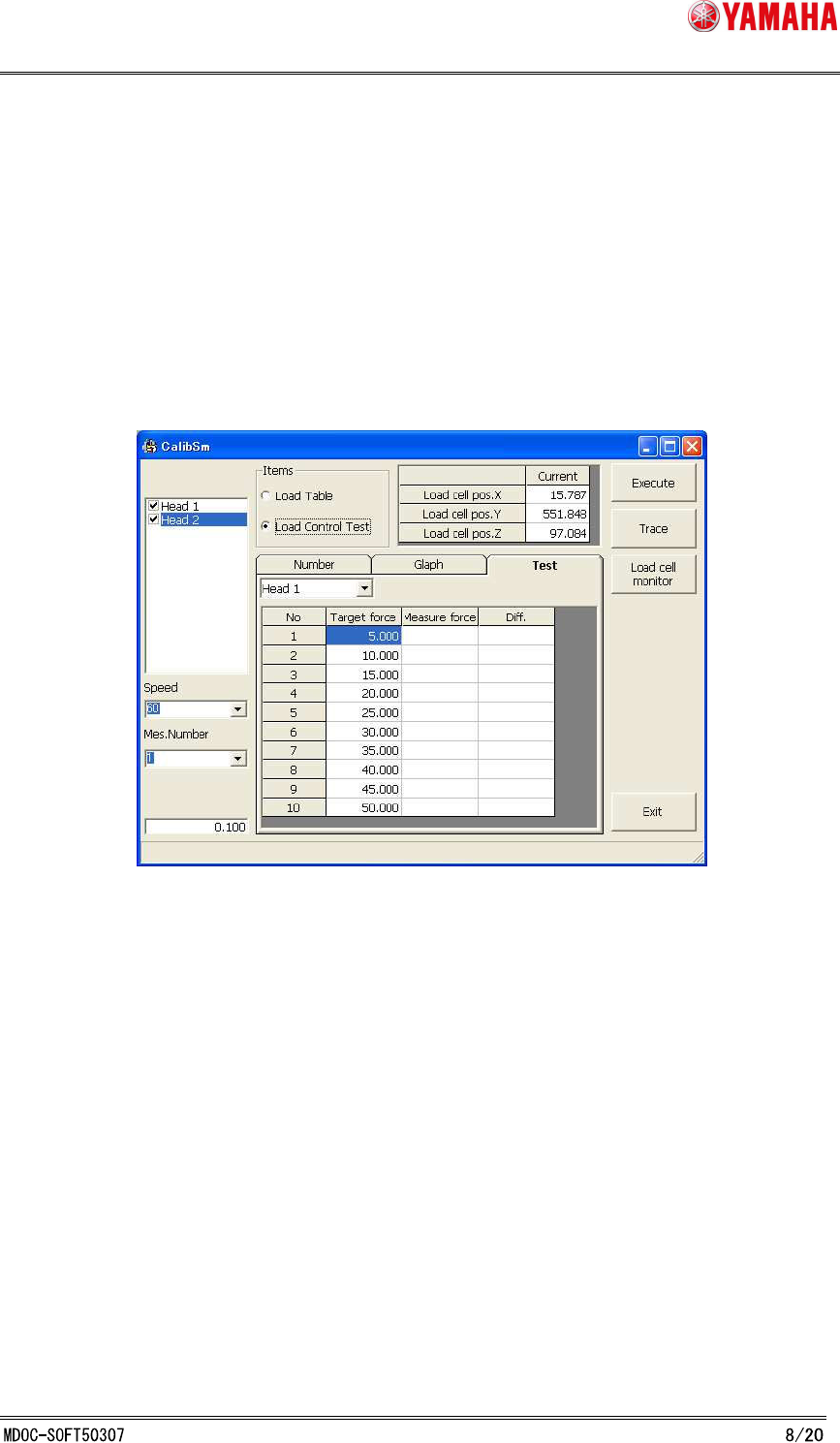
3. Select [Test]. (See Fig. 3.3.4.1)
Select a head from the list on upper left of the screen.
Fig. 3.3.4.1 Force Control Test
4. Click the [Exec] button.
XY- axis automatically moves to the load cell, and Load Control Test starts based
on the adjustment rault.
5. When Load Control Test is completed, test results are displayed in the [Measur
force] and [Diff.] column.
If the value of "Diff." is within the following control accuracy, adjustment is
succeeded.
If test results are out of the range, execute Force Control Correction Table
Adjustment again.
Control accuracy : 5N-20N±2N, 20N-50N±10%
SMT Software Engineering Group
IM Operations YAMAHA MOTOR CO., LTD.
Force Control Setting (Parts information)
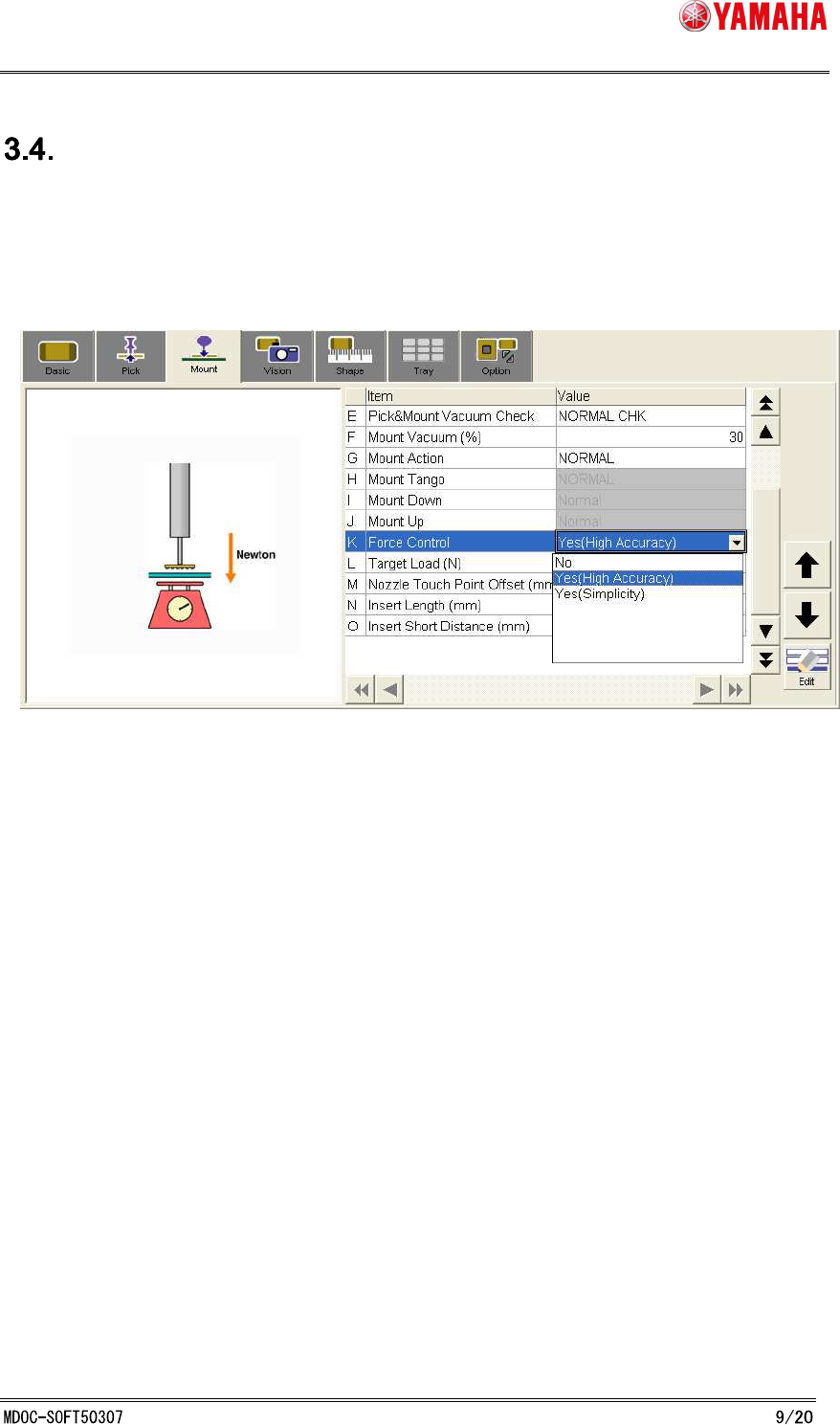
This item can be set for each parts.
Select “Yes(High Accuracy)” on [Parts] - [Pick] - [Q:Force Control], or [Dip] - [J:Force
Control]/[Mount] - [K:Force Control] to (See Fig. 3.4.1)
On YC8, only “Yes(High Accuracy)” is available.
Fig. 3.4.1 Parts Parameter Setting(Mount Tab)
SMT Software Engineering Group
IM Operations YAMAHA MOTOR CO., LTD.
Insertion parts under Force Control
4.1 Overview of insertion parts under Force Control
Force Control of insertion parts works between the height where thrust control starts and the
target descent height. (See Fig. 4.1.1)
Thrust control start height is the height where Force Control is started. It is calculated based on
board surface as follows.
(thrust control start height) = [Mount]-[Force Control Distance(mm)] of
[Machine]-[Specification Information]-[Force
Control Specification]-[Sequence]
+
[Parts]-[Shape]Tab-[Body Size Z(mm)]
Target descent height is the height where Force Control is ended. It is calculated besed on
board surface as follows.
(target descent height) = [Mount]-[Force Control Distance(mm)] of
[Machine]-[Specification Information]-[Force
Control Specification]-[Sequence]
+
[Parts]-[Mount]Tab-[Insert Length (mm)]
+
[Parts]-[Mount]Tab-[Mount Height (mm)]
Please note that the value of [Mount Height (mm)] means only pressing ammount, so that the
head acrually reaches the height without [Mount Height (mm)].