00195348-0402 - MM WPC4-5-6_en.pdf - 第17页
Maintenance Manual WPC4, WPC5 and WPC6 Greasing the Lifting Axis Spindle and Guidance Annual Maintenance Maintenance Manual SIPLACE WPC4, WPC5 and WPC6 17 The tower has two linear guidance s . Each of these has a lubrica…
Maintenance Manual WPC4, WPC5 and WPC6
Annual Maintenance Greasing the Lifting Axis Spindle and Guidance
16 Maintenance Manual SIPLACE WPC4, WPC5 and WPC6
Greasing the Lifting Axis Spindle a nd Guida nce
2.4.2 Greasing the Lifting Axis Spindle and Guidance
► Activate the placement machine and the WPC.
► Use the station software to move the magazine into the refill position.
The tower is then in the uppermost position.
► Remove all waffle pack trays from the tower.
► Switch the WPC off at the main switch and unplug the WPC from the power supply. This disconnects
the WPC reliably from the electricity.
► Disconnect the WPC data cable from the placement machine.
► Carefully remove the WPC from the placement machine.
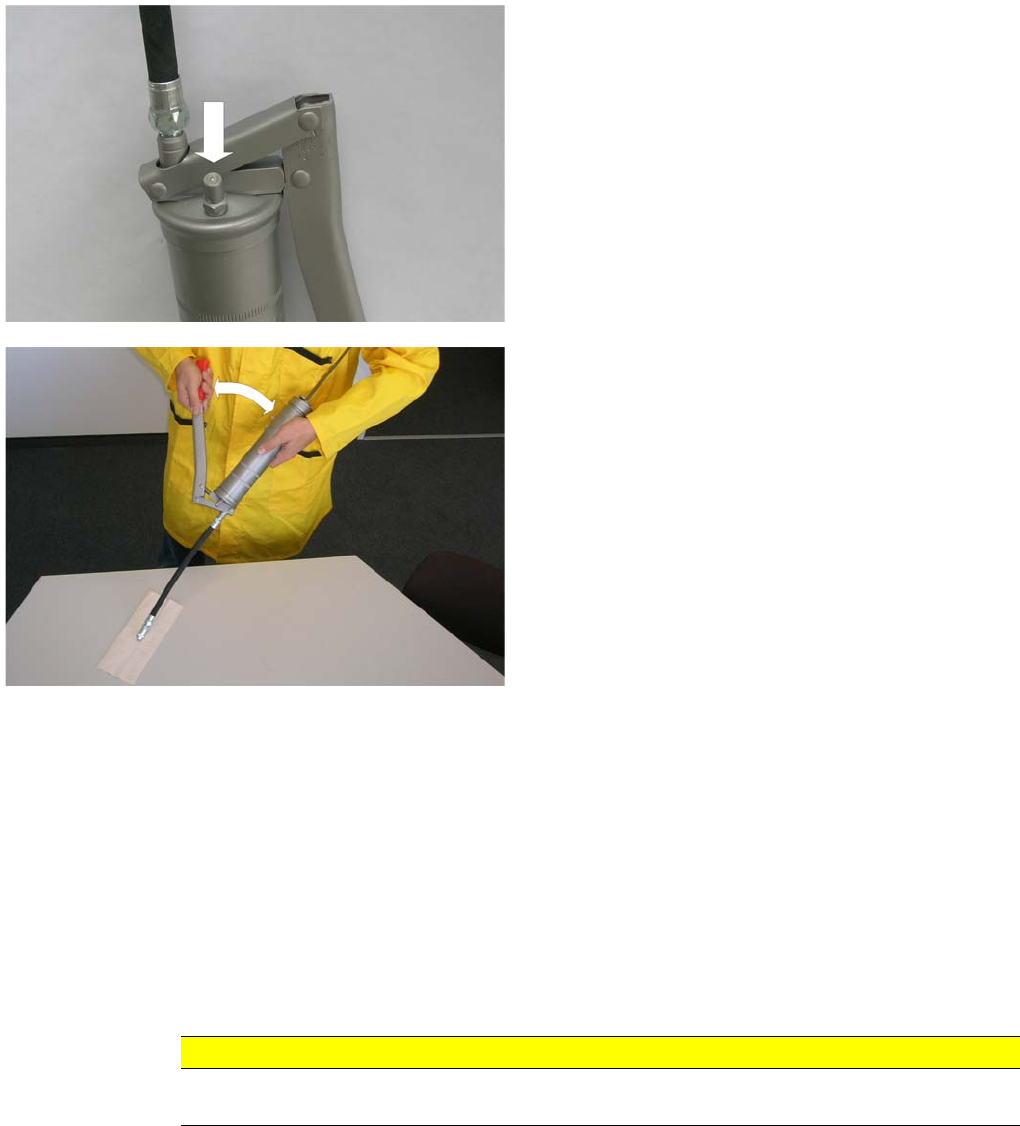
► Prepare the grease gun (see Section "Preparing the Grease Gun").
► Press your finger against the ball valve, to vent the
grease gun.
► To fill the rubber tank hose with grease, pump the
lever until grease appears at the end of the rubber
tank hose.
The grease gun is now ready for use.
CAUTION
Attention: the tower is in its refill position. The WPC center of gravity is higher up and there is
a greater risk of it tipping over.
Maintenance Manual WPC4, WPC5 and WPC6
Greasing the Lifting Axis Spindle and Guidance Annual Maintenance
Maintenance Manual SIPLACE WPC4, WPC5 and WPC6 17
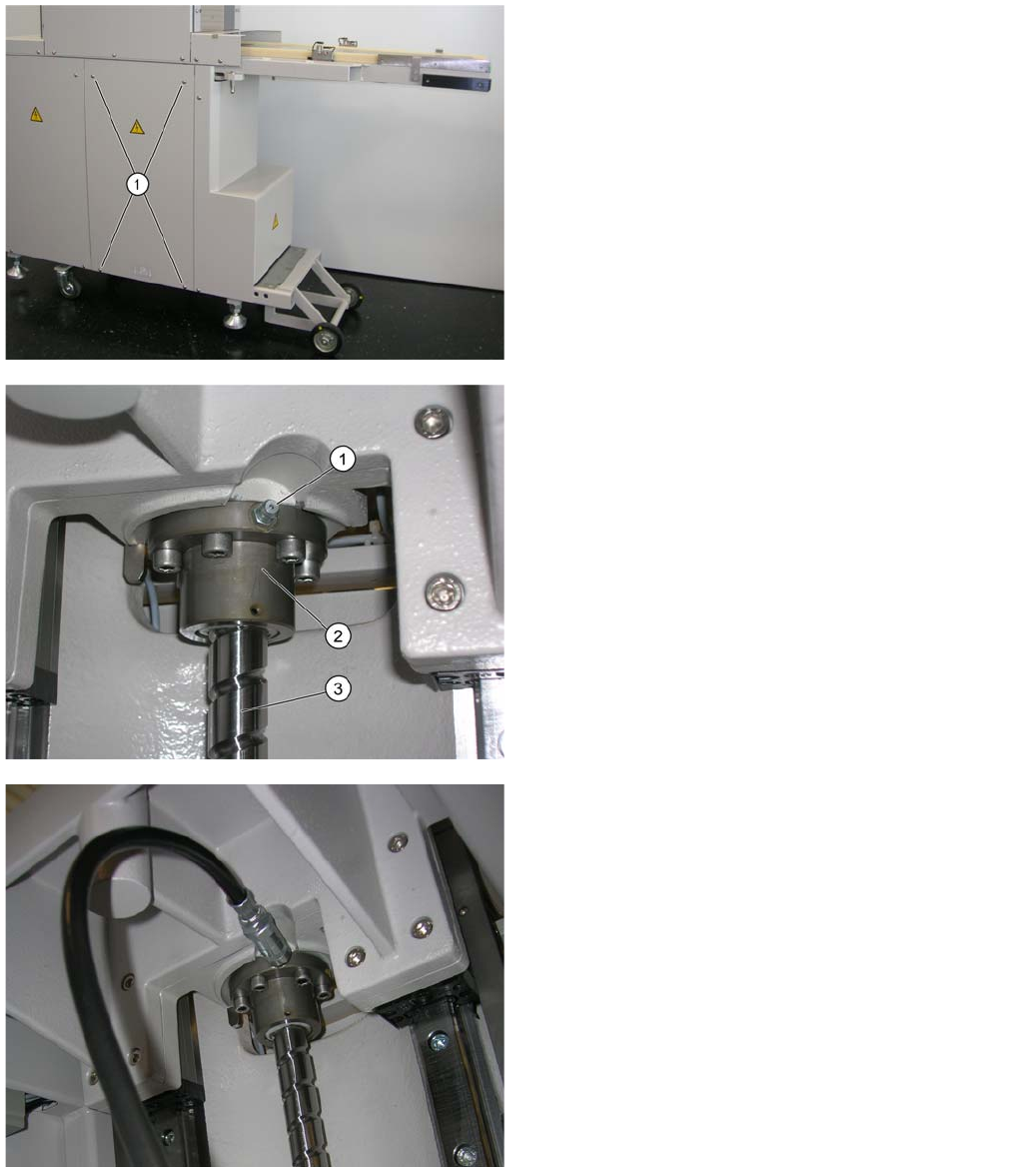
The tower has two linear guidances. Each of these has a lubrication nipple at the top (1). These
lubrication nipples can be reached via the open plexiglass door and the tower (refill position).
► Unscrew the 4 screws to remove the front, right-hand
side cover from the WPC.
You can now access the spindle nut.
1. Lubrication nipple
2. Spindle nut
3. Spindle
► Fit the universal grease gun mouthpiece onto the
lubrication nipple of the spindle nut.
► Pump the grease gun twice.
► Remove the grease gun.
► Use a dry cloth to remove any residual grease from
on and around the lubrication nipple.
Maintenance Manual WPC4, WPC5 and WPC6
Annual Maintenance Cleaning, Greasing and Checking the Feeder Axis Toothed Belt
18 Maintenance Manual SIPLACE WPC4, WPC5 and WPC6
► Refit the front, right-hand side cover onto the WPC.
Cleaning , Greasin g and Che cking the Feeder Axis Too thed Belt
2.4.3 Cleaning, Greasing and Checking the Feeder Axis Toothed Belt
► Activate the placement machine and the WPC.
► Remove all waffle pack trays from the magazine.
► Use the station software to move the empty magazine into the transport position.
The tower is now in the lowermost position.
► Switch the WPC off at the main switch and unplug the WPC from the power supply. This disconnects
the WPC reliably from the electricity.
► Disconnect the WPC data cable from the placement machine.
The toothed belt should now be accessible for cleaning and greasing.
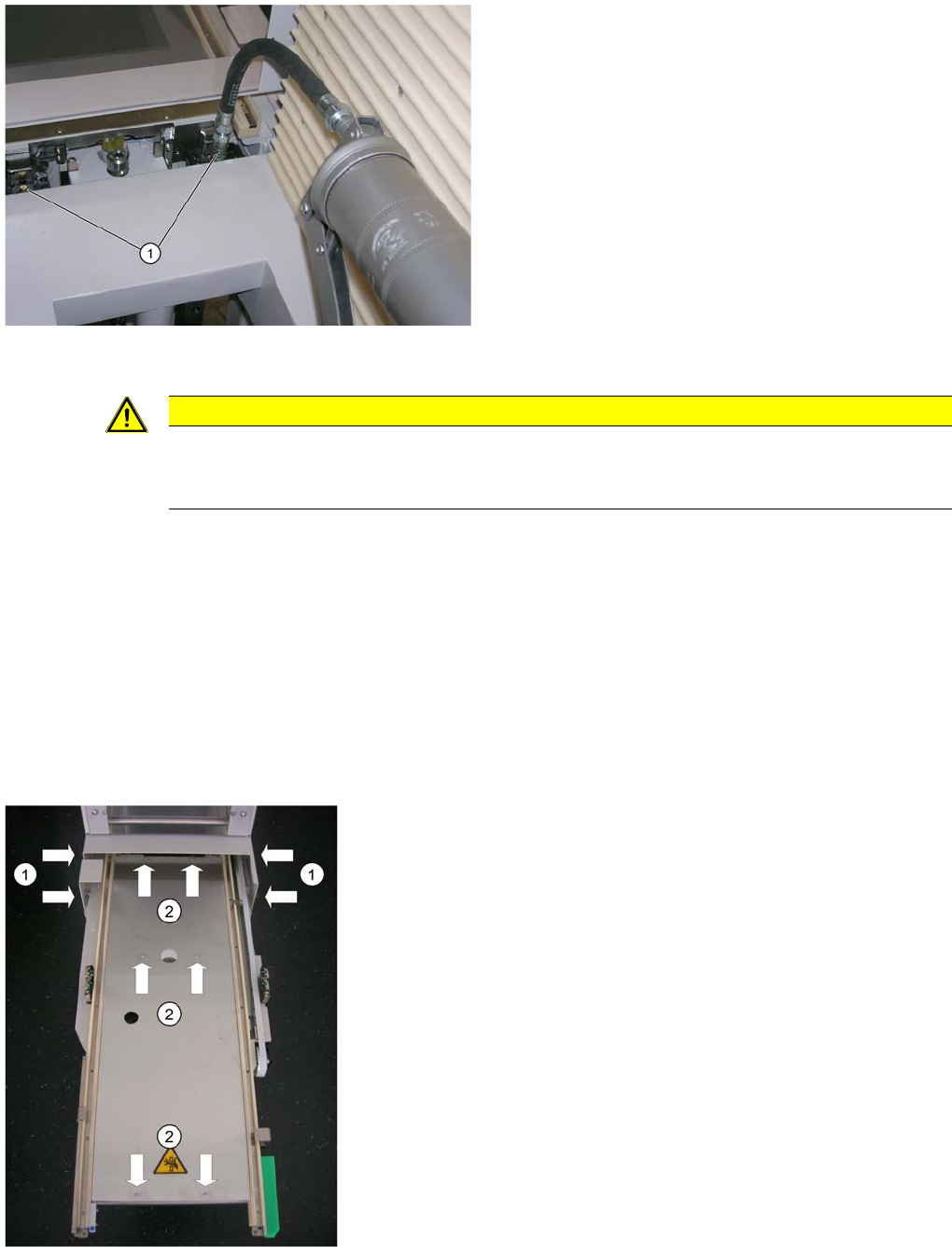
► From behind, lift the grease gun into the WPC tower.
► From above, fit the universal grease gun mouthpiece
onto the lubrication nipple of the right-hand sliding
guidance.
► Pump the grease gun twice.
► From above, fit the universal grease gun mouthpiece
onto the lubrication nipple of the left-hand sliding
guidance.
► Pump the grease gun twice.
► Remove the grease gun.
► Use a dry cloth to remove any residual grease from
on and around the lubrication nipples.
CAUTION
SIPLACE cloth
The spindle and the spindle nut, plus the sliding bearings and the sliding guidances must not
be cleaned with the SIPLACE cloth or with ethanol. This would remove any grease present.
Fig.: Feeder axis from above
► Loosen the 2 screws on the left and right (1) to
remove the bridge cover on the feeder axis.
► Loosen the 6 screws (2) to remove the cover plate on
the feeder axis.