吸嘴自动检查NozzleHealthCheck_E.pdf - 第11页
Product Engineering Division SMT Section IM Operations Y AMAHA MOTOR CO., L TD MDOC-SOFT50394 11/2 1 T able3.2 Form at of log fi le No. Item Nam e Explanation 1 Date Y ear , m onth, da y , hour , m inute, second when out…
Product Engineering Division
SMT Section
IM Operations
YAMAHA MOTOR CO., LTD
MDOC-SOFT50394
10/21
3.7 Operation control
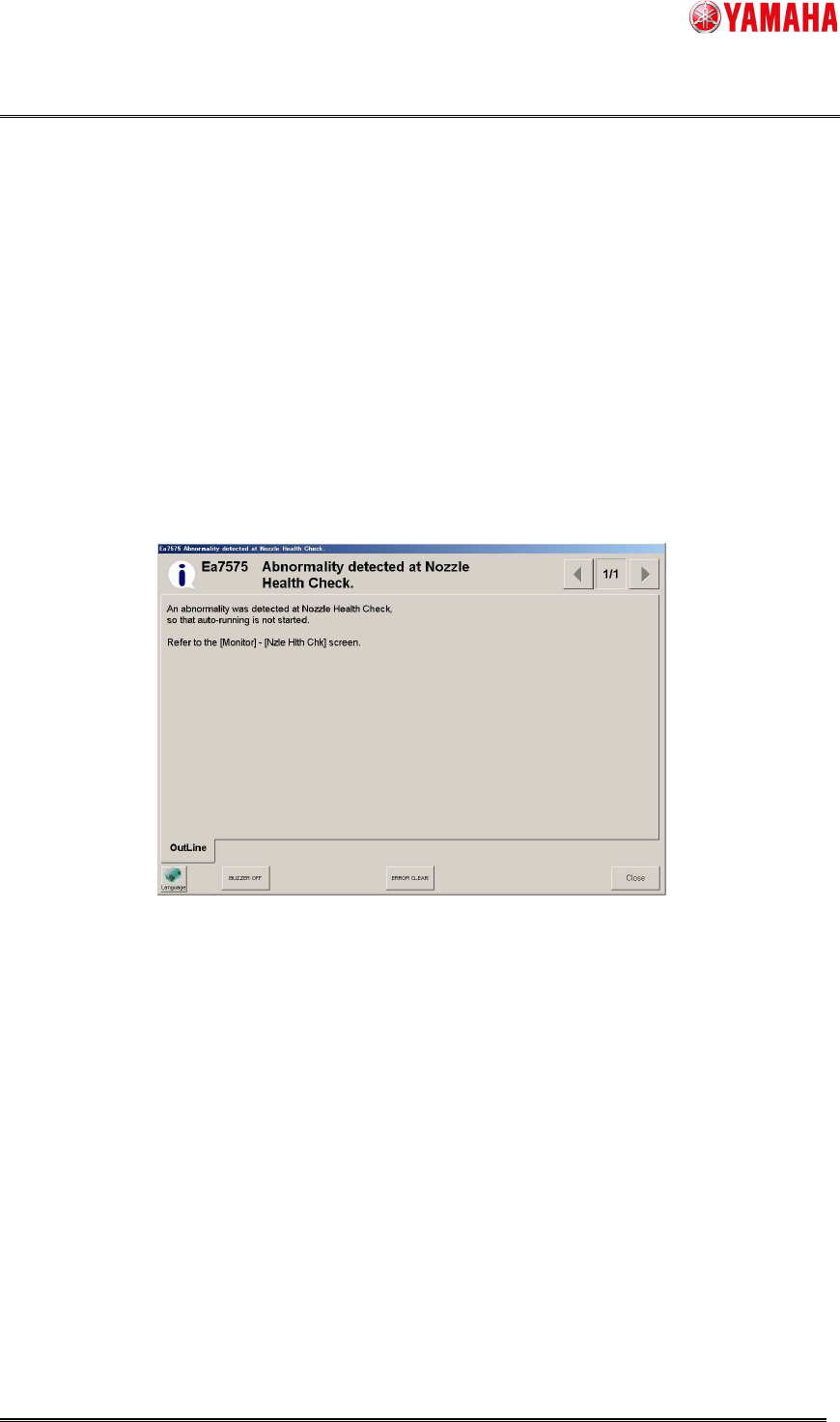
When the [Setup] - [Software Setting] - [Health Check] - [Don’t start running if Nozzle Health
Check NG is detected.] check box is checked, auto-running does not start as long as Nozzle
Health Check is not completed, or used nozzle is judged as “NG”.
When auto-running does not start, clean or exchange the NG nozzle, and perform Nozzle
Health Check again.
In the Nozzle Health Care function, when the [Don’t start running if Nozzle Health Check NG is
detected.] check box is checked, the abnormal nozzles are replaced with spare nozzles. If there
is no available spare nozzle, auto-running is suppressed.
When the [Don’t start running if Nozzle Health Check NG is detected.] check box is not checked,
the abnormal nozzles are not replaced with spare nozzles, auto-running is not suppressed.
▲4
3.8 Save log file
When [Setup] - [Software Setting] - [Health Check] - [Save log file] check box is checked, log file
is saved to [Output Path] folder.
Log file name is “NHCLog_(Machine serial number)_(Mount table Number)_YYYYMMDD.csv”.
(Example: NHCLog_Y20000_A_20150315.csv)
When either of following is performed, results of [Vacuum Check], [Nozzle Tip Dirt Check],
[Nozzle Buffing Check], [Nozzle Shape Check], [Nozzle Alignment Check] are output to log file.
Non-checked nozzle is not output to log file.
1. Tap [Health Check] button.
2. Tap either of [Vacuum check], [Nozzle Tip Dirt Check], [Nozzle Buffing Check], [Nozzle
Shape Check], [Nozzle Alignment Check] button.
3. Perform schedule spec.
Product Engineering Division
SMT Section
IM Operations
YAMAHA MOTOR CO., LTD
MDOC-SOFT50394
11/21
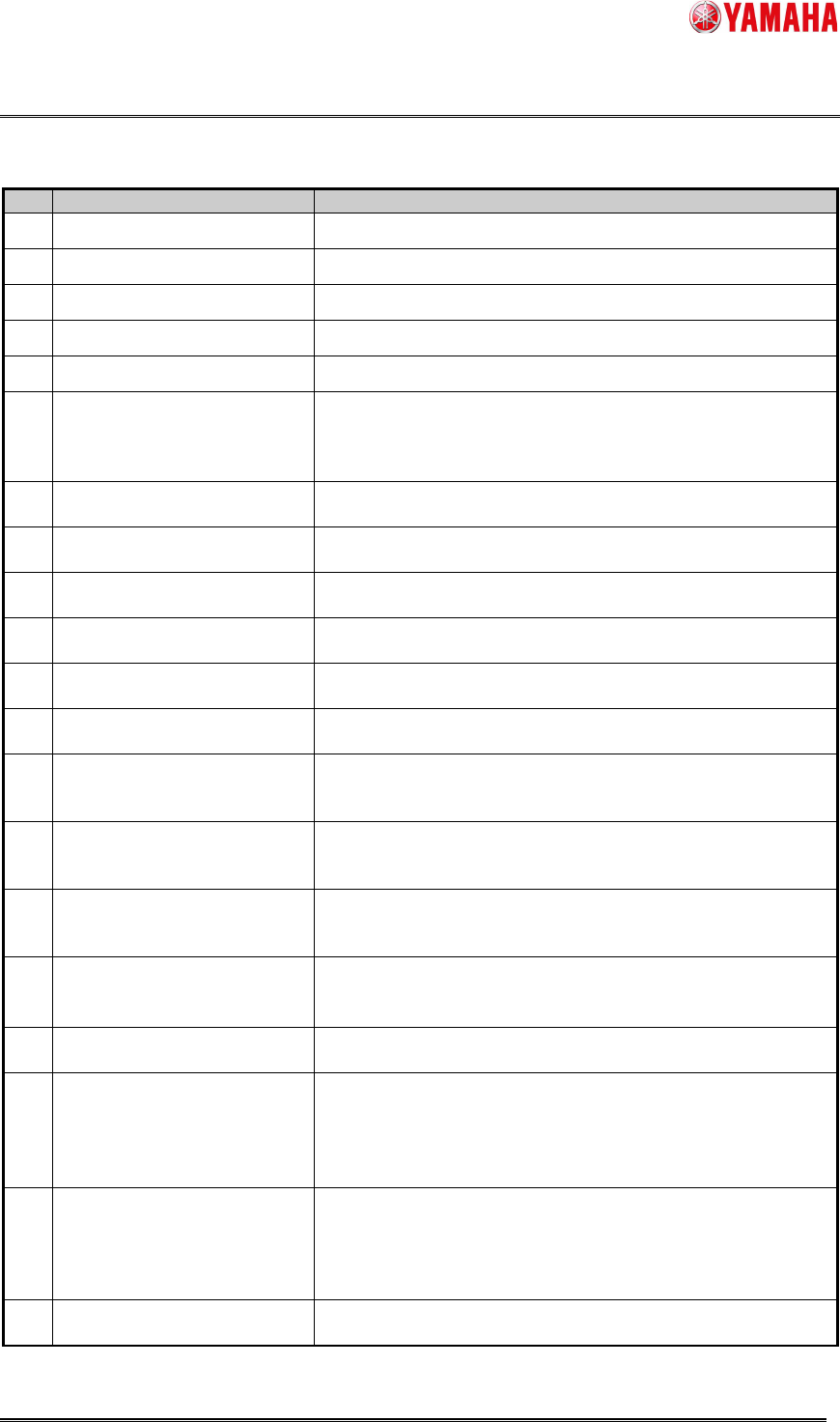
Table3.2 Format of log file
No.
Item Name Explanation
1
Date
Year, month, day, hour, minute, second when output.
2
Table No
Mount table name
3
Head No
Head number
4
Nozzle Type
Nozzle type name
5
Nozzle Station
Nozzle station number
6
Execute Trigger
Check timing
“NHC”: When executed from [Health Check] button.
“UTL”: When executed from each button.
“SCH”: When executed from schedule spec.
7
Vacuum Check
Result of Vacuum Check.
([OK] or [NG]. Empty when does not performed)
8
Tip Dirt Check
Result of Nozzle Tip Dirt Check.
([OK] or [NG]. Empty when does not performed)
9
Buffing Check
Result of Nozzle Buffing Check.
([OK] or [NG]. Empty when does not performed)
10
Shape Check
Result of Nozzle Shape Check.
([OK] or [NG]. Empty when does not performed)
11
Alignment Check
Result of Nozzle Alignment Check.
([OK] or [NG]. Empty when does not performed)
12
[Vacuum]Vacuum Level
Result of vacuum level.
(Only when vacuum check is executed)
13
[Vacuum]Pick Low Level
Value of [Machine] - [Machine Data] - [Head] - [Vacuum
Level] - [Low Level].
(Only when vacuum check is executed)
14
[Vacuum]Pick High Level
Value of [Machine] - [Machine Data] - [Head] - [Vacuum
Level] - [High Level].
(Only when vacuum check is executed)
15
[Vacuum]Detection Rate
Detection Rate(%) = ( Vacuum Level - Low Level ) / (High
Level - Low Level ) * 100
(Only when vacuum check is executed)
16
[Vacuum]Error Detection
Rate
Value of [Machine] - [Specification Information] - [Schedule
Specification] - [Vacuum Check] - [Error Detection Rate].
(Only when vacuum check is executed)
17
[Shape]Measurement[um]
Measure result of nozzle tip length.
(Only when Nozzle Shape Check is executed)
18
[Shape]Upper Limit[um]
“The design value under a nozzle tip length(um)” + “The
error under a nozzle tip length(um)” value of [Machine] -
[Specification Information] - [Side View Camera Spec] -
[Nozzle Basic Setting].
(Only when Nozzle Shape Check is executed)
19
[Shape]Lower Limit[um]
“The design value under a nozzle tip length(um)” - “The
error under a nozzle tip length(um)” value of [Machine] -
[Specification Information] - [Side View Camera Spec] -
[Nozzle Basic Setting].
(Only when Nozzle Shape Check is executed)
20
[Alignment]X-gaps[mm]
Measure result of nozzle gap X
(Only when Nozzle Alignment Check is executed)
Product Engineering Division
SMT Section
IM Operations
YAMAHA MOTOR CO., LTD
MDOC-SOFT50394
12/21
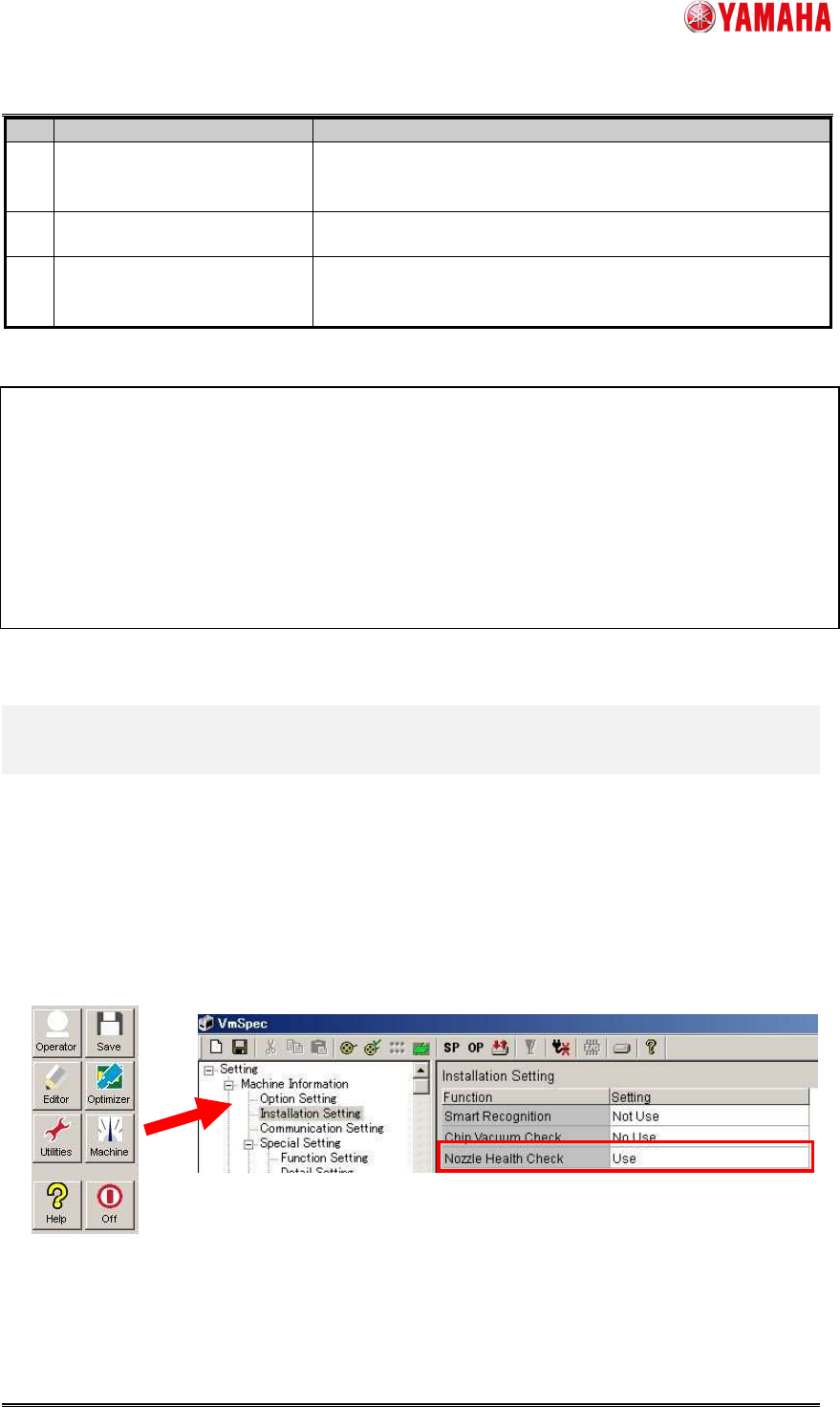
No.
Item Name Explanation
21
[Alignment]X-Upper
limit[mm]
Value of [Machine] - [Machine Data] - [PickupMACS] -
[NozzleMACS] - [Correct Limit X(mm)].
(Only when Nozzle Alignment Check is executed)
22
[Alignment]Y-gaps[mm]
Measure result of nozzle gaps Y.
(Only when Nozzle Alignment Check is executed)
23
[Alignment]Y-Upper
limit[mm]
Value of [Machine] - [Machine Data] - [PickupMACS] -
[NozzleMACS] - [Correct Limit Y(mm)].
(Only when Nozzle Alignment Check is executed)
* Example of log file
4. Setting Method
4.1 Machine Setting
4.1.1 Installation Setting
Set [Machine] - [Setting] - [Machine Information] - [Installation Setting] - [Nozzle Health Check]
to “Use”.
The conditions for using [Nozzle Health Care] function are as follows.
▲4
1. YSM40R
2. Super Hi-Speed Head
V1.00,MultiLanguage
EN,Date,Table No,Head No,Nozzle Type,Nozzle Station,Execute Trigger,Vacuum Check,Tip Dirt Check,Buffing
Check,Shape Check,Alignment Check,[Vacuum]Vaccum Level,[Vacuum]Pick Low Level,[Vacuum]Pick High
Level,[Vacuum]Detection Rate,[Vacuum]Error Detection Rate,[Shape]Measurement[um],[Shape]Upper
Limit[um],[Shape]Lower Limit[um],[Alignment]X-gaps[mm],[Alignment]X-Upper
limit[mm],[Alignment]Y-gaps[mm],[Alignment]Y-Upper limit[mm]
EN,2015/03/15 12:00:00,A,1,
TYPE-301,1,NHC,OK,OK,OK,OK,OK,200,180,200,100,30,2000,2040,1960,0.100,0.150,0.200,0.160
EN ,2015/03/15 12:01:00,A,3,TYPE-301,3,SCH,,NG,OK,OK,OK,,,,,,2000,2040,1960,0.200,0.150,0.100,0.160
EN ,2015/03/15 12:02:00,B,8,TYPE-302,28,UTL,OK,,,,,190,104,190,100,28,,,,,,,