00196351-06_UM_ACT_DE_EN.pdf - 第121页
ACT - Accurac y Check Tool / User Manual 09/2015 Edition 31 If this adaptio n of the board orientat ion is not perform ed, the followi ng error message (ex ample) is already displayed on t he SIPLACE Pro Line Control GUI…
ACT - Accuracy Check Tool / User Manual 09/2015 Edition
30
4.1.2 Scheduling the Boards
► Select a suiting placement program for your head configuration from the pre-configured boards
(with the aid of Table 4-1 or Table 4-2).
► Specify a job (recipe) in SIPLACE Pro Line Control and send it to the line (download).
NOTICE
Placement machines with dual conveyors
When using a dual conveyor, the ACT should be run with both conveyor lanes.
4.1.2.1 Troubleshooting: Accessibility for Various Machine / Head Configurations
SIPLACE SX4 and DX4 machines:
NOTICE
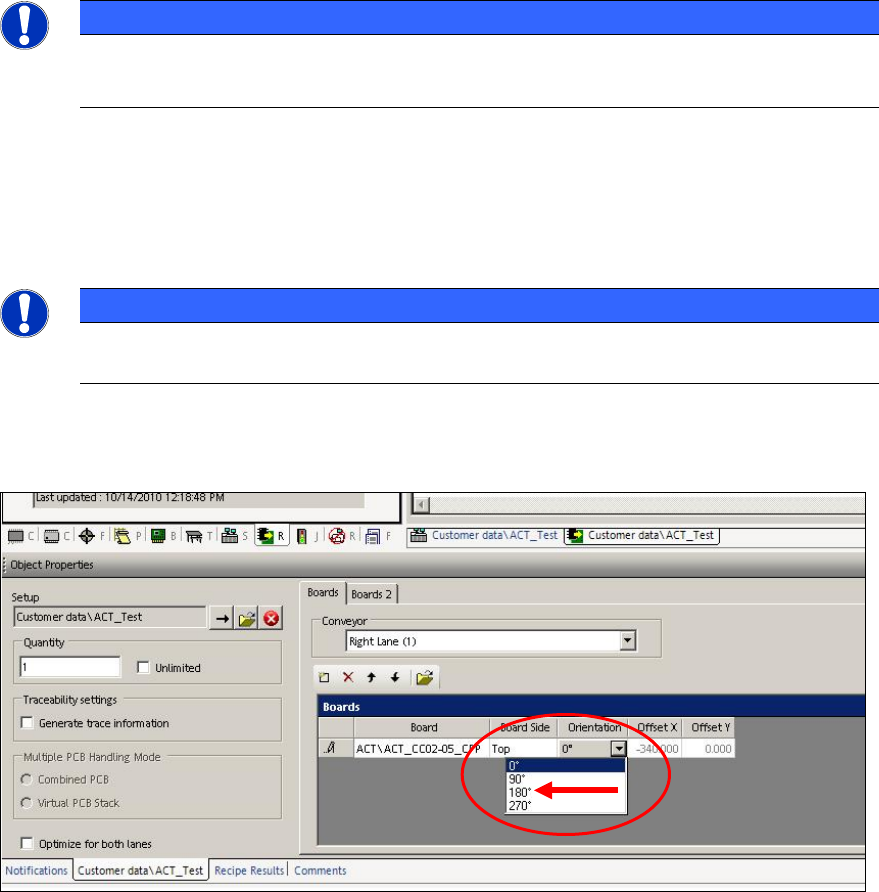
In order to access the fiducials, the ACT measuring plate has to be placed rotated by
180° in SIPLACE SX4 and DX4 machines.
Thus, if an ACT placement program is defined for a SIPLACE SX4 or DX4 machine, the orientation
(position) of the board has to be adapted to 180° in the created recipe.
Figure 4-1: Rotating board orientation by 180°on SX4, DX4
ACT - Accuracy Check Tool / User Manual 09/2015 Edition
31
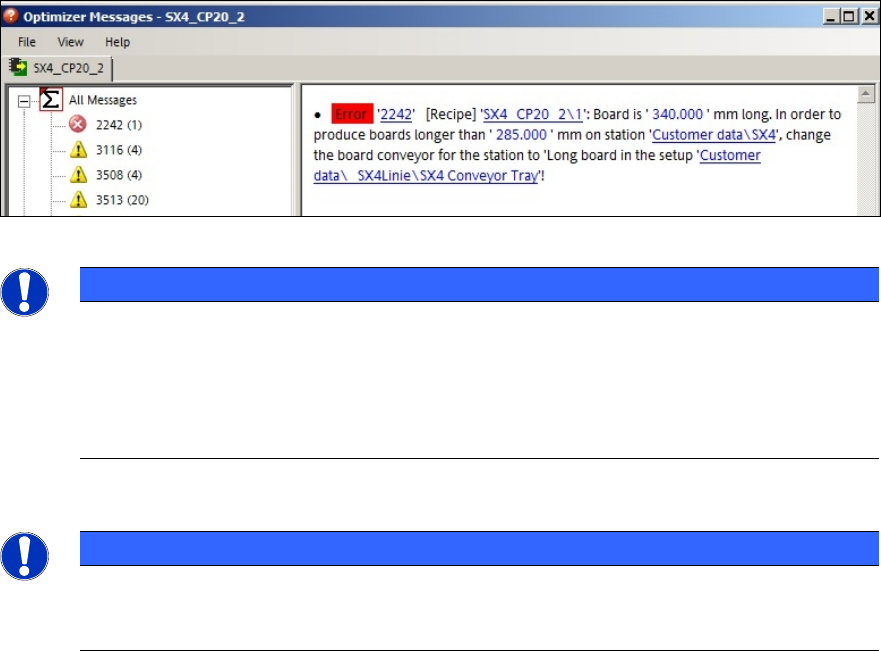
If this adaption of the board orientation is not performed, the following error message (example) is
already displayed on the SIPLACE Pro Line Control GUI during specification:
Figure 4-2: Example: Error message due to unavailable ink spots
NOTICE
Due to the problems of accessing the fiducials described above, please observe:
If the ACT has to be measured on a machine of the SX-, DX-, or X-series, in front of
which one or more SIPLACE SX4- or DX4-stations are arranged in a line, the Pass-
through function has to be activated on all machines in front of the measuring machine
that require another board orientation (0°/180°). Otherwise errors will occur when trying
to access the fiducials.
Twin Head – statistical reliability:
NOTICE
► Pay attention to the number of placed components per segment when measuring a
Twin Head, to ensure the statistical reliability of the measurement result.
At least 20 components per segment should be placed!
When setting up the tray with the glass components, pickup problems may occur for one segment
at some machine types because the components cannot be accessed.
► Pay attention to the tray positioning at the component table or in the WPC.
Variants:
► Make sure that the components can be accessed by both segments in X direction when
positioning the tray at the component table.
When the two front rows have been run empty:
► Stop the machine.
► Refill the components in the front rows.
► Reset the filling level to "Full".
This also applies when setting up the tray in the WPC. The components have to be refilled in
the WPC too (e.g. WPC at the SX1/2 machine) to ensure that a sufficient number of
components can be picked up by both Twin segments.
► If possible, use the Tray in Transport for ACT option. Thus, the accessibility in Y direction is
ensured.
ACT - Accuracy Check Tool / User Manual 09/2015 Edition
32
► In order to further increase the statistical reliability of the measurement result and at the same
time make sure that each segment meets these requirements, you can check each segment
individually.
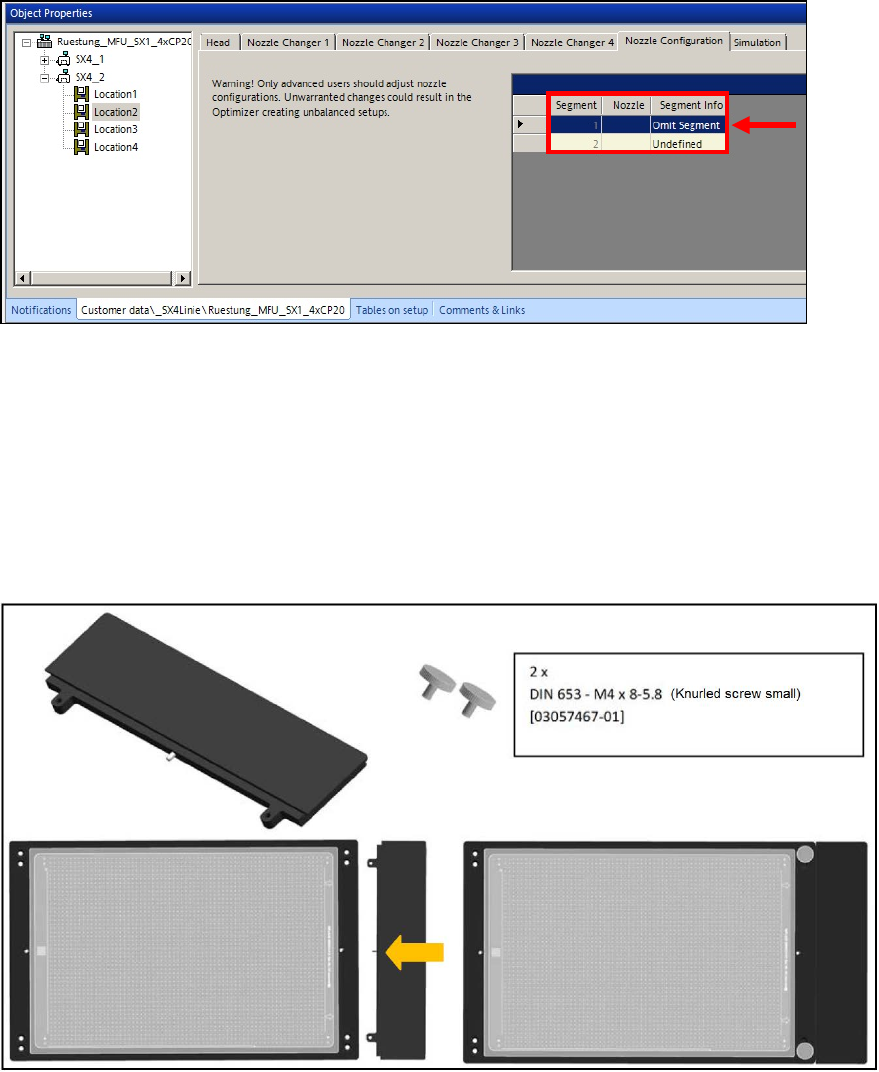
► For this, omit one of the segments in the Nozzle configuration tab of the Setup Editor in
SIPLACE Pro so that only one segment places all 48 components.
Figure 4-3: Omitting segment
Twin Head in Placement Area 1:
For machines with Twin Head in Placement Area 1 (i.e. gantry 1 and / or 4) you can use the
following adapter to ensure the accessibility of segment 2 when placing on the plate. The adapter is
inserted at the front of the plate so that the plate moves about 50 mm backwards in the direction of
the input belt.
Adapter 50 mm TWIN [03085310-01]
Figure 4-4: Adapter 50 mm TWIN