MPM_UP2000_HIE印刷机_.pdf - 第15页
5-HR90-7000-011 Page 15 of 51 11. 主操作屏幕 • • • • TEACH TEACH TEACH TEACH ( ( ( ( 教 習菜單 ) ) ) ) Teach Teach Teach Teach B oard Board Board Board : 用來設置新 P CB profile 或修 改已存在的 PCB profile . Teach Teach Teach Teach Visi on V…
5-HR90-7000-011 Page
14
of 51
11. 主操作屏幕
1
1
1
1 標題欄
標題欄由 5 個下拉菜單組成 :
•
•
•
• PRINT
PRINT
PRINT
PRINT (
(
(
( 印刷 )
)
)
)
•
•
•
• TEACH
TEACH
TEACH
TEACH (
(
(
( 教習 )
)
)
)
•
•
•
• FILE
FILE
FILE
FILE (
(
(
( 檔案 )
)
)
)
•
•
•
• UTILITIES
UTILITIES
UTILITIES
UTILITIES (
(
(
( 應用 )
)
)
)
•
•
•
• MAINTENANCE
MAINTENANCE
MAINTENANCE
MAINTENANCE (
(
(
( 維護 )
)
)
)
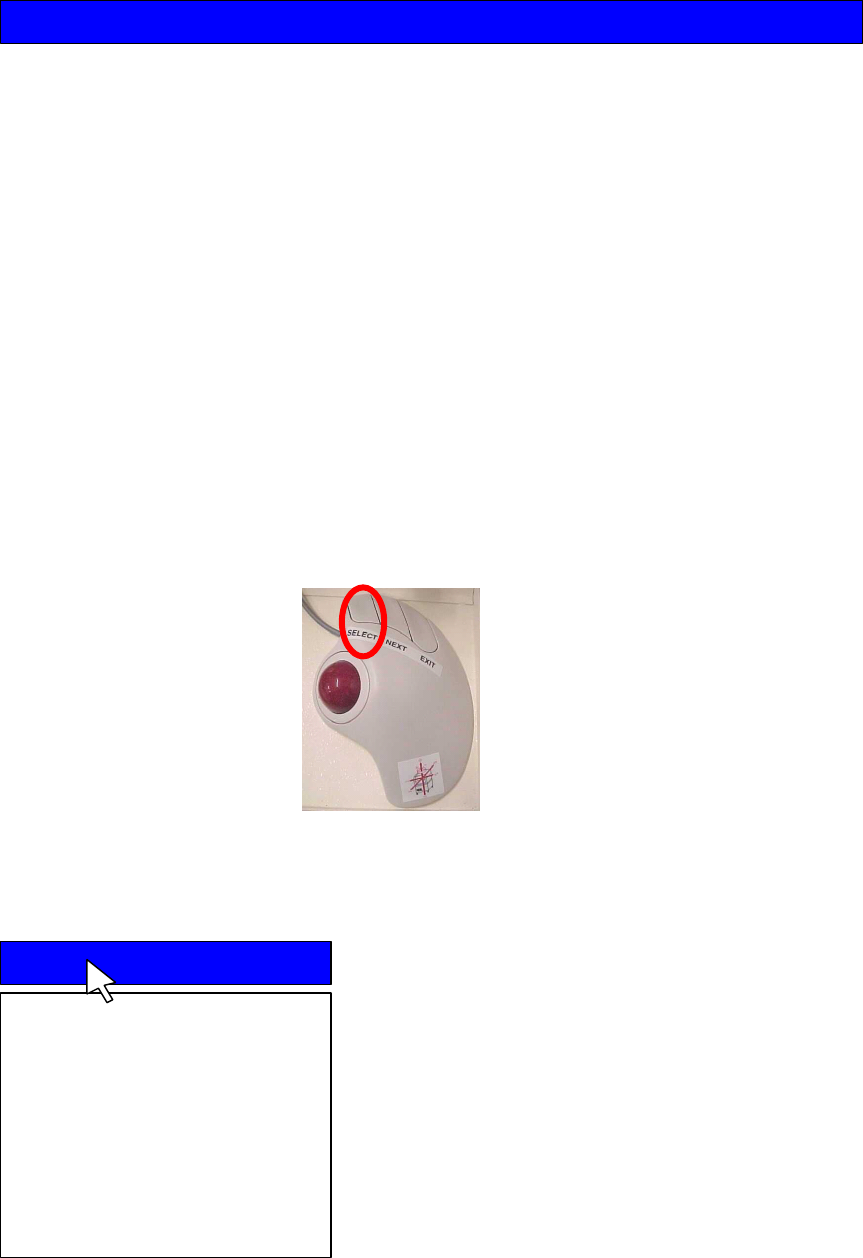
• 為打開下拉菜單 , 可能滾動跟蹤球到需要的菜單項 , 菜單將滑下 . 按 SELECT
SELECT
SELECT
SELECT
執行預期的命令 .
•
•
•
• PRINT
PRINT
PRINT
PRINT (
(
(
( 印刷 )
)
)
)
PRINT
PRINT
PRINT
PRINT 印刷下拉菜單包含下列選擇項 :
Auto
Auto
Auto
Auto Print
Print
Print
Print : 全自動連續印刷 .
Manual
Manual
Manual
Manual Print
Print
Print
Print : 如果印刷机是單獨地安裝 , 這
個選項會提示操作員裝入或卸下 PCB .
Pass
Pass
Pass
Pass Through
Through
Through
Through : 當選擇這處選項時机器不會
印刷 , 它只相當于導軌的作用 .
SPC
SPC
SPC
SPC Data
Data
Data
Data : 選擇這個選項時允許用戶收集最
多 250 塊板的統計資料 .
Print
Print
Print
Print Teach
Teach
Teach
Teach File
File
File
File Utilities
Utilities
Utilities
Utilities
Print
Print
Print
Print
Auto Print
Manual Print
Pass Through
SPC Data
5-HR90-7000-011 Page
15
of 51
11. 主操作屏幕
•
•
•
• TEACH
TEACH
TEACH
TEACH (
(
(
( 教 習菜單 )
)
)
)
Teach
Teach
Teach
Teach Board
Board
Board
Board : 用來設置新 PCB profile 或修
改已存在的 PCB profile .
Teach
Teach
Teach
Teach Vision
Vision
Vision
Vision : 用來對齊目標 .
Device
Device
Device
Device layout
layout
layout
layout : 用來教習 2D 常規檢查的零件
資料 .
Teach
Teach
Teach
Teach ID
ID
ID
ID : 用來确認印网相對于程序是正确
的 . 這可以在新程序裝入時校驗及識別唯一
的印网 .
• FILE
FILE
FILE
FILE (
(
(
( 檔案菜單 )
)
)
)
Load
Load
Load
Load File
File
File
File : 用來調用貯存于硬盤的所有檔案 .
Save
Save
Save
Save File
File
File
File : 用來將新 pcb 的參數貯存于硬盤
( 最多 . 400 個檔案 ).
Delete
Delete
Delete
Delete File
File
File
File : 顯示硬盤上能被刪除的檔案 .
Backup
Backup
Backup
Backup System
System
System
System : 從硬盤复制系統檔案到用
戶定義的路徑 ( 缺省值是軟驅 FDD).
Restore
Restore
Restore
Restore System
System
System
System : 從用戶定義的路徑复制到
硬盤 .
File
File
File
File Upload
Upload
Upload
Upload : 允許操作員從硬盤上載檔案到
軟驅 ( FDD ) .
File
File
File
File Download
Download
Download
Download : 用來下載個別的 PCB 檔案
到硬盤 .
Save
Save
Save
Save Timing
Timing
Timing
Timing File
File
File
File : 复制時序檔案到用戶定義
的路徑 . 包括最后 5 塊板的周期時間資料 .
Teach
Teach
Teach
Teach
Teach Board
Teach Vision
Device Layout
Teach ID
File
File
File
File
Load File
Save File
Delete File
Backup System
Restore System
File Upload
File Download
Save Timing File

5-HR90-7000-011 Page
16
of 51
11. 主操作屏幕
• UTILITIES
UTILITIES
UTILITIES
UTILITIES (
(
(
( 應用菜單 )
)
)
)
Load
Load
Load
Load Board
Board
Board
Board : 這一功能可裝 PCB 進入机器
檢查模具高度 , 視覺高度或印网高度 . 通過這
一步驟操作員可以在生產之前檢查 PCB 和
印网是否真正對齊 .
Stencil
Stencil
Stencil
Stencil Height
Height
Height
Height : 用來在設置期間允許机器測
量 Z 形架帶 PCB 移動到与印网的下面接触
的距离 .
Set
Set
Set
Set Stroke
Stroke
Stroke
Stroke : 此選項允許用戶定義刮刀移動范
圍 . 這由 PCB 的外形預定 .
Squeegee
Squeegee
Squeegee
Squeegee Height
Height
Height
Height : 用于測量刮刀与印网接触
時主高度 . 在印网或刮刀安裝后必須執行此
一步驟 .
Knead
Knead
Knead
Knead Paste
Paste
Paste
Paste : 將使刮刀攪拌錫漿以保持錫漿
在操作周期之間均勻 .
Cycle
Cycle
Cycle
Cycle Squeegee
Squeegee
Squeegee
Squeegee : 用來鎖定前后開始印刷的
刮刀位置 ( 即改變印漿的起始方向 ) .
Cycle
Cycle
Cycle
Cycle Wiper
Wiper
Wiper
Wiper : 將執行一個擦紙周期 .
Cycle
Cycle
Cycle
Cycle Dispenser
Dispenser
Dispenser
Dispenser : 將從自動補錫器執行一次
補錫 .
Verify
Verify
Verify
Verify Stencil
Stencil
Stencil
Stencil : 机器設置期間校驗是否已裝
入正确的印网 .
Cal
Cal
Cal
Cal Prestop
Prestop
Prestop
Prestop Position
Position
Position
Position : 校驗 PCB 裝入速度和
測量 PCB 剎車速度以決定适當的預停位置 .
Utilities
Utilities
Utilities
Utilities
Load Board
Stencil Height
Set Stroke
Squeegee Height
Knead Paste
Cycle Squeegee
Cycle Wiper
Cycle Dispenser
Verify Stencil
Cal Prestop Position