speedline 680SD Pump .pdf - 第12页
680SD BRUSHL ESS SERVO PUM P Ini tial Lif t Height Adjustment 10 680SD B rushless Servo Dri v en Pump Attention The numbers on the scale ring range from zero (0) t o .025" in .001 " i ncrements. The gap yo u se…
.
.
.
.
.
680SD BRUSHLESS SERVO PUMP
Initial Lift Height Adjustment
Operation and Maintenance Guide 9
Initial Lift Height Adjustment
Introduction Lift Height determines how much material is allowed to enter the needle during a
dispense cycle.
The lift height must be correct:
• To ensure the proper flow rate of material.
• To prevent leakage when not dispensing.
• To prevent damage to the lead screw and/or needle caused by excess force
(Insufficient gap).
Procedure To perform Lift Height adjustment:
1. Make sure a needle has been installed on the pump cartridge.
2. Loosen the red lock screw to release the adjustment ring and scale ring.
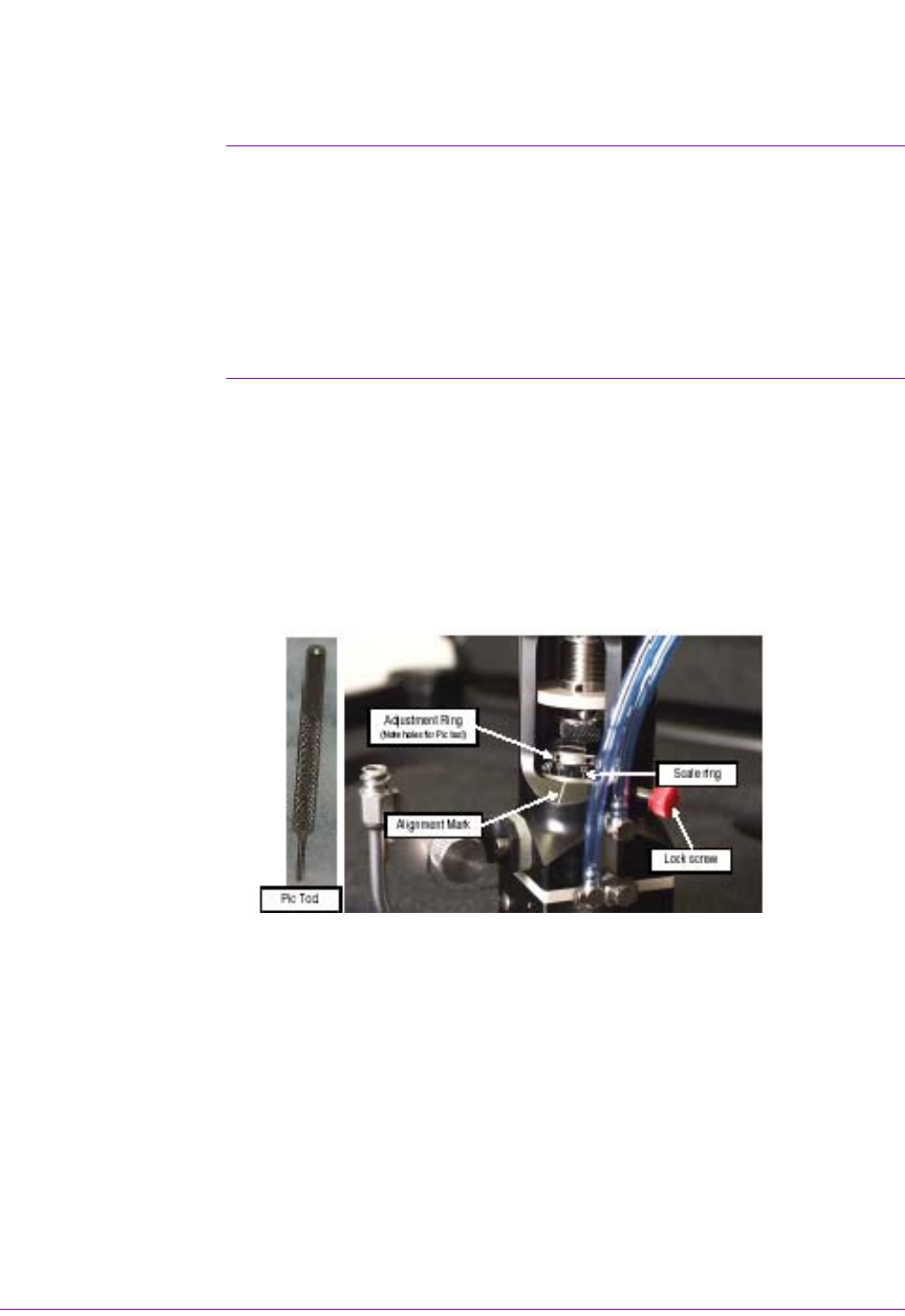
3. The adjustment ring and scale ring are visible through the access cutaway in the
pump body (see Figure 2).
4. Insert the pic tool (provided in the support kit) into a hole in the adjustment ring.
5. Using the pic tool as a lever, rotate the adjustment ring counter-clockwise until
the setscrew in the side of the scale ring is visible.
Figure 2
6. Loosen the set screw in the scale ring with the .035" Allen wrench (provided in
the pump support kit) until you are able to turn the scale ring and adjustment ring
independent of each other.
7. Leave the Allen wrench in the setscrew and rotate the adjustment ring clockwise
until resistance is felt. Resistance is felt when contact is made between the ball
on the end of the leadscrew and the ball seat in the needle.
8. Using the Allen wrench as a lever, rotate the scale ring clockwise until the zero
(0) lines up with the white alignment mark on the pump body.
9. Tighten the setscrew in the scale ring. The scale ring and adjustment ring are
now locked together.

680SD BRUSHLESS SERVO PUMP
Initial Lift Height Adjustment
10 680SD Brushless Servo Driven Pump
Attention
The numbers on the scale ring range from zero (0) to .025" in .001" increments. The
gap you set will depend on the material you are dispensing and the process. The gap
is preset at the factory for .010".
10. Adjust the scale ring to the appropriate gap (lift height).
11. Tighten the red lock screw.
.
.
.
.
.
680SD BRUSHLESS SERVO PUMP
Checking Lift Height
Operation and Maintenance Guide 11
Checking Lift Height
Procedure To check lift height:
1. Adjust the air pressure knob so that the air pressure gauge reads 15-20 PSI.
2. Perform a Purge Cup Position calibration. Make sure the purge Z-height is .5 in.
above the Weight Scale purge cone or purge cup so that the material stream is
easily observed.
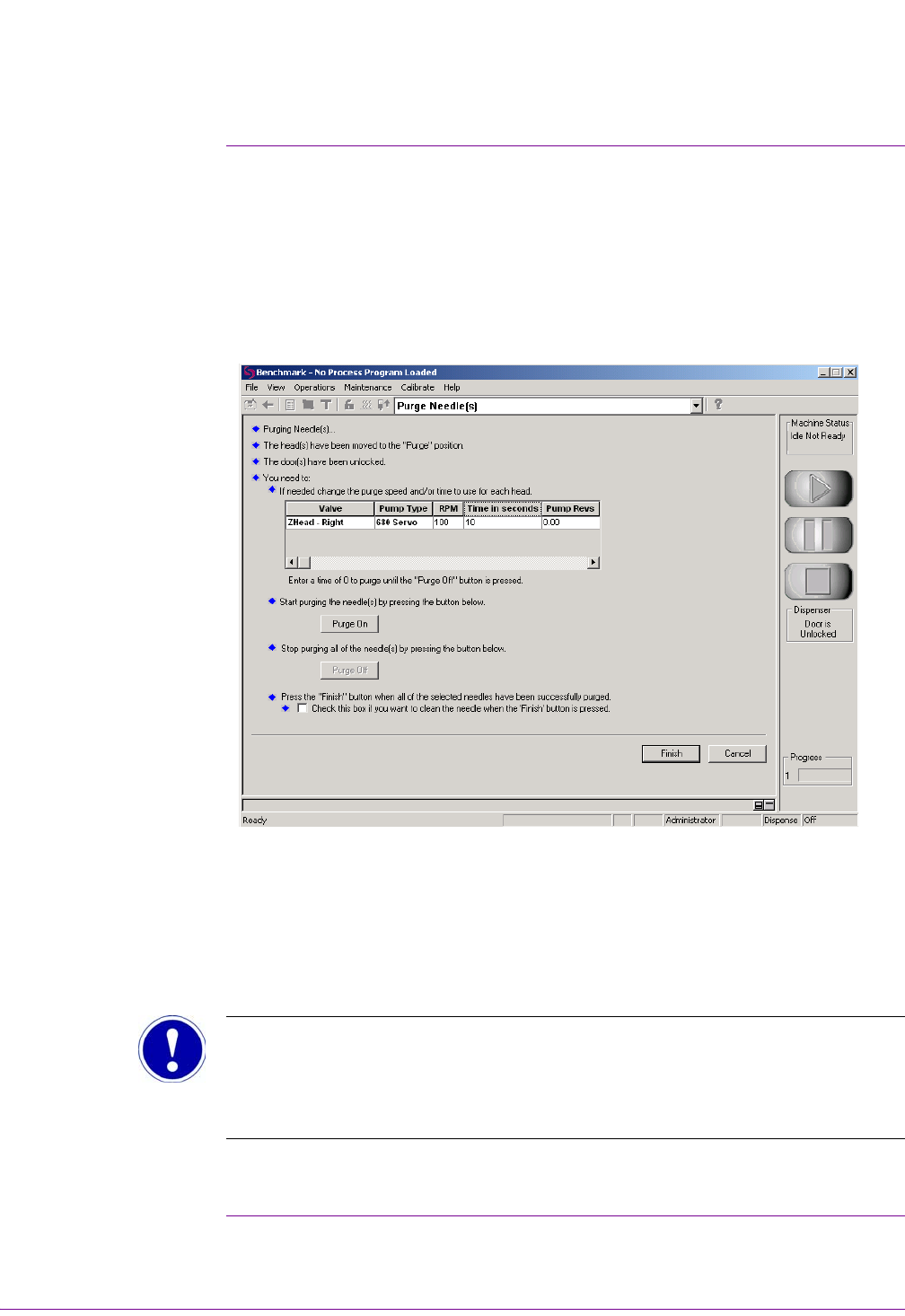
3. From the main Benchmark screen select: Maintenance > Purge Needle. The
Purge Needle(s) screen displays (Figure 3).
Figure 3
4. Select Pump Type 680 Servo. The head will move to the Purge position.
5. Select the appropriate Valve.
6. Set the RPM to 100-200.
7. Set the time to 15-20 seconds.
8. Select the Purge On button.
Attention
When the Purge On button is selected the pump begins to operate. The leadscrew is
lifted from the needle, allowing the flow of material through the needle.
9. Observe the needle to verify proper volume.