4OM-1064-001.pdf - 第175页
Tg0249-PM-MM 7.1 P .E.C. RECOG TEST Display When the [P .E.C. RECOG TEST] key is pressed at the “DEVICE TEST” dis- play , the following display appears on the screen. Refer to the following sessions for detailed descript…
Tg0249-PM-MM
7. DEVICE TEST Display
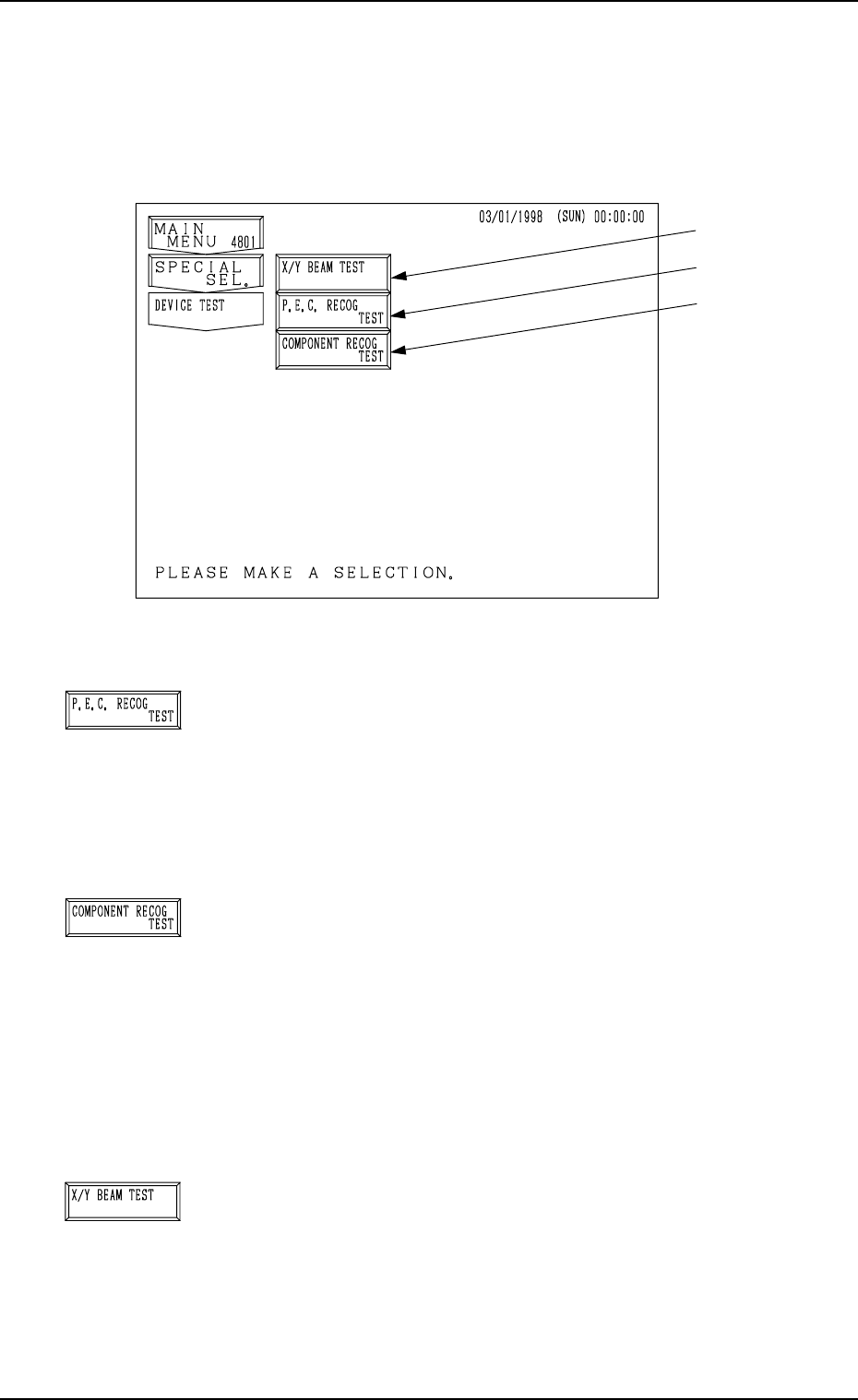
When the [DEVICE TEST] key is pressed at the “SPECIAL SEL.” display, the
following display appears on the screen.
*1 [P.E.C. RECOG TEST] Key
When this key is pressed, the “P.E.C. RECOG TEST” dis-
play opens,enabling the test and check operations (whether
or not P.E.C. recognition can be performed normally) of
fiducial mark recognition function.
Menus are provided to prepare for creation of recognition
mark data.
*2 [COMPONENT RECOG TEST] Key
When this key is pressed, the “COMPONENT RECOG.
TEST” display opens, enabling the check operation of cre-
ated component library data.
Menus are provided to make a test on component recogni-
tion and check whether or not the component designated
using a test ID can normally be recognized.
Note: When the [OPERATION/SET UP] switch is set to
the “SET UP” side, the device test operation can-
not be performed.
*3 [X/Y BEAM TEST] Key
When this key is pressed, the “X/Y BEAM TEST” display
appears on the screen, enabling the activation of only the
X/Y beam according to the current pattern program.
Menus are provide to check pattern program data and de-
termine operation start step No. of semi-automatic opera-
tion for continuous operation of the machine to complete
unfinished P.C.B.’s.
7. DEVICE TEST Display
9910-001 3-128
Fig. 3.84
*1
*2
*3
Tg0249-PM-MM
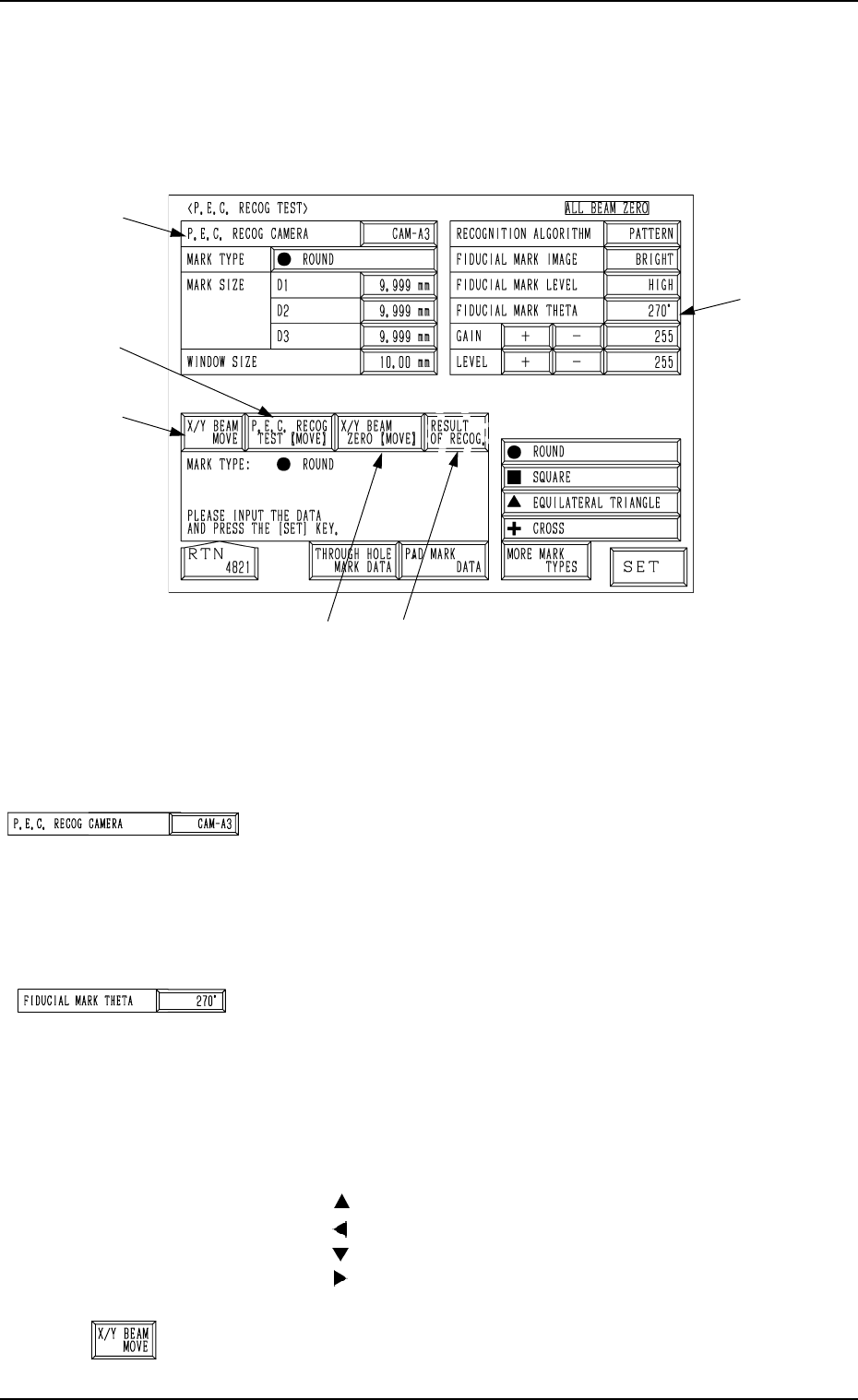
7.1 P.E.C. RECOG TEST Display
When the [P.E.C. RECOG TEST] key is pressed at the “DEVICE TEST” dis-
play, the following display appears on the screen.
Refer to the following sessions for detailed description of each data item.
Volume 2: “2.3.4 P.E.C. MARK DATA EDIT Display”
“5.10 P.E.C. RECOG CAMERA OFFSET Display”.
*1 P.E.C. RECOG CAMERA
Select the camera to be used for the P.E.C. recognition func-
tion.
<Options>
“CAM-A3” (Beam A)
“CAM-B3” (Beam B)
*2 FIDUCIAL MARK THETA
The parameter set in the “FIDUCIAL MARK THETA” data
box is unique for recognition test.
An angle must be set in the data box corresponding the
parameter set in the “MARK TYPE” data box at the “P.E.C.
MARK DATA EDIT” display.
Example:
Setting for equilateral triangle (upward)
: 0°
: 90°
: 180°
: 270°
*3 [X/Y BEAM MOVE] Key
When this key is pressed, the “X/Y BEAM MOVE” dis-
play appears on the screen.
7. DEVICE TEST Display
0004-002 3-129
Fig. 3.85
*1
*2
*3
*4
*5
*6
Tg0249-PM-MM
*4 [P.E.C. RECOG TEST [MOVE]] Key
This key is used to perform the recognition test.
When this key is selected and the [MOVE] button is pressed,
the recognition test starts.
*5 [X/Y BEAM ZERO [MOVE]] Key
This key is used to finish the P.E.C. recognition test and
zero the X/Y beam.
When this key is selected and the [MOVE] button is pressed,
the X/Y beam is zeroed.
*6 [RESULT OF RECOG.] Key
When this key is pressed, the “RESULT OF P.E.C. REC-
OGNITION” display appears on the screen.
The result of recognition appears after the P.E.C. recogni-
tion test is performed.
7.1.1 X/Y BEAM MOVE Display
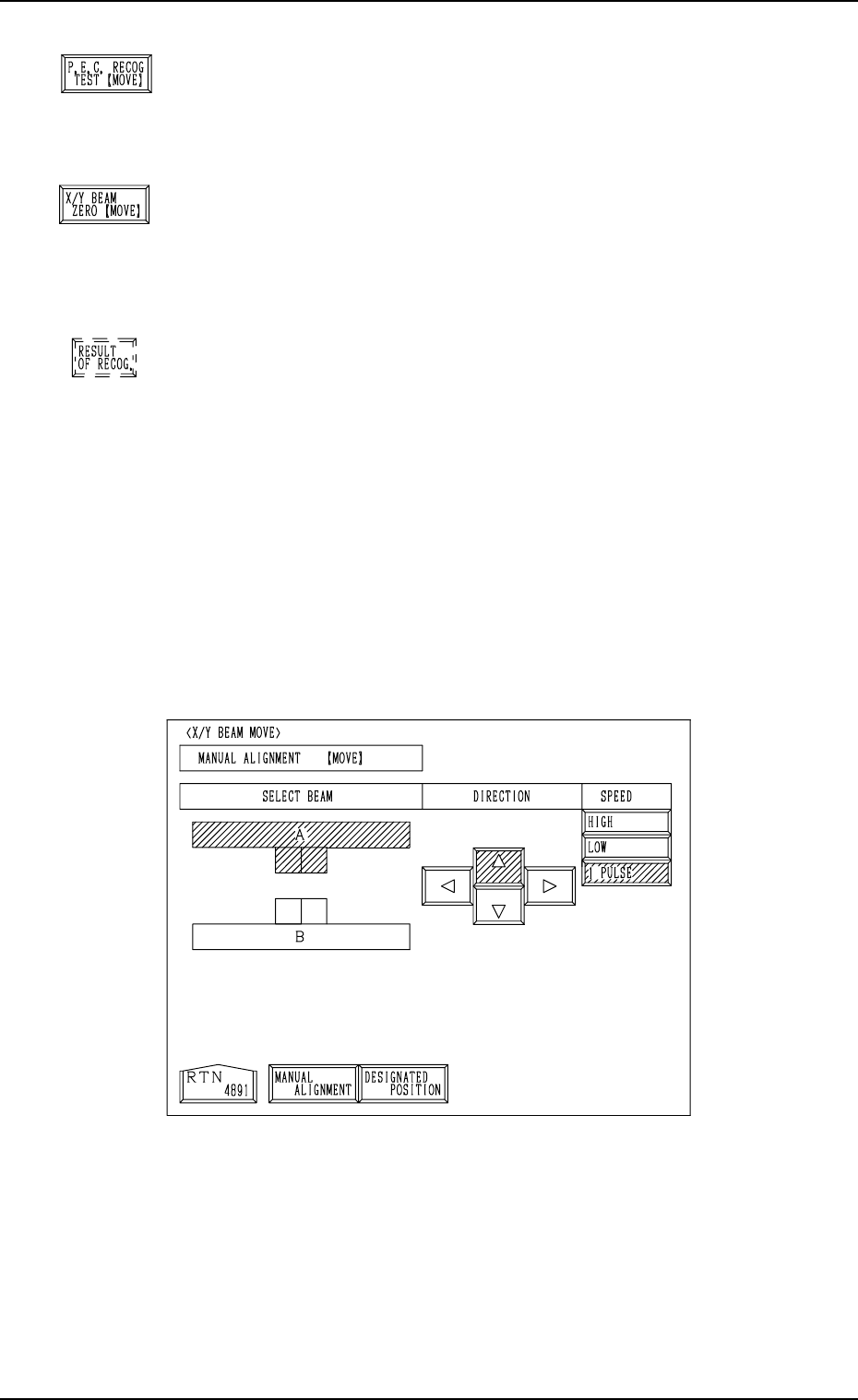
When the [X/Y BEAM MOVE] key is pressed at the “P.E.C. RECOG TEST”
display, the following display appears on the screen.
When the [DESIGNATED POSITION] key is pressed at the display (Fig. 3.86-
1), another “X/Y BEAM MOVE” display (Fig. 3.86-2) appears on the screen.
7. DEVICE TEST Display
9910-001 3-130
Fig. 3.86-1