4OM-1064-001.pdf - 第24页
Fig. 1.15 T eaching Plate Section T eaching Plate (Component Recognition Offset Jig) Checking and Cleaning • Check for any damage. • Clean it using air blow for the cam- era. Position of T eaching Plate Checking and Clea…

Table 1.6
6. Monthly Maintenance
Note: Grease Symbols
DE1 : DAPHNE EPONEX GREASE No.1
NM1 : NEW MOLYNOC GREASE No.1
9910-001 Tg0249-PM-MM1-13
6. Monthly Maintenance
Maintenance Spots Check
Name
Fig.
No.
Description Grease
Cleaning
Tools,
Nozzles, etc.
Teaching Plate
Section
Teaching Plate
(Component
Recognition Offset
Jig), Position of
Teaching Plate, Back
Light Stage
1.15 Checking and Cleaning Air Blow for
Camera
Nozzle Stocker Cam Follower 1.16 Cleaning and
Lubrication
Oiled Rag,
NM1, Brush
Nozzle Storage
Section
1.16 Cleaning Rag
Inside of Vacuum
Nozzle
1.17 Cleaning Air Gun
Hole of Vacuum
Nozzle
1.17 Cleaning Air Gun
Vacuum Nozzle End 1.17 Cleaning Rag
Placement Head Vacuum Filter 1.18 Checking Vacuum
Filter,
Replacement
Jig
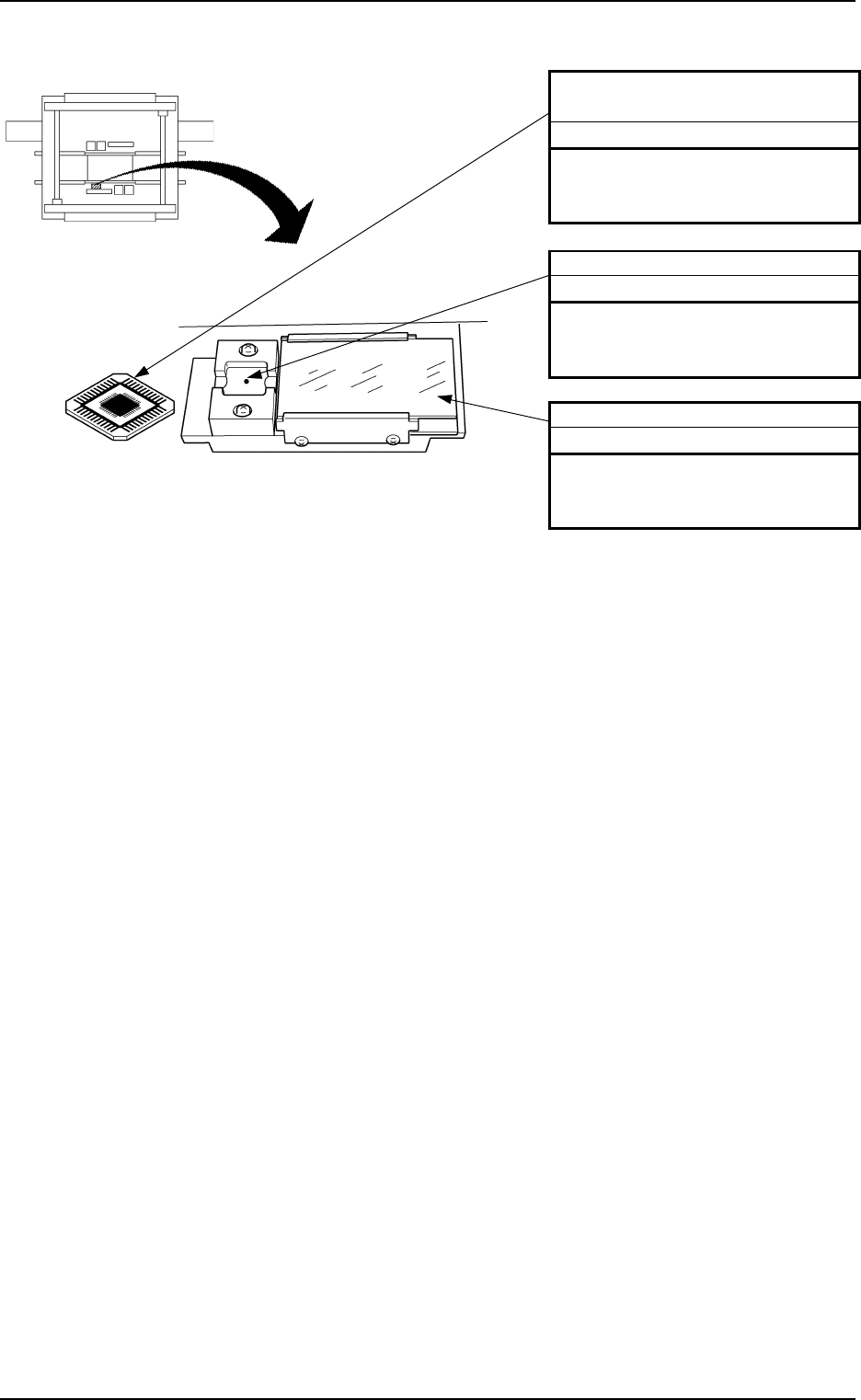
Fig. 1.15 Teaching Plate Section
Teaching Plate (Component
Recognition Offset Jig)
Checking and Cleaning
• Check for any damage.
• Clean it using air blow for the cam-
era.
Position of Teaching Plate
Checking and Cleaning
• Check for any damage.
• Clean it using air blow for the cam-
era.
Back Light Stage
Checking and Cleaning
• Check for any damage.
• Clean it using air blow for the cam-
era.
Beam A Side
Beam B Side
Note: Sebum nor oil, etc., should not adhere to the teaching plate (component rec-
ognition offset jig), the position of the teaching plate, and the back light stage.
If sebum or oil, etc., adheres, wipe it off with a lens cleaning cloth which
contains a small amount of alcohol.
9910-001 Tg0249-PM-MM1-14
6. Monthly Maintenance
1-15
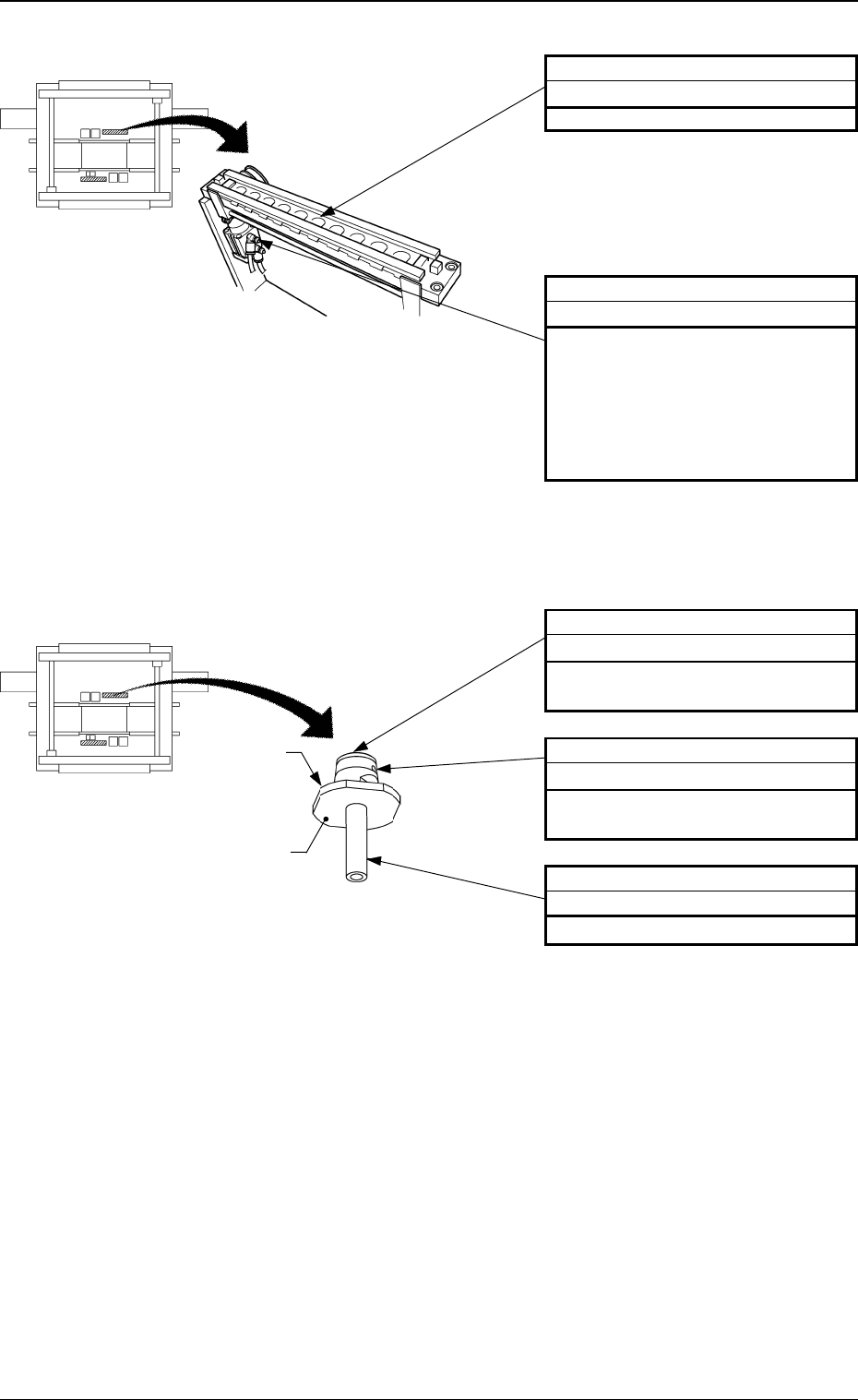
Fig. 1.17 Vacuum Nozzle
0004-002 Tg0249-PM-MM
6. Monthly Maintenance
Inside of Vacuum Nozzle
Cleaning
Blow air to the inside of the vacuum
nozzle.
Hole of Vacuum Nozzle
Cleaning
Blow air to the hole of the vacuum
nozzle.
Vacuum Nozzle End
Cleaning
Clean it with a rag.
Fig. 1.16 Nozzle Stocker
Nozzle Storage Section
Cleaning
Remove dirt and dust using a rag.
Cam Follower
Cleaning and Lubrication (NM1)
(1) Wipe off old grease with an oiled
rag.
Note: Take care not to leave
any waste thread.
(2) Apply new grease with a brush,
etc.
Beam A Side
Beam B Side
Beam A Side
Beam B Side
Note: Sebum nor oil, etc., should not adhere to the surface of the diffusion plate.
Do not use a rag to wipe off dirt.
Refer to “1.7 Vacuum Nozzles of Section 2 in Volume 1” for details.
Diffusion
Plate
Note