00197400-02_VD_SIPLACE_Pro_11.2_DE_EN.pdf - 第22页
SIPLACE Pro V11. 2 / Soft ware Ver sion Desc ription A usga be 05/2014 Edit ion 22 Example: Re port – Filtered Setup Figure 4-9 : Report – Filtered Set up 4.14 Restricti on Rules for Separ ate Lines Addition ally to stat…

SIPLACE Pro V11.2 / Software Version Description Ausgabe 05/2014 Edition
21
NOTICE
SiCluster Multiline displays the following warning under 32-bit operating systems:
Since you are running a 32-
bit operating system, only minor cases
can be optimized due to address space limitations. Please use
this product only on 64-bit operating systems with at least 8 GB
of RAM.
Detailed information can be found in the SIPLACE SiCluster Multiline User Manual, item no.
[00197496-xx].
See also Version Description to SIPLACE V11.1, section 4.30 "Definition of Process Attributes",
item no. [00197400-01].
4.11 SIPLACE Pro Optimizer Toolkit – Enhancements
– A new local cache has been introduced for the reuse of already calculated ideal cycle times.
During the job optimization, the ideal cycle times are stored in this cache together with the
minimum clusters for which they are valid.
The cache has been integrated in SIPLACE SiCluster Multiline and in SIPLACE SiCluster
Professional as well.
– The SiCluster icon has been removed from the tool box. Only SiCluster Professional and
SiCluster Multiline can be selected as optimization tools.It depends on the respective license
which version is started when SiCluster Professional is selected.
4.12 Displaying the Cycle Time in the Optimization Results
Until now, it was assumed and calculated in the Optimization Results that the same recipe would
be produced on the other side in I-Placement mode.
In many cases, this was not realistic. Thus, the real cycle time for a conveyor lane is displayed in
I-Placement mode as of this SIPLACE Pro version (i.e. for half of the machine).
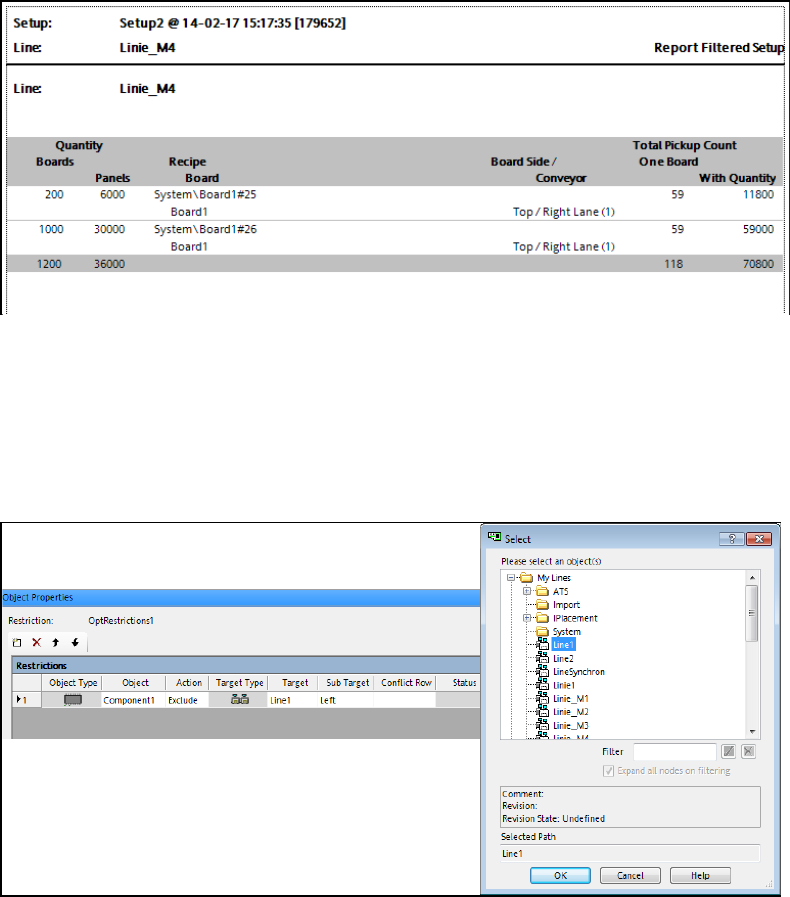
4.13 Enhancements Report – Filtered Setup
The print-out of the Report – Filtered Setup has been enhanced. The following is now displayed:
– Number of boards
– Number of panels that are flagged to be counted on the board
– Number of placement positions on a board
– Number of placement positions for n boards
The print-out of the Report – Filtered Setup can either be activated in the recipe list in the Job
Editor or on the Line Control GUI. The number of boards or the number of panels can be entered
in the recipe and on the Line Control GUI (LC-GUI) as well.
However, the entry in the LC-GUI has priority. The entry in the LC-GUI does not change the entry
in the recipe!
SIPLACE Pro V11.2 / Software Version Description Ausgabe 05/2014 Edition
22
Example: Report – Filtered Setup
Figure 4-9: Report – Filtered Setup
4.14 Restriction Rules for Separate Lines
Additionally to station types and stations, separate lines can now be selected as target for
restriction rules in the Restriction Editor.
Figure 4-10: Restriction rules for line
4.15 Grid Board – Map Offset for Grid Panel Type
The grid panel type on the grid board is always centered and has its zero point in the middle.The
grid panel type also contains fiducials that are aligned with this center point. The entire grid panel
type may be placed anywhere on the grid board, but if it is moved the fiducial positions will change,
too.
Therefore, a new offset has been introduced as of this SIPLACE Pro version with which the entire
grid panel package can be moved within the coordinate system without affecting the fiducials.
Primarily, this is required in the production process if only half of the grid panel package fits at the
left or right edges of the grid board. In this case the user can move the entire grid panel until it fits
completely at one edge of the grid board.
SIPLACE Pro V11.2 / Software Version Description Ausgabe 05/2014 Edition
23
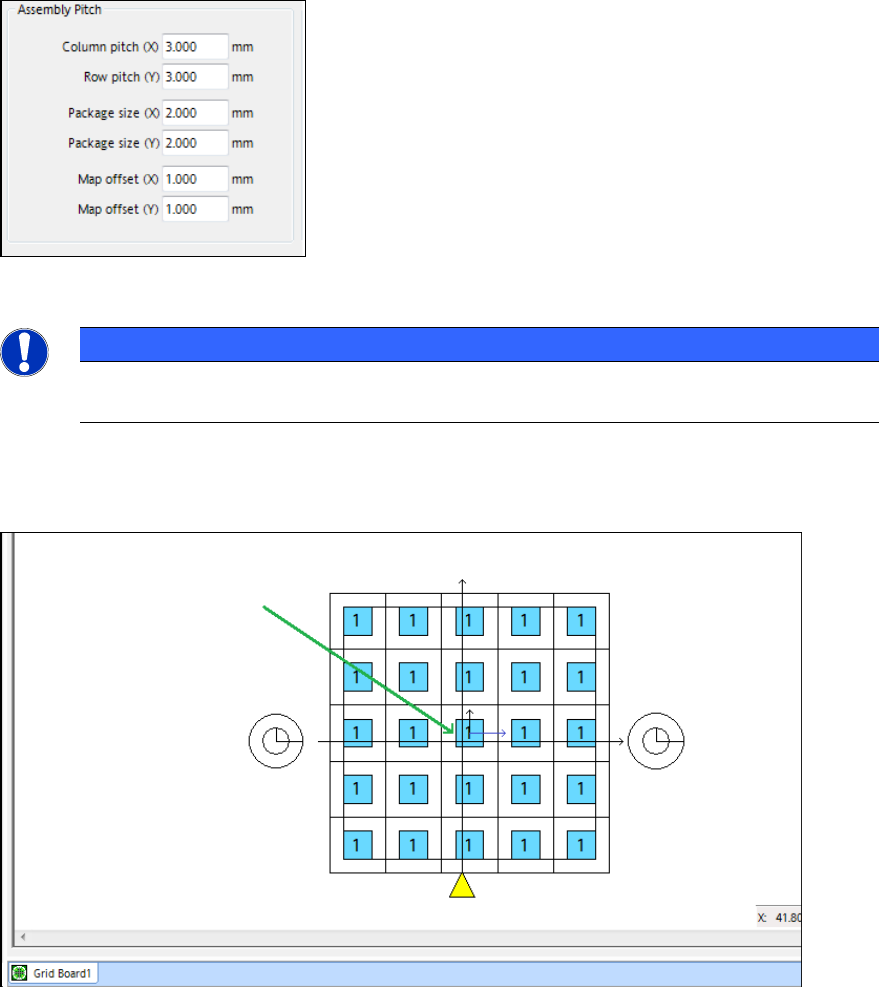
The X and Y map offsets can be set for a grid panel in the Grid Panel Type tab of the Grid Board
Editor:
Figure 4-11: Setting map offsets for grid panel packages
NOTICE
The Outline offset is unaccounted for now and has been removed from the Grid Panel
Type tab.
The middle of the grid panel is identified by small X- and Y-arrows if the map offset is nonzero.
Thus, it is visible that the grid panel is not centered within the coordinate system.
Figure 4-12: Drawing of grid panel package
Additionally, the components of the selected grid panel packages can be displayed via the new
Show components of selected packages button.
The number of displayed components might be reduced so that the machine speed will not slow
down.