00197400-02_VD_SIPLACE_Pro_11.2_DE_EN.pdf - 第5页
SIPLACE Pro V11. 2 / Soft ware Ver sion Desc ription A usga be 05/2014 Edit ion 5 1 Introduc tion SIPLAC E ® Pro is the pro gramm ing s y stem for SIPLACE © placem ent m achines under W indows. The placem ent progr ams f…
SIPLACE Pro V11.2 / Software Version Description Ausgabe 05/2014 Edition
5
1 Introduction
SIPLACE® Pro is the programming system for SIPLACE© placement machines under Windows.
The placement programs for the placement lines are prepared, generated and optimized with
SIPLACE Pro.
1.1 System Overview
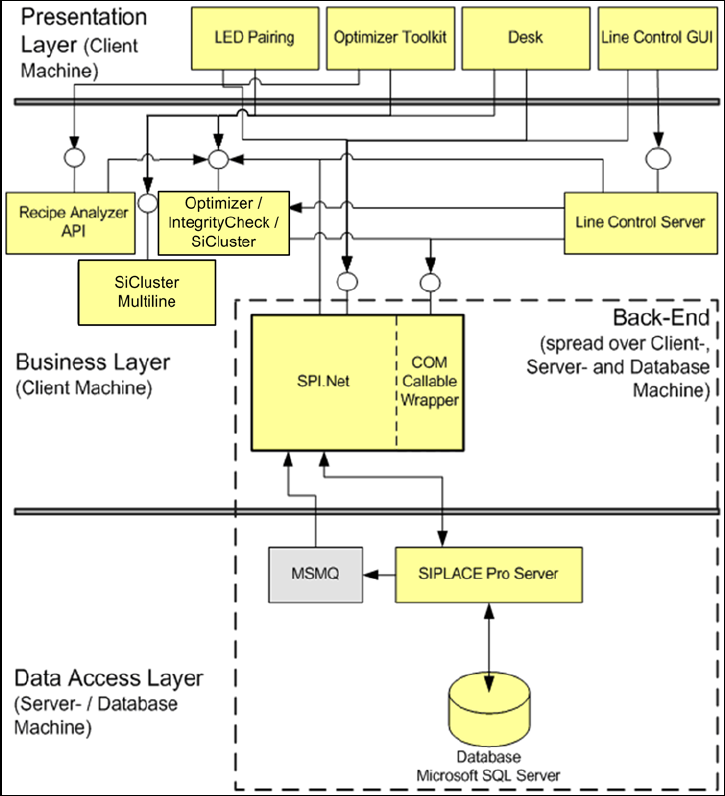
The SIPLACE Pro programming system consists of the following subsystems:
Figure 1-1:System overview
SIPLACE Pro saves all data in a database (Microsoft SQL Server). All clients, such as the Desk,
communicate via the Business Layer with the SIPLACE Pro Server.
The system installation can be distributed across several computers.

SIPLACE Pro V11.2 / Software Version Description Ausgabe 05/2014 Edition
6
2 Scope of Delivery
2.1 Packages
● SIPLACE Pro Basic License V11.2, item no. [00116532-xx] contains:
– 1 SIPLACE Pro Factory License (without connection to the SIPLACE stations)
● SIPLACE Pro Media Package V11.2, item no. [00116531-xx] contains:
– Software CD-ROM with SIPLACE Pro 11.2
– Software CD-ROM with OIS application 11.2, item no.: [00392168-xx]
– Software DVD SIPLACE NET Support Media Version 1.16, item no.: [00392803-xx]
– Software Installation Manual SIPLACE Pro V11.2, (English) item no.: [00197401-xx]
– Software Installation Manual SIPLACE LED Pairing V2.1, (English) item no.: [00197283-xx]
● SIPLACE Pro Language Package V11.2, item no.: [00116534-xx]
– Software CD-ROM (language pack)
– Software Installation Manual SIPLACE Pro V11.2 (English) Language Pack, item no.:
[00197401-xx]
NOTICE
To Support Media DVD:
Please use the Navigation Guide button of the Support Media Launcher to navigate
through the documentation.
The navigation guide and all related documents are available on the Support Media
DVD.