00196737-07_IM_eWinXP_DE_EN.pdf - 第12页
W indows XP Em bedded / I nstallat ion Ma nual Ausgabe 06/2013 Ed ition 12 4.2 Perfor ming B IOS U pdate/ S etti ngs on the M achine C omput er and Visi on Co mputer The im age files for the BIO S updat e/BIO S settin gs…
Windows XP Embedded / Installation Manual Ausgabe 06/2013 Edition
11
4 Installation
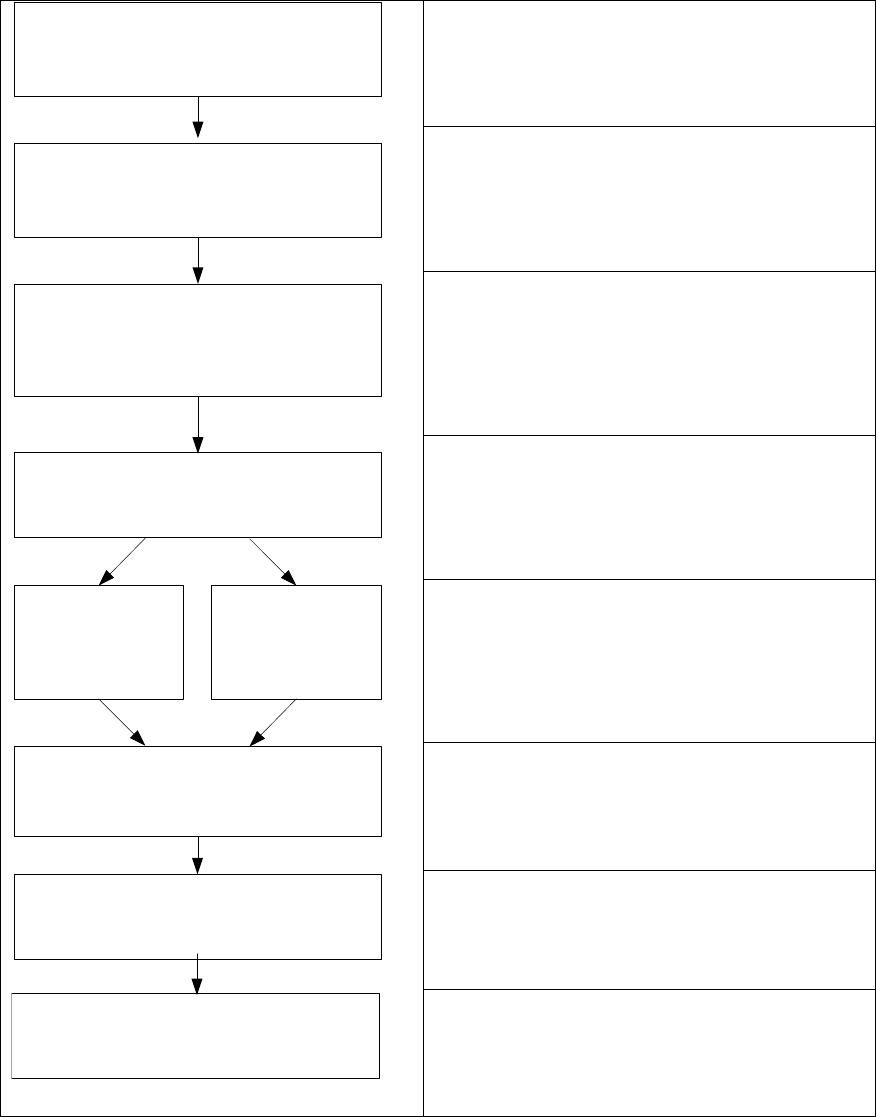
4.1 Overview
Install Boot CD/DVD
Choose computer configuration
CD SIPLACE XP embedded Configurator
Install and calibrate Touchscreen
BIOS settings on the machine/Vision
computer
Perform BIOS settings
Back up the machine data
BIOS update on the machine/Vision
computer
Perform BIOS update
Restore CD
CPU 627/627B/
827B, I-Base
Restore DVD
CPU 627C/827C
Restore the initial configuration
See section 4.2.
See section 4.2.
Installing the operation system Windows XP
embedded, see section 4.3.
See section 4.3.2.
See section 5.
See section 6.

Windows XP Embedded / Installation Manual Ausgabe 06/2013 Edition
12
4.2 Performing BIOS Update/Settings on the Machine Computer and
Vision Computer
The image files for the BIOS update/BIOS settings and the corresponding installation instruction
(readme file) are available on the V1.0 BIOS CD that can be ordered via the service technician or
downloaded from the SIPLACE Download Center.
NOTICE
Please note that the BIOS settings are different for the 60x and the 70x station software!
As of the 605.03 SP2 station software, the "Multi Core" functionality of the processors is
used for the D series placement machines in one-computer operation. The
BIOS settings
have to be made accordingly.
The following steps have to be performed before installing Windows XP Embedded:
► Press the F2 key to access BIOS after the computer has started.
► Press the F9 key (Setup Default) to set the default settings.
NOTICE
It is not necessary to reinstall Windows XP Embedded on pre-installed computers!
► Change the BIOS settings for the various BoxPCs as described in the following sections.
4.2.1 BIOS Settings for 627 BoxPC with 60x and 70x Station Software Versions
► Set the following values in BIOS:
Under Main / Hardware Options:
Safecard Functions [ Disabled ]
Fan Control [ Enabled ]
Under Advanced / SATA/PATA Configuration:
SATA Controller Mode [ Compatible ]
Under Advanced:
Installed O/S [ WinXP ]
Under Boot the following boot priority sequence:
1: USB CDROM:
2: SATA0: xxxxxxxxxx
3: ......
► Exit BIOS with Exit / Exit saving changes / Yes.
Windows XP Embedded / Installation Manual Ausgabe 06/2013 Edition
13
4.2.2 BIOS Settings for 627B / 827B BoxPCs with 60x und 70x Station Software
Versions
► Set the following values in BIOS:
Under Main / Hardware Options:
PCI-MPI/DP [ Disabled ]
Safecard Functions [ Disabled ]
Fan Control [ Enabled ]
Under Advanced / SATA/PATA Configuration:
SATA Controller Mode [ Compatible ]
Under Advanced:
Core Multi-processing [ Enabled ] for station software 70x
Core Multi-processing [ Disabled ] for station software 60x
Under Advanced:
Installed O/S [ WinXP ]
Under Boot the following boot priority sequence:
1: USB CDROM:
2: SATA0: xxxxxxxxxx
3: ......
Under Exit / Profile:
Profile: [User]
► Exit BIOS with Exit / Exit saving changes / Yes.