Apollo1_Operators_Manuel.pdf - 第120页
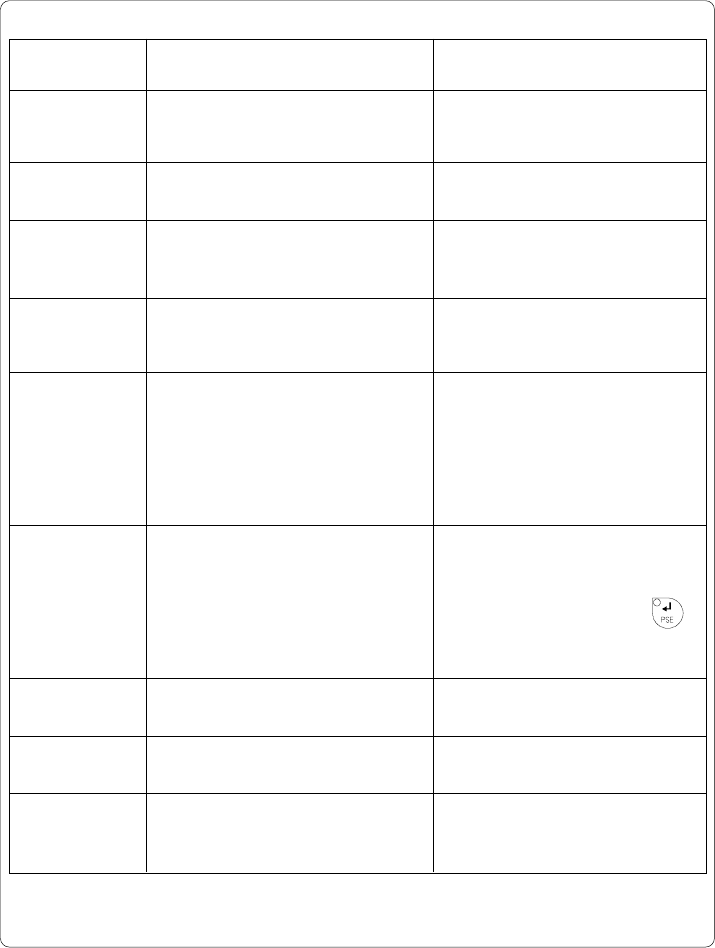
C-1 20 cab - Produkttechnik GmbH / Tharo Systems, Inc. Possible cause Hardware error PC card error The data receive buffer is full but the computer is still transmitting data Refers to the optional memory card; No more d…
C-119cab - Produkttechnik GmbH / Tharo Systems, Inc.
Irrecoverable Errors
While switching on the printer or during printing, a fault has occured which
cannot be cleared by the operator without cancelling the current print run.
(e.g. hardware fault)
Display
The display shows the type of fault.
LED Display
LED CAN is flashing.
Function Keys
CAN key Cancels the current print job.
Switch into ONLINE mode.
(LED ONL on, LED CAN off, LED PSE off)
If ONLINE mode cannot be entered, switch printer on and off
again.
If the fault remains again, contact Technical Service
Table C-2 Function keys in mode FAULT-IRRECOVERABLE
Error Messages
The following table contains an overview of possible error messages, their
possible causes as well as solutions to the problems.
Correctable faults as defined above are marked with a " * ".
If the suggested solutions turn out unsuccessful, contact our Technical Service.
A list of errors, which are exclusively related to the applicator, is included in the
manual of the applicator.
C-120 cab - Produkttechnik GmbH / Tharo Systems, Inc.
Possible cause
Hardware error
PC card error
The data receive buffer is full but
the computer is still transmitting
data
Refers to the optional memory card;
No more data can be stored on the
card
Refers to the optional cutter;
The cutter is unable to cut the labels
due to the extreme thickness of the
material;
Cutter cannot return into its home
position and stays in an undefined
position
Refers to the optional cutter;
The cutter is unable to cut the labels
due to the extreme thickness of the
material but is able to return into its
home position
Hardware error referring to the
optional cutter
Hardware error
Refers to the peripheral connector;
Caused by connected optional device
Solution
Switch printer off and then on.
If error recurs ® contact Service.
Replace battery inside the PC card.
Use the protocol (preferably RTS/
CTS) for data transmission.
Replace card.
Switch printer off, remove material
from the cutter, switch printer on.
If then the error message "Cutter
stuck" appears ® contact Service.
Otherwise, check the thickness of
the label material and replace if
necessary.
Switch printer off, and check the
material in the cutter area for possible
double laying.
Start test cut by pressing the
key. If error recurs, replace the label
material.
Switch printer off and then on.
If error recurs ® contact Service.
Switch printer off and then on.
If error recurs ® contact Service.
Switch printer off and then on.
If error recurs check the connected
device.
Error message
ADC malfunction
Battery low
Buffer overflow
Card full
Cutter blocked
Cutter jammed *
Cutter stuck
dRAM
malfunction
Ext. I/O error
Table C-3 Error messages
C-121cab - Produkttechnik GmbH / Tharo Systems, Inc.
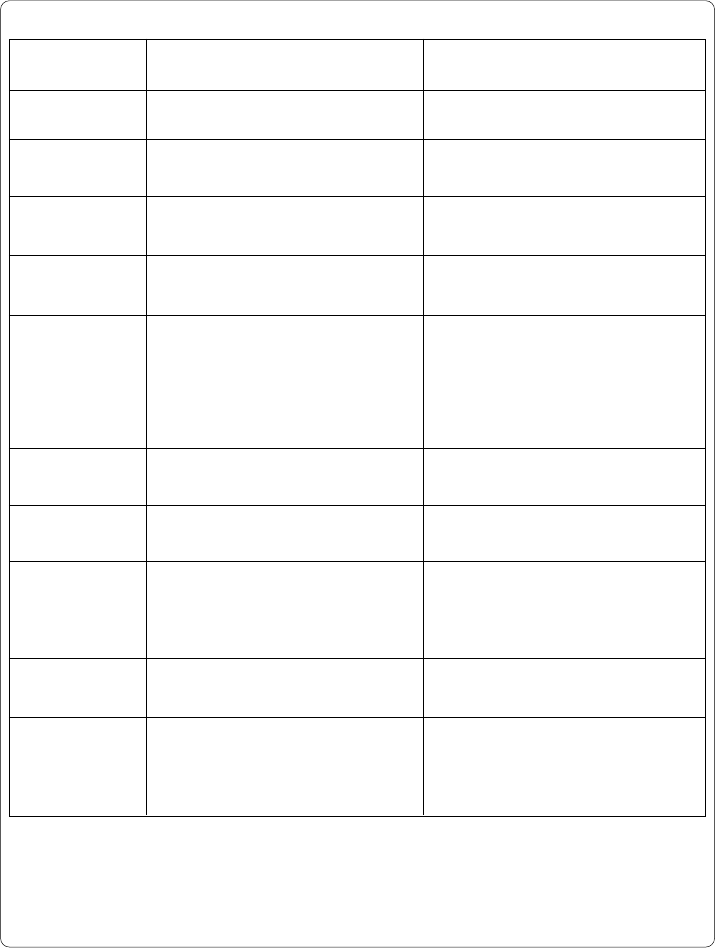
Error message
File not found
FPGA
malfunction
Head error
Head open *
Head too hot *
Invalid data
Invalid outline
Invalid setup
LCD malfunction
Memory overflow
Solution
Check the contents of the card.
Switch printer off and then on.
If error recurs ® contact Service.
Switch printer off and then on.
If error recurs ® contact Service.
Lock printhead.
After pausing to cool down the
printhead, the print job will be
continued automatically.
If the fault recurs repeatedly, reduce
the heat level or the print speed via the
software.
Cancel current print job.
Check data.
Cancel current print job.
Change font.
Use RESTORE function to reset all
settings back to factory settings.
Configure setup. (see Chapter 9)
If error recurs ® contact Service.
Switch printer off and then on.
If error recurs ® contact Service.
Cancel current print job.
Reduce amount of information.
Possible cause
Requested file is not on the card
Hardware error
Hardware error
Printhead is not properly locked
(Apollo 1 only)
Printhead is overheated due to
labels containing a lot of graphics,
text, bar codes, etc.
Fault while downloading graphic
data
Error with the selected font
(download font)
Setup is invalid
Hardware error
Current print job contains too much
information
(selected fonts, large graphics)
Table C-3 Error messages (continuation)