Apollo1_Operators_Manuel.pdf - 第91页
91 cab - Produkttechnik GmbH / Tharo Systems, Inc. Memory Cards The printers of the Apollo series provide an option for using memory cards to permanently save graphics, fonts, complete label formats, or database informat…
90 cab - Produkttechnik GmbH / Tharo Systems, Inc.
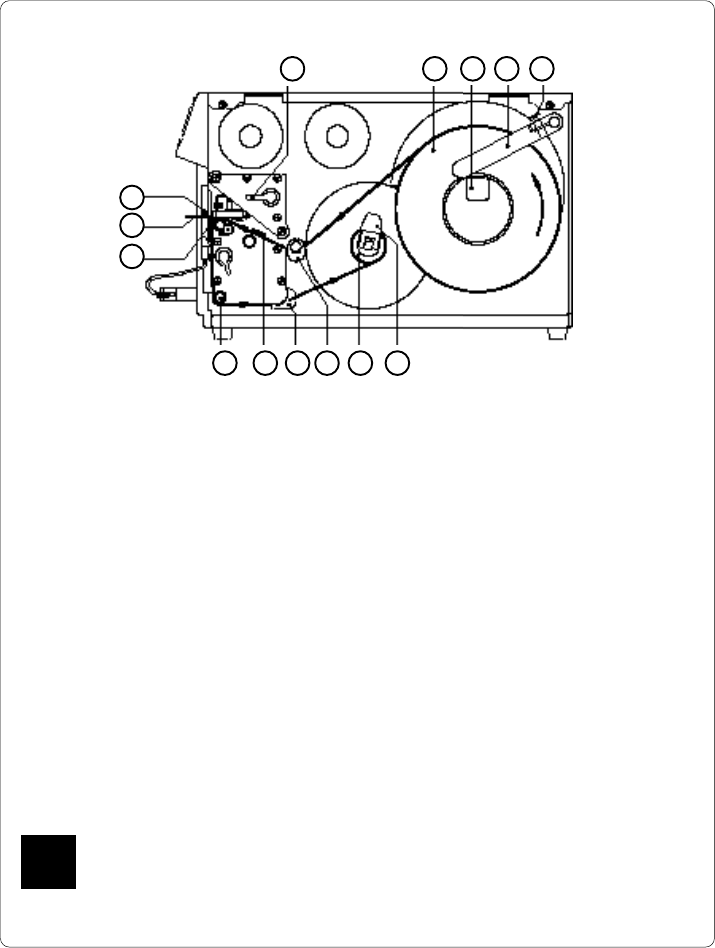
1. Lift the printhead by turning the lever (7) clockwise until it stops.
2. Loosen the knurled screw (11) and swing media retainer (10) upwards.
3. Place the media roll (8) onto the media hub (9). Swing the media retainer
(10) downwards and inwards until it rests against the side of the roll.
Tighten the knurled screw (11).
4. Slide the two media guides (14/15) to their outermost position.
5. Unroll a length of media stock and feed it through the Apollo as shown in
Figure 13 n. It is particularly important to ensure that the media strip slides
properly between the adjustable fittings of the photocell assembly (16).
6. Feed the media strip between the print roller and the thermal printhead,
and then over the dispense edge (18) up to the internal rewinder (13).
7. Turn the locking lever (12) of the internal rewinder towards the axle to
release the expanding axle. Slide the media strip underneath the rewinder
clamps up to the rewinder plate. Expand the axle by turning the lever (12)
back to its original position. Rotate the rewinder counter-clockwise to tighten
the media strip.
8. Slide the two media guides (14/15) against the edge of the media strip.
9. Lock the printhead by turning the lever (7) counter-clockwise until it stops.
If you do not use the printer for an extended period of time, lift the printhead to
avoid possible flattening of the print roller.
Fig. 13 n Inserting the labels for peel-off
F
121314151617
Inserting the Labels for Peel-off
7 8 9 10 11
18
19
6
91
cab - Produkttechnik GmbH / Tharo Systems, Inc.
Memory Cards
The printers of the Apollo series provide an option for using memory cards to
permanently save graphics, fonts, complete label formats, or database
information. Data transfer may be performed via interface. Alternatively, the
printer is able to read from cards which has been written on in PC card drives
of lap-tops or other computers, etc.
The Apollo is able to read from PCMCIA version 2.1 compatible sRAM cards
or Flash-EPROM cards. The maximum memory capacity for Apollo 1/2 is 4
MegaByte, and for Apollo 3 16 MegaByte.
Preparing the Memory Card
1 2 3
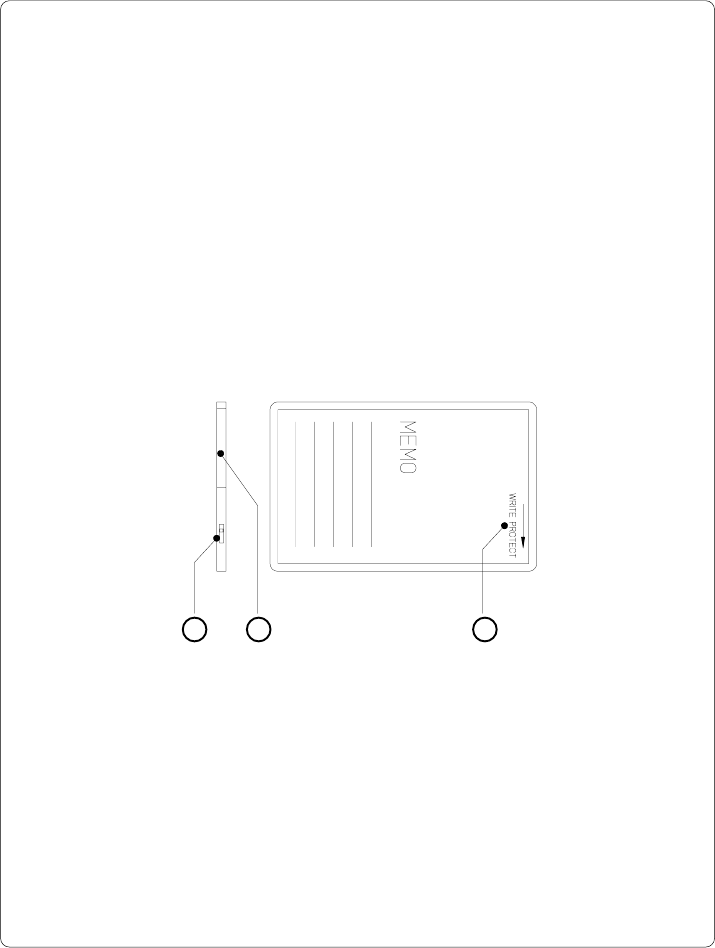
Fig. 13 o Write protection/ Inserting the battery
The write protection of the card may be activated or deactivated by shifting the
switch (1) located at the front side of the card. The interpretation of the setting
may be read from an imprint (3) on the back of the card.
If you want to format the card or write on it, switch off the write protection.
In case the battery has to be replaced, it is usually found in a slot (2) above the
switch (1).
For replacing or inserting the battery in sRAM cards refer to the instructions of
the manufacturer.
92 cab - Produkttechnik GmbH / Tharo Systems, Inc.
Installation of the Memory Card
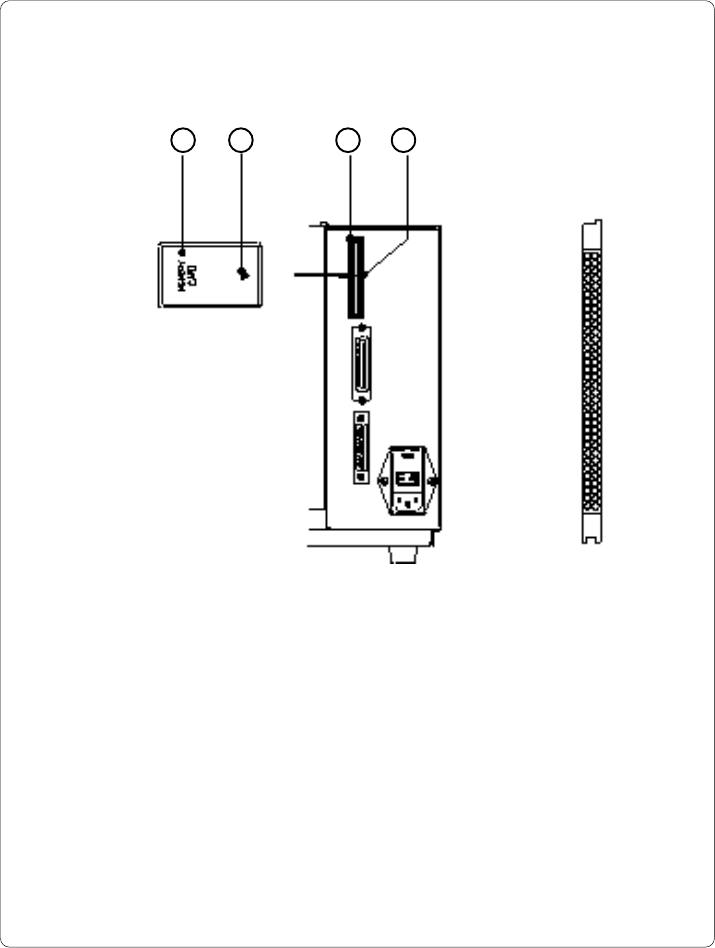
Fig. 13 p Installation of the memory card Fig. 13 q Connecting side
1 2 34
The front side of the memory card (1) is usually marked by the inscription
"MEMORY CARD", and an arrow (2) representing the direction of inserting the card
into the drive. There is also an arrow (4) impressed into the frame of the memory
card slot of the Apollo.
Insert the card (1) into the slot (3) so that the front of the card faces the arrow (4).
At the connecting side of the card there are different guides on the top and the
bottom which make it impossible to insert the card incorrectly.