00191376-07.pdf - 第22页
4 Weekly maintenance jobs HS Preventive Maintenance 01/2006 US E dition 22 4 Weekly maintenance jobs 4

HS Preventive Maintenance 3 Daily maintenance jobs
01/2006 US Edition
21
Vacuum the feeders 3
3
Keep at least 1 cm away from the feeder module to avoid damaging the component covers. 3
3
a Carefully clean the feeder area with a vacuum cleaner. There should be no loose components
in the feeder area.
3
: Close the protective cover.
: Press the Start button.
3
The placement machine can continue placement during the following steps. 3
3
3
Empty waste tape container 3
s Pull the waste tape container out of the component trolley.
d Empty it into the waste bin.
3
f Clean around the waste tape container with the vacuum cleaner, then push it back into the
component trolley.
3
3
: Repeat the "daily maintenance jobs" at every feeder area.
3
3
3
3
3
3
3
3
4 Weekly maintenance jobs HS Preventive Maintenance
01/2006 US Edition
22
4 Weekly maintenance jobs
4

HS Preventive Maintenance 4 Weekly maintenance jobs
01/2006 US Edition
23
4
4
You will need the following tools and consumables for the weekly maintenance jobs. 4
– Vacuum cleaner (with appropriate nozzle)
–Waste bin
–Brush
–Scissors
– Lint-free cloths
– Ethyl alcohol
– Set of cleaned ceramic nozzles or new nozzles
– Filter mat 230x360 for the air filter box, if required.
4
There must be no PCBs in the machine during the following maintenance steps. 4
: Select “Block manually” (status closed) on the station computer and click on OK (for dual con-
veyor track 1 / track 2).
Wait until the last PCB is finished and has left the machine.
The working area is now clear. 4
: Press the Stop button.
: Open the protective cover.
4
4
To move the gantry, take hold of the C&P head handle and push gently and carefully. 4
4
: Push the gantry over the component table. This will stop it outside your working area.
4
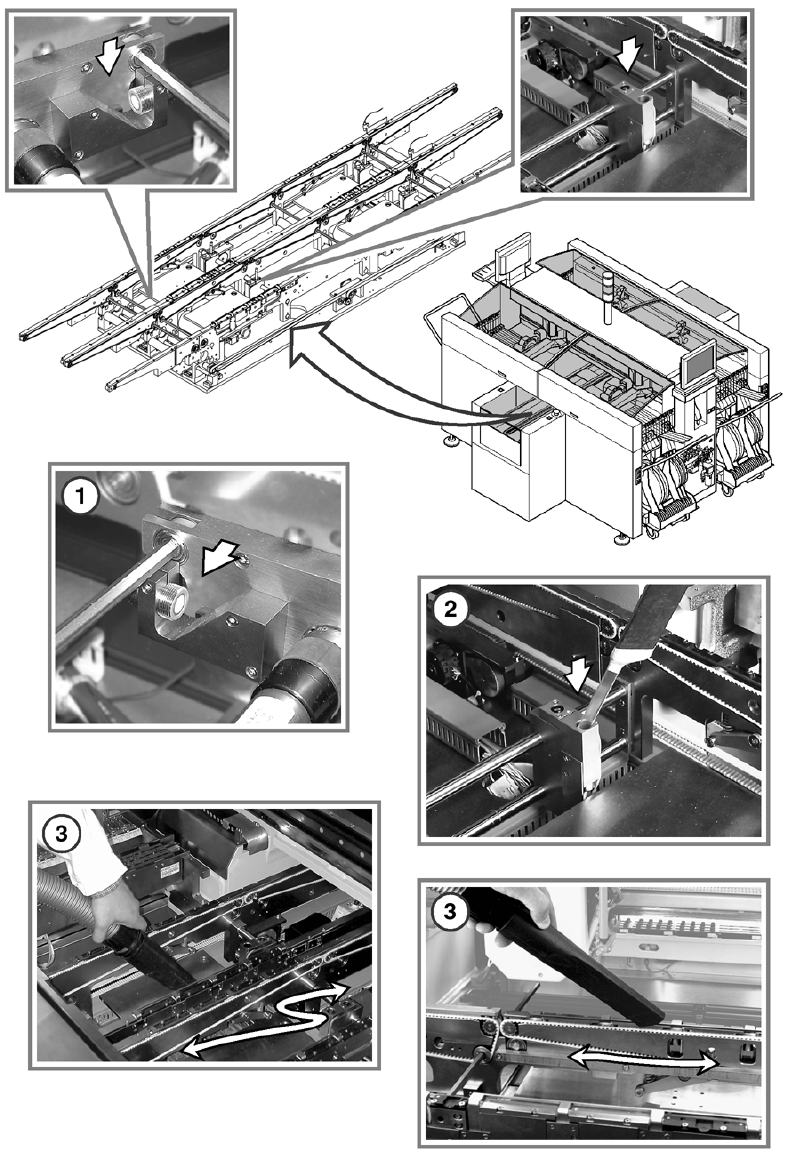
Vacuum PCB conveyor / sonar sensors (sonar sensors on the HS-50 only) 4
a Vacuum the sonar sensor (HS-50) thoroughly.
s Use a suitable vacuum cleaner nozzle to remove loose components from the sonar sensor unit
(HS-50 only).
d Use the vacuum cleaner to remove all loose components on and around the PCB conveyor.
Loose components on the PCB conveyor and in the sonar sensor unit could cause faults. 4
4
4