OperatorManual.pdf - 第12页
IMPORTANT Because the oven software app lication uses the Windows registry to manage Directories , you should only create/delete or rename direc tories through this application! setu p a reci p e or p roduct OFFLINE Belo…
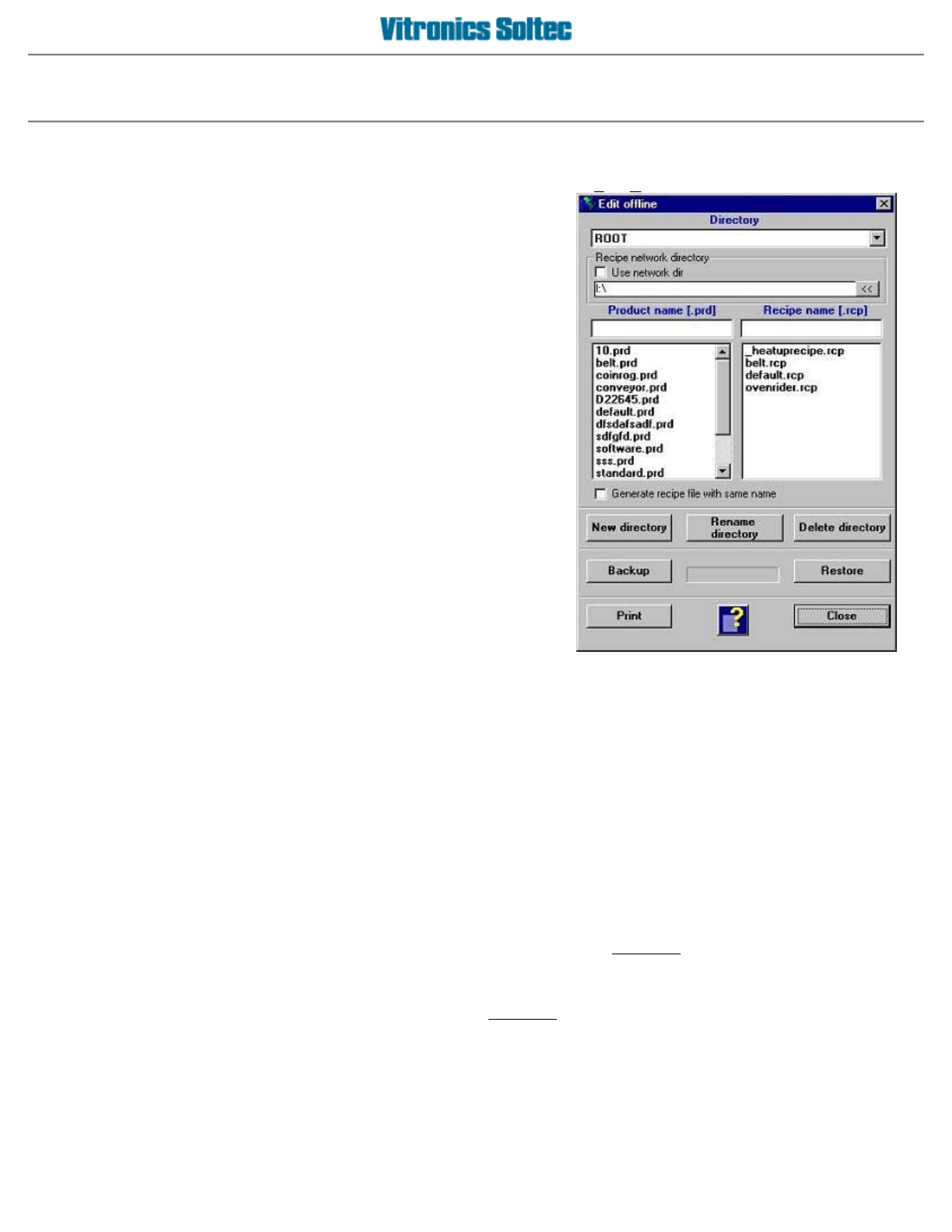
Setup recipe or product offline
To setup products or recipes offline, go to the main menu and select
F
ile, Reci
p
e/Product editor
.
This will bring you in the offline editor. A
drop down list box
containing the current directory is displayed at the top of the
dialog box.
A
t the bottom of the product/recipe editor the following
command buttons
are available:
z
New directory
- If you select this option, you will be prompted to enter a new directory name.
After a confirmation and a validity check, the new directory will be added to the directory list,
and also to the Windows registry.
z
Rename directory -
Rename the current directory.
z
Delete directory
- Delete the current directory. The directory must be empty (no products and
recipes) in order for it to be deleted.
z
Backup
- This command creates an archive copy of the
complete
product/recipe directory
structure and it's contents. The files are stored to a floppy disk using a compressed format.
z
Restore
- This command restores the
complete
product/recipe directory structure and its archive
contents from a backup floppy disk, uncompressing the files.
z
Print
- Print a complete list of all the products and recipes, per directory.
z
Close
- Close the offline editor.
Operator manual 11 August 2003
IMPORTANT
Because the oven software application uses the Windows registry to manage Directories, you
should only create/delete or rename directories through this application!
setu
p
a reci
p
e or
p
roduct OFFLINE
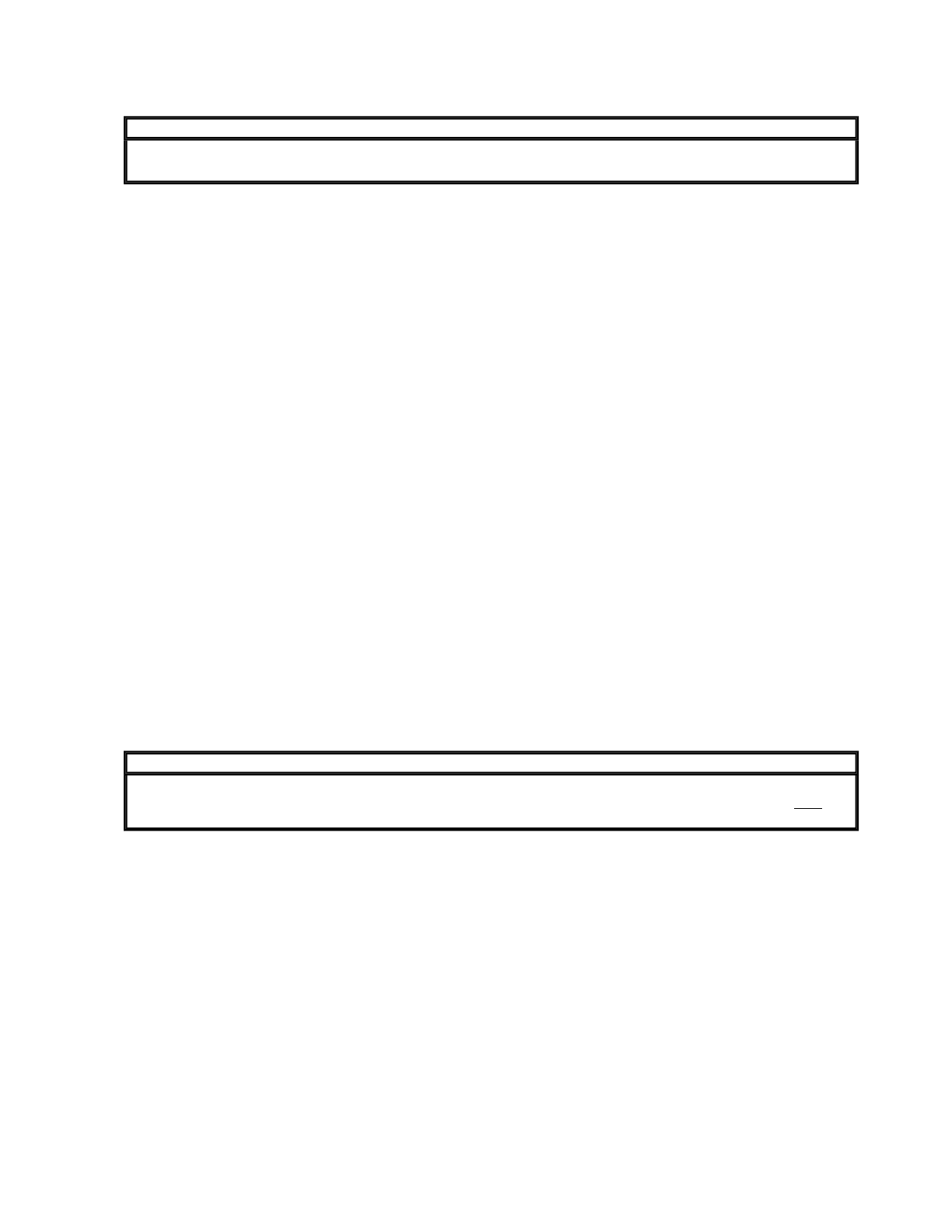
Below the directory box there are two
panels
which show the products and recipes that are present in the
current directory. If you right click your mouse when you are in one of the panels, a popup menu appears where
you can activate product/recipe dependent file actions. The following actions are the same for both recipe and
product files. The available actions are:
z
Edit
- If you select this option, you can view and modify the contents of the selected recipe. You
can also start the editor by double clicking the recipe you want to modify.
z
Send to Floppy (A:)
- Save a recipe to a floppy disk.
z
Copy from Floppy (A:)
- Copy a recipe from a floppy disk.
z
New
- Create a new recipe. The contents of the default recipe are used as initial values.
z
Copy as
- Creates a new recipe with the contents of the selected recipe used as initial
values.
z
Rename
- Rename the selected recipe.
z
Copy Recipe(s)
- Copy the selected recipe(s) to the clipboard.
z
Paste Recipe(s)
- Paste the selected recipe(s) from the clipboard.
z
Delete
- Delete the selected recipe(s). You will be prompted as a safety check for each file that
you want to delete.
IMPORTANT
It is possible to copy/paste products and recipes at the same time. The product list and the recipe
list each have their own clipboard. This is useful when you want to copy a set of products and
reci
p
es to a new director
y
.
Below the product/recipe panels there is a
checkbox
which will enable, the automatic creation of a new recipe
with the same name when you create a new product (if checked).
The default recipe
The default recipe has settings provided by Vitronics Soltec that can be used as a good starting point for initial
machine setup. The default recipe is located in the ROOT of the recipe directory .
Operator manual 12 August 2003
PRODUCT DEFINITION
A
file that contains the information for a board. The product file
contains the following parameters:
z Recipe name
z Board length
z Board width
z
Tracking Enable (option)
z
Board jam length (option)
z
Comment
RECIPE DEFINITION
A
file that contains the information of a process. The recipe file
may contain the following parameters:
z General
z Fan speed
z
Stabilize time
z Countdown time
z Heaters
z
Top and Bottom heater temperatures
z Deviation warning
z
Deviation alarm
z Conveyor
z Conveyor type (belt/rail)
z
Conveyor speed
z Deviation warning
z
Deviation alarm
z Controlled Cooling
z Cooling temperatures
z
Deviation warning
z Deviation alarm
z
Oxygen analyzer
z O2 ppm level
z Deviation warning
z
Deviation alarm
Operator manual 13 August 2003