OperatorManual.pdf - 第18页
Heater parameters have an extra check box in the edit wi ndow to disable the hea ter. When a heater is disabled, the oven controller disregards that heater all together , including deviation alarms. Th e heater disable s…
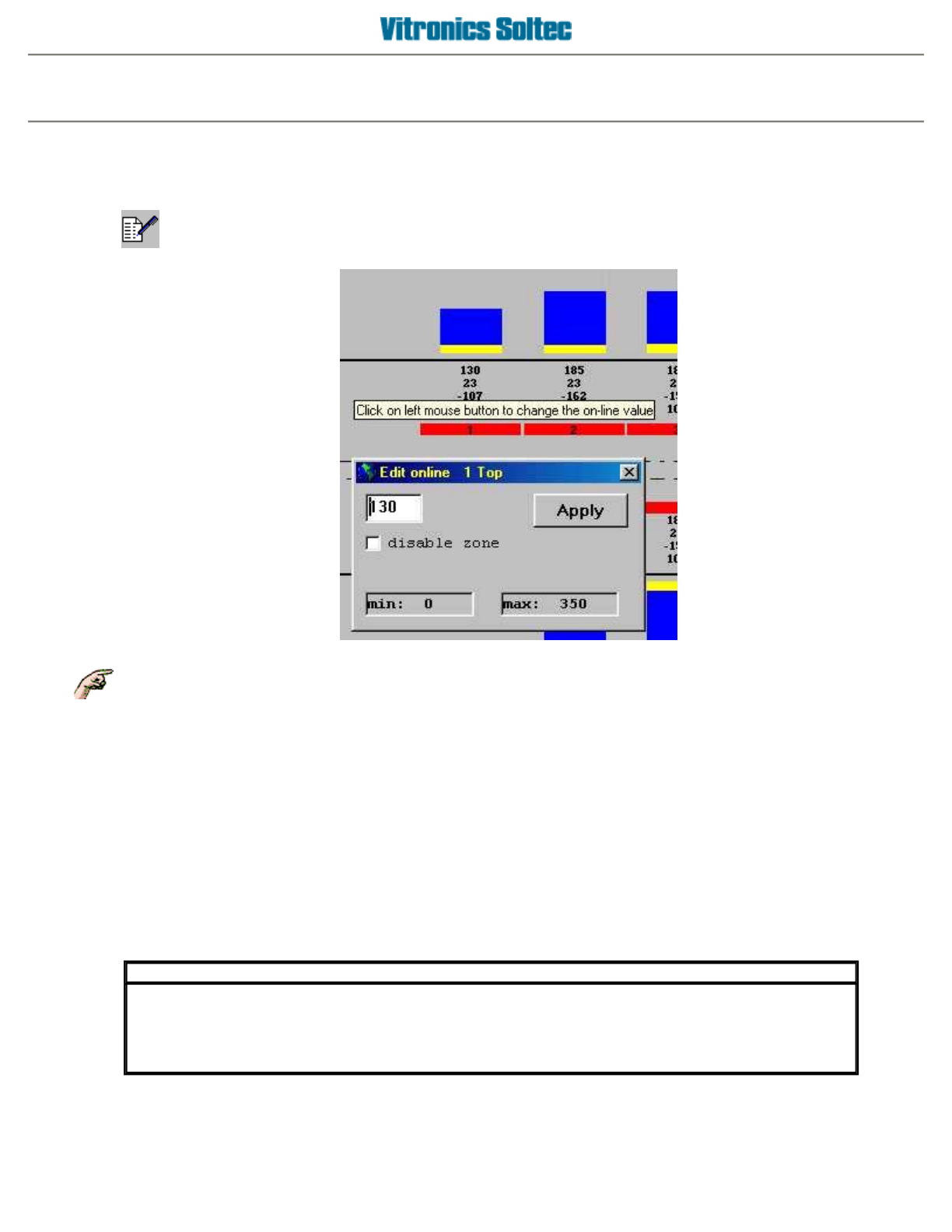
Edit online
ONLINE EDITING OF RECIPE AND PRODUCT PARAMETERS
Changes made to a running RECIPE will affect
all
PRODUCTS using that RECIPE!!
Click the
Edit online icon
on the icon bar on top of the main screen. This is the icon towards the right of the
screen with a pencil image, which toggles edit online mode on and off.
The edit online icon will appear as depressed on the screen while edit online mode is active. In edit online
mode, the mouse cursor shape changes to a pencil when moved over one of the oven parameter set points that
can be edited. Left click the mouse when the pointer shape is a pencil to open an edit window to modify the set
point at the cursor.
A
set point value can be entered in the edit window, and this value is validated against the parameter's set point
boundaries when the
Apply button
is clicked. Click the
Apply button
to validate the entered set point value. If
the entered set point value is within the parameter's set point boundaries then it is sent to the oven controller,
which modifies the current oven process. Otherwise an out of boundary error message is displayed, and the
entered value is ignored.
IMPORTANT
Set point changes made in edit online mode are only sent to the oven controller, and are
temporary until the changes are saved to a recipe file. Online changes should be saved to a recipe
file once you are satisfied with the results. A prompt message to save changes is displayed when
edit online mode is terminated and changes were made.
Operator manual 17 August 2003

Heater parameters have an extra check box in the edit window to disable the heater. When a heater is disabled,
the oven controller disregards that heater all together, including deviation alarms. The heater disable status is
global, and takes precedence over heater set points in recipes. This allows an oven to continue operating with a
faulty heater until the faulty heater is replaced, without requiring modifications to individual recipes.
A
nother way to make online changes is to click on the product or recipe name at the bottom of the screen. This
starts the product/recipe editor, which allows the oven parameter set points to be changed. Click the
OK button
on the product/recipe editor to save the changes to the current product/recipe, and to send the changed
product/recipe set points to the oven controller.
If the recipe editor is closed by clicking the
close window icon
('x'), the exit without saving changes
confirmation dialog is displayed. The changes can then be saved by returning to the recipe editor and saving the
changes, or discarded by closing the recipe editor without saving the changes.
IMPORTANT
The save changes confirmation dialog is displayed when an action that modifies the current
oven parameter set points is initiated. If you decide to save the changes, the changes are saved
before the action is executed. An example of one of these situations is a stop/restart of the oven.
When you try to restart the oven, the save changes confirmation dialog is displayed before the
oven restarts (assuming edit online mode is active). This allows temporary oven parameter set
points in the oven controller to be saved to a product/recipe file, before new oven parameter set
p
oints are sent to the oven controller.
Operator manual 18 August 2003

Shutdown machine
SHUTDOWN PROCEDURE
Go to
File, Stop Running Process
or click on the oven power switch to begin the shutdown procedure. The
heaters are turned off, the conveyor and cell fans continue to run.
The status bar will display:
SHUTDOWN
When the oven has entered shutdown, or when the oven is first powered up, a procedure called
SHUTDOWN
is
executed. (This procedure cannot be modified by the user) During
SHUTDOWN
, the cell fans are enabled and
the conveyor runs at maximum speed. The red light on the light tower is on.
When the temperatures of all cells are below 100 degrees C, the oven enters the
OFF
state. The status bar
indicates:
OFF
The cell fans and the conveyor stop. The red light on the light tower, and the red light on the operator panel are
on.
While the oven is in an
OFF
state, if any cell temperature goes above 100 deg C, the oven will re-enter the
SHUTDOWN
procedure, the Oven will go into Alarm and the Cell fans will run at full speed.
Operator manual 19 August 2003