2OM-1086-002.pdf - 第103页
2.4 “PCB Backup” T ab *1 *2 *7 *6 *4 *5 *3 0211-005 Chapter 1 2 - 38 Tg0583-PM-D2 2. 4 "PCB Backup" T ab The corresponding tab sheet can be used to specify how to support a P .C.B., etc. • Sheet Layout When you…
0211-005 Chapter 1 2-37 Tg0583-PM-D2
*7
*8
*9
*10
*11
*12
*13
*14
2.3
"
Print
"
Tab
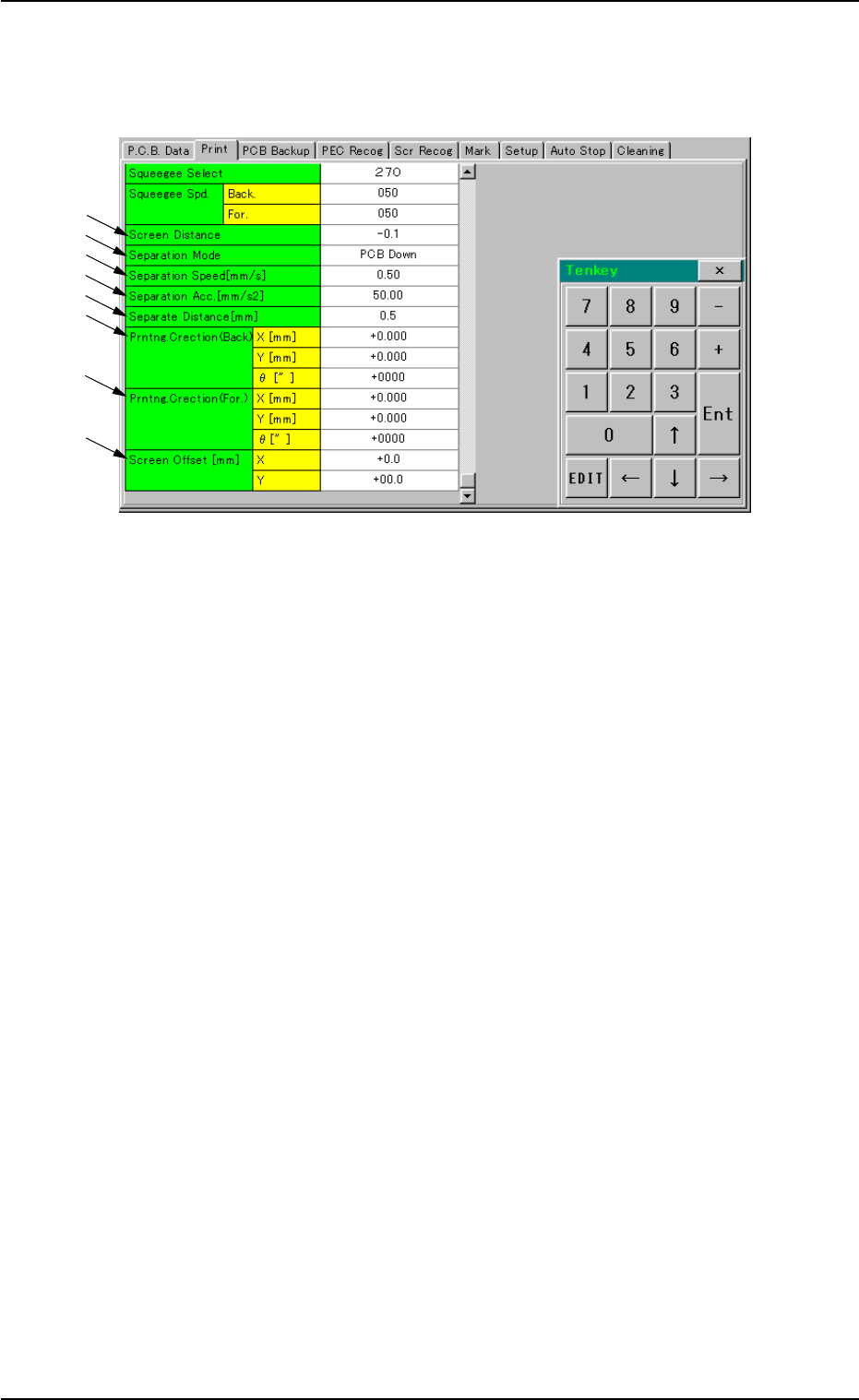
*6 Squeegee Spd.
Make the ten-key window appear and enter values in the "Back."
and "For." text boxes.
Fig. 3B87-1 "Print" Tab Sheet (2)
*7 Screen Distance
Make the ten-key window appear and enter a value in the text box.
*8 Separation Mode
Push the text box twice. The text box changes to a combo box.
Push the down arrow to open the drop-down list. Select "PCB Down"
or "Squeegee Up" from the drop-down list.
*9 Separation Speed [mm/s]
Make the ten-key window appear and enter a value in the text box.
*10 Separation Acc. [mm/s2]
Make the ten-key window appear and enter a value in the text box.
*11 Separate Distance [mm]
Make the ten-key window appear and enter a value in the text box.
*12 Prntng. Correction (Back.)
Make the ten-key window appear and enter values in the "X [mm]",
"Y [mm]", and " θ[″]" text boxes.
*13 Prntng. Correction (For.)
Make the ten-key window appear and enter values in the "X [mm]",
"Y [mm]", and " θ[″]" text boxes.
*14 Screen Offset [mm]
Make the ten-key window appear and enter values in the text boxes.
2.4 “PCB Backup” Tab
*1
*2
*7
*6
*4
*5
*3
0211-005 Chapter 1 2-38 Tg0583-PM-D2
2.4 "PCB Backup" Tab
The corresponding tab sheet can be used to specify how to support a
P.C.B., etc.
• Sheet Layout
When you push the "PCB Backup" tab in the "Pattern Program" edit
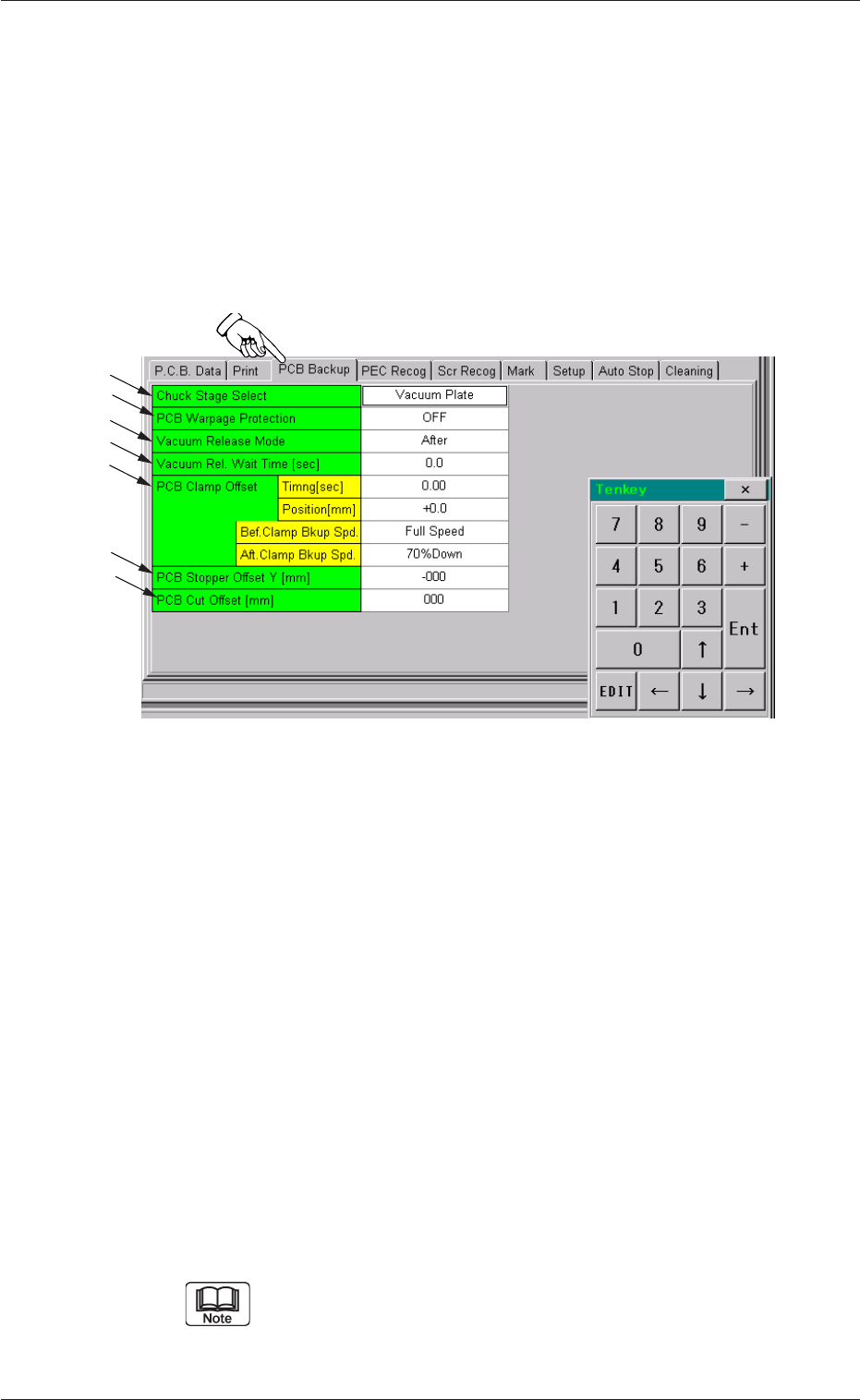
window, the following tab sheet appears.
Fig. 3B88 "PCB Backup" Tab Sheet
• Sheet Composition
*1 Chuck Stage Select
Push the text box twice. The text box changes to a combo box.
Push the down arrow to open the drop-down list. Select "Backup
Jig", "Backup Pin", or "Vacuum Plate" from the drop-down list.
*2 PCB Warpage Protection
Push the text box twice. The text box changes to a combo box.
Push the down arrow to open the drop-down list. Select "OFF" or
"ON" from the drop-down list.
*3 Vacuum Release Mode
Push the text box twice. The text box changes to a combo box.
Push the down arrow to open the drop-down list. Select "Before" or
"After" from the drop-down list.
The value can be changed only when "Vacuum Plate" is
selected in the "Chuck Stage Select" text box *1.

0211-005 Chapter 1 2-39 Tg0583-PM-D2
2.4 “PCB Backup” Tab
*4 Vacuum Rel. Wait Time [sec]
Make the ten-key window appear and enter a value in the text box.
The value can be changed only when "Vacuum Plate" is selected
in the "Chuck Stage Select" text box *1.
*5 PCB Clamp Offset
Timing [sec] : Make the tenkey window appear and
enter a value in the text box.
Position [mm] : Make the tenkey window appear and
enter a value in the text box.
Bef.Clamp Bkup Spd. : The ascending speed of the backup
table can be set in the range of 10 steps
(Full Speed to 90% Down) before the
P.C.B. is clamped.
Aft.Clamp Bkup Spd. : The ascending speed of the backup
table can be set in the range of 10 steps
(Full Speed to 90% Down) after the
P.C.B. is clamped.
*6 PCB Stopper Offset Y [mm]
Make the ten-key window appear and enter a value in the text box.
*7 PCB Cut Offset [mm]
Make the ten-key window appear and enter a parameter in the text
box.