2OM-1086-002.pdf - 第115页
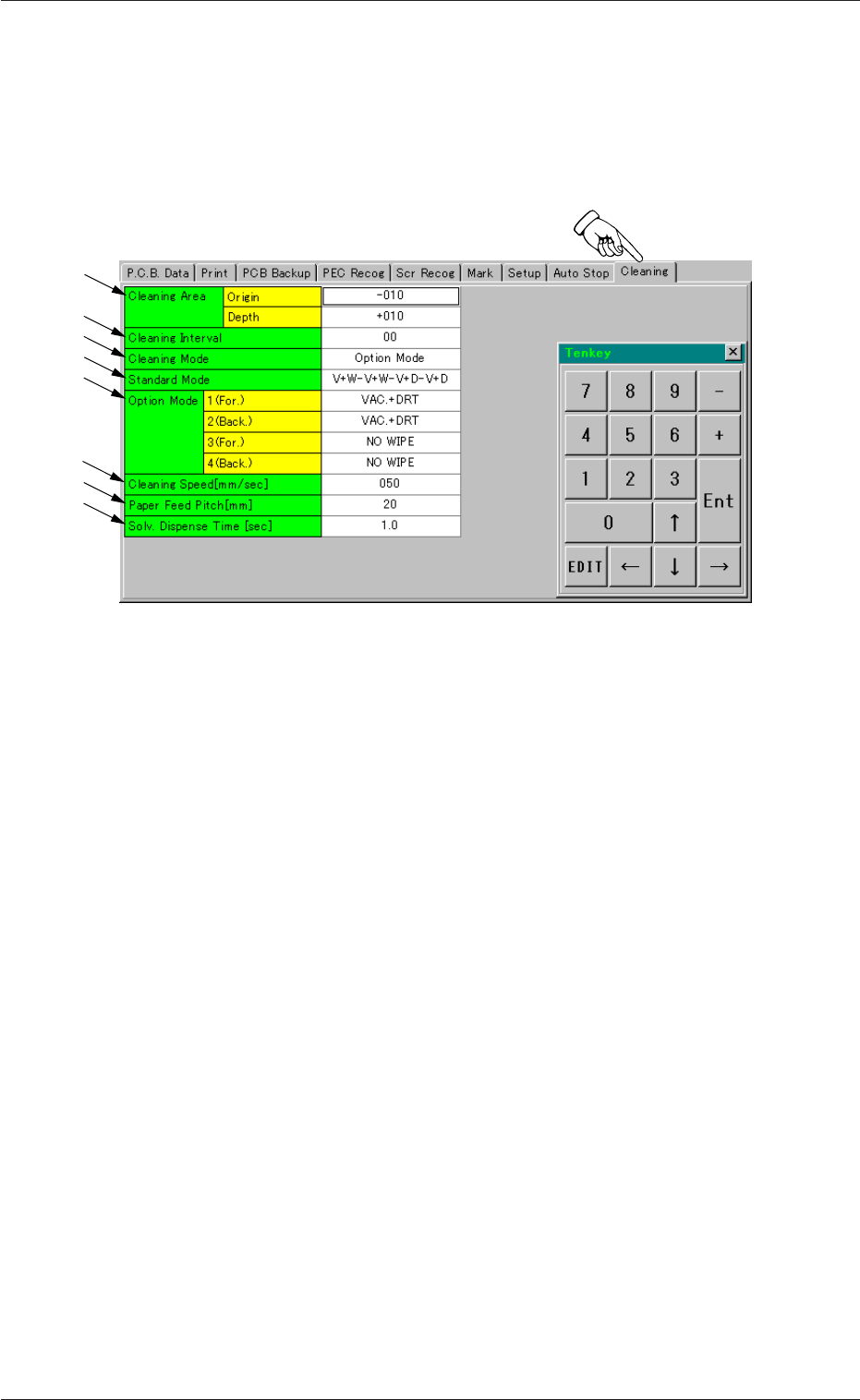
0211-005 Chapter 1 2 - 49 Tg0583-PM-D2 2.10 “Cleaning” T ab * 6 Cleaning Spped [mm/sec] Make the ten-key window appear and enter a value in the text box. * 7 Paper Feed Pitch [mm] Make the ten-key window appear and enter…
2.10 “Cleaning” Tab
*1
*2
*3
*4
*6
*5
*7
*8
0211-005 Chapter 1 2-48 Tg0583-PM-D2
2.10 "Cleaning" Tab
• Sheet Layout
When you push "Cleaning" tab in the "Pattern Program" edit win-
dow, the following tab sheet appears.
Fig. 3B94 "Cleaning" Tab Sheet
• Sheet Composition
*1 Cleaning Area
Make the ten-key window appear and enter values in the text boxes.
*2 Cleaning Interval
Make the ten-key window appear and enter a value in the text box.
*3 Cleaning Mode
Push the text box twice. The text box changes to a combo box.
Push the down arrow to open the drop-down list. Select "Standard
Mode" or "Option Mode" from the drop-down list.
*4 Standard Mode
Push the text box twice. The text box changes to a combo box.
Push the down arrow to open the drop-down list. Select the de-
sired pattern from the drop-down list.
*5 Option Mode
Push the text box twice. The text box changes to a combo box.
Push the down arrow to open the drop-down list. Select one of the
options from the drop-down list.

0211-005 Chapter 1 2-49 Tg0583-PM-D2
2.10 “Cleaning” Tab
*6 Cleaning Spped [mm/sec]
Make the ten-key window appear and enter a value in the text box.
*7 Paper Feed Pitch [mm]
Make the ten-key window appear and enter a value in the text box.
*8 Solv. Dispense Time [sec]
Make the ten-key window appear and enter a value in the text box.

Section 3
Menus for Management Data
0211-005 Chapter 1 3-1 Tg0583-PM-D2
This section describes the functions and operations in
each window (window which opens after a menu button
is pressed at the "MANAGE. DATA" window).