2OM-1086-002.pdf - 第143页
• • • • • How to save the data files (stored in the hard disk of the ma- chine) on a floppy disk Save Operation (1) Insert a 3.5-inch floppy disk (formatted) into the drive of the front service panel. (2) Press the desir…

[Patt Prgm Mng] Button: When pressed, this button enables the
operator to save the pattern program
management data on a floppy disk.
It is impossible to load a pattern program
management data file from the corre-
sponding floppy disk (the disk where the
pattern program data is saved) to the
hard disk of the machine.
*2 List of Files on Hard Disk
When one of the data type buttons (*1) is pressed, the correspond-
ing data files on the hard disk of the machine are listed.
When a line of listed file is pressed, the file is selected.
When a line of the selected file is pressed, the selection is can-
celed.
When the [Select All] button is pressed, all listed files are selected
at a time.
When the [Cancel All] button is pressed, the selection of all listed
files is canceled.
*3 Operation Buttons
The following buttons are provided.
[Search] Button: When pressed, this button searches and
loads the data from the floppy disk in the drive
of the front service panel.
[Delete <<] Button: When pressed, this button deletes the data
files selected in “*4” (List of Files on Floppy
Disk).
*4 List of Files on Floppy Disk
When one of the data type buttons (*1) is pressed, the correspond-
ing data files are loaded and listed from the floppy disk in the drive
of the front service panel.
••
••
• How to select files or cancel the selection
The following describes how to select files from the list panes (Lists
of Files on Hard Disk and Floppy Disk) and cancel the selection.
When a line of listed data file is pressed, the file is selected.
When a line of the selected file is pressed, the selection is canceled.
When the [Select All] button is pressed, all listed files are selected at
a time.
When the [Cancel All] button is pressed, the selection of all listed
files is canceled.
0211-005
Chapter 1 3-27 Tg0583-PM-D2
4.
"
FILE OPN.
"
Window (Submenu)
••
••
• How to save the data files (stored in the hard disk of the ma-
chine) on a floppy disk
Save Operation
(1) Insert a 3.5-inch floppy disk (formatted) into the drive of the front
service panel.
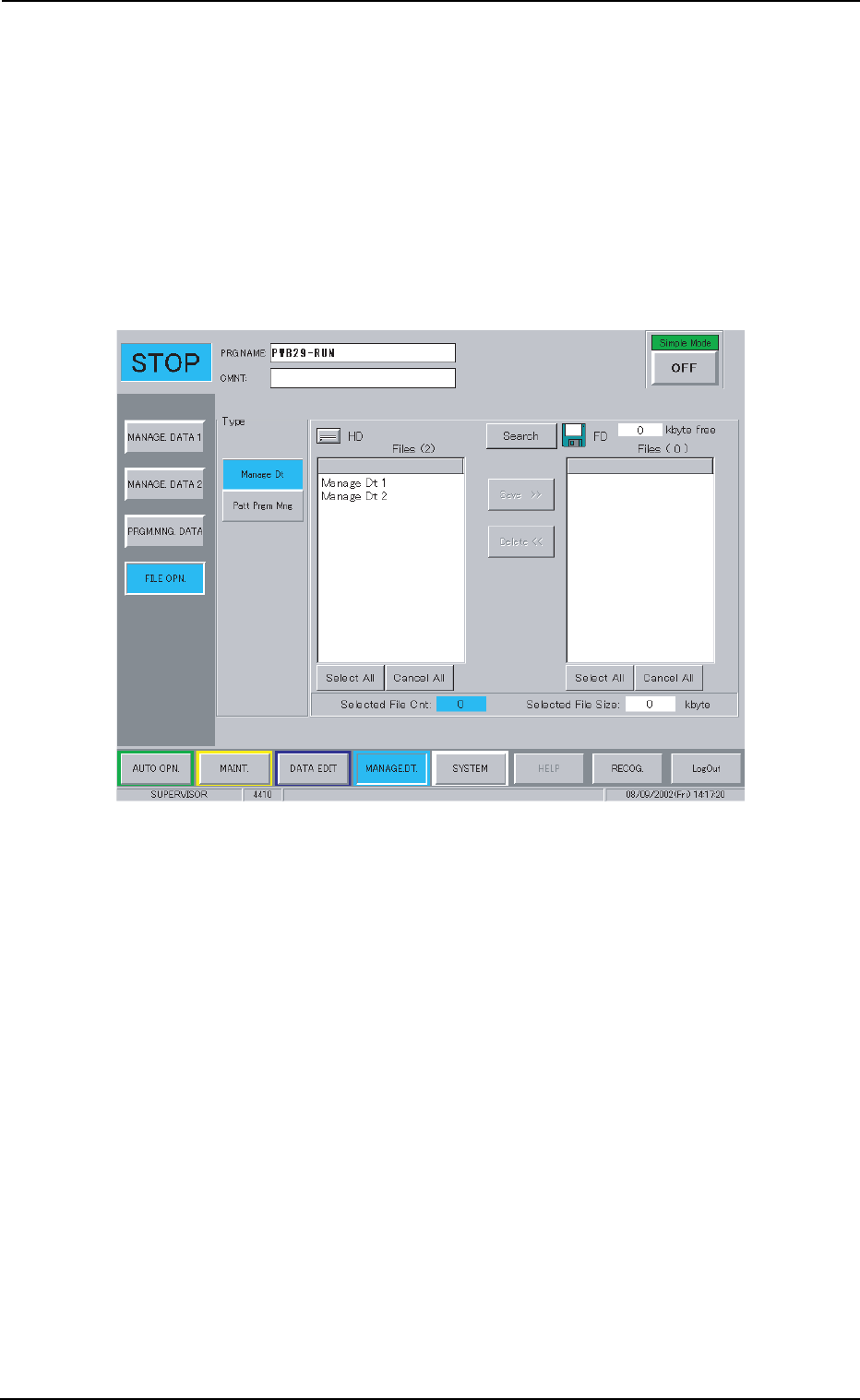
(2) Press the desired data type button to specify the type of the data to
be loaded.
The data files of the selected type (stored in the hard disk of the
machine) are displayed in the “List of Files on Hard Drive” pane.
Fig. 3C19 Selection of Data Type
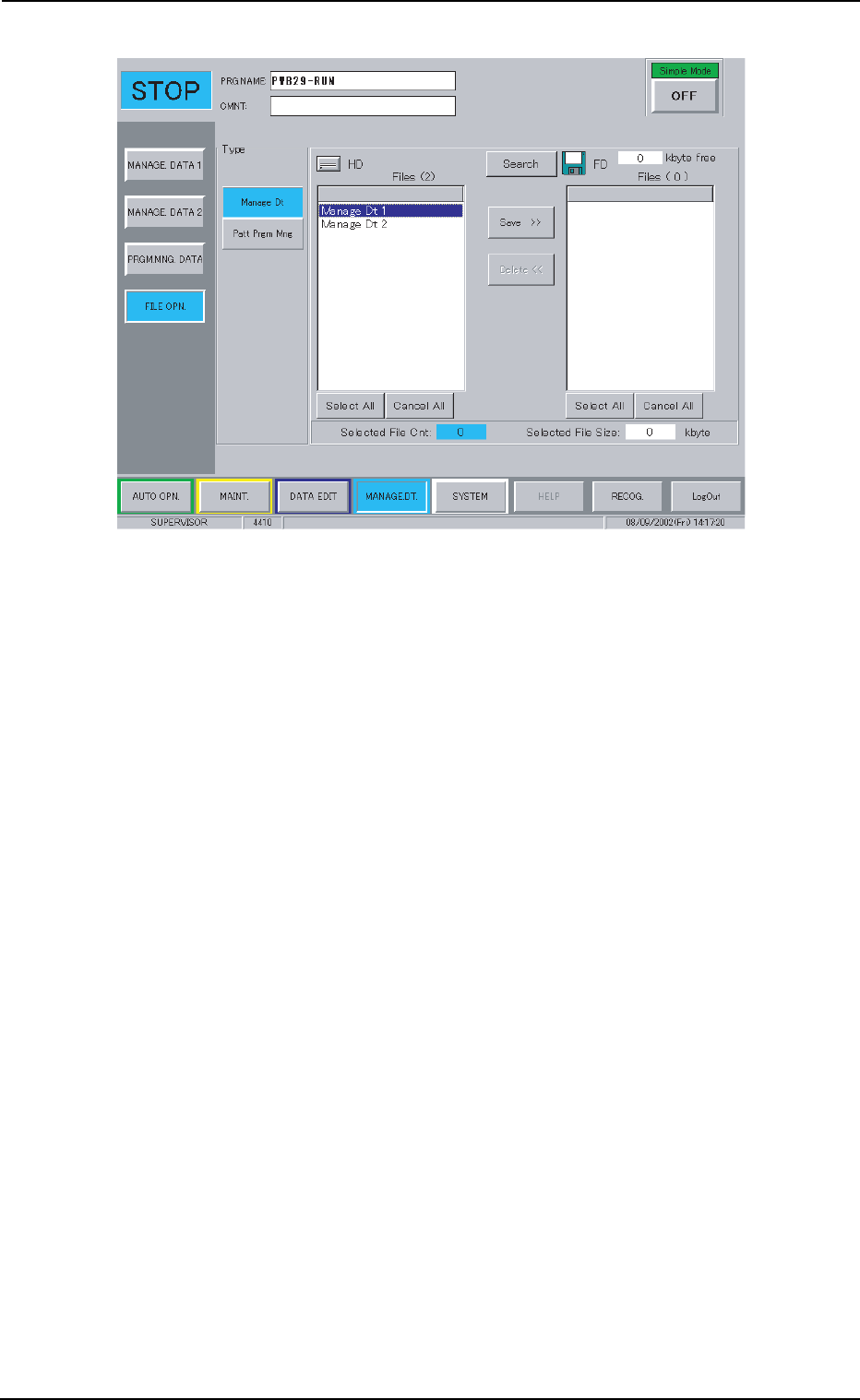
(3) Select the data files to be saved on the floppy disk from the “List of
Files on Hard Drive” pane.
The selected lines of files turn sky blue.
0211-005 Chapter 1 3-28 Tg0583-PM-D2
4.
"
FILE OPN.
"
Window (Submenu)
0211-005 Chapter 1 3-29 Tg0583-PM-D2
Fig. 3C20 Selection of Files Saved
(4) Press the [Save >>] button.
The selected file is saved on the floppy disk.
••
••
• How to delete the data files from a floppy disk
Delete Procedure
(1) Insert the floppy disk (the disk where the data is saved) into the
drive.
(2) Press the desired data type button to specify the type of the data to
be deleted.
(3) Press the [Search] button.
The names of the retrieved files are displayed in the “List of Files on
Floppy Disk” pane.
4.
"
FILE OPN.
"
Window (Submenu)