Maintenance Manual.pdf - 第82页
AV131 MAINTENANCE MANUAL 4.1 Cont rol Sy ste m Confi guration D79MEC- 14-020-A0 4.1- 1 1 Func ti on Error code N o. Cause Co untermeasu re * EEPRO M check code error 37 W hen reading the dat a f rom t he EEPROM a t pow e…

AV131
MAINTENANCE MANUAL
4.1 Control System Configuration
D79MEC-14-020-A0
4.1-10
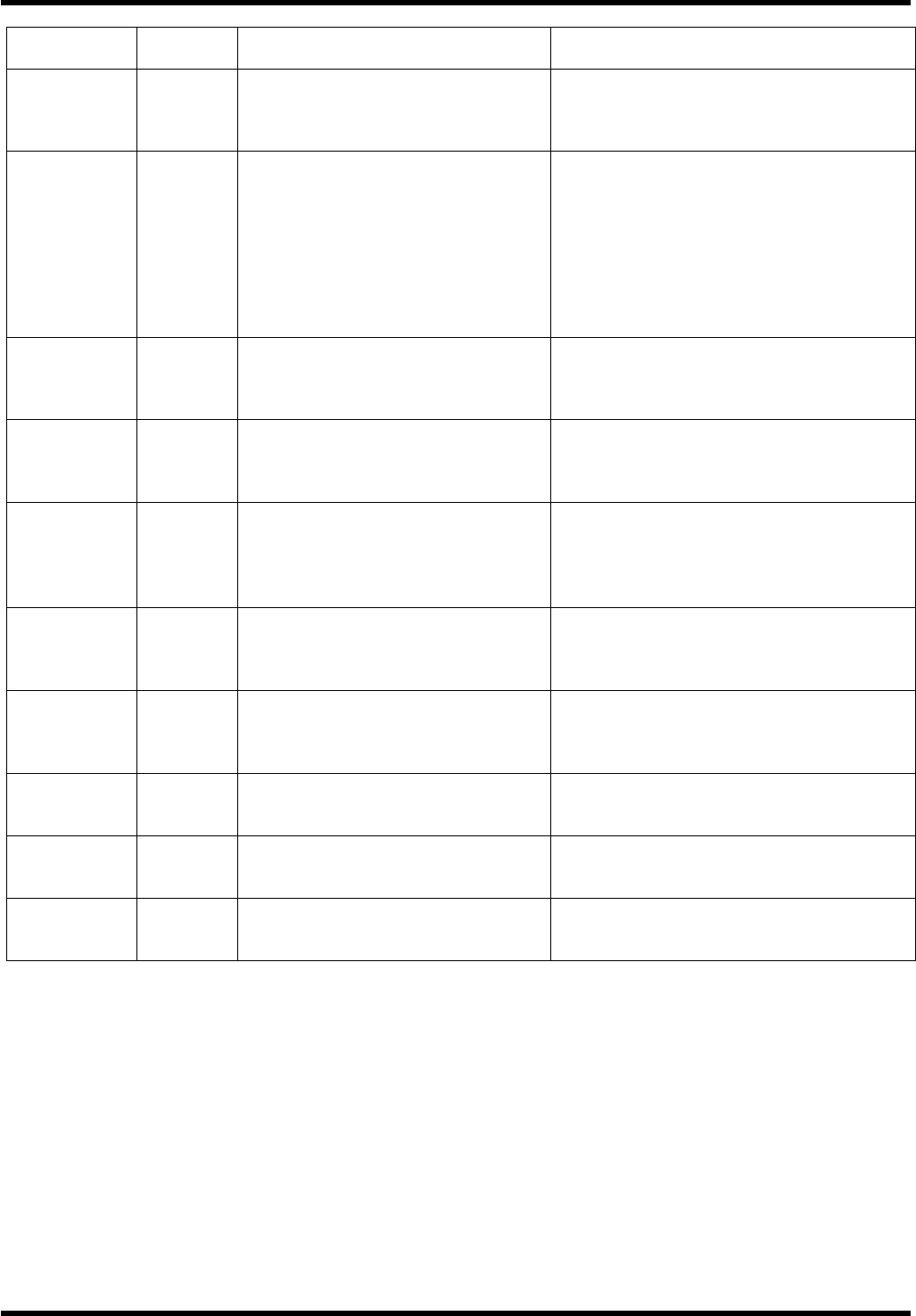
Function
Error
code No.
Cause Countermeasure
* Excessive
hybrid
deviation
25
During full-closed, 2nd full-closed or
external encoder control mode, the
load position by external scale and
the motor position by encoder
deviated by more than the pulses set
by SV.Pr.7B (excessive hybrid
deviation).
Check the motor and load for connection.
Check for any looseness, sliding or play.
Check that the changed motor position
(encoder feedback value) and load position
(external scale feedback value) have the
same sign when moving the load.
Check if the settings of SV.Pr74 (External
scale numerator), SV.Pr75 (External scale
numerator scale factor) and SV.Pr76
(External scale denominator) are set
properly.
Overspeed 26
Motor rotating speed exceeded the
set value of SV.Pr73 (Acceleration
level setting).
Check for any excessive speed command
issued.
If overshoot occurred due to improper
adjustment of gain, adjust the gain.
* External
scale
communi
cation data
error
28
Communication error due to data
from external scale. Data from the
external scale causes
communication error. Mainly caused
by noise. Although the data was
received successfully, the contents of
data were abnormal.
Separate the motor cable from the
connection cable of the external scale if
connected together.
Connect the shield to the FG. Refer to the
connection diagram of the external scale.
Deviation
counter
overflow
29
Deviation counter exceeded 2
27
(134217728).
Check if the motor rotates according to the
position command pulse.
Check the torque monitor for saturated
output torque. Set SV.Pr5E (1st torque limit
setting) and SV.Pr5F (2nd torque limit
setting) to the maximum value.
Adjust the gain.
Increase the acceleration/deceleration time
and lighten the load to decrease the speed.
Software limit 34
The motor exceeded the allowable
movable range set by the SV.Pr26
(Software limit setting) for the
position command input range.
1. The gain is not matched.
2. The value of SV.Pr.26 (Software
limit setting) is small.
1. Check the gain (balance of positional
loop gain and speed loop gain) and
inertia ratio.
2. Increase the setting value of SV.Pr26.
Or, set SV.Pr26 to 0 to disable the
software limit protection.
* External
scale
connection
error
35
Trouble occurred in the wire
connection of the external scale
(breaking, etc.)
Perform wiring of the external scale as
indicated.
Reconnect the connector pins correctly.
Secure the power supply voltage 5V
DC±5% (4.75 to 5.25V) of the external
scale. Use care especially when the
connection cable is long.
* EEPROM
parameter
error
36
When reading the data from the
EEPROM at power ON, the
parameter save area data was found
to be destroyed.
Set all parameters again.
If the error persists, the EEPROM may be
defective. Replace the servo amplifier.
Consult with the dealer for inspection
(repair).
AV131
MAINTENANCE MANUAL
4.1 Control System Configuration
D79MEC-14-020-A0
4.1-11
Function
Error
code No.
Cause Countermeasure
* EEPROM
check code
error
37
When reading the data from the
EEPROM at power ON, the
EEPROM write check data was
found to be destroyed.
Replace the servo amplifier because it may
be faulty.
Consult with the dealer for inspection
(repair).
Emergency
stop input
error
39
When the emergency stop input
(EMG-STP: CN X5 2 pin) is turned
OFF, the system takes it as an error
and trip occurs.
Check for any abnormality in the switch
power or wires connected to the emergency
stop input.
Check that the emergency stop input (CN
X5 2 pin) is turned ON.
Check that the rising time of the control
signal wire (12 to 24V DC) at power ON is
not longer than the one for the servo
amplifier.
Absolute
system failure
40
Built-in capacitor voltage dropped to
below the rated value because the
supply power to the 17-bit absolute
encoder and battery power ran down.
Connect the battery power and clear the
absolute encoder.
The alarm cannot be cleared unless the
absolute encoder is not cleared.
* Absolute
counter
overflow
41
The multiple rotation counter of the
17-bit absolute encoder exceeded
the rated value.
Set the SV.Pr0B (absolute encoder setting)
to a proper value.
Set the travel from the machine origin to
within 32767 rotations.
Absolute
overspeed
42
The rotating speed of the motor
exceeded the rated value while
battery power only was being
supplied at power failure of the 17-bit
absolute encoder.
Check the power voltage (5±5%) on the
encoder side.
Check the connector CN X6 for proper
connection. The alarm cannot be cleared
unless the absolute encoder is not cleared.
* Absolute
single-rotation
counter error
44
The 17-bit absolute encoder detected
a single rotation counter error. Single
rotation counter error of serial
encoder was detected. (2500 [p/r] 5)
Replace the servomotor.
*Absolute
multiple-
rotation
counter error
45
The 17-bit absolute encoder detected
a multiple rotation counter error. AB
phase signal error of serial encoder
was detected. (2500 [p/r] 5)
Replace the servomotor.
Absolute
status error
47
The 17-bit absolute encoder rotated
at the rated value or more at power
ON
Do not let the motor move when turning
power ON.
* Encoder Z
phase error
48
Missing pulses of serial encoder
Z-phase were detected. (2500 [p/r]
5).
Replace the servomotor.
* Encoder CS
signal error
49
CS signal logic error of serial
encoder was detected. (2500 [p/r] 5)
Encoder is at fault.
Replace the servomotor.
AV131
MAINTENANCE MANUAL
4.1 Control System Configuration
D79MEC-14-020-A0
4.1-12
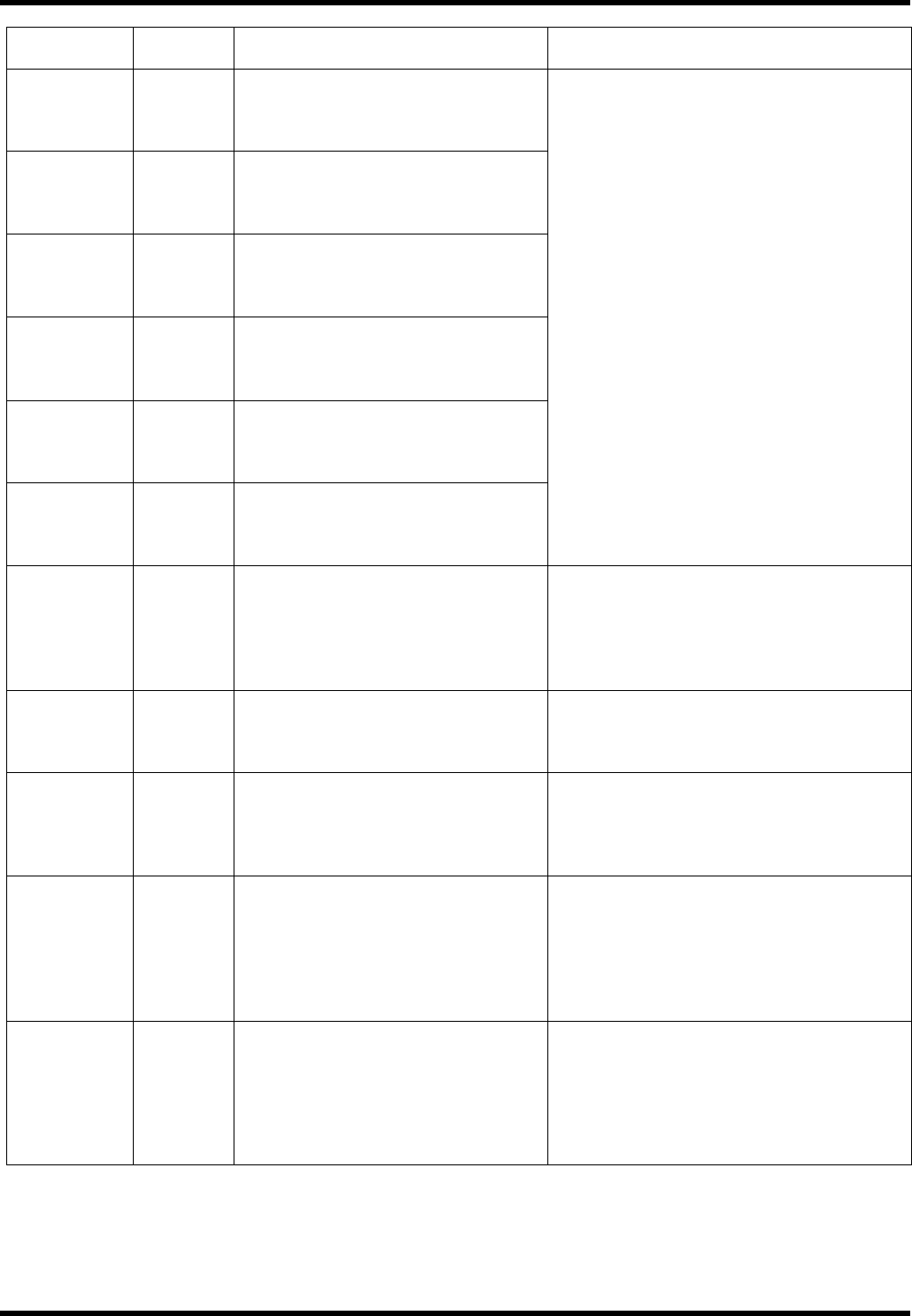
Function
Error
code No.
Cause Countermeasure
* External
scale status
0 error
50
The bit 0 for the error code (ALMC)
of the external scale changed to 1.
Check the specifications of the
external scale
* External
scale status
1 error
51
The bit 1 for the error code (ALMC)
of the external scale changed to 1.
Check the specifications of the
external scale
* External
scale status
2 error
52
The bit 2 for the error code (ALMC)
of the external scale changed to 1.
Check the specifications of the
external scale
* External
scale status
3 error
53
The bit 3 for the error code (ALMC)
of the external scale changed to 1.
Check the specifications of the
external scale
* External
scale status
4 error
54
The bit 4 for the error code (ALMC)
of the external scale changed to 1.
Check the specifications of the
external scale
* External
scale status
5 error
55
The bit 5 for the error code (ALMC)
of the external scale changed to 1.
Check the specifications of the
external scale
Eliminate the cause of the error and clear
the error of the external scale. Then turn
the control power OFF once and turn it
back ON. Check the specifications of the
external scale concerning the causes of the
errors.
Origin return
error
68
An error occurred during origin
return. Abnormal inhibit input signal
was entered. Parameters required for
origin return have not been set or
invalid values have been set.
Check for abnormality in the switch, limit
sensor, wires and power supply to be
connected to the inhibit inputs (CCWL,
CWL: CN X5 19, 20 pin).
Check the parameters related to the origin
return.
Data
undefined
error
69
Parameters required for the
commanded step or jog movement
have not been set, or invalid values
have been set.
Check the settings of positioning and step
parameters.
Current
position
overflow
70
When the 16.Pr51 (wrap-around
permit) is 0, the current position
(-2147483647 to 2147483647)
overflowed.
Do not send such an operation command
as the current position outside
-2147483647 to 2147483647.
Take particular care for incremental
movement, jog or origin offset.
Drive inhibit
input
detection
error
71
During step or jog movement after
origin return, drive inhibit input for the
moving direction was detected.
Both of the drive inhibit inputs
(CCWL, CWL: CN X5, Pins #19 and
#20) opened.
Check the switches and limit sensors
connected to the drove inhibit input and
wiring or power supply for any problem.
Check the operation command and
installation of the limit sensor.
Check if the direction of origin offset
coincides with that of the drive inhibit input.
* Max. travel
limit error
72
The command position of the motor
exceeded the maximum travel limit
range in the step or jog mode after
origin return.
Make sure there is no positional command
that exceeds the maximum travel limit. Take
particular care for incremental movement,
jog or origin offset.
Check the setting values of 32.Pr01 (max.
travel in positive direction) and 32.Pr02
(max. travel in negative direction).