KE2010.Instruction Manual.Ver.2.01,Rev.08.pdf - 第569页
7 − 32 (3) Product ion oper ation T able 7.2.2.10.1 Pl acement wh en a unit is set as “Unused” No. Unit Production operation nozzle 1 nozzle 2 nozzle 3 1 L-Head nozzle 4 2 R-Head nozzle 1 (Not to be displayed w hen your …
7 − 31
7.2.2.10 Device enable
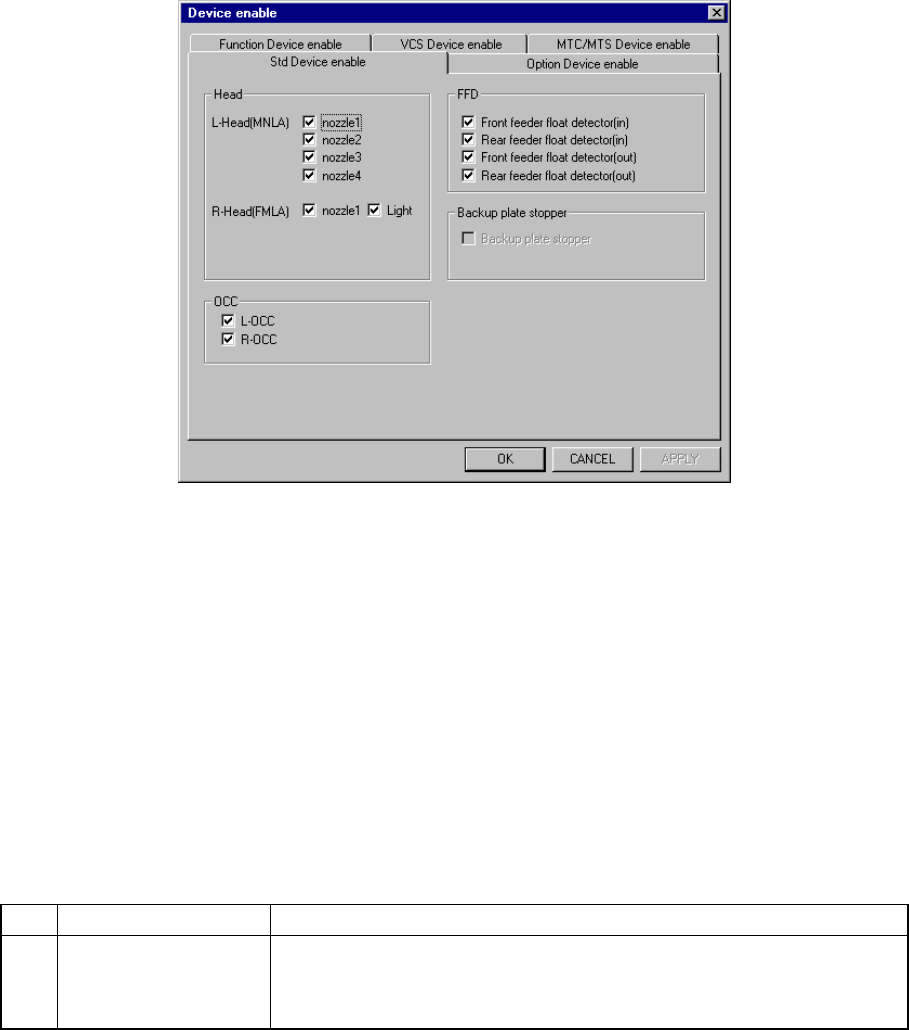
A screen appears as shown in Figure 7.2.2.10.1 “Device enable setting dialog box
with tabs” when [Device enable] is selected from the [Setting Group] menu.
Figure 7.2.2.10.1 Device enable setting dialog box with tabs
When you click the corresponding tab, the "Std Device enable", "Option Device
enable", "Function Device enable", "VCS Device enable" or "MTC/MTS Device
enable" dialog box appears.
Note that a KE-2010 does not display the "R-Head (FMLA)", "R-OCC" or "VCS Device
enable" tab.
7.2.2.10.1 Std Device enable 1
When you click the “Std Device enable” tab, a screen appears as shown in Figure
7.2.2.10.1 “Std Device enable setting dialog box”. The “Std Device enable” dialog
box is displayed as the initial screen immediately after you select the [Std Device
enable] menu item from the [Setting Group] pull-down menu.
(1) Setting items
No. Item Description
1 Std Device enable Unit to be used/not used
If a system unit malfunctions the unit can be defined as “a unit not used”
using this menu item. This allows the pick-and-place sequence to be
executed without modifying the production program data.
Table 7.2.2.10.1 shows whether or not a pick-and-place sequence can be
completed if the production program requires the unit defined as to be used
before it can complete itself.
(2) Setting the unit
− Specify the device unit to be used with the check box.
− A device unit which is not installed as an option (displayed in dimmed
characters) cannot be checked.
− Zeroing is required again when changing the head status from as not to be
used to as to be used.
7 − 32
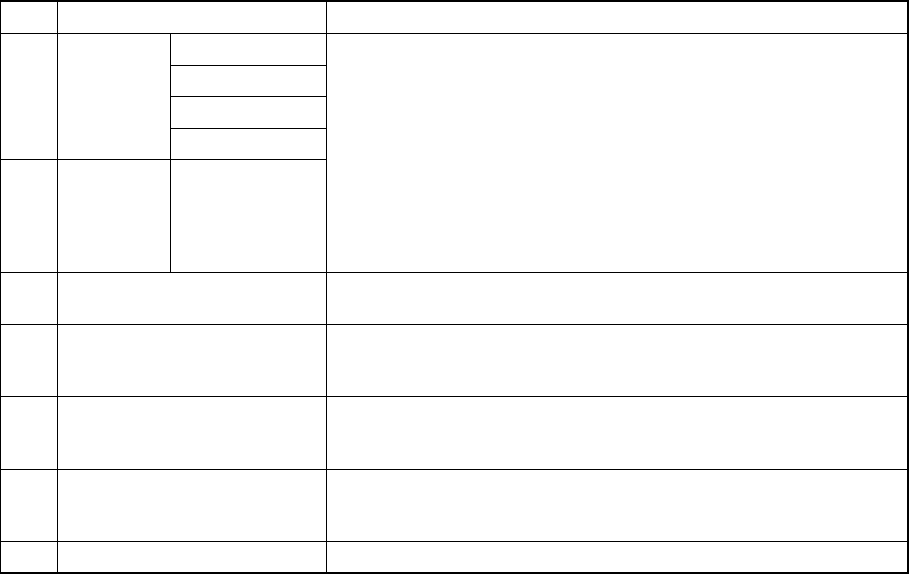
(3) Production operation
Table 7.2.2.10.1 Placement when a unit is set as “Unused”
No. Unit Production operation
nozzle 1
nozzle 2
nozzle 3
1 L-Head
nozzle 4
2 R-Head nozzle 1
(Not to be
displayed when
your model is a
KE-2010.)
Components to be placed by these heads are not placed.
The Optimization utility does not assign any component to these
heads.
3 Light The machine does not place a component that is recognized with the
VCS under the penetrative light.
4 L-OCC Placement of components is carried out without BOC mark or bank
mark recognition.
Placement of IC mark components is not carried out.
5 R-OCC
(Not to be displayed when your
model is a KE-2010.)
Placement of components is carried out without bank mark
recognition.
6 Feeder float detector
(Front inside, front outside,
rear inside and rear outside)
This function is disabled but placement of components is carried out.
7 Support plate stopper This function is disabled but placement of components is carried out.
7 − 33
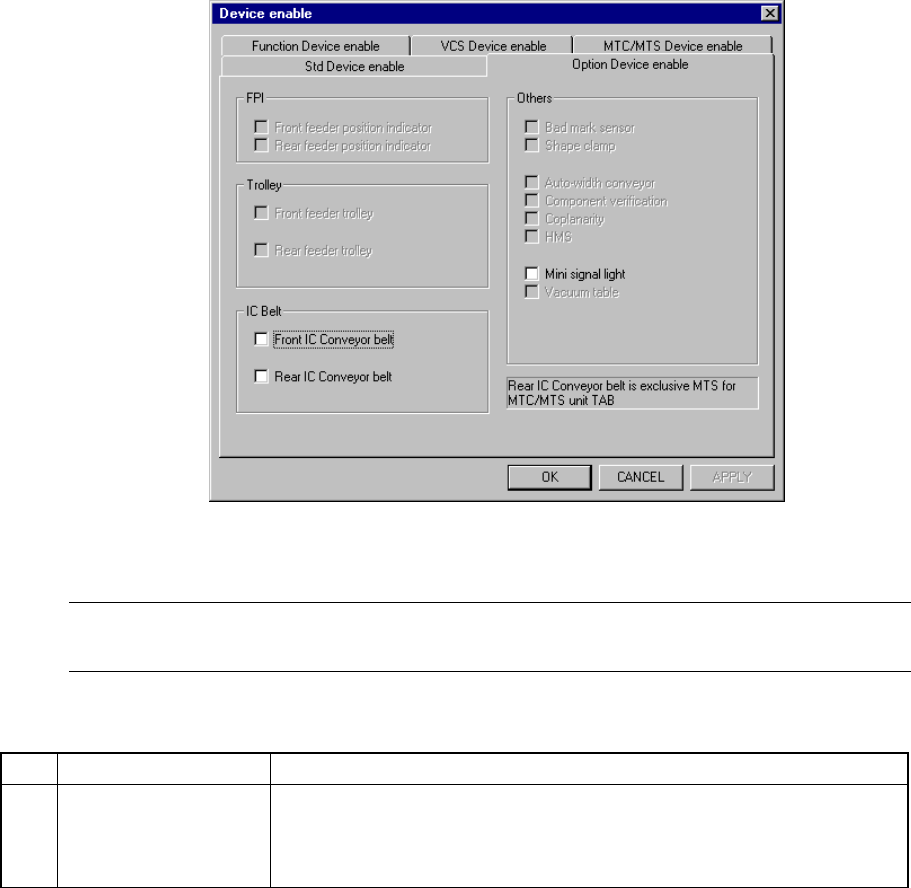
7.2.2.10.2 Option Device Enable
When you select the tab “Option Device enable”, the “Option Device enable”
setting dialog box appears on the screen as shown in Figure 7.2.2.10.2.
Figure 7.2.2.10.2 “Option Device enable” setting dialog box
(Screen example when a KE-2020 is used)
Note: Data displayed under the “Trolley” and “IC belt” menu items of the dialog box
above varies depending on the model you use (see Table 7.2.2.10.2).
(1) Setting items
No. Item Description
1 Option Device enable Unit to be used/not used
When you specify a malfunctioning unit as “a unit not used” on this dialog
box, you can allow the machine to pick up and place a component without
modifying the production program data.
Table 7.2.2.10.2 shows whether a component is actually placed on a board or
not if the production program requires the unit defined as to be used in order
to complete component placement operation.
(2) Setting the unit
− Specify the device unit to be used with the check box.
− A device unit that is not installed as an option (dimmed on the dialog box)
cannot be checked.
− Zeroing is required again when you change the head status from “Not to be
used” to “To be used”.