00191099-01.pdf - 第34页
Retrofitting I nstructions SIPLACE 80 / S-23 (HM) / HS-50 Component Bar-Code Scanner (Optional) 2.2 Safety Instructions Issue 06/00 34 6DIHW\,QV WUXFWLRQV DANGER Only the Siemens service en gineer is permitted to …
Component Bar-Code Scanner (Optional) Retrofitting Instructions SIPLACE 80 / S-23 (HM) / HS-50
Issue 06/00 2.1 Overview
33
5HWURILWWLQJ,QVWUXFWLRQV6,3/$&(
6+0+62SWLRQDO&RPSR
QHQW%DU&RGH6FDQQHU
2Y HUY LHZ
The optional hand-held component bar-code scanner is employed to identify components by
importing the bar-code label on the tape reel or, for example, to identify the bulk case allocated to
the track in question. The hand-held scanner provides the input signal for the station software of
the SIPLACE placement machine.
These instructions describe the retrofitting of the scanner for the following machines:
– SIPLACE 80 F4 / F4-6 / F5 (HM) / S-20 and SIPLACE S-23 (HM): see sequences in Section
2.7),
– SIPLACE 80 F3/S-15: see sequence in Section 2.8,
– SIPLACE HS-50: see sequence in Section 2.9.
On the SIPLACE HS-50 one hand-held scanner is retrofitted for each machine operator side
(retrofit kit includes scanners for both sides).
The bar-code scanner is connected to the station computer and the keyboard. It is kept in a
bracket next to the keyboard. On the SIPLACE 80 the bracket is mounted on the pivoting arm.
On the HS-50 it is in the rectangular pocket in the machine shell under the keyboard in question.
For information about the software and hardware requirements, refer to Section 2.6.
Refer to the relevant User Manual for the "Technical Data" of the component bar-code scanner
including the laser class (!).

Retrofitting Instructions SIPLACE 80 / S-23 (HM) / HS-50 Component Bar-Code Scanner (Optional)
2.2 Safety Instructions Issue 06/00
34
6DIHW\,QVWUXFWLRQV
DANGER
Only the Siemens service engineer is permitted to retrofit the component bar-code scanner
unless the customer’s trained service engineer receives permission to do so from SMD Service.
Comply with the higher ranking safety notes in Chapter "Operational Safety" in the appropriate
User Manual and Service Manual.
The SIPLACE 80 machines incl. SIPLACE S-23 (HM) are powered with 120V / 208V +/- 5% (US
version) or 3 x 230V/400V +/- 5%, 50/60 Hz from mains.
The machine SIPLACE HS-50 is powered by
219/380 V +/- 5% or
230/400 V +/- 5% or
239/415 V +/- 5% or
117/204 V +/- 5% or
133/230 V +/- 5%,
50/60 Hz line voltage.
Therefore portions of the system conduct dangerous voltages. Inside the machine frame this is
true even when the main switch is turned OFF. This must be kept in mind when retrofitting the
scanner on the HS-50 in particular, because the plug-in power supply module must be pulled out
to do this.
BEFORE all work the Windows operating system NT must first be shut down properly. Then the
machine must be turned OFF at the main switch and isolated from the mains. In addition, the
flow of compressed air supply must then be turned OFF at the main valve of the compressed air
unit (details: see the section on "Operating Safety").
Obey the applicable accident prevention regulations, DIN standards and special safety codes of
your country at all times. The stricter safety regulations DIN EN 60204, Part 1, must be adhered
to during all work inside the machine base.
Improper handling of the machine or touching parts of the machine that are conducting electricity
may cause death or severe bodily injury as well as considerable material damage.
Follow the instructions regarding residual voltages in Chapter "Operational Safety"
Comply with regulations on ESDs (see Chapter "Operational Safety").
Component Bar-Code Scanner (Optional) Retrofitting Instructions SIPLACE 80 / S-23 (HM) / HS-50
Issue 06/00 2.2 Safety Instructions
35
During the work of retrofitting secure the machine conscientiously against other personnel and
prevent it from being turned back on without authorization, as described in the Operator’s Manual
in the chapter "Locking the Machine...".
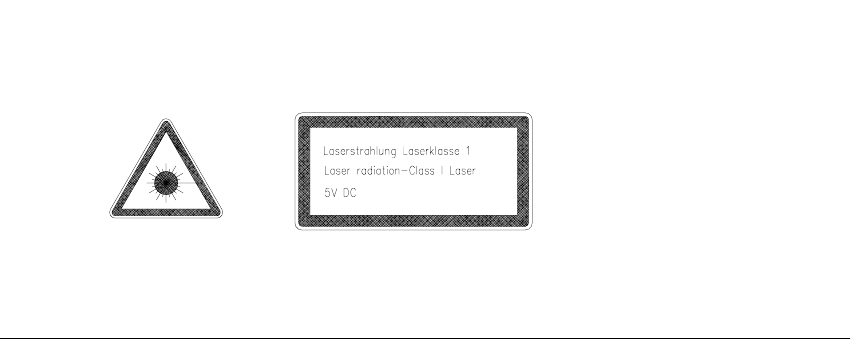
The beam that reads the bar code (= laser beam) must be pointed directly at the bar code on the
label, the track bar code. Do not point it at "everything in the neighborhood".
The laser I.D. code must be on the component bar-code scanner.