00191099-01.pdf - 第49页
Component B ar-Code Sc anner (Optional) Retrofitting Instructions SIPLACE 80 / S-23 (HM) / HS-50 Issue 06/00 2.8 Component Bar-Code Scanner on SIPLACE 80 S-15/F3 49 7 HVWLQJWKH+DUGZ DUHDQG6RIWZDUH Y ou can chec…

Retrofitting Instructions SIPLACE 80 / S-23 (HM) / HS-50 Component Bar-Code Scanner (Optional)
2.8 Component Bar-Code Scanner on SIPLACE 80 S-15/F3 Issue 06/00
48
%DU&RGH6HWWLQJV
This section is applicable for all SIPLACE 80 and S-23 (HM) machines and HS-50 machines:
The hand-held scanner or the keyboard can recognize a large number of different types of bar-
codes. Different parameters can be set in each bar-code type.
The scanner and keyboard can store 5 different types of bar-codes. The following types of bar-
codes are set:
– EAN/UPC family with/without ADD ON
– Code 39 (normal / FULL ASCII)
– CODABAR
–INTERLEAVED 2/5
– Normal 2/5 (5 bars)
– In case of S-15/F3: Code 128 is set at the keyboard instead of Normal 2/5 (5 bars). Code 128
is not set on the laser. Scanner or keyboard must be reprogrammed.
NOTE:
If other types are to be used, it will be necessary to reprogram the SCANNERS on
SIPLACE 80 S-20/S-15/F4/F4_6 / F5 (HM) and SIPLACE S-23 (HM) and HS-50
and
the scanner AND the keyboard on SIPLACE 80 S-15/F3.
To reprogram the component bar-code (or the keyboard) proceed as indicated in the Program-
ming Flow Chart in the User Manual accompanying the hand-held scanner (or keyboard).
&RQILJXULQJWKH%DU&RGH
Configure the component bar-code as described in Section12 of the relevant User Manual,
"Means of Production, Station Configuration and Line Configuration" and also in Section 11 of the
User Manual for the station computer, "Station Expansions and Options".
Component Bar-Code Scanner (Optional) Retrofitting Instructions SIPLACE 80 / S-23 (HM) / HS-50
Issue 06/00 2.8 Component Bar-Code Scanner on SIPLACE 80 S-15/F3
49
7HVWLQJWKH+DUGZDUHDQG6RIWZDUH
You can check the setting by importing a bar-code.
To do so, access the DOS level / the DOS input window as follows:
Å Boot DOS until C:\ appears or
select "Start" -> "Programs" -> DOS input request
on the NT main screen.
Å Hold the hand-held scanner vertical about 5 to 10 cm away from the bar-code strip on the
safety door of the component feeding area (so that it can read the entire bar-code).
Å Press the green button on the hand-held scanner.
NOTE:
The hand-held scanner acknowledges each input by sounding a signal. The bar-code text ap-
pears on the screen.
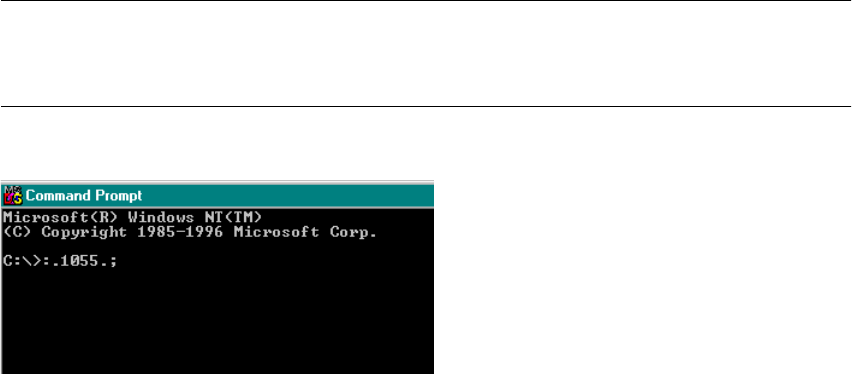
Fig. 2.8.2 DOS Windows (Section): Checking the Imported Bar-Code
Å Check: The two initial characters (header ":.") and the two final characters (terminator ".;") and
the bar-code characters must appear correctly, as shown above.
If the keyboard configuration is incorrect (which can be ascertained via a test input at the key-
board) the character "ß": appears instead of "-".
Å For more detailed information, refer to the enclosed User Manual.
Retrofitting Instructions SIPLACE 80 / S-23 (HM) / HS-50 Component Bar-Code Scanner (Optional)
2.9 Retrofitting Sequence on SIPLACE HS-50 Issue 06/00
50
5HWURILWWLQJ6HTXHQFHRQ6,3/$&(+6
+DUGZ DU H,QVWDOODWLRQ
Å Turn the machine OFF, isolate the machine from the mains and turn OFF the flow of com-
pressed air at the compressed air unit (see DANGER text in Section 2.2).
Å Wait until the voltage decays.
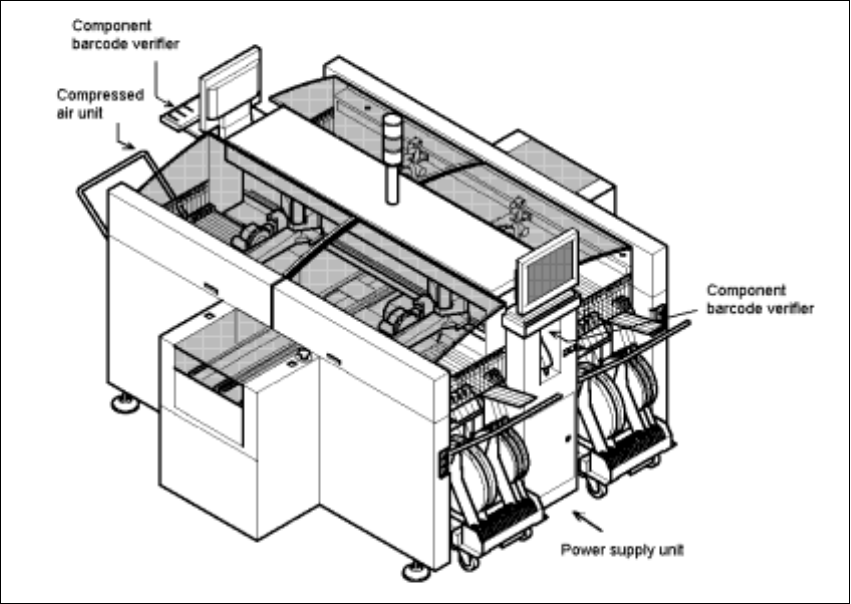
Fig. 2.9.1 Overall View of the SIPLACE HS-50: Orientation, Retrofit the Comp.Bar-Code Scanner
Å Open the machine frame doors on the plug-in power supply component and on the com-
pressed air unit.
Å For the work inside the machine frame, comply with the stricter safety regulations DIN EN
60204, Part 1 (see Section 2.2).