00195342-01_InstallationGuide_SiPro_4.1.pdf - 第10页
1 Introduction Installation manual SIPLACE Pro Edition 12/2006 US 8 The following Sof tware is required: 1 – Windows XP Pr ofessional with S P2 and M SDE 2000 with SP4 and – Microsoft .NET Fr amework 1.1, and – Microsoft…

Installation manual SIPLACE Pro 1 Introduction
Edition 12/2006 US
7
1.3.2 SIPLACE Pro Client
The following Hardware is recommended for the SIPLACE Pro Client: 1
– Pentium 4 with 3.0GHz or higher
– 40 GB hard disk
– 512 MB memory
– 21” screen (19’’ min.)
The following Software is required: 1
– Windows XP Professional with SP2 and MSDE 2000 with SP4 and
– Microsoft .NET Framework 1.1, and
– Microsoft .NET Framework 1.1 SP1, and
– Microsoft .NET Framework 2.0
Note:
A hard disk with 500 MB or more free space should be used for installation (without the operating
system installed there should be at least 1 GB free space). 1
Note:
Windows 2003 Server SP1 is supported, but not required for the SIPLACE Pro installation. 1
1.3.3 SIPLACE Stand Alone Configuration
The following Hardware is recommended for the SIPLACE Pro Server: 1
– Pentium 4 with 3.0GHz or higher
– 80 GB hard disk
– 1024 MB memory (512 MB min.)
– Backup drive (e.g. DAT, CD, DVD)
– 21” screen (19’’ min.)
– optional SR-UPS
1

1 Introduction Installation manual SIPLACE Pro
Edition 12/2006 US
8
The following Software is required: 1
– Windows XP Professional with SP2 and MSDE 2000 with SP4 and
– Microsoft .NET Framework 1.1, and
– Microsoft .NET Framework 1.1 SP1, and
– Microsoft .NET Framework 2.0
Note:
Windows 2003 Server SP1 is supported, but not required for the SIPLACE Pro installation. 1
Installation manual SIPLACE Pro 2 System components and configurations
Edition 12/2006 US
9
2 System components and configurations
2.1 Overview of system components
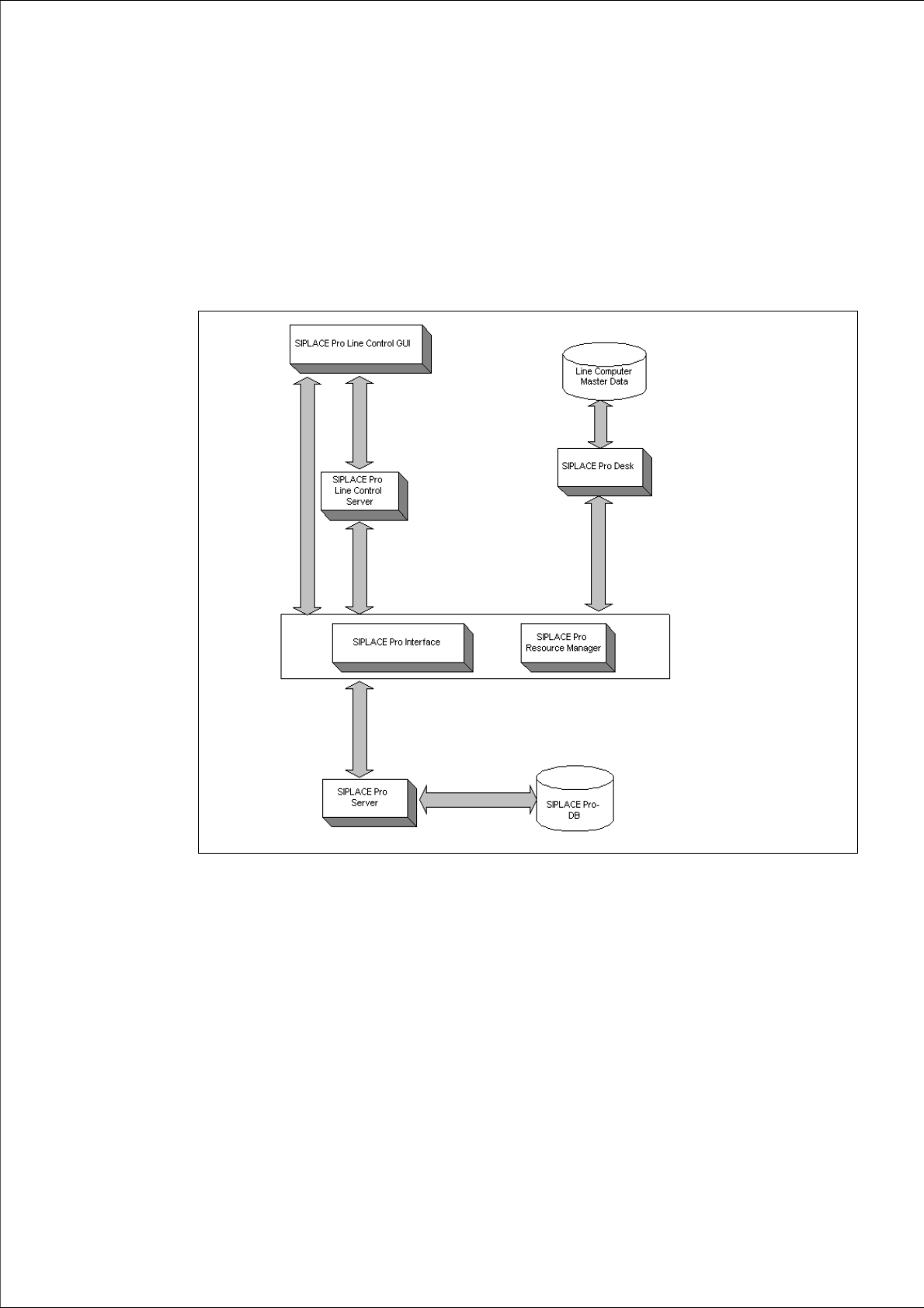
A complete installation of SIPLACE Pro consists of the following components. 2
Fig. 2 - 1 Overview of SIPLACE Pro system components
Æ Please read the documents "Configurations for SIPLACE Pro" and "Navigation Guide for the
Installation Procedure of SIPLACE Software Systems". You will find the documents on the
Installation CD for SIPLACE Pro (Folder "Documentation") and the Support Media DVD (Art.
No. 00383100-xx) that is added to any software product.