00197185-01_IM_Required_Steps_before_using_Support_Media_EN.pdf - 第28页
Required Steps before using Suppo rt Media 10/2011 Edition You should also disabl e not used network adapters to avoid conflicts. To do this: Figure 7-6: Disabling a network adapter ► Right-click on the appro priate (not…
Required Steps before using Support Media 10/2011 Edition
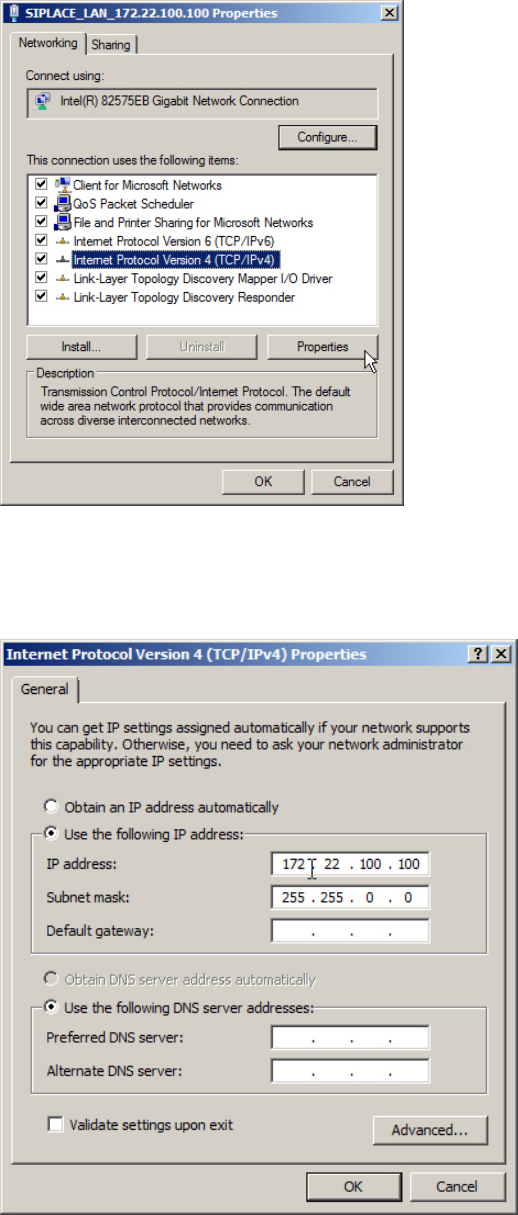
Figure 7-4: Adapter Properties
► Select the entry Internet Protocol Version 4 (TCP/IPv4) (don’t uncheck the checkbox!)
► Click on Properties.
Figure 7-5: TCP/IP Properties
► Verify your TCP/IP settings. If you don’t have a valid default gateway, don’t enter one!!
► Click OK when you’re done.
27
Required Steps before using Support Media 10/2011 Edition
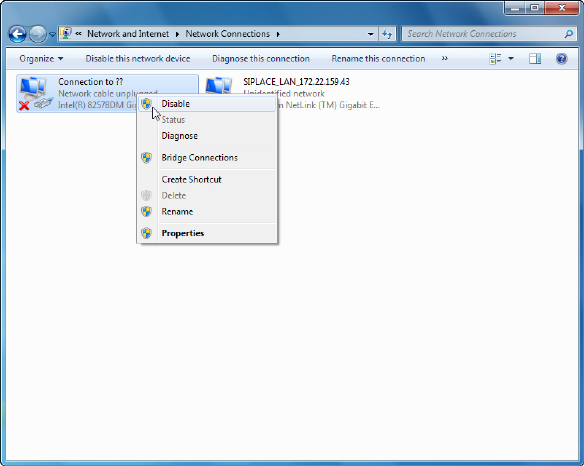
You should also disable not used network adapters to avoid conflicts. To do this:
Figure 7-6: Disabling a network adapter
► Right-click on the appropriate (not used) network adapter and select Disable.
28

Required Steps before using Support Media 10/2011 Edition
8 Hints and Troubleshooting
This chapter contains some important hints and troubleshooting tips.
NOTICE
Subject to change
This chapter may describe SIPLACE product-/version-specific behaviour which might
change in future versions.
8.1 Hints for Default SIPLACE Installations
For computers installed with SIPLACE-delivered default settings:
– The account to be used for administrative Tasks including installations is SIPLACEAdmin.
– When asked by SIPLACE Pro Setup, the account to be used for COM+Services is
SIPLACEServices.
– The non-administrative default account to be used is plr when using simple passwords or
siplace when using complex passwords.
– The default passwords for SIPLACE-created accounts are documented in the technical
information TI2008-04V08.
8.1.1 SIPLACE Pro Share Permissions
By default, SIPLACE Pro Setup creates a share in the folder where it has been installed (default:
%ProgramFiles%\SIPLACE\SIPLACE Pro). This share is required for the Client Installation to be
performed. Due to security restrictions (especially in domain environments), SIPLACE Pro Setup
doesn’t automatically set permissions to this share.
For default SIPLACE installations, we recommend adding the SIPLACEAdmin account to the share
permissions as described in this chapter. Also refer to the installation documentation of SIPLACE
Pro.
29