故障排除Troubleshooting.pdf - 第21页
Page 19 IM T r oubleshooting 52489101 Rev . B This document supports Radial 88, VCD Seq 88, and Jumper Wire 88 machines. Radial Only This table is for Radial. P r ob a b l e Ca us e C o r re c t iv e A c t i o n 1 Wait i…
Page 18
52489101 Rev. B IM Troubleshooting
This document supports Radial 88, VCD Seq 88, and Jumper Wire 88 machines.
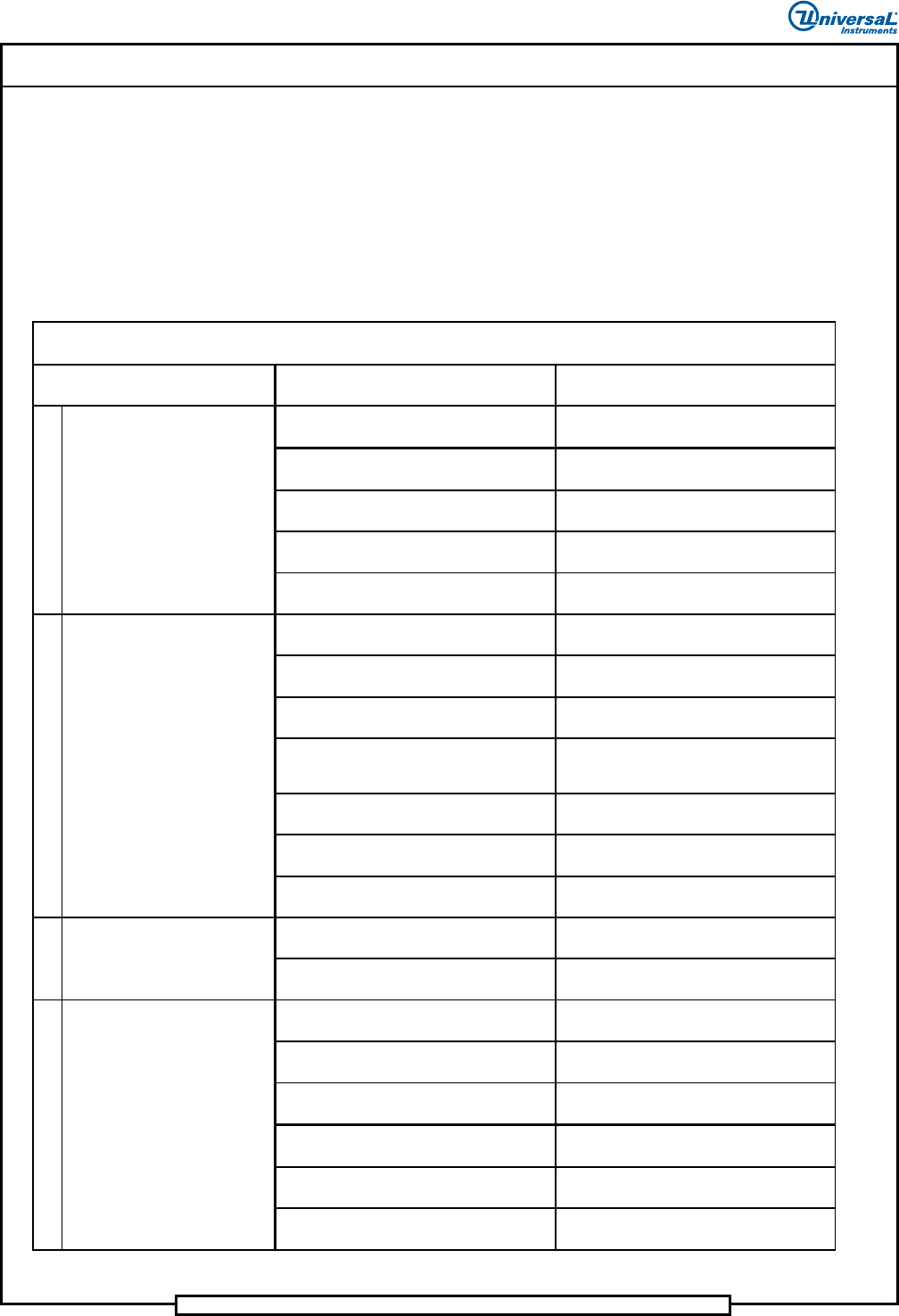
Troubleshooting Table - Clinch Assembly
The following tables lists possible error scenarios for the clinch assembly.
VCD and Jumper Wire Only
This table is for VCD and Jumper Wire.
Probable Ca use Correc tive Action
Pattern step list has an "ignore continuity"
command.
Determine why the command is there, and
take corrective action.
VCD O nly:
Clinch cutter stroke too long.
Refer to maintenance procedures and
adjust cutter stroke.
Multi input card bit switch settings are
incorrect.
Refer to maintenance procedures and set
bit switches.
Multi input card failure. Replace failed card.
Broken continu ity cable/wires. Replace faile d cable.
Clinch set up incorrect.
Refer to maintenance procedures and
adjust clinch setup.
Multi input card bit switch settings are
incorrect.
Refer to maintenance procedures and set
bit switches.
Multi input card failure. Replace failed card.
VCD O nly:
Leads clogging clinch or scrap tubes
causes shortened clinch.
Clean clinch and scrap tubes.
Broken continu ity cable/wires. Replace faile d cable.
Clinch dirty. Clean clinch.
Worn cutter bushings. Replace cutter bushings.
Clinch jammed. Remove clinch jam.
Clinch failed.
Refer to Clinch Functional Problems in this
document.
Incorrect tooling to printed circuit board
clearance.
Refer to maintenance section and adjust
tooling to board clearance.
Clinch height set too low.
Refer to maintenance section and adjust
clinch height.
Incorrect head to clinch alignment.
Refer to maintenance section and align
head to clinch.
Printed circuit board not properly
positioned .
Correct board positioning problem.
CAP span value set too small. Reset CAP to correct value.
Clinch cu tter stro ke ou t of a djustme nt.
Refer to Maintenance manual (Cutter
Stroke Adjustment section).
1
2
Troubleshooting Table - Clinch Assembly
Jumper Wire and VCD Only
4
Component leads are clinched
but leads are too long.
Indicated Trouble
3
Machine does not detect insert
errors.
Machine reports insert errors
when insertion is good.
Leads not clinched.
Page 19
IM Troubleshooting 52489101 Rev. B
This document supports Radial 88, VCD Seq 88, and Jumper Wire 88 machines.
Radial Only
This table is for Radial.
Probable Ca use Correc tive Action
1 Waiting for clinch in.
Clinch in sensor not made when cylinder is
actuated.
Check for faulty sensor and adjust per
Maintenance Manual.
2 Shorted clinch.
Debris in cutter head assembly or
continuity gap incorrect.
Clean and PM cutter head, adjust
continuity gap per Maintenance Manual.
3
Insert error, continuity not
sensed.
Incorrect continuity gap, loose or broken
continuity cable.
Set continuity gap per Maintenance
Manual, check cable, replace if bad.
4
Component clinched to PCB OK
but insert error detected.
Continuity not sensed on one side or the
other of cutter head.
Check continuity gap, check pre-load
adjustment on plunger screw.
5 Insert errors, loose components.
Worn cutters pulling leads instead of
cutting.
Check for worn/damaged cutter tooling;
replace as needed.
6
Leads not clinched or bent when
inserting through PCB holes.
Clinch assembly not properly aligned to
insertion head.
Align clinch assembly to insertion head,
check theta per Maintenance Manual.
7 Lead too long or loose in PCB. Clinch height too low.
Set clinch up position per Maintenance
Manual.
8 Bottom side of PCB damaged. Clinch height too high.
Set clinch up position per Maintenance
Manual.
Troubleshooting Table - Clinch Assembly
Ra dial Only
Indicated Trouble
Page 20
52489101 Rev. B IM Troubleshooting
This document supports Radial 88, VCD Seq 88, and Jumper Wire 88 machines.
Troubleshooting Clinch Problems
The following paragraphs will detail various clinch problems and the
procedures required to resolve these problems. The types of problems
presented include clinch form problems and clinch functional problems.
Clinch Form Problems
The following presents various form problems that may be encountered, the
general cause of the problem and the resolution of the problem.
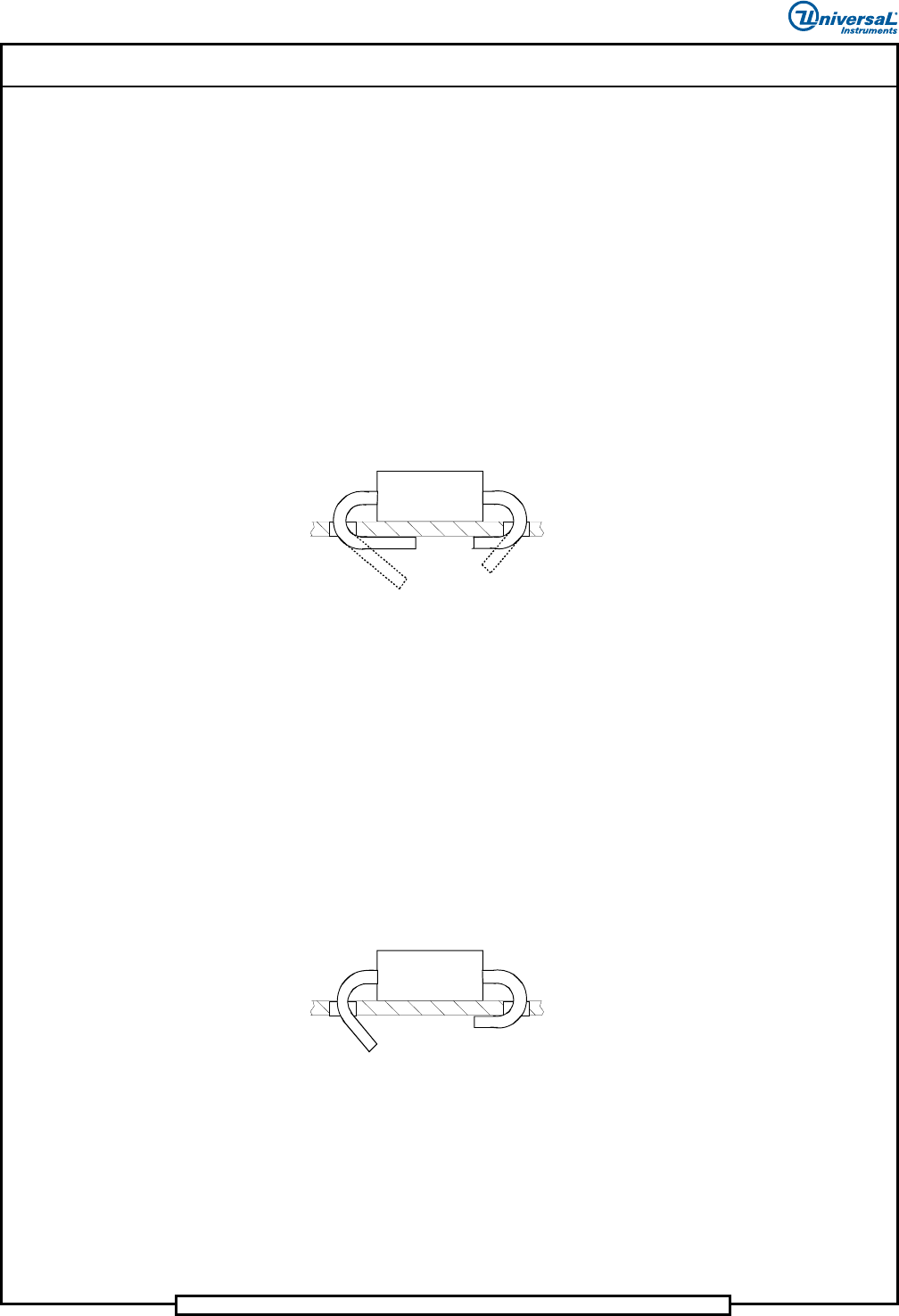
Problem: Lead Lengths Not Equal (VCD and Jumper Wire)
(VCD pictured.)
Cause
Clinch to Head X direction misalignment.
Possible Resolution
Realign Clinch to Head. Refer to Clinch to Head Alignment Procedure.
Cutter Set Up (clinch angle) might need to be readjusted.
Problem: Unequal Lead Angle (VCD Only)
(VCD pictured.)
Cause
Cutter linkage not adjusted properly.
Possible Resolution
Adjust leads to desired angles. Refer to Cutter Set Up procedure.