SOM-1756-001.pdf - 第21页
8.3.2 "TRA Y2" T ab Sheet This enables the operator to confirm the ACV check status for each individual blocks of Multi-Layer T ray Feeder #2. • Sheet Layout When the "TRA Y2" tab is pressed in the &q…

*9 PCB Rem
Displayed is the number of P.C.B.'s that can be produced when a
production is initiated according to the current pattern program and
using the components remaining in each feeder.
Since the number of remaining components is divided by the num-
ber of components to be used for one P.C.B., it is required to cor-
rectly set the number of remaining components.
This value decreases when the number of remaining components
is lessened during automatic operation.
When "Enable" is set for the ACV function, the [PCB Remainder]
button is selected in the "Opn. Mode" tab sheet, and the value for
"PCB Rem" is smaller than the specified one, the background color
of the numerical value turns yellow.
When the machine is powered or a program change operation is
performed, "---" appears.
PCB Rem (Estimated) =
Number of Remaining Components/
Number of Components Used for One P.C.B.
*10 Feed Rem Tm
Displayed is the period of time during which the components can be
fed when a production is initiated according to the current pattern
program and using the components remaining in each feeder. (Time:
Minutes)
Since the number of remaining components (estimated) is multi-
plied by the time required to finish one P.C.B., it is required to cor-
rectly set the number of remaining components.
This value decreases when the number of remaining components
is lessened during automatic operation.
When the [Enable] button is selected in the "ACV Function" group
box and [Comp Feed Rem Tm] button in the "Alarm for Component
Remainder" group box of the "Opn Mode" tab sheet and the value
under "Feed Rem Tm" is smaller than the specified one, the back-
ground color of the numerical value turns yellow.
When the machine is powered or a program change operation is
performed, "---" appears.
Feed Remainder Time (Estimated) =
Number of Producible P.C.B.'s (Estimated)
××
××
×
Time Required to Finish One P.C.B.
8.3 "ACV Check Status" Tab Sheet
0311-001 19 AIT01EGP
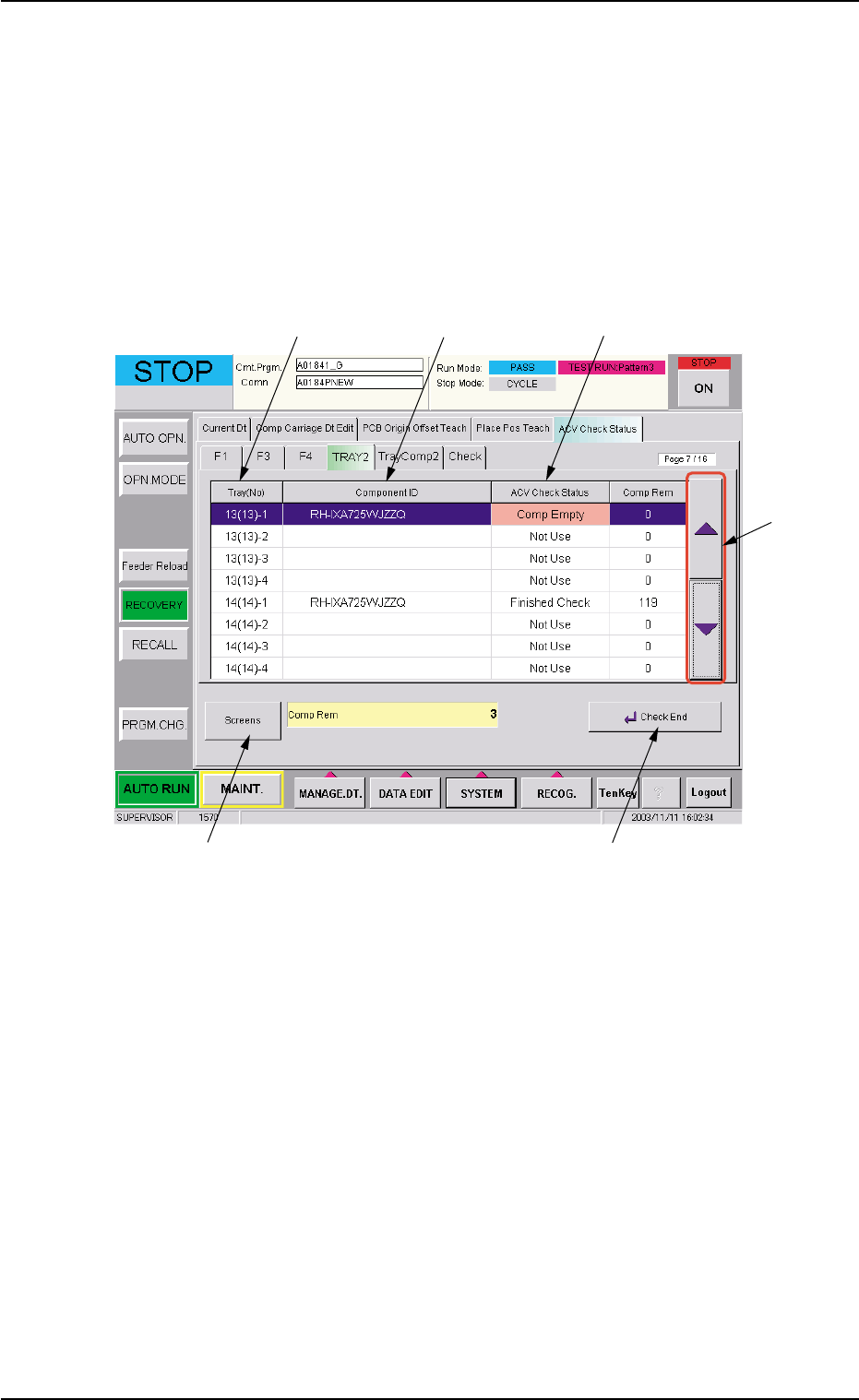
8.3.2 "TRAY2" Tab Sheet
This enables the operator to confirm the ACV check status for each
individual blocks of Multi-Layer Tray Feeder #2.
• Sheet Layout
When the "TRAY2" tab is pressed in the "RECOVERY" window
(submenu), the following tab sheet appears.
Fig. 9
8.3 "ACV Check Status" Tab Sheet
*1 *2 *3
*4
*5 *7
0311-001 20 AIT01EGP
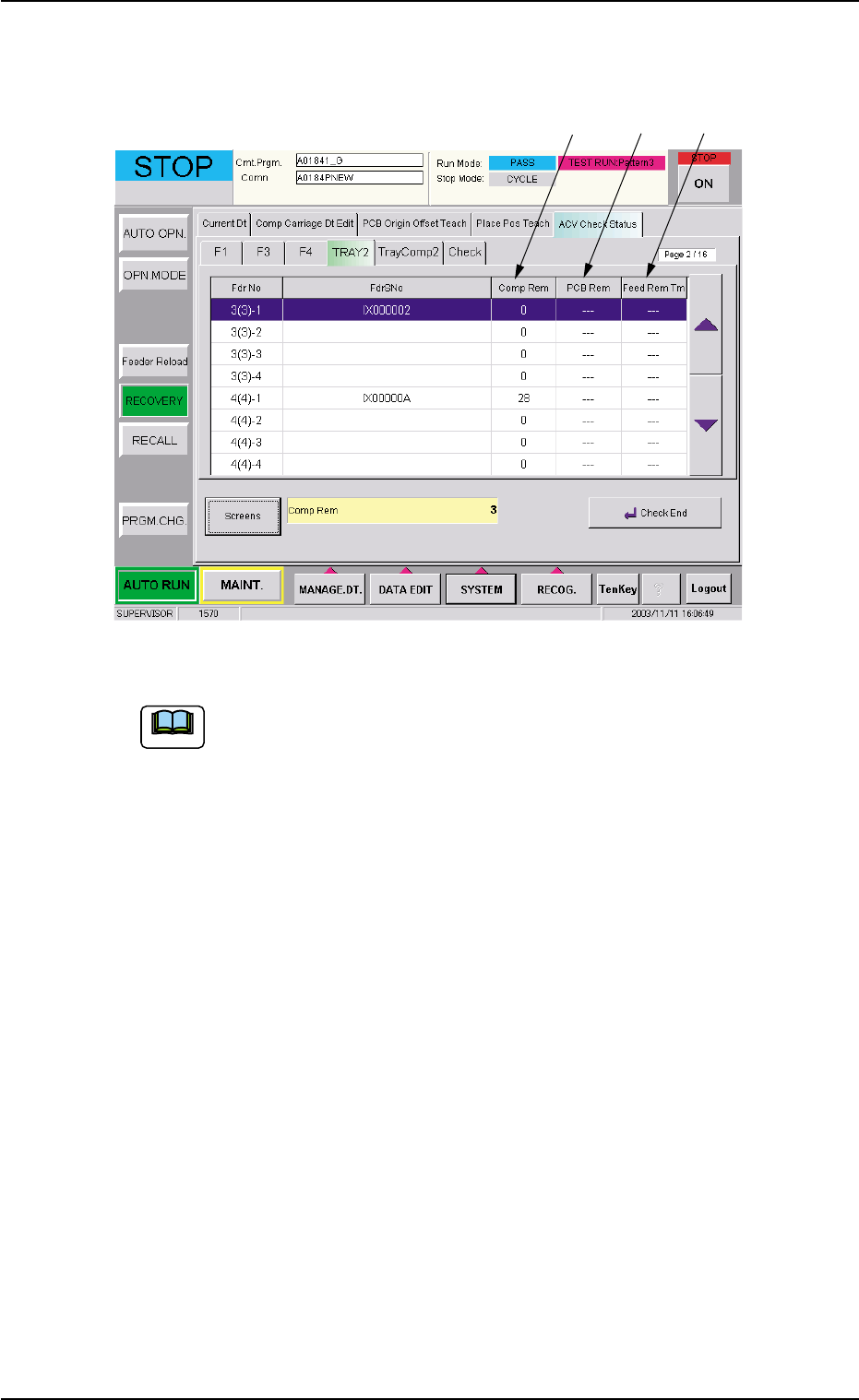
When the [Screens] button (*5) is pressed in the tab sheet (Fig. 9), the
following tab sheet appears.
Fig. 10
Refer to "8.3.1 "F1", "F3", and "F4" Tab Sheets" for the detailed
information on "*1 through *5" and "*7 through *10".
8.3 "ACV Check Status" Tab Sheet
*8 *9 *10
Note
0311-001 21 AIT01EGP