ELA Generic Tooling.pdf - 第26页
MACHI NE PROG RAMMI NG STAGE 5 D - MULTIFLE X TOOLING 1.40 User Manual 17. Us e the Incr . and Decr . keys (F6 - F7), or th e forward slash key (/) on the keyboard, to change the p arameter v alue. 18. Sel ect Save (F2).…
MACHINE PROGRAMMING
STAGE 5D - MULTIFLEX TOOLING
User Manual 1.39
NOTE
Ensure that Generic Tooling is set to Enabled in Set Prefs.
6. If there is a screen loaded continue with Step 7. If there is no screen loaded
go to Step 13.
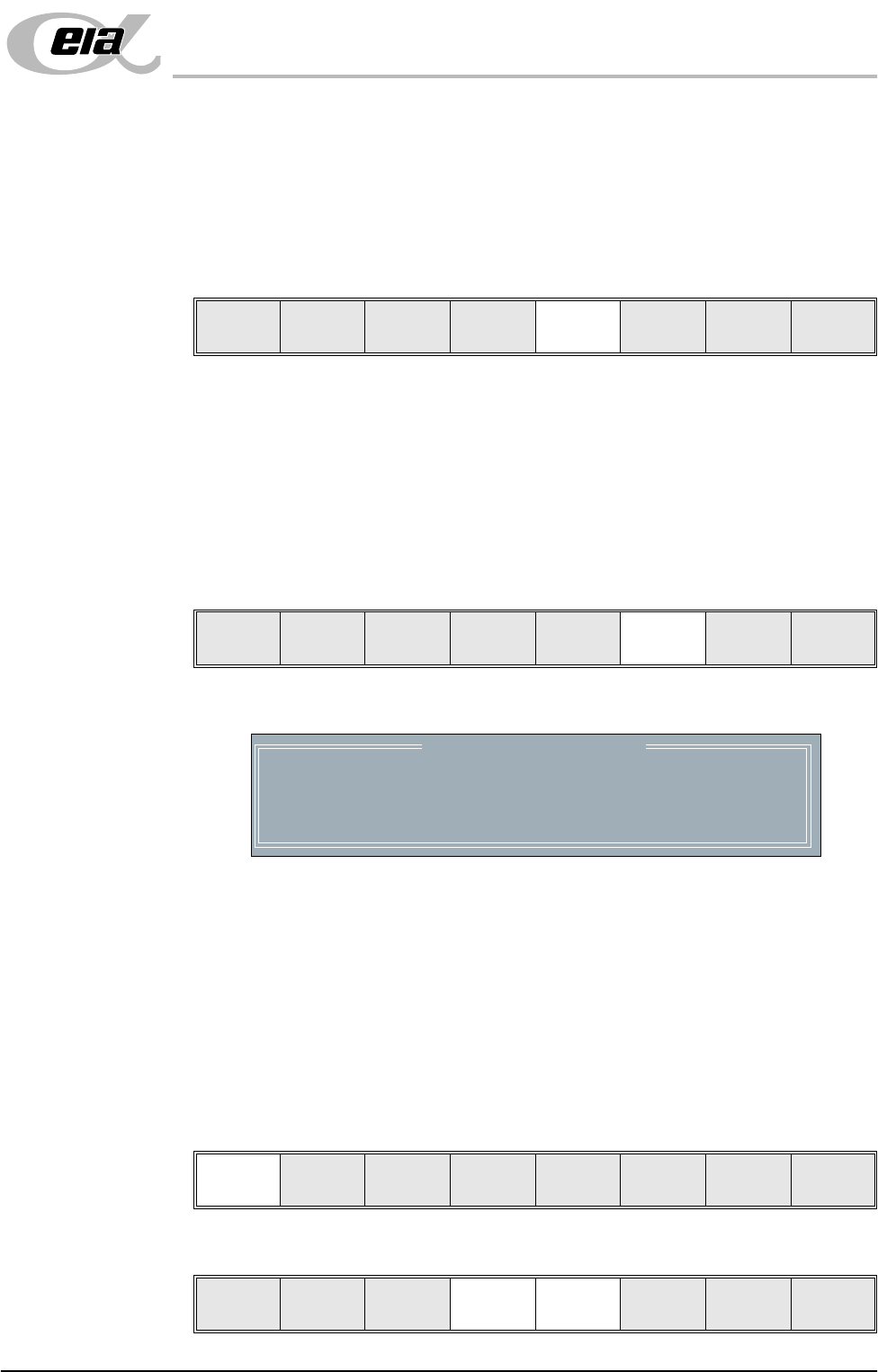
7. Select Change Screen (F5). The message ‘Open Front Cover and
Remove Screen’ is displayed.
8. Raise the machine shutter, lower drop down panel.
9. Toggle screen clamp switch to the up position (Off) (fixed width chase only).
10. Remove the stencil from the printer.
11. Raise the drop down panel, lower machine shutter.
12. Press the System button.
13. Select Change Tooling (F6). The print carriage and the under screen
cleaner are moved to the rear.
The Change Tooling Parameters window is displayed:
NOTE
If the remote board stop is fitted the Board Stop X and Board Stop Y
parameters are replaced by Remote Board Stop X.
14. Setting up the board stop position is automatically done using the board
dimensions previously set in the product file. If they need adjustment to re-
position the board stop for any reason, ie any routing on the board edge or
a badly positioned image on the stencil, this can be done now. If adjustment
is necessary continue with Step 15. If adjustment is not necessary go to
Step 20.
15. Select Adjust (F1).
16. Use the Next and Previous keys (F4 - F5) to highlight each parameter.
Mode
Load
Data
Edit
Data
Setup
Squeegee
Change
Screen
Change
Tooling
Change
Language
Exit
Mode
Load
Data
Edit
Data
Setup
Squeegee
Change
Screen
Change
Tooling
Change
Language
Exit
Change Tooling Parameters
BOARD WIDTH
BOARD STOP X
BOARD STOP Y
UNDER CLEARANCE
216.0
125.0
142.6
19.0
mm
mm
mm
mm
Adjust
Open
Cover
Home
Cleaner
Board
Stop
Full
Width
Load
Width
Generic
Tooling
Exit
Save Next Previous Incr. Decr. Exit
MACHINE PROGRAMMING
STAGE 5D - MULTIFLEX TOOLING
1.40 User Manual
17. Use the Incr. and Decr. keys (F6 - F7), or the forward slash key (/) on the
keyboard, to change the parameter value.
18. Select Save (F2). The message ‘Saving fiducial data - Please wait Board
data file saved’ is displayed.
19. Select Exit (F8).
20. Select Full Width (F5). The message ‘Checking for a board on the belts’
is displayed. Whilst the rear rail is moving the following message ‘Rail
moving...’ is displayed.
21. Select Open Cover (F2).
22. Raise the machine shutter, lower drop down panel.
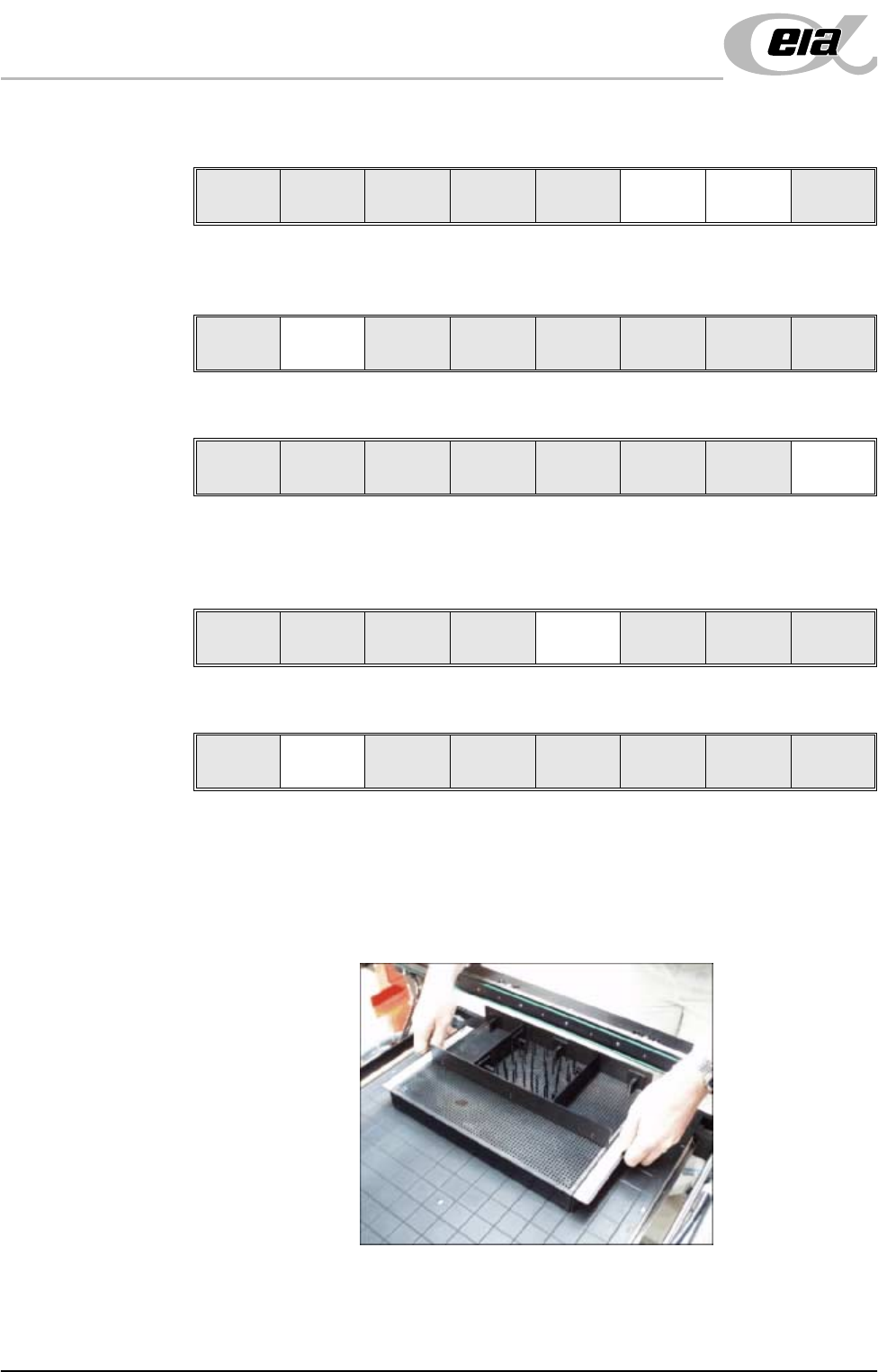
23. The MultiFlex tooling can now be fitted into the appropriate location holes in
the tooling plate. Ensure that the tooling is placed into the correct set of
holes, taking regard of the type of screen being used and hence the position
of the fixed rail.
24. Raise the drop down panel, lower the machine shutter.
25. Press the System button.
26. Select Board Width (F5). The message ‘Checking for a board on the
Save Next Previous Incr. Decr. Exit
Save Next Previous Incr. Decr. Exit
Save Next Previous Incr. Decr. Exit
Adjust
Open
Cover
Home
Cleaner
Board
Stop
Full
Width
Load
Width
Generic
Tooling
Exit
Adjust
Open
Cover
Home
Cleaner
Board
Stop
Board
Width
Load
Width
Generic
Tooling
Exit
MACHINE PROGRAMMING
STAGE 5D - MULTIFLEX TOOLING
User Manual 1.41
belts’ is displayed. Whilst the rear rail is moving the message ‘Rail
moving...’ is displayed.
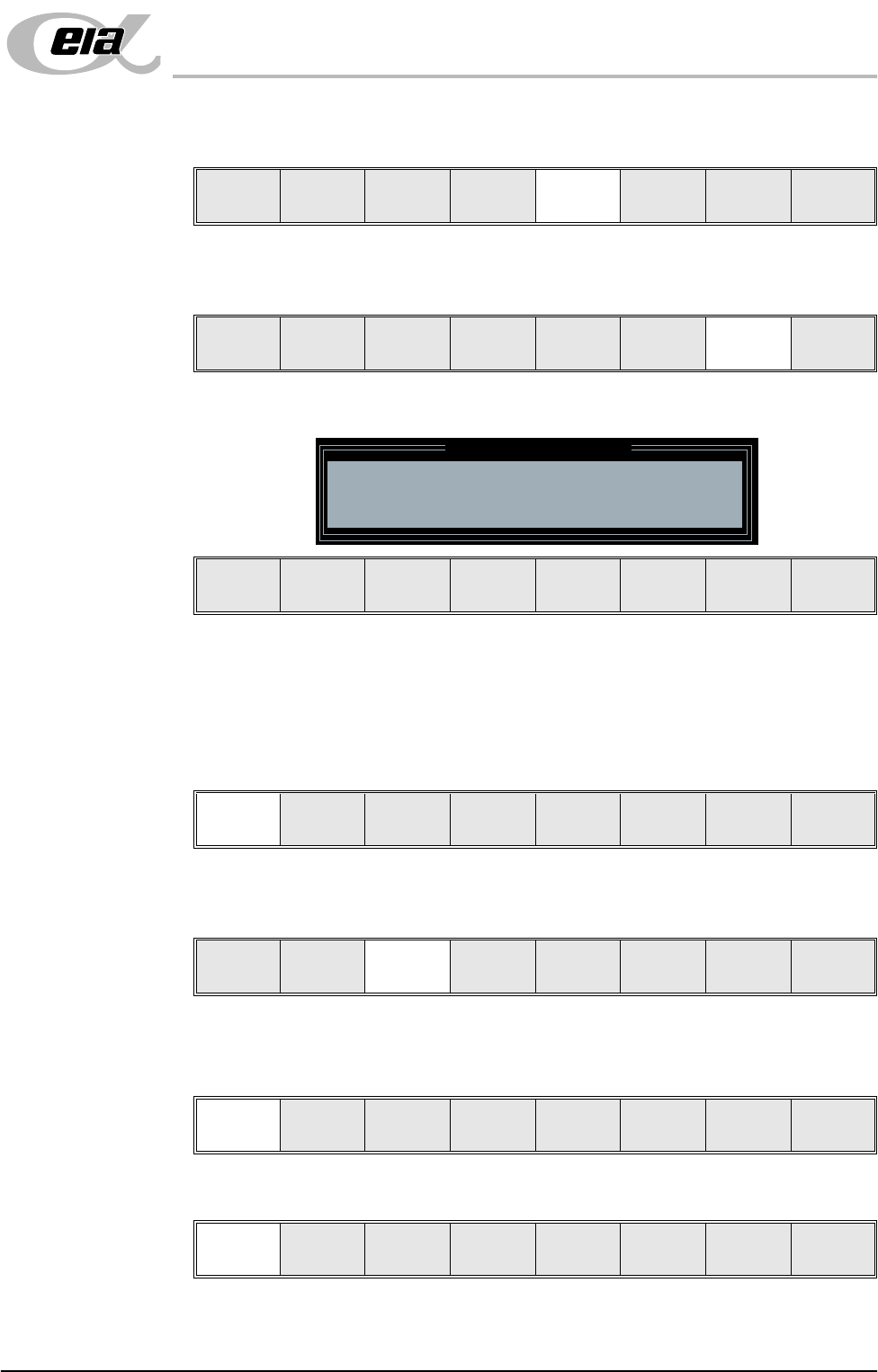
27. Select Generic Tooling (F7). The print carriage moves to the front of the
machine.
The following window and menu bar is displayed:
NOTE
If contaminated squeegees are fitted, these should be replaced at this point.
28. Select Continue (F1). Cleaner moves to the Home position and the print
carriage moves to the rear of the machine. The message ‘Table at Home
Height’ is displayed.
29. Select Transprt Height (F3). The message ‘Table at Transport Height’ is
displayed.
30. Place a board on the input sensor of the upline conveyor of the machine.
31. Select Load (F1).
32. Select Auto Board (F1).
33. Select Vision Height (F3). The message ‘Table at Vision Height. Check
Adjust
Open
Cover
Home
Cleaner
Board
Stop
Board
Width
Load
Width
Generic
Tooling
Exit
Adjust
Open
Cover
Home
Cleaner
Board
Stop
Full
Width
Load
Width
Generic
Tooling
Exit
Generic Tooling Warning
WARNING Paste may drip into the machine
Remove Squeegees NOW
Continue
Open
Cover
Exit
Continue
Open
Cover
Exit
Load
Transprt
Height
Board
Clamps
Change
Screen
Open
Cover
Exit
Load
Vision
Height
Home
Height
Board
Clamps
Change
Screen
Open
Cover
Exit
Auto
Board
Manual
Board