00198501-02_IM_711.1_R18-1_EN.pdf - 第12页
Station Software V ersion 711.1 (R 18 - 1) / Installat ion Manual 05/2018 Edition 12 4 Requirements 4.1 Software Compo nents of SIPLAC E Series X, X S, SX, DX, CA and TX 4.1.1 Station – Microsoft .NET 4. 6.1 ( mus t be i…
Station Software Version 711.1 (R18-1) / Installation Manual 05/2018 Edition
11
► An upgrade of the embedded software is necessary for the LDU-X. Generally, it is not possible
to perform a download of the embedded software via the station software for the LDU-X. The
LDU-X has to be upgraded to the 2.02 software version with the aid of an external PC.
► There is new embedded software for the feeders. As soon as a feeder with an elder eSW is set
up an update of the eSW is proposed. This can be cancelled but it is not possible to take out
the table as long as the update is pending. To get the table out without a download you have to
take out the feeders or disable the feeder download within the SW options.
► There is new embedded software for CPP and C&P20 placement heads. After an update from
a lower version they are recognized as modified heads and the head data has to be saved
manually once after the installation.
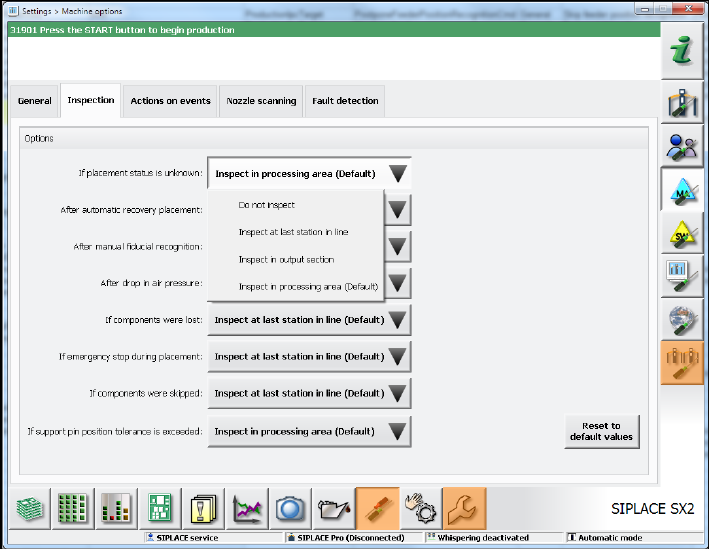
► When upgrading to the 707.x station software the inspection options will be reset to the
respective default values. If necessary, the inspection options have to be adjusted under
Settings – Machine options – Inspection.
Figure 3-3: Adjusting inspection options
3.9 Upgrading from the 705.xx Software Version
► If necessary, perform an upgrade to the Microsoft Windows Embedded Standard 7 (WES7,
32-bit or 64-bit) operating system. Please refer to sections 4.1.1 and 5.3.1.
► SX1/SX2 and DX1/DX2 placement machines in the field with an FC camera at Location 1:
Due to an error correction in the configuration, the FC camera position has been moved and
thus the calibration values for the camera and the segment offset are invalid.
Recalibrate the camera and the segment offset.
Station Software Version 711.1 (R18-1) / Installation Manual 05/2018 Edition
12
4 Requirements
4.1 Software Components of SIPLACE Series X, X S, SX, DX, CA and
TX
4.1.1 Station
– Microsoft .NET 4.6.1 (must be installed manually)
– The station only uses one of the following operating system configurations on the station
computer and Coplan computer/feeder computer:
– Microsoft Windows Embedded Standard 7 (WES7, 32-bit or 64-bit)
The station computer has to be equipped with at least 2 GB memory (RAM) with WES 7, 32-bit
and 4 GB memory (RAM) with WES7, 64-bit respectively. If necessary, station computers in the
field have to be exchanged or upgraded with a memory extension. Please refer to the
Technical Information TI2014-09E04.
4.1.2 Machine Components
The following versions of other machine components are required for the station software to
function correctly:
SIPLACE station software SIPLACE Vision SIPLACE Pro
Version 711.1
*)
Version 552 Version 15.1
**)
*)
in compatible mode: Version 710.3©
**)
in compatible mode: SIPLACE Pro 14.x
CAUTION
The functional statuses of the station computer, Vision computer and SIPLACE Pro
software must be compatible, as specified above. Another configuration is not supported.

Station Software Version 711.1 (R18-1) / Installation Manual 05/2018 Edition
13
4.1.3 Embedded Software
4.1.3.1 Composition of the File Name
1..6 7 8 9 10 11 12 13 14 15 16 17 18 19
Sub-
system
name
Sepa-
rator
Variant ID Hard-
ware ID
1)
Target
2)
Version Release . File type
Please
refer to
table in
section
4.1.3.2
_ 0 = no
variant
00
0 = BIOS 00
H
00
H
. HEX
_ A =
Variant
(SOKO)
…
… … … . JED
_ ... 99 9 = App 9 FF
H
FF
H
. BHX
Table 4-1: Composition of the file name
1)
Change compared with old file name (from one to 2 digits)
2)
Extended to second CAN